
Zendesk MCP Server
Enables comprehensive management of Zendesk tickets, comments, and Help Center articles through tools for searching, creating, and updating content. It includes specialized prompts for ticket analysis and response drafting to streamline support workflows.
README
Zendesk MCP Server

A Model Context Protocol server for Zendesk.
Note: This is a fork of reminia/zendesk-mcp-server with the following additions:
search_ticketstool for searching tickets by text, filters, custom fields, and date ranges
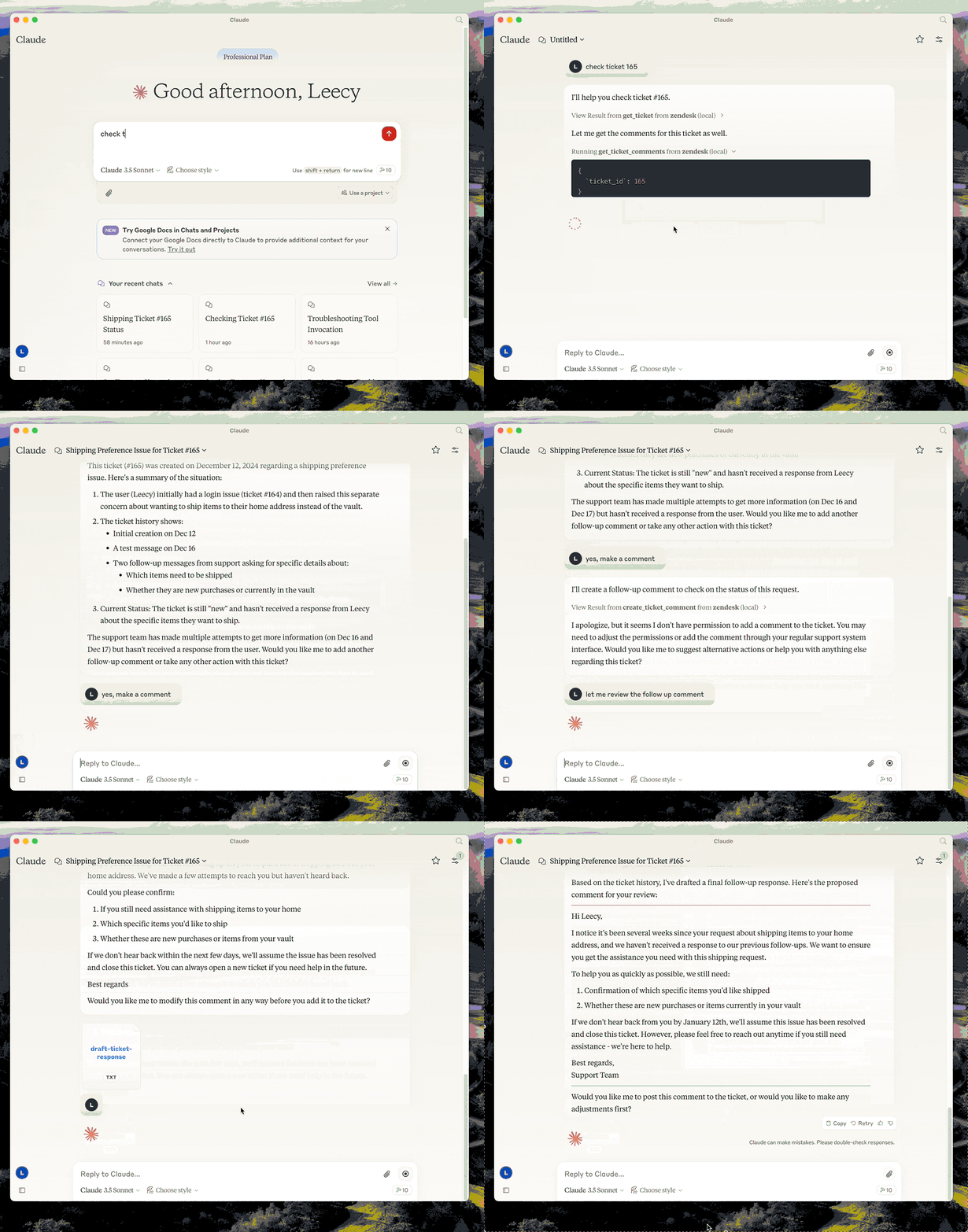
This server provides a comprehensive integration with Zendesk. It offers:
- Tools for retrieving and managing Zendesk tickets and comments
- Ticket search with support for custom fields, filters, and date ranges
- Specialized prompts for ticket analysis and response drafting
- Full access to the Zendesk Help Center articles as knowledge base
Prerequisites
-
uv - Python package manager (required)
Install uv if you don't have it:
# macOS/Linux
curl -LsSf https://astral.sh/uv/install.sh | sh

# Or with Homebrew
brew install uv
Setup
-
Clone the repository and note the full path (you'll need it for configuration):
git clone <repo-url> /path/to/zendesk-mcp-server -
Build the project:
cd /path/to/zendesk-mcp-server uv venv && uv pip install -e . -
Configure Zendesk credentials in a
.envfile:cp .env.example .env # Edit .env with your Zendesk subdomain, email, and API key -
Configure in Claude Desktop (or Claude Code):
Add to your MCP settings, replacing
/path/to/zendesk-mcp-serverwith the absolute path to where you cloned the repo:
{
  "mcpServers": {
      "zendesk": {
          "command": "uv",
          "args": [
              "--directory",
              "/path/to/zendesk-mcp-server",
              "run",
              "zendesk"
          ]
      }
  }
}
Example paths:
- macOS:
/Users/yourname/dev/zendesk-mcp-server - Linux:
/home/yourname/projects/zendesk-mcp-server - Windows:
C:\\Users\\yourname\\dev\\zendesk-mcp-server
zendesk-help Skill
The zendesk-help skill provides tools for searching and managing Zendesk tickets. If you upload the SKILL.md file to Claude Desktop, you can use the zendesk-help skill to search for tickets and manage them. This will make claude's use of the zendesk-mcp-server more seamless.
Resources
- zendesk://knowledge-base, get access to the whole help center articles.
Prompts
analyze-ticket
Analyze a Zendesk ticket and provide a detailed analysis of the ticket.
draft-ticket-response
Draft a response to a Zendesk ticket.
Tools
get_tickets
Fetch the latest tickets with pagination support
-
Input:
page(integer, optional): Page number (defaults to 1)per_page(integer, optional): Number of tickets per page, max 100 (defaults to 25)sort_by(string, optional): Field to sort by - created_at, updated_at, priority, or status (defaults to created_at)sort_order(string, optional): Sort order - asc or desc (defaults to desc)
-
Output: Returns a list of tickets with essential fields including id, subject, status, priority, description, timestamps, and assignee information, along with pagination metadata
get_ticket
Retrieve a Zendesk ticket by its ID
- Input:
ticket_id(integer): The ID of the ticket to retrieve
get_ticket_comments
Retrieve all comments for a Zendesk ticket by its ID
- Input:
ticket_id(integer): The ID of the ticket to get comments for
create_ticket_comment
Create a new comment on an existing Zendesk ticket
- Input:
ticket_id(integer): The ID of the ticket to comment oncomment(string): The comment text/content to addpublic(boolean, optional): Whether the comment should be public (defaults to true)
create_ticket
Create a new Zendesk ticket
- Input:
subject(string): Ticket subjectdescription(string): Ticket descriptionrequester_id(integer, optional)assignee_id(integer, optional)priority(string, optional): one oflow,normal,high,urgenttype(string, optional): one ofproblem,incident,question,tasktags(array[string], optional)custom_fields(array[object], optional)
update_ticket
Update fields on an existing Zendesk ticket (e.g., status, priority, assignee)
- Input:
ticket_id(integer): The ID of the ticket to updatesubject(string, optional)status(string, optional): one ofnew,open,pending,on-hold,solved,closedpriority(string, optional): one oflow,normal,high,urgenttype(string, optional)assignee_id(integer, optional)requester_id(integer, optional)tags(array[string], optional)custom_fields(array[object], optional)due_at(string, optional): ISO8601 datetime
search_tickets
Search Zendesk tickets using query syntax with support for text search, filters, custom fields, and date ranges.
-
Input:
query(string, optional): Text to search in subject/descriptionstatus(string, optional): Filter by status -new,open,pending,hold,solved,closedpriority(string, optional): Filter by priority -low,normal,high,urgentassignee(string, optional): Filter by assignee emailrequester(string, optional): Filter by requester emailtags(array[string], optional): Filter by tagscustom_field_id(integer, optional): Custom field ID to searchcustom_field_value(string, optional): Value to match in custom fieldcreated_after(string, optional): ISO date - tickets created after this datecreated_before(string, optional): ISO date - tickets created before this datesort_by(string, optional): Field to sort by -created_at,updated_at,priority,status(defaults toupdated_at)sort_order(string, optional): Sort order -ascordesc(defaults todesc)limit(integer, optional): Max results, up to 100 (defaults to 25)
-
Output: Returns matching tickets with id, subject, status, priority, description, timestamps, assignee info, and tags, along with search metadata
-
Example - Search by custom field (e.g., transfer ID):
{
  "custom_field_id": 23301179390491,
  "custom_field_value": "txn_abc123"
}
Recommended Servers

playwright-mcp
A Model Context Protocol server that enables LLMs to interact with web pages through structured accessibility snapshots without requiring vision models or screenshots.

Magic Component Platform (MCP)
An AI-powered tool that generates modern UI components from natural language descriptions, integrating with popular IDEs to streamline UI development workflow.

Audiense Insights MCP Server
Enables interaction with Audiense Insights accounts via the Model Context Protocol, facilitating the extraction and analysis of marketing insights and audience data including demographics, behavior, and influencer engagement.

VeyraX MCP
Single MCP tool to connect all your favorite tools: Gmail, Calendar and 40 more.

graphlit-mcp-server
The Model Context Protocol (MCP) Server enables integration between MCP clients and the Graphlit service. Ingest anything from Slack to Gmail to podcast feeds, in addition to web crawling, into a Graphlit project - and then retrieve relevant contents from the MCP client.

Kagi MCP Server
An MCP server that integrates Kagi search capabilities with Claude AI, enabling Claude to perform real-time web searches when answering questions that require up-to-date information.

Neon Database
MCP server for interacting with Neon Management API and databases

E2B
Using MCP to run code via e2b.

Exa Search
A Model Context Protocol (MCP) server lets AI assistants like Claude use the Exa AI Search API for web searches. This setup allows AI models to get real-time web information in a safe and controlled way.

Qdrant Server
This repository is an example of how to create a MCP server for Qdrant, a vector search engine.