
vexor
A semantic search engine for files and code.
README
<div align="center">
<img src="https://raw.githubusercontent.com/scarletkc/vexor/refs/heads/main/assets/vexor.svg" alt="Vexor" width="35%" height="auto">
Vexor



</div>
Vexor is a semantic search engine that builds reusable indexes over files and code. It supports configurable embedding and reranking providers, and exposes the same core through a Python API, a CLI tool, and an optional desktop frontend.
<video src="https://github.com/user-attachments/assets/4d53eefd-ab35-4232-98a7-f8dc005983a9" controls="controls" style="max-width: 600px;"> Vexor Demo Video </video>
Featured In
Vexor has been recognized and featured by the community:
- Ruan Yifeng's Weekly (Issue #379) - A leading tech newsletter in the Chinese developer community.
- Awesome Claude Skills - Curated list of best-in-class skills for AI agents.
Why Vexor?
When you remember what a file does but forget its name or location, Vexor finds it instantly—no grep patterns or directory traversal needed.
Designed for both humans and AI coding assistants, enabling semantic file discovery in autonomous agent workflows.
Install
Download standalone binary from releases (no Python required), or:
pip install vexor # also works with pipx, uv
Quick Start
0. Guided Setup (Recommended)
vexor init
The wizard also runs automatically on first use when no config exists.
1. Search
vexor "api client config"  # defaults to search current directory
# or explicit path:
vexor search "api client config" --path ~/projects/demo --top 5
# in-memory search only:
vexor search "api client config" --no-cache
Vexor auto-indexes on first search. Example output:
Vexor semantic file search results
──────────────────────────────────
#   Similarity   File path                       Lines   Preview
1   0.923        ./src/config_loader.py          -       config loader entrypoint
2   0.871        ./src/utils/config_parse.py     -       parse config helpers
3   0.809        ./tests/test_config_loader.py   -       tests for config loader
2. Explicit Index (Optional)
vexor index  # indexes current directory
# or explicit path:
vexor index --path ~/projects/demo --mode code
Useful for CI warmup or when auto_index is disabled.
Desktop App (Experimental)
The desktop app is experimental and not actively maintained. It may be unstable. For production use, prefer the CLI.
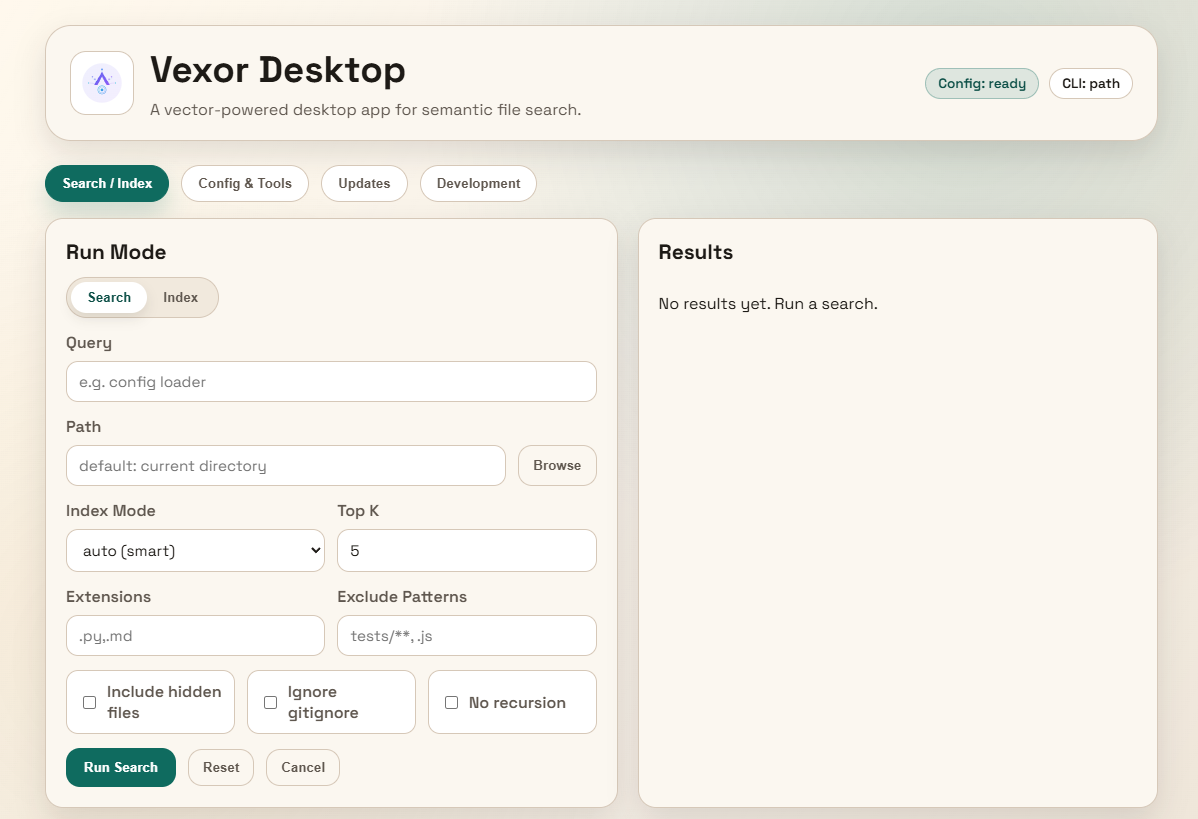
Download the desktop app from releases.
Python API
Vexor can also be imported and used directly from Python:
from vexor import index, search

index(path=".", mode="head")
response = search("config loader", path=".", mode="name")

for hit in response.results:
    print(hit.path, hit.score)
By default it reads ~/.vexor/config.json. For runtime config overrides, cache
controls, and per-call options, see docs/api/python.md.
AI Agent Skill
This repo includes a skill for AI agents to use Vexor effectively:
vexor install --skills claude  # Claude Code
vexor install --skills codex   # Codex
Skill source: plugins/vexor/skills/vexor-cli
MCP Server
<!-- mcp-name: io.github.scarletkc/vexor -->

[!NOTE] The Agent Skill and the MCP server provide the same core capability — pick one per agent. The skill teaches shell-capable agents (Claude Code, Codex) to drive the full CLI and assumes
vexoris installed on PATH; the MCP server exposes search as native tools, works in any MCP client (Cursor, Windsurf, Zed, ...), and can bootstrap without prior setup viauvxand environment variables.
Vexor ships a built-in MCP stdio server, so any MCP-capable agent can use semantic file search as a native tool:
claude mcp add vexor -- vexor mcp   # Claude Code
codex mcp add vexor -- vexor mcp    # Codex
Or configure manually in any MCP client, optionally supplying the API key
and any config overrides via env (no vexor init needed):
{
  "mcpServers": {
    "vexor": {
      "command": "vexor",
      "args": ["mcp"],
      "env": {
        "VEXOR_API_KEY": "sk-...",
        "VEXOR_CONFIG_JSON": "{\"provider\": \"gemini\", \"rerank\": \"bm25\"}"
      }
    }
  }
}
The server exposes two tools: vexor_search (semantic file search) and vexor_index (explicit index warm-up). No extra dependencies are required. Vexor is listed on the official MCP registry as io.github.scarletkc/vexor. See docs/mcp.md for tool schemas, environment variables, and client setup details.
Configuration
vexor init                             # guided setup (recommended)
vexor config --set-api-key "YOUR_KEY"  # or env: VEXOR_API_KEY / OPENAI_API_KEY / ...
vexor config --set-provider openai     # default; also gemini/voyageai/custom/local
vexor config --rerank bm25             # recommended: improves search accuracy
vexor config --show                    # view current settings
Config lives in ~/.vexor/config.json. Any field can also be injected via the VEXOR_CONFIG_JSON environment variable (useful for MCP client configs and CI), and fully offline use is supported through local embedding models.
See docs/configuration.md for the complete reference: all config commands, API keys and environment variables, rerank strategies (BM25 / FlashRank / remote), remote vs local providers, embedding dimensions, and offline local model setup.
CLI Reference
Everyday usage fits in vexor "query", vexor search, and vexor index (see Quick Start). The full command table, common flags, index modes (--mode auto/name/head/brief/full/code/outline), cache behavior, and porcelain output format are documented in docs/cli.md.
Documentation
- Configuration — providers, API keys, rerank, embedding dimensions, local models
- CLI reference — commands, flags, index modes, cache behavior
- MCP server — client setup, environment variables, tool schemas
- Python API — programmatic usage
Contributing
Contributions, issues, and PRs welcome! Commit messages and PR titles follow Conventional Commits (e.g. feat(mcp): add stdio server). Star if you find it helpful.
Star History
License
Recommended Servers

playwright-mcp
A Model Context Protocol server that enables LLMs to interact with web pages through structured accessibility snapshots without requiring vision models or screenshots.

Magic Component Platform (MCP)
An AI-powered tool that generates modern UI components from natural language descriptions, integrating with popular IDEs to streamline UI development workflow.

Audiense Insights MCP Server
Enables interaction with Audiense Insights accounts via the Model Context Protocol, facilitating the extraction and analysis of marketing insights and audience data including demographics, behavior, and influencer engagement.

VeyraX MCP
Single MCP tool to connect all your favorite tools: Gmail, Calendar and 40 more.

graphlit-mcp-server
The Model Context Protocol (MCP) Server enables integration between MCP clients and the Graphlit service. Ingest anything from Slack to Gmail to podcast feeds, in addition to web crawling, into a Graphlit project - and then retrieve relevant contents from the MCP client.

Kagi MCP Server
An MCP server that integrates Kagi search capabilities with Claude AI, enabling Claude to perform real-time web searches when answering questions that require up-to-date information.

E2B
Using MCP to run code via e2b.

Neon Database
MCP server for interacting with Neon Management API and databases

Exa Search
A Model Context Protocol (MCP) server lets AI assistants like Claude use the Exa AI Search API for web searches. This setup allows AI models to get real-time web information in a safe and controlled way.

Qdrant Server
This repository is an example of how to create a MCP server for Qdrant, a vector search engine.