
unreal-api-mcp
Provides accurate Unreal Engine C++ API documentation to AI agents, preventing hallucinated signatures and incorrect includes.
README
unreal-api-mcp
<!-- mcp-name: io.github.Codeturion/unreal-api-mcp -->







MCP server that gives AI agents accurate Unreal Engine C++ API documentation. Saves tokens, context, and time — prevents hallucinated signatures, wrong #include paths, and deprecated API usage.
Works with Claude Code, Cursor, Windsurf, or any MCP-compatible AI tool. No Unreal Engine installation required. Check the supported versions. New versions are detected and built automatically every week.
Quick Start
Add to your MCP config (.mcp.json, mcp.json, or your tool's MCP settings), setting UNREAL_VERSION to match your project:
{
  "mcpServers": {
    "unreal-api": {
      "command": "uvx",
      "args": ["unreal-api-mcp"],
      "env": {
        "UNREAL_VERSION": "5.5"
      }
    }
  }
}
Set this to match your project's UE version. See supported versions for all available databases.
On first run the server downloads the correct database to ~/.unreal-api-mcp/. Patch versions (e.g. "5.7.3") fall back to the major.minor database (e.g. "5.7") if a patch-specific one isn't available.
How It Works
- Version detection. The server figures out which UE version to serve:
| Priority | Source | Example |
|---|---|---|
| 1 | UNREAL_VERSION env var |
"5.5", "5.7", "5.7.3" |
| 2 | UNREAL_PROJECT_PATH |
Reads .uproject EngineAssociation field (e.g. 5.5.1 or 5.7) |
Set one of these to match your project. Without either, the server defaults to UE 5.7.
-
Database download. If the database for that version isn't cached locally, it downloads from GitHub (one time). For patch versions, falls back to the major.minor database if needed. Also checks for updates on startup.
-
Serve. All tool calls query the version-specific SQLite database. Exact lookups return in <1ms, searches in <5ms.
Each version has its own database with the correct signatures, deprecation warnings, and member lists for that release.
Tools
| Tool | Purpose | Example |
|---|---|---|
search_unreal_api |
Find APIs by keyword | "character movement", "spawn actor", "K2Node" |
get_function_signature |
Exact signature with parameters and return type | AActor::GetActorLocation |
get_include_path |
Resolve #include for a type |
"ACharacter" -> #include "GameFramework/Character.h" |
get_class_reference |
Full class reference card | "APlayerController", "UK2Node_SpawnActorFromClass", "UEdGraphSchema_K2" |
get_deprecation_warnings |
Check if an API is obsolete | "K2_AttachRootComponentTo" -> Use AttachToComponent() instead |
Coverage
All Engine Runtime, Editor, Developer modules, plus built-in plugins (Enhanced Input, Gameplay Abilities, Common UI, Niagara, Chaos, and hundreds more).
Includes Blueprint graph internals: 158 UK2Node subclasses, UEdGraphSchema_K2, BlueprintGraph, KismetCompiler, and GraphEditor modules (1,120+ entries). If you're writing custom K2 nodes or editor tooling, it's indexed.
See the full list of supported versions and databases on the db-v1 release page. New versions are detected and built automatically every Monday via CI.
Record breakdown (UE 5.7):
| Type | Count | Source |
|---|---|---|
| Classes (UCLASS) | 10,075 | AActor, ACharacter, UGameplayStatics, ... |
| Structs (USTRUCT) | 9,014 | FHitResult, FVector, FTransform, ... |
| Enums (UENUM) | 3,475 | EMovementMode, ECollisionChannel, ... |
| Functions (UFUNCTION) | 23,414 | Signatures with params, return types, specifiers |
| Properties (UPROPERTY) | 66,340 | Types, specifiers, doc comments |
| Delegates | 2,406 | Dynamic multicast, delegate declarations |
Does not cover third-party plugins or marketplace assets. For those, rely on project source.
Benchmarks
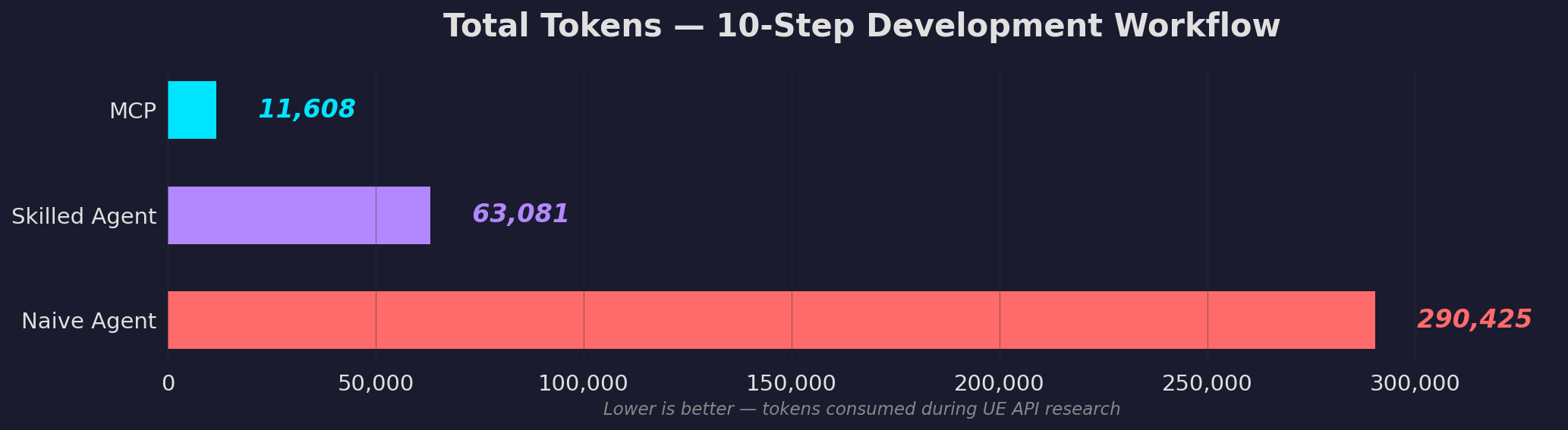
In a 10-step character movement development workflow, MCP consistently uses far fewer tokens than agents working with grep and file reads:
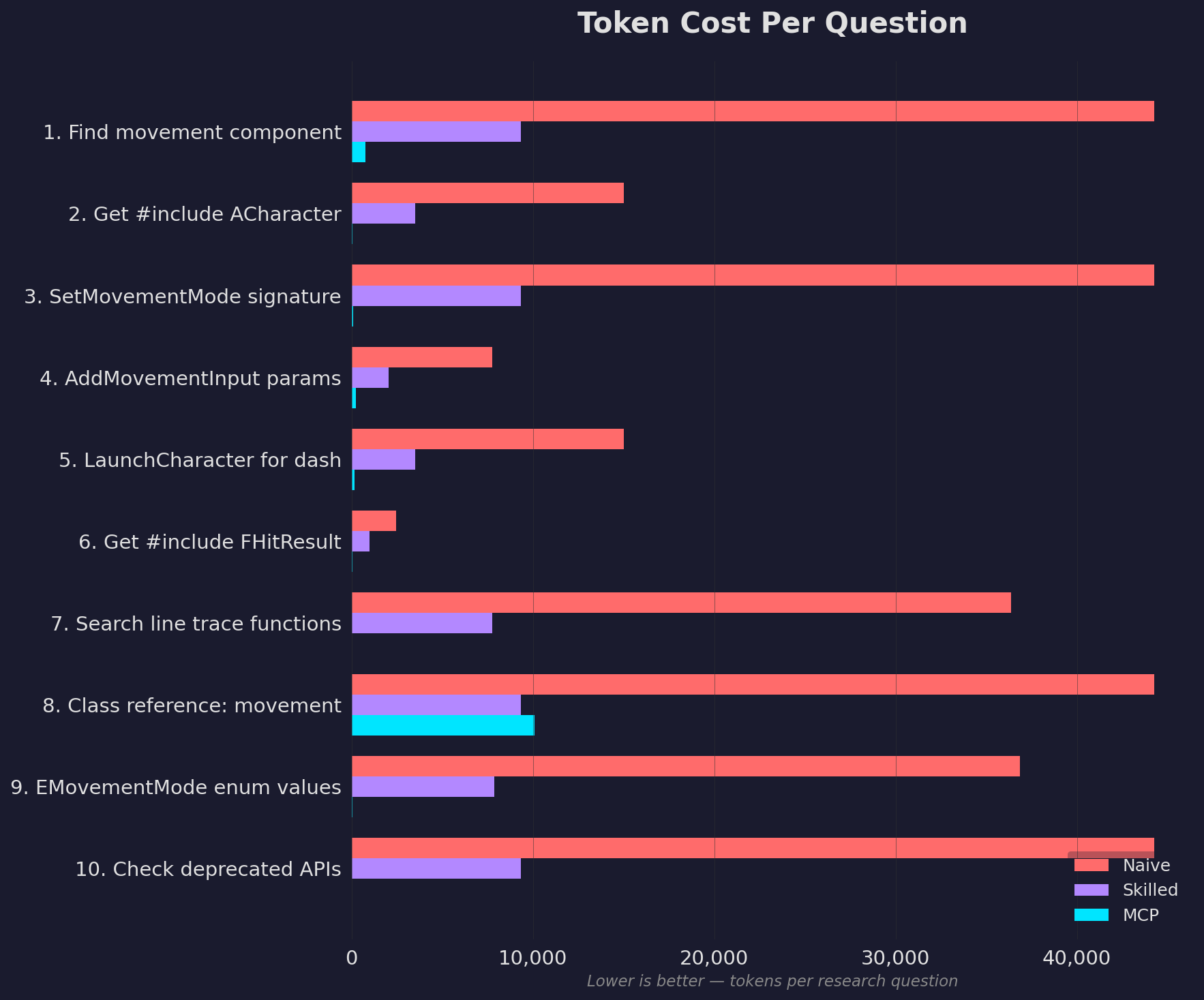
The gap holds across every question type. MCP wins on simple include lookups and complex class references alike:
Even in a realistic hybrid workflow where MCP results are followed up with targeted file reads, it still uses significantly fewer tokens than a skilled agent working without MCP:
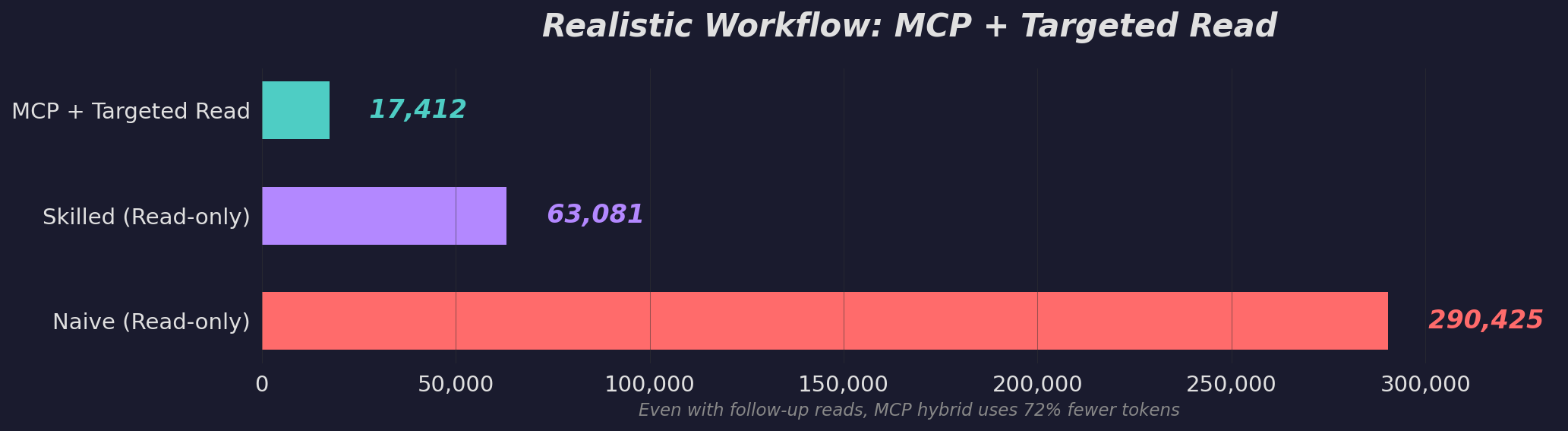
"Without MCP" estimates assume full or partial file reads. A skilled agent with good tooling may use fewer tokens than shown. What MCP guarantees is a correct, structured answer in one call every time.
Per-question breakdown
<details> <summary>Query latency</summary>
Measured on UE 5.7 database (114,724 records), 50 iterations per query:
| Query | Median | p95 |
|---|---|---|
Exact FQN lookup (get_function_signature) |
<1ms | <1ms |
| FTS search: specific function name | <1ms | <1ms |
| FTS search: keyword ("spawn actor") | 1ms | 1ms |
| Include path resolution | 2ms | 2ms |
| Class reference (full member list) | 22ms | 23ms |
| Deprecation check | 24ms | 25ms |
</details>
<details> <summary>Accuracy</summary>
| Test | Result |
|---|---|
| Search top-1 relevance (8 common queries) | 100% |
| Include path resolution (6 key classes) | 100% |
| Function signature accuracy (3 common functions) | 100% |
| Class reference completeness (2 classes) | 100% |
| Deprecation detection (1 deprecated API) | 100% |
Ranking uses BM25 with tuned column weights (member name 10x, class name 5x) plus core module boosting to ensure AActor::GetActorLocation ranks above niche plugin APIs.
</details>
CLAUDE.md Snippet
Add this to your project's CLAUDE.md (or equivalent instructions file). This step is important. Without it, the AI has the tools but won't know when to reach for them.
## Unreal Engine API Lookup (unreal-api MCP)

Use the `unreal-api` MCP tools to verify UE C++ API usage instead of guessing. **Do not hallucinate signatures or #include paths.**

| When | Tool | Example |
|------|------|---------|
| Unsure about a function's parameters or return type | `get_function_signature` | `get_function_signature("AActor::GetActorLocation")` |
| Need the `#include` for a type | `get_include_path` | `get_include_path("ACharacter")` |
| Want to see all members on a class | `get_class_reference` | `get_class_reference("UCharacterMovementComponent")` |
| Searching for an API by keyword | `search_unreal_api` | `search_unreal_api("spawn actor")` |
| Checking if an API is deprecated | `get_deprecation_warnings` | `get_deprecation_warnings("K2_AttachRootComponentTo")` |
| Writing custom K2 nodes or editor tools | `get_class_reference` | `get_class_reference("UK2Node_SpawnActorFromClass")`, `get_class_reference("UEdGraphSchema_K2")` |

**Rules:**
- Before writing a UE API call you haven't used in this conversation, verify the signature with `get_function_signature`
- Before adding a `#include`, verify with `get_include_path` if unsure
- Covers: all Engine Runtime/Editor modules, built-in plugins (Enhanced Input, GAS, CommonUI, Niagara, etc.), Blueprint graph internals (UK2Node subclasses, EdGraphSchema, BlueprintGraph, KismetCompiler)
- Does NOT cover: third-party plugins or marketplace assets
Setup Details
<details> <summary>Auto-detect version from .uproject</summary>
Instead of setting UNREAL_VERSION, you can point to your Unreal project. The server reads the EngineAssociation field from your .uproject file:
{
  "mcpServers": {
    "unreal-api": {
      "command": "uvx",
      "args": ["unreal-api-mcp"],
      "env": {
        "UNREAL_PROJECT_PATH": "F:/Unreal Projects/MyProject"
      }
    }
  }
}
</details>
<details> <summary>Alternative installation methods</summary>
Using pip install:
pip install unreal-api-mcp
{
  "mcpServers": {
    "unreal-api": {
      "command": "unreal-api-mcp",
      "args": [],
      "env": {
        "UNREAL_VERSION": "5.5"
      }
    }
  }
}
</details>
<details> <summary>Environment variables</summary>
| Variable | Purpose | Example |
|---|---|---|
UNREAL_VERSION |
UE version to serve | 5.5, 5.7, 5.7.3 |
UNREAL_PROJECT_PATH |
Auto-detect version from .uproject | F:/Unreal Projects/MyProject |
UNREAL_INSTALL_PATH |
Override UE install path (for ingest only) |
H:/UE_5.6 |
</details>
<details> <summary>Building databases locally</summary>
If you want to build a database from your own Unreal Engine installation instead of downloading:
# Build for a specific version
python -m unreal_api_mcp.ingest --unreal-version 5.6 --unreal-install "H:/UE_5.6"
python -m unreal_api_mcp.ingest --unreal-version 5.5 --unreal-install "H:/UE_5.5"
Databases are written to ~/.unreal-api-mcp/unreal_docs_{version}.db by default.
</details>
<details> <summary>Project structure</summary>
unreal-api-mcp/
├── src/unreal_api_mcp/
│   ├── server.py          # MCP server (5 tools)
│   ├── db.py              # SQLite + FTS5 database layer
│   ├── version.py         # Version detection + DB download
│   ├── header_parser.py   # Parse Unreal C++ headers (UCLASS, UFUNCTION, etc.)
│   ├── unreal_paths.py    # Locate UE installs + discover modules
│   └── ingest.py          # CLI ingestion pipeline
└── pyproject.toml
Databases are stored in ~/.unreal-api-mcp/ (downloaded on first run).
</details>
Troubleshooting
| Problem | Fix |
|---|---|
| "Could not download UE X database" | Check internet connection. Or build locally: python -m unreal_api_mcp.ingest --unreal-version 5.6 --unreal-install H:/UE_5.6 |
| Wrong API version being served | Set UNREAL_VERSION explicitly. Check stderr: unreal-api-mcp: serving UE <version> |
| Server won't start | Check python --version (needs 3.10+). Check path: which unreal-api-mcp or where unreal-api-mcp |
| Third-party plugins return no results | Marketplace/third-party plugins are not indexed. Only built-in Engine and Plugin APIs are covered. |
See Also
unity-api-mcp — Same concept for Unity (C#). Covers Unity 2022, 2023, and Unity 6.
Contact
Need a custom MCP server for your engine or framework? I build MCP tools that cut token waste and prevent hallucinations for AI-assisted game development. If you want something similar for your team's stack, reach out.
fuatcankoseoglu@gmail.com
License
Free to use, fork, modify, and share for any personal or non-commercial purpose. Commercial use requires permission.
Recommended Servers

playwright-mcp
A Model Context Protocol server that enables LLMs to interact with web pages through structured accessibility snapshots without requiring vision models or screenshots.

Magic Component Platform (MCP)
An AI-powered tool that generates modern UI components from natural language descriptions, integrating with popular IDEs to streamline UI development workflow.

Audiense Insights MCP Server
Enables interaction with Audiense Insights accounts via the Model Context Protocol, facilitating the extraction and analysis of marketing insights and audience data including demographics, behavior, and influencer engagement.

VeyraX MCP
Single MCP tool to connect all your favorite tools: Gmail, Calendar and 40 more.

graphlit-mcp-server
The Model Context Protocol (MCP) Server enables integration between MCP clients and the Graphlit service. Ingest anything from Slack to Gmail to podcast feeds, in addition to web crawling, into a Graphlit project - and then retrieve relevant contents from the MCP client.

Kagi MCP Server
An MCP server that integrates Kagi search capabilities with Claude AI, enabling Claude to perform real-time web searches when answering questions that require up-to-date information.

E2B
Using MCP to run code via e2b.

Neon Database
MCP server for interacting with Neon Management API and databases

Exa Search
A Model Context Protocol (MCP) server lets AI assistants like Claude use the Exa AI Search API for web searches. This setup allows AI models to get real-time web information in a safe and controlled way.

Qdrant Server
This repository is an example of how to create a MCP server for Qdrant, a vector search engine.