
Tychi Wallet MCP
Self-custody wallet MCP server for Arbitrum, enabling local key signing and wallet management via tools; supports chat for balances, sends, and policy.
README
Tychi MCP (@tychilabs/tyi-mcp)







Audience: MCP host agents (OpenClaw, Claude Desktop, Cursor, Codex).
Not for humans. Human CLI: @tychilabs/tyi.
Self-custody wallet MCP. Keys in ~/.tyi. Brain at http://hosted_brain.tychilabs.com. Signing local only.
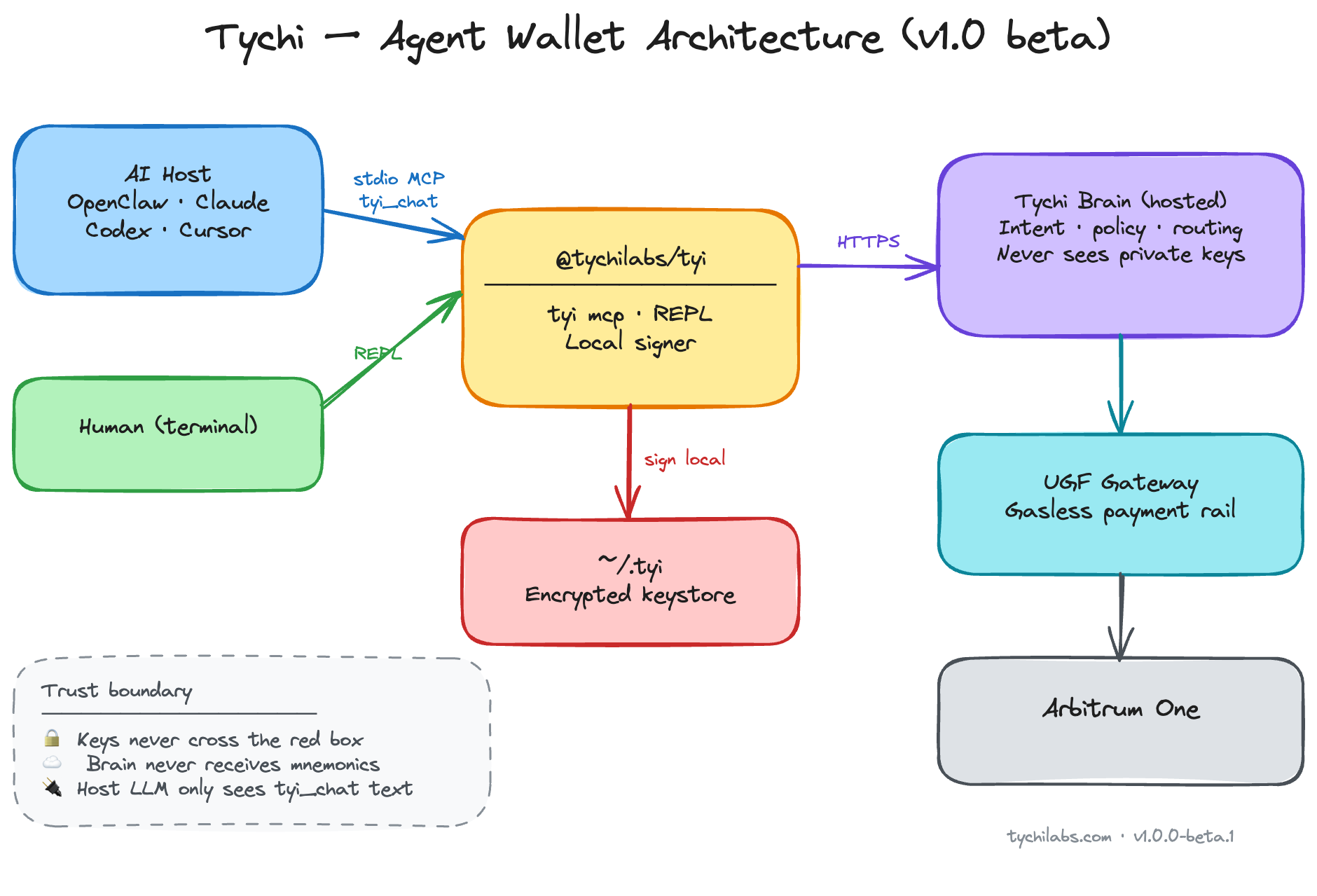
Mandatory flow
tyi_route → tyi_status
  → direct tool (create/import/switch/onboard/reset)   ← FAST, no brain
  → tyi_chat only for balance/send/policy              ← SLOW
Never call tyi_chat when tyi_status.ready is false.
Import additional wallet: collect seed/privkey from operator → tyi_import_wallet — never via tyi_chat.
Upcoming on Arbitrum One
Onchain DeFi for your agent wallet — same self-custody, same local signing, built for Arbitrum One:
| Coming | What it unlocks |
|---|---|
| Automation | Policy-gated agents that act onchain 24/7 — recurring sends, triggers, scheduled flows |
| Trading | Spot swaps and routing across Arbitrum liquidity — agent quotes, you confirm, sign locally |
| Lending | Supply assets on Arbitrum money markets — earn yield without leaving your keystore |
| Borrowing | Collateralized borrow onchain — agent-assisted, cap-enforced, fully self-custodial |
Native Arbitrum execution. UGF gas routing today. Full DeFi stack next.
| Brain action | MCP tool | Status |
|---|---|---|
import_wallet |
tyi_import_wallet |
done |
create_wallet |
tyi_create_wallet |
done |
switch_wallet |
tyi_switch_wallet |
done |
reveal_wallet |
tyi_reveal_wallet |
missing |
Tools
| Tool | When |
|---|---|
tyi_route |
First — intent → tool map |
tyi_create_wallet |
User wants new wallet → not tyi_chat |
tyi_import_wallet |
User wants import → not tyi_chat |
tyi_switch_wallet |
Change active wallet → not tyi_chat |
tyi_onboard |
First setup |
tyi_chat |
Balance, send, pay, policy only |
Operator prompts (you ask human; never invent secrets)
| Field | Prompt |
|---|---|
password |
Keystore password for ~/.tyi → later TYI_PASSWORD in MCP env |
agent_name |
Agent name (default Tychi) |
llm_provider |
anthropic | gemini | openai | groq |
llm_api_key |
Provider API key (validated, stored encrypted on brain) |
mnemonic |
Optional import (fresh only) |
Prefer MCP env for TYI_PASSWORD over chat after onboard.
Modes (tyi_status.mode)
| Mode | Meaning | tyi_onboard needs |
|---|---|---|
fresh |
No wallet / incomplete | password, llm_provider, llm_api_key; optional agent_name, mnemonic |
llm_only |
Wallet exists, no LLM vault | Same LLM fields + password |
ready |
OK for chat | Do not onboard; use tyi_chat |
MCP host config
{
  "tychi": {
    "command": "npx",
    "args": ["-y", "@tychilabs/tyi-mcp@beta"],
    "env": {
      "TYI_PASSWORD": "<from tyi_onboard>",
      "TYCHI_BRAIN_URL": "http://hosted_brain.tychilabs.com"
    }
  }
}
OpenClaw set:
openclaw mcp set tychi '{"command":"npx","args":["-y","@tychilabs/tyi-mcp@beta"],"env":{"TYI_PASSWORD":"<password>","TYCHI_BRAIN_URL":"http://hosted_brain.tychilabs.com"}}'
openclaw mcp reload
Remove integration + data
tyi_resetwith{ "confirm": true }— wipes~/.tyi- Remove
TYI_PASSWORDfrom MCP env - OpenClaw:
openclaw mcp unset tychithenopenclaw mcp reload
Errors
| Symptom | Action |
|---|---|
not_ready on chat |
Run onboard flow |
TYI_PASSWORD env required |
Set env after onboard; reload host |
no_llm_key / missing llm_key |
tyi_onboard llm_only |
partial install |
tyi_reset then fresh onboard |
fetch failed on brain |
Use http:// not https:// for hosted brain |
Env
| Var | Required | Default |
|---|---|---|
TYI_PASSWORD |
After onboard, for chat | — |
TYCHI_BRAIN_URL |
No | http://hosted_brain.tychilabs.com |
TYI_DATA_DIR |
No | ~/.tyi |
KEYSTORE_PASSWORD |
Alias for TYI_PASSWORD |
— |
Install
npx -y @tychilabs/tyi-mcp@beta
npx @tychilabs/tyi-mcp@beta --tools
License
Apache License 2.0 — see LICENSE. Runtime dependency: @tychilabs/tyi.
Recommended Servers

playwright-mcp
A Model Context Protocol server that enables LLMs to interact with web pages through structured accessibility snapshots without requiring vision models or screenshots.

Magic Component Platform (MCP)
An AI-powered tool that generates modern UI components from natural language descriptions, integrating with popular IDEs to streamline UI development workflow.

Audiense Insights MCP Server
Enables interaction with Audiense Insights accounts via the Model Context Protocol, facilitating the extraction and analysis of marketing insights and audience data including demographics, behavior, and influencer engagement.

VeyraX MCP
Single MCP tool to connect all your favorite tools: Gmail, Calendar and 40 more.

graphlit-mcp-server
The Model Context Protocol (MCP) Server enables integration between MCP clients and the Graphlit service. Ingest anything from Slack to Gmail to podcast feeds, in addition to web crawling, into a Graphlit project - and then retrieve relevant contents from the MCP client.

Kagi MCP Server
An MCP server that integrates Kagi search capabilities with Claude AI, enabling Claude to perform real-time web searches when answering questions that require up-to-date information.

E2B
Using MCP to run code via e2b.

Neon Database
MCP server for interacting with Neon Management API and databases

Exa Search
A Model Context Protocol (MCP) server lets AI assistants like Claude use the Exa AI Search API for web searches. This setup allows AI models to get real-time web information in a safe and controlled way.

Qdrant Server
This repository is an example of how to create a MCP server for Qdrant, a vector search engine.