
trade-mcp
An advanced MCP server for real-time worldwide stock market data, technical indicators, financials, news, and Python sandboxing with AI models, supporting US and Indian markets.
README
title: Trade MCP emoji: 📈 colorFrom: blue colorTo: indigo sdk: docker app_port: 7860 pinned: false
📈 trade-mcp — Advanced Stock Market MCP Server



An elite, high-performance Model Context Protocol (MCP) server providing real-time worldwide stock market data (including extensive US & Indian markets), technical indicators, historical data, company financials, news feeds, and native Python data-science sandboxing alongside Groq/NVIDIA AI models.
https://github.com/Techie03/trade-mcp/assets/assets/public/intro_video.mp4
🏗️ System Architecture
trade-mcp acts as a unified bridge between your favorite AI hosts and multiple free market data sources, running on a dual-transport layer.
graph TD
    %% AI Hosts
    subgraph Hosts [MCP Client Hosts]
        A[Cursor]
        B[Claude Desktop]
        C[Manus / SSE Clients]
        D[Zed / Windsurf / Continue]
    end

    %% Transport Selector
    subgraph Transport [Dual-Transport Layer]
        E{MCP_TRANSPORT}
        E1[Stdio Transport]
        E2[HTTP / SSE Server]
    end

    A & B & D -->|stdio stdio/stderr| E1
    C -->|HTTP POST /sse| E2

    %% Main Server
    subgraph Server [trade-mcp Core Node.js Engine]
        F[Request Router]
        G[(In-Memory Cache TTL)]
    end

    E1 & E2 --> F
    F <--> G

    %% Providers and Services
    subgraph Providers [Data & Execution Providers]
        H[Yahoo Finance <br> Free - No Key]
        I[Alpha Vantage <br> Free Key - 25/day]
        J[Finnhub <br> Free Key - 60/min]
        K[NSE India <br> Session Handshake]
        L[Python Sandbox <br> Exec-ChildProcess]
        M[AI Intelligence <br> Groq / NVIDIA]
    end

    F --> H & I & J & K & L & M

    %% Targets
    subgraph DataTargets [Data Target Systems]
        H1[US/Global Quotes & Summary]
        I1[Forex & Technical Indicators]
        J1[Crypto & News Feeds]
        K1[Live Quotes / F&O Option Chain / Bhavcopy ZIPs]
        L1[Matplotlib Plots / Pandas / NumPy Scripts]
        M1[Portfolio Insights & Sentiment Analysis]
    end

    H --> H1
    I --> I1
    J --> J1
    K --> K1
    L --> L1
    M --> M1

    %% Styling
    style Server fill:#f9f,stroke:#333,stroke-width:2px
    style Transport fill:#bbf,stroke:#333,stroke-width:1px
    style Providers fill:#bfb,stroke:#333,stroke-width:1px
⚡ Quick Start
Step 1 — Clone & Install Dependencies
First, make sure you have Node.js >= 20 and Python >= 3 installed.
git clone https://github.com/Techie03/trade-mcp.git
cd trade-mcp
npm install
Step 2 — Configure Environment Variables
Copy .env.example to .env:
copy .env.example .env
Open the .env file and insert your API keys:
# ── Market Data (all free) ──────────────────────
ALPHA_VANTAGE_KEY=your_alpha_vantage_key
FINNHUB_KEY=your_finnhub_key

# ── AI Intelligence (all free) ──────────────────
GROQ_API_KEY=your_groq_api_key
NVIDIA_API_KEY=your_nvidia_api_key

# ── Transport (stdio is default for local hosts)
MCP_TRANSPORT=stdio
PORT=3000
Step 3 — Compile the Server
Build the TypeScript files into compiled JavaScript:
npm run build
🔌 Host Configurations
Configure the server in your favorite editor/client.
⚡ Direct Remote SSE Connection (No Installation Required)
You can connect directly to the active remote server instance https://nishith374-stock-mcp.hf.space/sse immediately without cloning the code or compiling it locally!
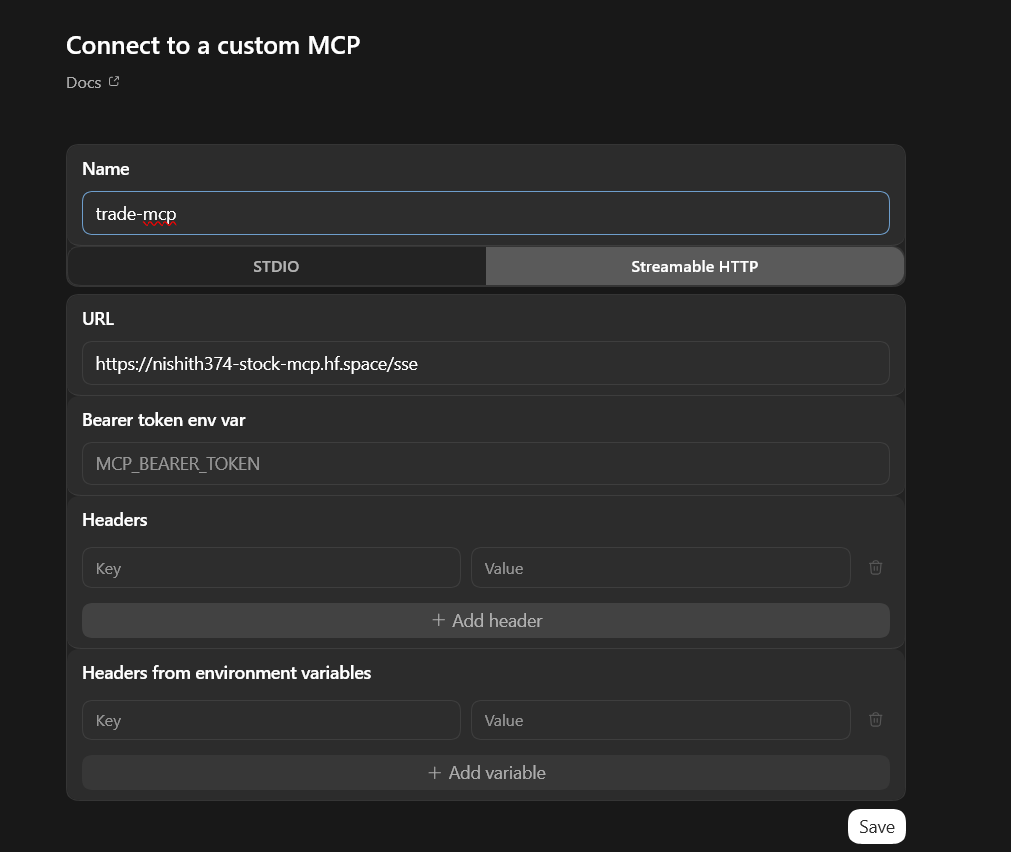
1. Codex / Cursor (Via Settings UI)
- Navigate to Cursor Settings → Models → MCP.
- Click + Add New MCP Server.
- Enter Name:
trade-mcp - Choose Type:
Streamable HTTP - Paste URL:
https://nishith374-stock-mcp.hf.space/sse - Click Save.
2. Cursor (Via Config JSON)
Update your global mcp.json file (typically in %APPDATA%\Cursor\User\mcp.json or ~/.config/Cursor/User/mcp.json):
{
  "mcpServers": {
    "trade-mcp": {
      "url": "https://nishith374-stock-mcp.hf.space/sse"
    }
  }
}
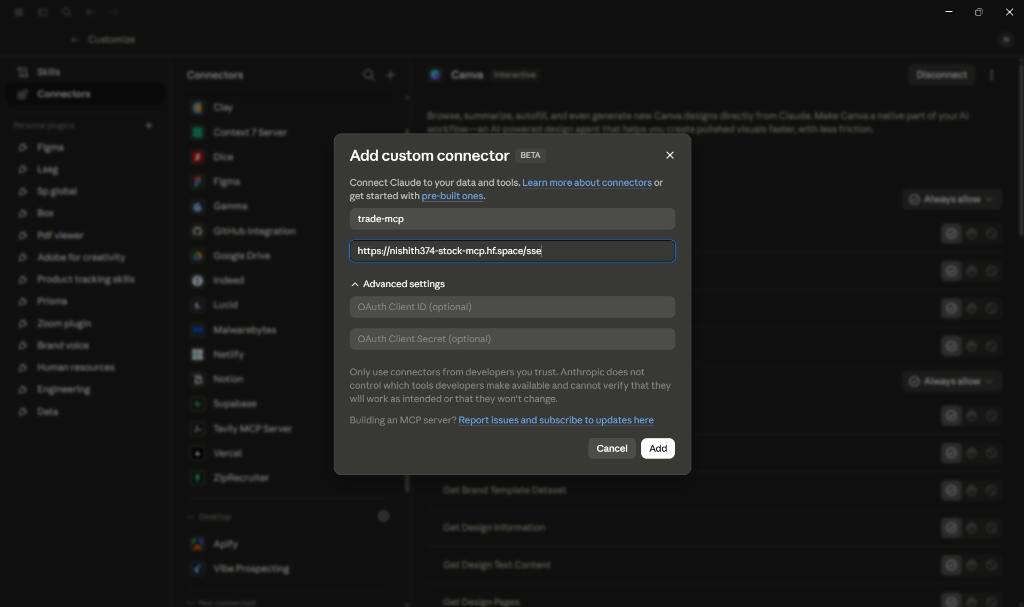
3. Claude.ai (Via Custom Connectors UI)
- Open your Claude.ai account settings → Connectors.
- Click Add custom connector.
- Enter Name:
trade-mcp - Enter URL:
https://nishith374-stock-mcp.hf.space/sse - Click Add.
4. Claude Desktop (Config JSON)
Update your claude_desktop_config.json file:
{
  "mcpServers": {
    "trade-mcp-remote": {
      "command": "npx",
      "args": [
        "-y",
        "mcp-remote",
        "https://nishith374-stock-mcp.hf.space/sse"
      ]
    }
  }
}
💻 Local Installation & Config
If you choose to clone, compile, and run the server locally on your machine:
1. Cursor (Local)
Copy the configuration block to your global Cursor configuration file:
- Windows:
%APPDATA%\Cursor\User\mcp.json - macOS/Linux:
~/.config/Cursor/User/mcp.json
{
  "mcpServers": {
    "trade-mcp": {
      "command": "node",
      "args": ["C:/Users/nishi/Desktop/trade-mcp/dist/index.js"],
      "env": {
        "ALPHA_VANTAGE_KEY": "your_alpha_vantage_key",
        "FINNHUB_KEY": "your_finnhub_key",
        "GROQ_API_KEY": "your_groq_api_key",
        "NVIDIA_API_KEY": "your_nvidia_api_key"
      }
    }
  }
}
(Note: Replace the absolute path "C:/Users/nishi/Desktop/trade-mcp/dist/index.js" with the actual folder path on your system, using forward slashes /.)
2. Claude Desktop
Add to your Claude Desktop config file:
- Windows:
%APPDATA%\Claude\claude_desktop_config.json - macOS:
~/Library/Application Support/Claude/claude_desktop_config.json
{
  "mcpServers": {
    "trade-mcp": {
      "command": "node",
      "args": ["C:/Users/nishi/Desktop/trade-mcp/dist/index.js"],
      "env": {
        "ALPHA_VANTAGE_KEY": "your_alpha_vantage_key",
        "FINNHUB_KEY": "your_finnhub_key",
        "GROQ_API_KEY": "your_groq_api_key",
        "NVIDIA_API_KEY": "your_nvidia_api_key"
      }
    }
  }
}
3. Zed Editor
Add to ~/.config/zed/settings.json:
{
  "context_servers": {
    "trade-mcp": {
      "command": {
        "path": "node",
        "args": ["C:/Users/nishi/Desktop/trade-mcp/dist/index.js"],
        "env": {
          "ALPHA_VANTAGE_KEY": "your_alpha_vantage_key",
          "FINNHUB_KEY": "your_finnhub_key",
          "GROQ_API_KEY": "your_groq_api_key",
          "NVIDIA_API_KEY": "your_nvidia_api_key"
        }
      }
    }
  }
}
4. Continue.dev
Merge the following into ~/.continue/config.json:
{
  "experimental": {
    "modelContextProtocolServers": [
      {
        "transport": {
          "type": "stdio",
          "command": "node",
          "args": ["C:/Users/nishi/Desktop/trade-mcp/dist/index.js"],
          "env": {
            "ALPHA_VANTAGE_KEY": "your_alpha_vantage_key",
            "FINNHUB_KEY": "your_finnhub_key",
            "GROQ_API_KEY": "your_groq_api_key",
            "NVIDIA_API_KEY": "your_nvidia_api_key"
          }
        }
      }
    ]
  }
}
🛠️ Complete Tools Reference (28 Tools)
📈 Market Data (4)
| Tool Name | Key Parameters | Description |
|---|---|---|
get_quote |
symbol (e.g. AAPL, TCS.NS) |
Returns real-time equity quotes with high/low/close and volume metrics. |
get_historical |
symbol, range, interval |
Returns OHLCV historical time series (1d to 10y ranges). |
get_market_summary |
None | Returns quick global indices scoreboard (S&P500, NIFTY50, Nasdaq, FTSE). |
search_symbol |
query (e.g. Reliance) |
Fuzzy search for stocks across worldwide exchanges. |
🏢 Fundamentals (3)
| Tool Name | Key Parameters | Description |
|---|---|---|
get_company_overview |
symbol (e.g. MSFT) |
Detailed capital metrics (Beta, P/E, EPS, Profit Margins, Sector). |
get_financials |
symbol, period |
Pulls balance sheet, cash flows, and income statement. |
get_earnings |
symbol |
Earnings history, consensus estimates, and surprise metrics. |
📰 News Feeds (2)
| Tool Name | Key Parameters | Description |
|---|---|---|
get_news |
symbol, days |
Pulls recent market and corporate news articles for a specific stock. |
get_market_news |
category (general, tech, etc) |
Global general financial news stream. |
📊 Technical Indicators (2)
| Tool Name | Parameters | Description |
|---|---|---|
get_technical_indicators |
symbol, indicator |
SMA, EMA, RSI, MACD, Bollinger Bands, VWAP, ADX indicators. |
get_sector_performance |
None | Real-time performance breakdown of standard US market sectors. |
🇮🇳 India-Specific (6)
| Tool Name | Parameters | Description |
|---|---|---|
get_nse_quote |
symbol (e.g. RELIANCE) |
Official quote with VWAP, circuit filters, delivery quantities, and margins. |
get_nse_indices |
None | Real-time index tracker for Nifty50, Banknifty, Midcap, VIX, etc. |
get_nse_option_chain |
symbol |
Live derivatives option chain (Call/Put Open Interest, strike prices). |
get_nse_historical |
symbol, date (YYYYMMDD) |
Unzips and extracts EOD historical Bhavcopy for any listed stock. |
get_nse_corporate_actions |
symbol |
Board meetings, dividends, splits, announcements. |
get_bse_quote |
symbol (e.g. 500325) |
Pulls delayed Bombay Stock Exchange pricing. |
💱 Forex & Crypto (2)
| Tool Name | Parameters | Description |
|---|---|---|
get_forex |
from_currency, to_currency |
Real-time conversion rates (e.g., USD to INR, EUR to USD). |
get_crypto_quote |
symbol (e.g. BTC, ETH) |
Captures USD coin quotes using exchange socket data. |
🤖 AI Market Intelligence (8)
| Tool Name | Description | Engine |
|---|---|---|
analyze_sentiment |
Bullish/Bearish/Neutral score with confidence. | Groq LLaMA 3.3 -> NVIDIA NIM |
get_stock_insight |
Deep dashboard: metrics, technicals, news, and rating. | Groq LLaMA 3.3 -> NVIDIA NIM |
summarize_news |
Summarizes recent news articles into a concise brief. | Groq LLaMA 3.3 -> NVIDIA NIM |
analyze_earnings |
Analyses EPS surprises, revenue growth, and guidance. | Groq LLaMA 3.3 -> NVIDIA NIM |
compare_stocks |
Side-by-side comparison of 2-5 tickers with verdict. | Groq LLaMA 3.3 -> NVIDIA NIM |
get_trade_signal |
Generates a buy/sell rating based on RSI & moving averages. | Groq LLaMA 3.3 -> NVIDIA NIM |
analyze_portfolio |
Analyzes portfolio diversification, risk, and sectors. | Groq LLaMA 3.3 -> NVIDIA NIM |
explain_indicator |
Explains technical outputs in plain language. | Groq LLaMA 3.3 -> NVIDIA NIM |
🐍 Python Data-Science Sandbox (1)
| Tool Name | Parameters | Description |
|---|---|---|
run_python_analysis |
code (Python string) |
Runs dynamic analysis code in the analysis/ folder. Supports pandas, numpy, and matplotlib to write files and output complex math or saved charts. |
🔍 Web Search (1)
| Tool Name | Parameters | Description |
|---|---|---|
search_web |
query, max_results (int, default: 5) |
Performs a real-time financial or general web search using the Tavily API, returning concise text snippets optimized for LLM context. |
📊 Live Verification Results
The server contains an automated verification suite verifying all primary functions:
node --env-file=.env test.mjs
Passing Output:
╔══════════════════════════════════════════════════════════╗
║           trade-mcp  —  Live API Test Results           ║
╠══════════════════════════════════════════════════════════╣
║ ✅ PASS  Yahoo Finance (RELIANCE.NS)                     ║
║      ₹1263 | 0.33% | NSI                                 ║
╠══════════════════════════════════════════════════════════╣
║ ✅ PASS  Yahoo Finance (AAPL)                            ║
║      $295.63 | 1.39%                                     ║
╠══════════════════════════════════════════════════════════╣
║ ✅ PASS  Finnhub News (TCS)                              ║
║      0 articles returned                                 ║
╠══════════════════════════════════════════════════════════╣
║ ✅ PASS  Alpha Vantage (AAPL overview)                   ║
║      P/E: 35.83 | Sector: TECHNOLOGY                     ║
╠══════════════════════════════════════════════════════════╣
║ ✅ PASS  NSE Bhavcopy (CSV/ZIP)                          ║
║      RELIANCE close ₹1258.8 | 2660 stocks                ║
╠══════════════════════════════════════════════════════════╣
║ ✅ PASS  Groq AI (LLaMA 3.3)                             ║
║      Bullish | score:80 | Groq                           ║
╠══════════════════════════════════════════════════════════╣
║ ✅ PASS  Python Execution (run_python)                   ║
║      Pandas loaded & executed | stdout: MEAN: 2.0        ║
╠══════════════════════════════════════════════════════════╣
║  Result: 7/7 tests passed                                ║
╚══════════════════════════════════════════════════════════╝
🌐 Remote Deployment
To connect remote hosts (like Manus or other cloud agents), you can deploy the Docker container to a cloud provider:
Cloud Hosting (Hugging Face Spaces, Koyeb, Render, etc.)
This repository is equipped with a production-ready Dockerfile listening on port 7860.
- Fork or push this repository to GitHub or Hugging Face.
- Setup a Docker-based app/Space.
- Configure your API keys (
ALPHA_VANTAGE_KEY,FINNHUB_KEY,GROQ_API_KEY,NVIDIA_API_KEY,TAVILY_API_KEY) securely as environment variables/secrets. - Get your public HTTPS server endpoint (e.g.
https://your-app.hf.space/sse).
🛡️ Rate Limits & Cache
To prevent rate-limit bans on free keys:
- Yahoo Finance: Public endpoint uses browser headers & session rotation.
- NSE India: Custom 2-step handshake (initializes session cookie by visiting homepage, then requests endpoint).
- Alpha Vantage: Auto-stops fetching and switches to caches once the 25 req/day limit is hit.
- Finnhub: Hard rate checking (resets every minute).
- Groq: LLaMA 3.3 fallback to NVIDIA NIM when hits
429 Too Many Requests.
📜 Disclaimer & License
Disclaimer: This server is meant strictly for educational and informational purposes. None of the data or responses produced constitute financial advice.
Licensed under the MIT License.
Recommended Servers

playwright-mcp
A Model Context Protocol server that enables LLMs to interact with web pages through structured accessibility snapshots without requiring vision models or screenshots.

Magic Component Platform (MCP)
An AI-powered tool that generates modern UI components from natural language descriptions, integrating with popular IDEs to streamline UI development workflow.

Audiense Insights MCP Server
Enables interaction with Audiense Insights accounts via the Model Context Protocol, facilitating the extraction and analysis of marketing insights and audience data including demographics, behavior, and influencer engagement.

VeyraX MCP
Single MCP tool to connect all your favorite tools: Gmail, Calendar and 40 more.

graphlit-mcp-server
The Model Context Protocol (MCP) Server enables integration between MCP clients and the Graphlit service. Ingest anything from Slack to Gmail to podcast feeds, in addition to web crawling, into a Graphlit project - and then retrieve relevant contents from the MCP client.

Kagi MCP Server
An MCP server that integrates Kagi search capabilities with Claude AI, enabling Claude to perform real-time web searches when answering questions that require up-to-date information.

E2B
Using MCP to run code via e2b.

Neon Database
MCP server for interacting with Neon Management API and databases

Exa Search
A Model Context Protocol (MCP) server lets AI assistants like Claude use the Exa AI Search API for web searches. This setup allows AI models to get real-time web information in a safe and controlled way.

Qdrant Server
This repository is an example of how to create a MCP server for Qdrant, a vector search engine.