
toshi-mcp
Enables a side-panel companion that watches your coding session and provides context-aware answers about your codebase and session state through a small, token-cheap MCP interface.
README
Toshi — a terminal companion

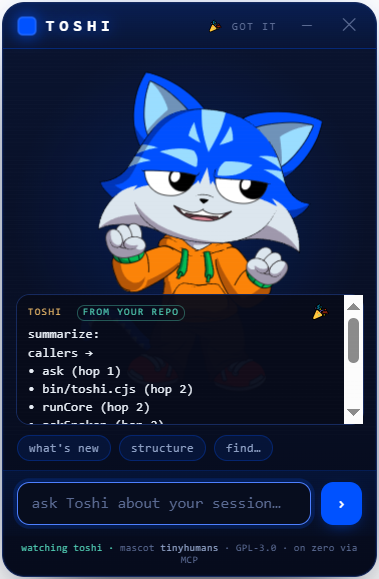
A tiny AI companion that lives beside your terminal, wearing the community-ready Toshi mascot from
tinyhumansai/mascots. It watches your gitlawb/zero
coding session and you can talk to it about what's happening — what changed, why a test is red, what to do next —
through a small, token-cheap context instead of a full chat UI.
Not a new mascot. We take the already-open-source Toshi model (PR #2, merged) and give it tools: a
zeroplugin + an MCP server + a side-panel that renders the real Rive mascot.
What it is
- Rides on
gitlawb/zero— Zero is the runtime (Go, MIT, MCP client and server). Toshi is a plugin (./.zero/plugins/toshi/) plus a stdio MCP server so any MCP client (Claude Desktop, Cline, …) can call it. - The mascot on the side —
panel/index.htmlis a WebView that loads the realtoshi.rivfrom the tinyhumans manifest and drives its state machine (idle · look_around · pointing · hand_wave · dancing · celebration, plus the eye channel). It's the face; the MCP is the brain. - Token-cheap by design — session awareness comes from
DeusData/codebase-memory-mcp(MIT): a persistent knowledge graph of the repo, ~99% fewer tokens than reading files one by one. Toshi asks it what changed instead of re-reading the tree, so most turns stay small. - You sign, always — any money action is descriptor-only: Toshi prepares a transaction, you sign it. No custody.
Layout
toshi/
├── panel/index.html      the side-panel WebView (renders the real Toshi mascot + talk-to-session)
├── mcp/toshi-mcp.mjs      the MCP server (toshi_status / toshi_ask / toshi_mood) + the /ask bridge the panel calls
├── plugin/plugin.json     the gitlawb/zero plugin manifest
├── tinyhumans/mascots.json pinned copy of the upstream manifest (the mascot contract we consume)
├── ATTRIBUTION.md         upstream credits + licences
└── LICENSE                GPL-3.0 (the Toshi mascot is GPL-3.0, so this is too)
Run it
The floating companion (Clippy-energy) — one command launches the mascot window and its brain:
npm install          # once
npm run toshi        # a frameless, always-on-top Toshi floats bottom-right, over any terminal
Launch from anywhere (Windows · macOS · Linux) — npm i -g . once, then just type toshi in any repo and
it floats over that terminal, reading that repo. Windows also has a double-clickable toshi.bat. Drag Toshi
by its header; hide it with ✕. It greets you with a wave, floats + blinks on its own, reacts when you ask, and
bursts into a celebration when it has a grounded answer from your repo.
Make its answers real — index your repo so toshi_ask reads the graph instead of guessing (token-cheap):
# get codebase-memory-mcp (MIT, local, no telemetry), then:
codebase-memory-mcp cli index_repository '{"repo_path":"/abs/path/to/your/repo"}'
# tell Toshi where the repo + binary are (optional; defaults to cwd / PATH):
export TOSHI_REPO=/abs/path/to/your/repo
export CODEBASE_MEMORY_BIN=/abs/path/to/codebase-memory-mcp
Until then Toshi runs in honest demo mode — the mascot is fully alive, and it says it can't read your session yet (with the exact index command) rather than inventing an answer.
Give Toshi a voice (optional) — install zero and run zero setup with any
provider (free/local models like ollama work). Toshi then speaks its grounded answers in your language —
1-3 warm sentences synthesized ONLY from what it retrieved, never invented. No zero? Point Toshi at any
OpenAI-compatible endpoint instead: TOSHI_API_URL + TOSHI_API_KEY + TOSHI_API_MODEL. TOSHI_LLM=off disables.
Put the CLI everywhere
The same three files run on Windows, macOS and Linux (CI-proven on all three):
| Surface | How |
|---|---|
| Any terminal (everyone) | npm i -g github:philpof102-svg/toshi — no registry needed. Then type toshi in any repo: first call floats the companion; typing toshi in another terminal connects that repo to it (no second window). Electron is optional — where it can't install, toshi runs the brain + a browser panel at http://127.0.0.1:4821/panel/ instead. |
| zero plugin | drop this repo at ./.zero/plugins/toshi/ → zero gets toshi_status / toshi_ask / toshi_mood / toshi_watch. |
| Auto-float with zero | toshi setup (or npm run zero-hook) once → a sessionStart hook makes Toshi appear (watching that repo) every time you launch zero. toshi setup --remove undoes it. |
| Summon / minimize | toshi show · toshi hide · toshi toggle from any terminal (picked up in ~4s). The ─ button folds Toshi into a small floating head — click it to expand; ✕ quits. |
| openclaude | toshi setup --mcp registers Toshi's MCP in ~/.openclaude.json → toshi_ask / toshi_status / toshi_mood / toshi_watch inside openclaude. |
| Claude Desktop / Cline / any MCP client | toshi setup --mcp --file <path-to-config>, or by hand: {"command": "node", "args": ["/abs/path/toshi/mcp/toshi-mcp.mjs"]} |
| Scripts / anything HTTP | POST http://127.0.0.1:4820/ask {"q":"…"} · POST /repo {"path":"…"} · GET /health |
| Browser (no Electron) | node serve.js → http://127.0.0.1:4821/panel/ |
Honest status
- v0, unaudited. The panel + mascot rendering are real; the MCP's "answer about your session" is a skeleton that
bridges to
codebase-memory-mcp— wire your model/provider before trusting its answers. - The Rive runtime and the
.rivload over the network in a real browser/WebView. Vendor them for offline use. - Licence: GPL-3.0 (the upstream Toshi mascot is GPL-3.0; a derivative must match it). See
ATTRIBUTION.md.
Credits
Mascot Toshi by tinyhumans (GPL-3.0). Session memory by codebase-memory-mcp (MIT). Runtime gitlawb/zero (MIT).
Recommended Servers

playwright-mcp
A Model Context Protocol server that enables LLMs to interact with web pages through structured accessibility snapshots without requiring vision models or screenshots.

Audiense Insights MCP Server
Enables interaction with Audiense Insights accounts via the Model Context Protocol, facilitating the extraction and analysis of marketing insights and audience data including demographics, behavior, and influencer engagement.

Magic Component Platform (MCP)
An AI-powered tool that generates modern UI components from natural language descriptions, integrating with popular IDEs to streamline UI development workflow.

VeyraX MCP
Single MCP tool to connect all your favorite tools: Gmail, Calendar and 40 more.

graphlit-mcp-server
The Model Context Protocol (MCP) Server enables integration between MCP clients and the Graphlit service. Ingest anything from Slack to Gmail to podcast feeds, in addition to web crawling, into a Graphlit project - and then retrieve relevant contents from the MCP client.

Kagi MCP Server
An MCP server that integrates Kagi search capabilities with Claude AI, enabling Claude to perform real-time web searches when answering questions that require up-to-date information.

Neon Database
MCP server for interacting with Neon Management API and databases

Exa Search
A Model Context Protocol (MCP) server lets AI assistants like Claude use the Exa AI Search API for web searches. This setup allows AI models to get real-time web information in a safe and controlled way.

Qdrant Server
This repository is an example of how to create a MCP server for Qdrant, a vector search engine.

E2B
Using MCP to run code via e2b.