
threejs-editor-mcp
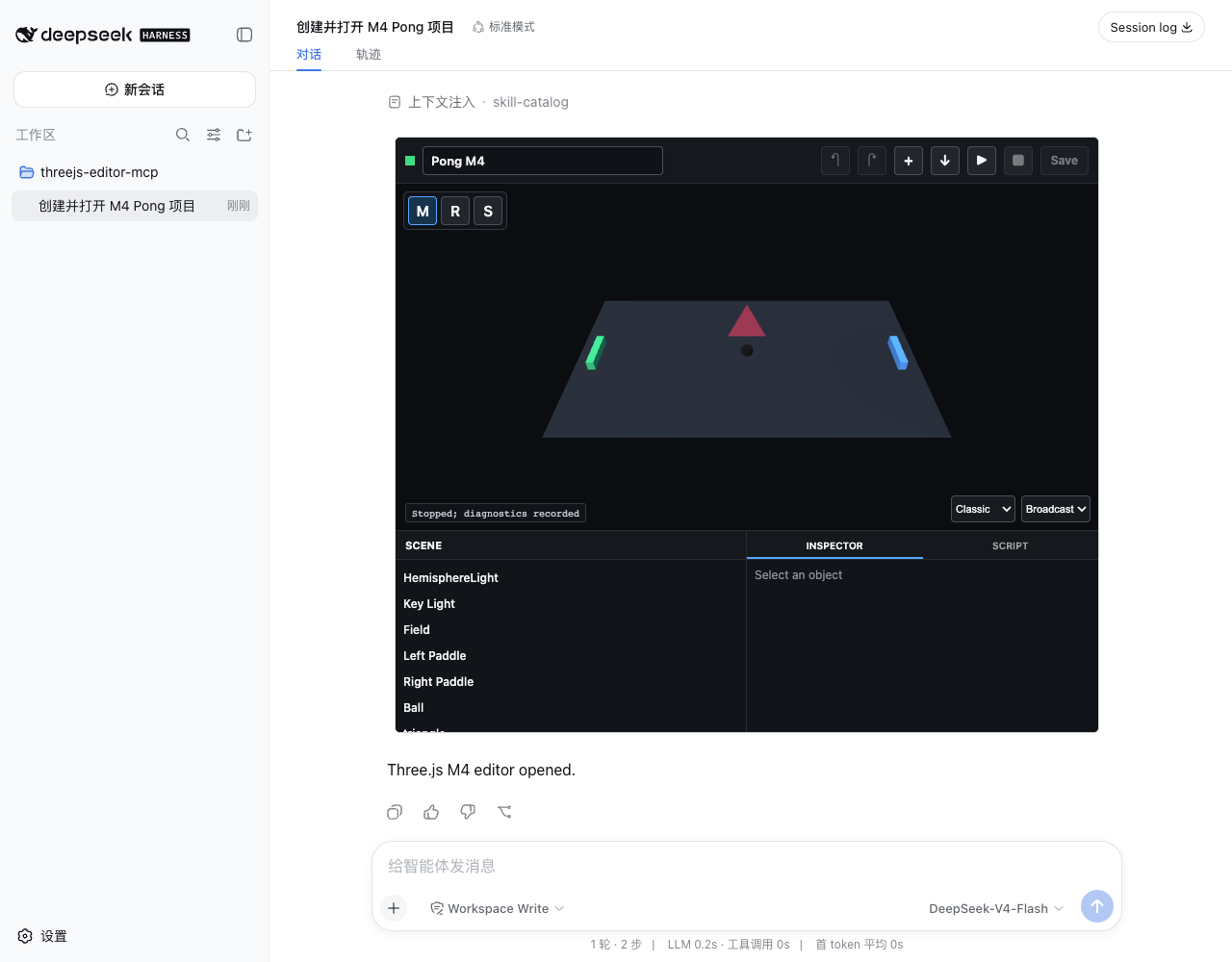
Enables creating, editing, running, and inspecting small Three.js games inside a DeepSeek Harness chat card via an MCP server and bundled app.
README
threejs-editor-mcp
English | 简体中文
Create, edit, run, and inspect small Three.js games inside a DeepSeek Harness
chat card. One npm package provides the stdio MCP Server, model tools, app-only
tools, and the bundled ui://threejs-editor/app MCP App.
Architecture
flowchart LR
  Agent["Harness Agent"] -->|"model-visible tools"| Host["dsh-mcp-apps"]
  Host --> Server["threejs-editor-mcp<br/>stdio server"]
  Server --> Store["project.json<br/>diagnostics.json<br/>assets/"]
  Server -->|"resources/read"| App["MCP App Sandbox<br/>Three.js Editor"]
  App -->|"app-only tools"| Host
  Human["Human"] --> App
The Editor uses the official three npm package. It is a product-owned,
lightweight editor inspired by the official Three.js Editor; no Editor source
is vendored and no separate web service is required.
Install and Run with npm
Install the MCP Apps Host and this MCP Server:
dsh plugin --profile web add @creative-dswork/dsh-mcp-apps
npm install --global threejs-editor-mcp@0.1.0
threejs-editor-mcp --root /absolute/path/to/threejs-projects
Or run the Server without a global install:
npx --yes threejs-editor-mcp@0.1.0 --root /absolute/path/to/threejs-projects
For a global install, configure the mcp-apps row in the Harness Web profile:
- id: mcp-apps
  config:
    maxBodyBytes: 2097152
    servers:
      - serverName: threejs
        transport: stdio
        command: threejs-editor-mcp
        args:
          - --root
          - /absolute/path/to/threejs-projects
To let npm resolve the package directly, use npx in the same configuration:
- id: mcp-apps
  config:
    maxBodyBytes: 2097152
    servers:
      - serverName: threejs
        transport: stdio
        command: npx
        args:
          - --yes
          - threejs-editor-mcp@0.1.0
          - --root
          - /absolute/path/to/threejs-projects
The root can also be provided with THREEJS_EDITOR_PROJECT_ROOT.
Capabilities
emptyand playablepongproject templates;- hierarchy, viewport picking, transform controls, Inspector, undo/redo;
- one
start/update/disposegame script with keyboard and pointer input; - revision-checked human saves and model changes;
- revision-bound Play diagnostics;
- GLB, PNG, and JPEG import plus self-contained project export;
- clean reload and dirty conflict preservation.
Model-visible tools:
list_projects, create_project, open_editor, inspect_project,
apply_scene_changes, and check_project.
App-only tools:
pull_project, push_project, save_project_copy, report_diagnostics,
put_asset, and export_project.
Asset Limits
Assets are local only. Each file is limited to 256 KiB, each project to eight
files and 512 KiB total. The Server validates names, MIME types, signatures,
GLB 2.0 headers, and rejects external GLB resource URIs. Supported extensions
are .glb, .png, .jpg, and .jpeg.
The JSON export contains the saved project, exact revision, and base64 copies of its original assets. The MCP Apps Host mediates the download because direct downloads are blocked inside the Sandbox.
Development
Requires Node.js 22.19 or newer and pnpm 10.25.
pnpm install
pnpm run check
pnpm run test:pack
Run the server directly:
pnpm run build
node dist/server.js --root .tmp/projects
The complete design and phased evidence are in DESIGN.md and
reports/.
Security
Projects and assets are confined to the configured root. Project writes are size-bounded, revision-checked, serialized per project, and committed with temporary-file rename. Project paths, asset paths, symlinks, stale revisions, oversized payloads, mismatched file types, and external asset URLs are rejected. Game scripts run only in the existing different-origin double iframe Sandbox.
License
MIT
Recommended Servers

playwright-mcp
A Model Context Protocol server that enables LLMs to interact with web pages through structured accessibility snapshots without requiring vision models or screenshots.

Magic Component Platform (MCP)
An AI-powered tool that generates modern UI components from natural language descriptions, integrating with popular IDEs to streamline UI development workflow.

Audiense Insights MCP Server
Enables interaction with Audiense Insights accounts via the Model Context Protocol, facilitating the extraction and analysis of marketing insights and audience data including demographics, behavior, and influencer engagement.

VeyraX MCP
Single MCP tool to connect all your favorite tools: Gmail, Calendar and 40 more.

graphlit-mcp-server
The Model Context Protocol (MCP) Server enables integration between MCP clients and the Graphlit service. Ingest anything from Slack to Gmail to podcast feeds, in addition to web crawling, into a Graphlit project - and then retrieve relevant contents from the MCP client.

Kagi MCP Server
An MCP server that integrates Kagi search capabilities with Claude AI, enabling Claude to perform real-time web searches when answering questions that require up-to-date information.

E2B
Using MCP to run code via e2b.

Neon Database
MCP server for interacting with Neon Management API and databases

Exa Search
A Model Context Protocol (MCP) server lets AI assistants like Claude use the Exa AI Search API for web searches. This setup allows AI models to get real-time web information in a safe and controlled way.

Qdrant Server
This repository is an example of how to create a MCP server for Qdrant, a vector search engine.