
the-notebook-mcp
Enables AI agents to directly manipulate Jupyter Notebook cells and structure through a secure, well-defined API, overcoming Cursor's AI agent mode limitations.
README







The Notebook MCP
A Model Context Protocol (MCP) server that enables AI agents to interact with Jupyter Notebook (.ipynb) files. Designed to overcome limitations with Cursor's AI agent mode, this tool allows AI assistants to directly manipulate notebook cells and structure through a secure, well-defined API.
Current Version: 0.9.0 - See the CHANGELOG.md for details on recent changes.
Why Use This?
- For Cursor Users: Enables AI assistants to properly edit, create, and manipulate Jupyter notebooks.
- For Data Scientists: No more copy-pasting AI output manually into your notebooks.
- For Developers: Create complex notebook workflows with AI assistance while maintaining proper notebook structure.
Although originally designed for Cursor, this MCP server can be used with any MCP-compatible AI assistant tool, such as Claude Code.
Quick Start (no install)
# Run (minimal example)
uvx the-notebook-mcp --allow-root /path/to/your/notebooks

# Too see command options...
uvx the-notebook-mcp help
Video Walkthrough
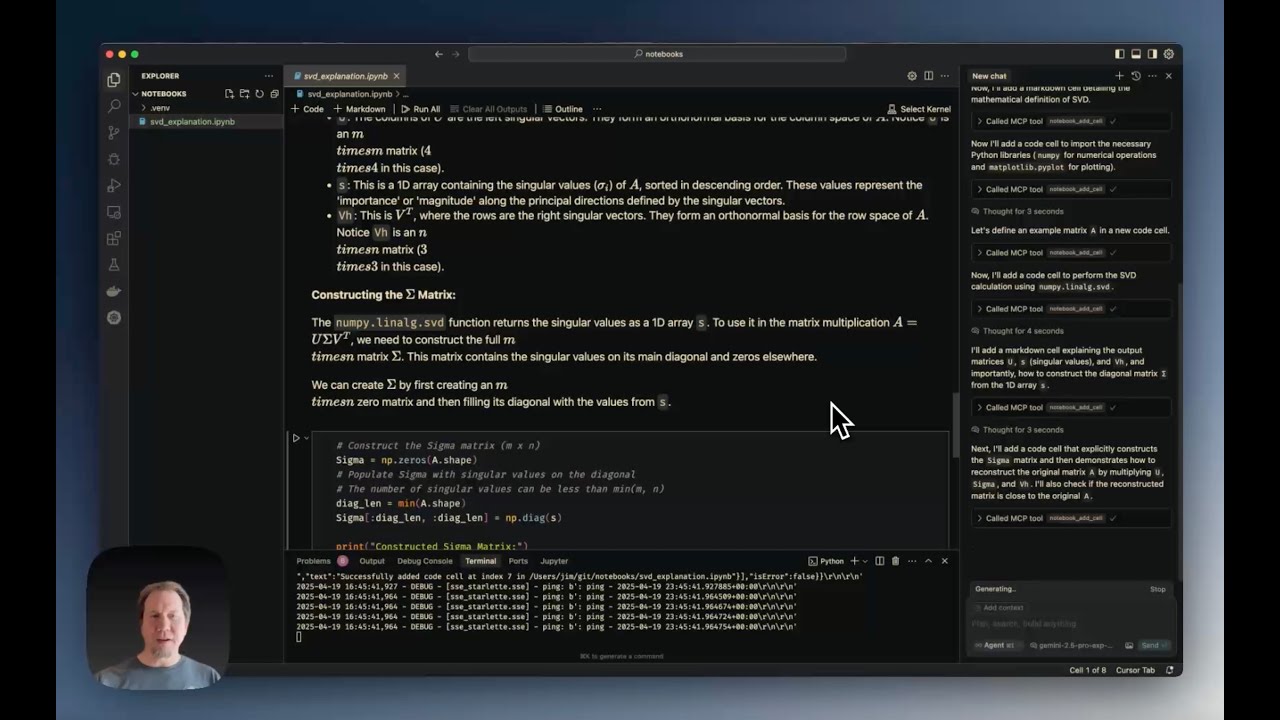
Cursor Jupyter Notebook MCP Server Tutorial demonstrates:
- Installation and configuration
- Creating notebooks from scratch
- Using editing tools (edit, split, duplicate cells)
- Working with notebook metadata
- Exporting notebooks to Python
Features
The server provides the following MCP tools:
File Operations
notebook_create: Creates a new, empty notebook filenotebook_delete: Deletes an existing notebook filenotebook_rename: Renames/moves a notebook file from one path to anothernotebook_export: Exports the notebook to another format (python, html, etc.)notebook_validate: Validates the notebook structure against the nbformat schema
Reading Operations
notebook_read: Reads an entire notebook and returns its structure as a dictionarynotebook_read_cell: Reads the source content of a specific cellnotebook_get_cell_count: Returns the total number of cellsnotebook_get_info: Retrieves general information about the notebooknotebook_get_outline: Generates a structural outline of the notebook (headings, definitions)notebook_search: Searches for a string within all notebook cells
Cell Manipulation
notebook_add_cell: Adds a new code or markdown cellnotebook_edit_cell: Replaces the source content of a specific cellnotebook_delete_cell: Deletes a specific cellnotebook_move_cell: Moves a cell to a different positionnotebook_change_cell_type: Changes a cell's type (code, markdown, or raw)notebook_duplicate_cell: Duplicates a cell multiple timesnotebook_split_cell: Splits a cell into two at a specified line numbernotebook_merge_cells: Merges a cell with the one immediately following itnotebook_execute_cell: Executes a code cell and returns its outputs- Note: Requires an active Jupyter server
- Example:
notebook_execute_cell('/path/to/notebook.ipynb', 1, server_url='http://localhost:8888', token='your-token') - Kernel state is preserved between calls, allowing variables defined in earlier cells to be accessed in later cells
Metadata and Outputs
notebook_read_metadata: Reads the top-level notebook metadatanotebook_edit_metadata: Updates the top-level notebook metadatanotebook_read_cell_metadata: Reads the metadata of a specific cellnotebook_edit_cell_metadata: Updates the metadata of a specific cellnotebook_read_cell_output: Reads the output list of a specific code cellnotebook_clear_cell_outputs: Clears the outputs and execution count of a specific cellnotebook_clear_all_outputs: Clears outputs and execution counts for all code cells
Requirements
Python Dependencies
-
Python Version: ≥ 3.10
-
Core Dependencies: (automatically installed)
fastmcp ≥ 2.3.3nbformat ≥ 5.0nbconvert ≥ 6.0ipythonjupyter_coreloguru ≥ 0.7.3
-
SSE Transport: (install with
uv pip install "the-notebook-mcp[sse]")uvicorn ≥ 0.20.0starlette ≥ 0.25.0
External System Dependencies
For exporting to certain formats, you may need:
- Pandoc: Required for many non-HTML export formats (installation instructions)
- LaTeX: Required for PDF export (installation instructions)
Installation
No Install!
You can run the server directly with
uvx the-notebook-mcp --allow-root $PWD
But if you prefer to install it...
# Basic installation (stdio transport only)
uv tool install the-notebook-mcp

# Using pip
pip install the-notebook-mcp
Development Installation
-
Clone the repository:
git clone https://github.com/svallory/the-notebook-mcp.git cd the-notebook-mcp -
Create and activate a virtual environment:
uv venv source .venv/bin/activate # On Windows use `.venv\Scripts\activate` -
Install in development mode:
uv pip install -e ".[dev]" -
Set up pre-commit hooks (recommended):
pre-commit installSee Pre-commit Hook Setup for details.
Running the Server
Basic Usage
# stdio transport (default)
the-notebook-mcp --allow-root /path/to/notebooks

# SSE transport
the-notebook-mcp --transport sse --allow-root /path/to/notebooks --host 0.0.0.0 --port 8889
Development Mode
Use one of these methods when working with the source code:
# Using poethepoet tasks
uv run poe start

# Using the Python module
python -m the_notebook_mcp.server --allow-root /path/to/notebooks
Available Tasks (poethepoet)
The project includes these predefined tasks:
start: Start the server with default settingscheck-help: Show help informationcheck-version: Show version informationtest: Run the test suite
Example:
# Show help
uv run poe check-help

# Run tests
uv run poe test
Command-Line Arguments
--allow-root: (Required) Path to a directory where notebooks are allowed (can be used multiple times)--transport:stdio(default) orsse--host: Host for SSE transport (default:0.0.0.0)--port: Port for SSE transport (default:8889)--max-cell-source-size: Maximum bytes for cell source (default: 10MB)--max-cell-output-size: Maximum bytes for cell output (default: 10MB)--log-dir: Directory for log files (default:~/.the_notebook_mcp)--log-level:DEBUG,INFO(default),WARNING,ERROR,CRITICAL
Cursor Integration
To configure Cursor to use this server, add settings to ~/.cursor/mcp.json (global) or .cursor/mcp.json (project-specific).
No-Install stdio Transport
[!IMPORTANT] Cursor will expand the
"."argument, but it does not expand"./some/folder".
{
  "mcpServers": {
    "the-notebook-mcp": {
      "command": "uvx",
      "args": [
        "the-notebook-mcp",
        "start",
        "--allow-root",
        "."
      ]
    }
  }
}
stdio Transport
{
  "mcpServers": {
    "the-notebook-mcp": {
      "command": "the-notebook-mcp",
      "args": [
        "start",
        "--allow-root",
        "."
      ]
    }
  }
}
SSE Transport (Recommended)
[!NOTE] You'll need to run the server separately
{
  "mcpServers": {
    "notebook_mcp": {
      "url": "http://127.0.0.1:8889/sse"
    }
  }
}
Limitations and Security
- Security Measures:
- Paths are restricted to allowed root directories
- Size limits on cell sources and outputs
- Input validation for file extensions and types
Development & Testing
# Setup
uv venv
source .venv/bin/activate
uv pip install -e ".[dev]"
pre-commit install

# Testing
uv run poe test
Known Issues
- UI Refresh Issues: Some operations may succeed at the file level, but the Cursor UI might not update immediately. To fix, close and reopen the notebook or choose "Revert" when prompted.
Contributing
Contributions are welcome! Please:
- Fork the repository
- Create a feature branch
- Make your changes with tests
- Submit a pull request
See GitHub Issues for existing bugs or feature requests.
Acknowledgments
This project is based on the work of Jim Beno in cursor-notebook-mcp.
License
This project is licensed under the MIT License. See the LICENSE file for details.
Author
Maintained by Saulo Vallory.
Recommended Servers

playwright-mcp
A Model Context Protocol server that enables LLMs to interact with web pages through structured accessibility snapshots without requiring vision models or screenshots.

Magic Component Platform (MCP)
An AI-powered tool that generates modern UI components from natural language descriptions, integrating with popular IDEs to streamline UI development workflow.

Audiense Insights MCP Server
Enables interaction with Audiense Insights accounts via the Model Context Protocol, facilitating the extraction and analysis of marketing insights and audience data including demographics, behavior, and influencer engagement.

VeyraX MCP
Single MCP tool to connect all your favorite tools: Gmail, Calendar and 40 more.

graphlit-mcp-server
The Model Context Protocol (MCP) Server enables integration between MCP clients and the Graphlit service. Ingest anything from Slack to Gmail to podcast feeds, in addition to web crawling, into a Graphlit project - and then retrieve relevant contents from the MCP client.

Kagi MCP Server
An MCP server that integrates Kagi search capabilities with Claude AI, enabling Claude to perform real-time web searches when answering questions that require up-to-date information.

E2B
Using MCP to run code via e2b.

Neon Database
MCP server for interacting with Neon Management API and databases

Exa Search
A Model Context Protocol (MCP) server lets AI assistants like Claude use the Exa AI Search API for web searches. This setup allows AI models to get real-time web information in a safe and controlled way.

Qdrant Server
This repository is an example of how to create a MCP server for Qdrant, a vector search engine.