
tapsite
An MCP server for web intelligence extraction that provides 55 tools for extracting structured data, design systems, accessibility audits, and more from websites.
README
tapsite



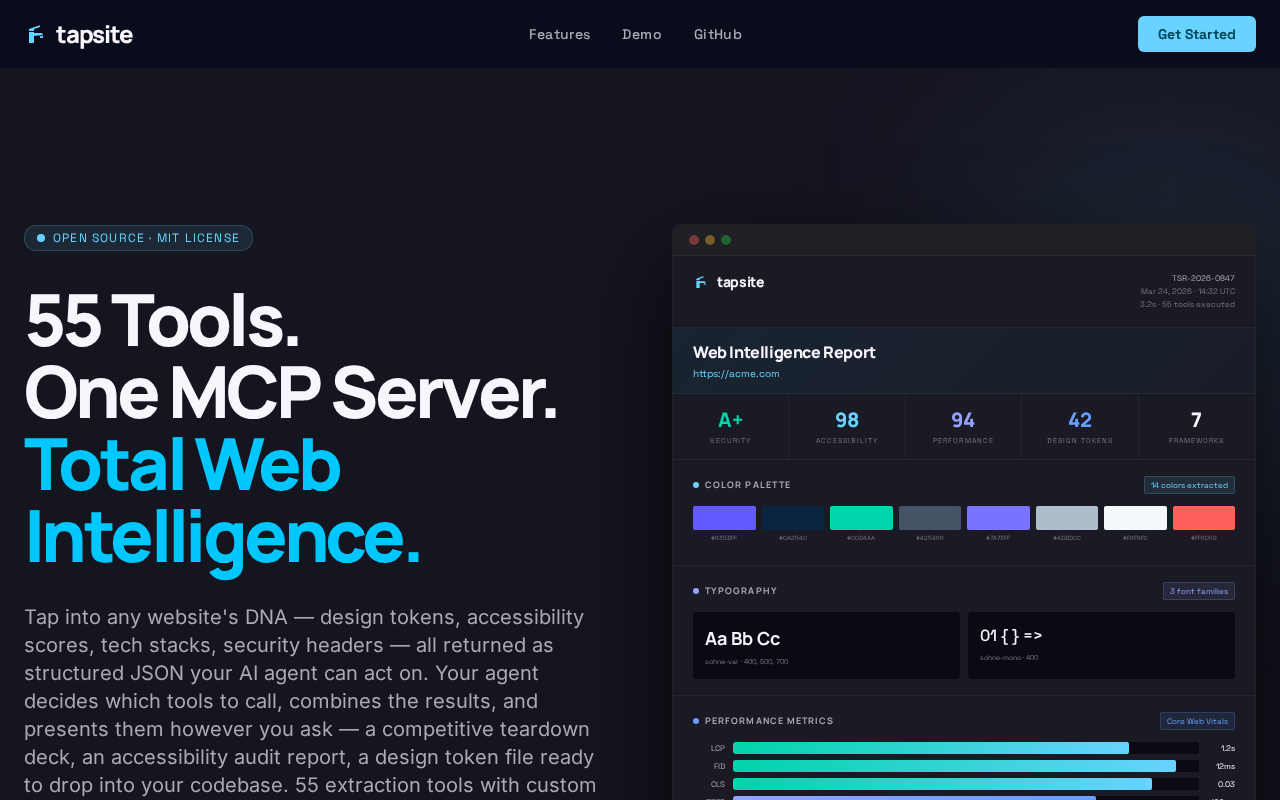
The MCP server for web intelligence extraction. 55 tools that give AI agents the ability to understand websites — not just drive a browser, but extract structured intelligence about design systems, accessibility, performance, content, and more.
Other MCP browser tools let agents click buttons. tapsite lets agents extract a complete color palette, audit WCAG contrast ratios, diff two sites' design tokens, detect tech stacks, or pull structured data with custom CSS/XPath/regex selectors — all as structured JSON that agents can reason about.
55 Tools · 11 Categories · 4 Workflows · Multi-Format Export
Works with Claude, Cursor, Windsurf, and any MCP-compatible AI agent. LangChain/LangGraph integration coming soon.
Installation
# Quick start (no install required)
npx -y tapsite

# Or install globally
npm install -g tapsite
npx playwright install chromium
npx playwright install-deps chromium
Add to your AI agent's MCP config:
{
  "mcpServers": {
    "tapsite": {
      "command": "npx",
      "args": ["-y", "tapsite"]
    }
  }
}
First run: Playwright will install Chromium automatically if not already present (~150MB one-time download).
Also available on the MCP Registry and Glama.
What makes tapsite different
| Other browser MCPs | tapsite |
|---|---|
| Click buttons | Extract full design systems |
| Fill forms | Audit WCAG accessibility |
| Take screenshots | Diff sites over time |
| Read raw HTML | Detect tech stacks & APIs |
| Custom CSS / XPath / regex extraction | |
| Anti-bot resilience & proxy rotation |
Extract design systems — colors, fonts, spacing scales, breakpoints, components, shadows, icons, CSS variables, and contrast ratios from any website. Output as structured JSON or W3C design tokens.
Audit quality — accessibility scoring with WCAG contrast analysis, performance timing (Core Web Vitals), tech stack detection, dark mode support, and animation inventory.
Compare and track — diff two sites side by side, or track a single site over time with snapshot-based temporal diffs. Regressions and improvements are flagged automatically. Disk caching means crawls resume where they left off, and results are reused across sessions.
Work behind login walls — persistent browser sessions with full MFA support. A 3-tier anti-bot escalation system handles protected sites automatically — from stealth scripts to proxy rotation. Log in once manually, then extract across tool calls without re-authenticating. Credentials never enter the chat.
Tools (55)
Session (8)
| Tool | Description |
|---|---|
tapsite_login_manual |
Open headed browser for manual login + MFA |
tapsite_login_check |
Verify authenticated session state |
tapsite_inspect |
Navigate to URL and inspect the DOM (nav, headings, buttons, forms, tables, links) |
tapsite_screenshot |
Take a screenshot of the current page |
tapsite_interact |
Click or fill an indexed element from the last inspect |
tapsite_scroll |
Scroll the page |
tapsite_run_js |
Execute arbitrary JavaScript and return the result |
tapsite_close |
Close the browser session |
Content Extraction (6)
| Tool | Description |
|---|---|
tapsite_extract_table |
Extract a specific table as structured data |
tapsite_extract_links |
Extract all links with text and href |
tapsite_extract_metadata |
Extract page metadata (title, description, OG tags, etc.) |
tapsite_extract_content |
Extract main readable content (article body, headings, paragraphs) |
tapsite_extract_forms |
Extract all forms with fields, labels, and actions |
tapsite_extract_markdown |
Extract page content as clean Markdown (raw, fit, or citations mode) with optional chunking |
Custom Extraction (2)
| Tool | Description |
|---|---|
tapsite_extract_custom |
Extract structured data using custom schemas (CSS selectors, XPath, or regex) |
tapsite_extract_schema_suggest |
Analyze page DOM and auto-suggest extraction schemas |
Design Tokens (5)
| Tool | Description |
|---|---|
tapsite_extract_colors |
Extract color palette (hex values + usage counts) |
tapsite_extract_fonts |
Extract font families, sizes, weights |
tapsite_extract_css_vars |
Extract CSS custom properties |
tapsite_extract_spacing |
Extract spacing scale values |
tapsite_extract_shadows |
Extract box-shadow and text-shadow patterns |
Visual Assets (4)
| Tool | Description |
|---|---|
tapsite_extract_images |
Extract all images with src, alt, dimensions |
tapsite_download_images |
Download images to local output directory |
tapsite_extract_svgs |
Extract inline SVGs |
tapsite_extract_favicon |
Extract favicon URLs and sizes |
Layout Intelligence (3)
| Tool | Description |
|---|---|
tapsite_extract_layout |
Extract layout tree (inline text representation) |
tapsite_extract_components |
Detect repeated UI components and patterns |
tapsite_extract_breakpoints |
Extract responsive breakpoints from CSS media queries |
Quality & Compliance (7)
| Tool | Description |
|---|---|
tapsite_extract_a11y |
Accessibility audit (ARIA, roles, contrast issues) |
tapsite_extract_contrast |
Audit WCAG contrast ratios between text and background |
tapsite_extract_perf |
Extract performance metrics (Core Web Vitals, resource sizes) |
tapsite_extract_security |
Audit security headers (CSP, HSTS, SRI, permissions policy) |
tapsite_extract_darkmode |
Detect dark mode support and extract dark palette |
tapsite_extract_pwa |
Detect PWA support (manifest, service worker, installability) |
tapsite_extract_i18n |
Extract internationalization signals (lang, hreflang, translations) |
Technology Detection (10)
| Tool | Description |
|---|---|
tapsite_extract_stack |
Detect frontend framework, libraries, and tech stack |
tapsite_extract_animations |
Extract CSS animations and transitions |
tapsite_extract_icons |
Detect icon libraries and extract icon usage |
tapsite_extract_graphql |
Detect GraphQL endpoints and introspect schemas |
tapsite_extract_aiml |
Detect AI/ML integrations (models, embeddings, inference endpoints) |
tapsite_extract_canvas |
Extract canvas and WebGL usage patterns |
tapsite_extract_wasm |
Detect WebAssembly modules and usage |
tapsite_extract_web_components |
Detect custom elements and shadow DOM usage |
tapsite_extract_third_party |
Inventory third-party scripts, trackers, and services |
tapsite_extract_storage |
Audit client-side storage (cookies, localStorage, sessionStorage, IndexedDB) |
Network & API (2)
| Tool | Description |
|---|---|
tapsite_capture_network |
Capture network requests during a page load |
tapsite_extract_api_schema |
Infer API schema from observed network traffic |
Multi-page (2)
| Tool | Description |
|---|---|
tapsite_crawl |
Crawl multiple pages from a start URL |
tapsite_diff_pages |
Compare two URLs (cross-site) or track changes over time (temporal) using real extractors |
Export (2)
| Tool | Description |
|---|---|
tapsite_export |
Export inspection results as JSON + Markdown + HTML report + CSV tables + screenshots |
tapsite_export_design_report |
Full design system report: report.html (visual), design-tokens.json (W3C format), design-tokens.css (copy-pasteable :root vars) |
Engine
Resilient extraction engine. Parallel browser pooling for concurrent page extraction. Persistent disk caching — crawls resume where they left off and results are reused across sessions. 3-tier anti-bot escalation with automatic proxy rotation for protected sites.
Workflows (4)
| Tool | Description |
|---|---|
tapsite_teardown |
Comprehensive competitive design teardown (all extractors) |
tapsite_audit |
Pre-launch quality audit (a11y, contrast, perf, SEO, darkmode) |
tapsite_harvest |
Inventory all site assets (images, SVGs, forms, fonts, links) |
tapsite_designsystem |
Extract design tokens as W3C JSON and CSS variables |
LangChain / LangGraph integration (coming soon)
Native LangChain and LangGraph integration is on the roadmap. When released, it will provide a dedicated Python wrapper with tool subsets and managed session lifecycle.
Security
Prompt injection defense (hidden element filtering + output sanitization), HTTPS enforced, private IPs blocked, auth headers redacted. Credentials never enter the chat — log in manually with full MFA support.
Prompt injection defense
Extractors skip hidden elements (display:none, visibility:hidden, opacity:0, zero-size, clip-hidden) to prevent invisible text injection. All output is scanned for prompt injection patterns — instruction overrides, role hijacking, exfiltration attempts, and tool manipulation are flagged inline as [INJECTION_DETECTED].
Credential safety
Never pass credentials through the chat. Use tapsite_login_manual to open a headed browser, log in manually (including MFA), then tapsite_login_check to confirm. Credentials never touch the AI provider's servers or local transcripts.
Docker
tapsite ships a Dockerfile and docker-compose.yml for headless-only use — CI pipelines, server deployments, or anywhere you don't want a local Node.js install.
docker build -t tapsite .
docker compose up
tapsite_login_manual is not available in Docker (it requires a display). To use authenticated sessions in Docker, log in locally first, then mount the profiles/ directory into the container:
volumes:
  - ./output:/app/output
  - ./profiles:/app/profiles
Security note:
profiles/contains live session cookies. Don't commit it to version control (it's already in.gitignore).
Development setup
git clone https://github.com/mgriffen/tapsite
cd tapsite
npm install
npx playwright install chromium
npx playwright install-deps chromium
MCP config pointing to local source:
{
  "mcpServers": {
    "tapsite": {
      "command": "node",
      "args": ["/absolute/path/to/tapsite/src/server.js"]
    }
  }
}
Project structure
src/
  server.js        — MCP server entry point
  browser.js       — shared Chromium context (ensureBrowser, closeBrowser)
  helpers.js       — shared helpers (safeNavigate, summarizeResult, indexPage)
  sanitizer.js     — prompt injection detection
  diff.js          — per-extractor diff logic and extractor name/args mapping
  snapshots.js     — temporal snapshot I/O (saveSnapshot, loadLatestSnapshot)
  browser-pool.js  — parallel browser context pooling
  cache.js         — persistent disk caching with TTL
  markdown.js      — HTML-to-Markdown converter (raw/fit/citations)
  chunker.js       — LLM-friendly text chunking (fixed/semantic/sentence)
  content-filter.js — BM25 relevance filtering
  anti-bot.js      — block detection and tier escalation
  proxy.js         — proxy rotation with failure tracking
  stealth-setup.js — Puppeteer-extra stealth plugin registration
  extraction-strategies.js — CSS/XPath/regex flexible extractors
  extractors.js    — browser-context extraction functions (page.evaluate())
  exporter.js      — file export: JSON, Markdown, HTML, CSV
  inspector.js     — DOM extraction for inspect tools
  cli.js           — standalone CLI (login, inspect, session)
  config.js        — paths and defaults
  tools/
    session.js     — login, inspect, screenshot, interact, scroll, run_js, close
    extraction.js  — all extract_* tools
    network.js     — capture_network, extract_api_schema, extract_stack
    multipage.js   — crawl, diff_pages
    export.js      — export, export_design_report
    workflows.js   — teardown, audit, harvest, designsystem
profiles/          — browser state / session cookies (gitignored)
output/            — export results + snapshots (gitignored)
Output formats
output/run-{timestamp}/—tapsite_export: JSON, Markdown, HTML, screenshots, CSV tablesoutput/design-report-{timestamp}/—tapsite_export_design_report:report.html,design-tokens.json,design-tokens.cssoutput/snapshots/{domain}/—tapsite_diff_pagestemporal snapshots
License
MIT
Recommended Servers

playwright-mcp
A Model Context Protocol server that enables LLMs to interact with web pages through structured accessibility snapshots without requiring vision models or screenshots.

Magic Component Platform (MCP)
An AI-powered tool that generates modern UI components from natural language descriptions, integrating with popular IDEs to streamline UI development workflow.

Audiense Insights MCP Server
Enables interaction with Audiense Insights accounts via the Model Context Protocol, facilitating the extraction and analysis of marketing insights and audience data including demographics, behavior, and influencer engagement.

VeyraX MCP
Single MCP tool to connect all your favorite tools: Gmail, Calendar and 40 more.

graphlit-mcp-server
The Model Context Protocol (MCP) Server enables integration between MCP clients and the Graphlit service. Ingest anything from Slack to Gmail to podcast feeds, in addition to web crawling, into a Graphlit project - and then retrieve relevant contents from the MCP client.

Kagi MCP Server
An MCP server that integrates Kagi search capabilities with Claude AI, enabling Claude to perform real-time web searches when answering questions that require up-to-date information.

E2B
Using MCP to run code via e2b.

Neon Database
MCP server for interacting with Neon Management API and databases

Exa Search
A Model Context Protocol (MCP) server lets AI assistants like Claude use the Exa AI Search API for web searches. This setup allows AI models to get real-time web information in a safe and controlled way.

Qdrant Server
This repository is an example of how to create a MCP server for Qdrant, a vector search engine.