
SYKE
AI code impact analysis MCP server that monitors file changes, maps dependency graphs, detects cascading breakage, and gates builds before damage spreads.
README
SYKE — Your Codebase Has a Pulse
AI code impact analysis MCP server. SYKE monitors every file your AI touches, maps dependency graphs, detects cascading breakage, and gates builds before damage spreads.
Works with Claude Code, Cursor, Windsurf, and any MCP-compatible AI coding agent.
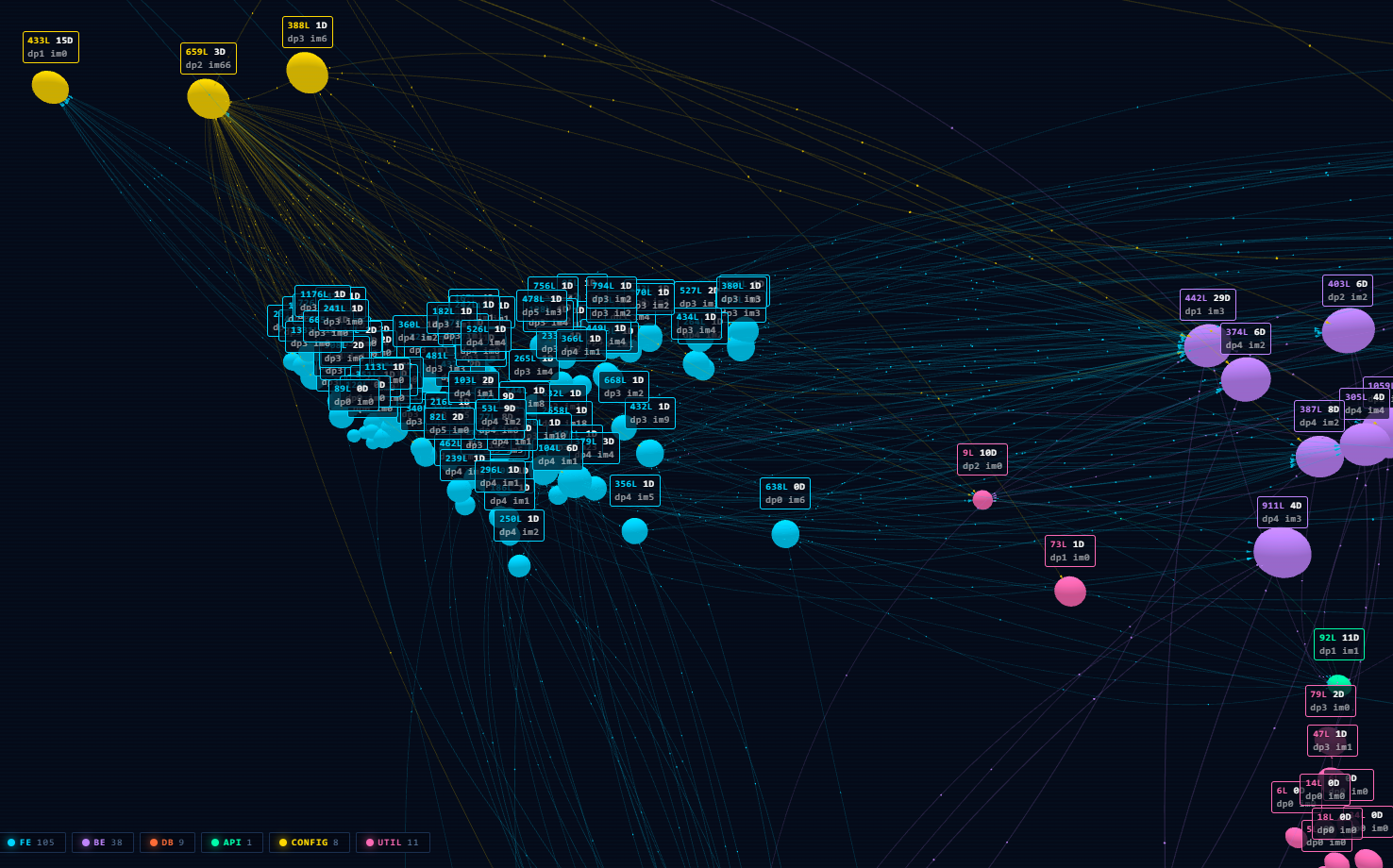
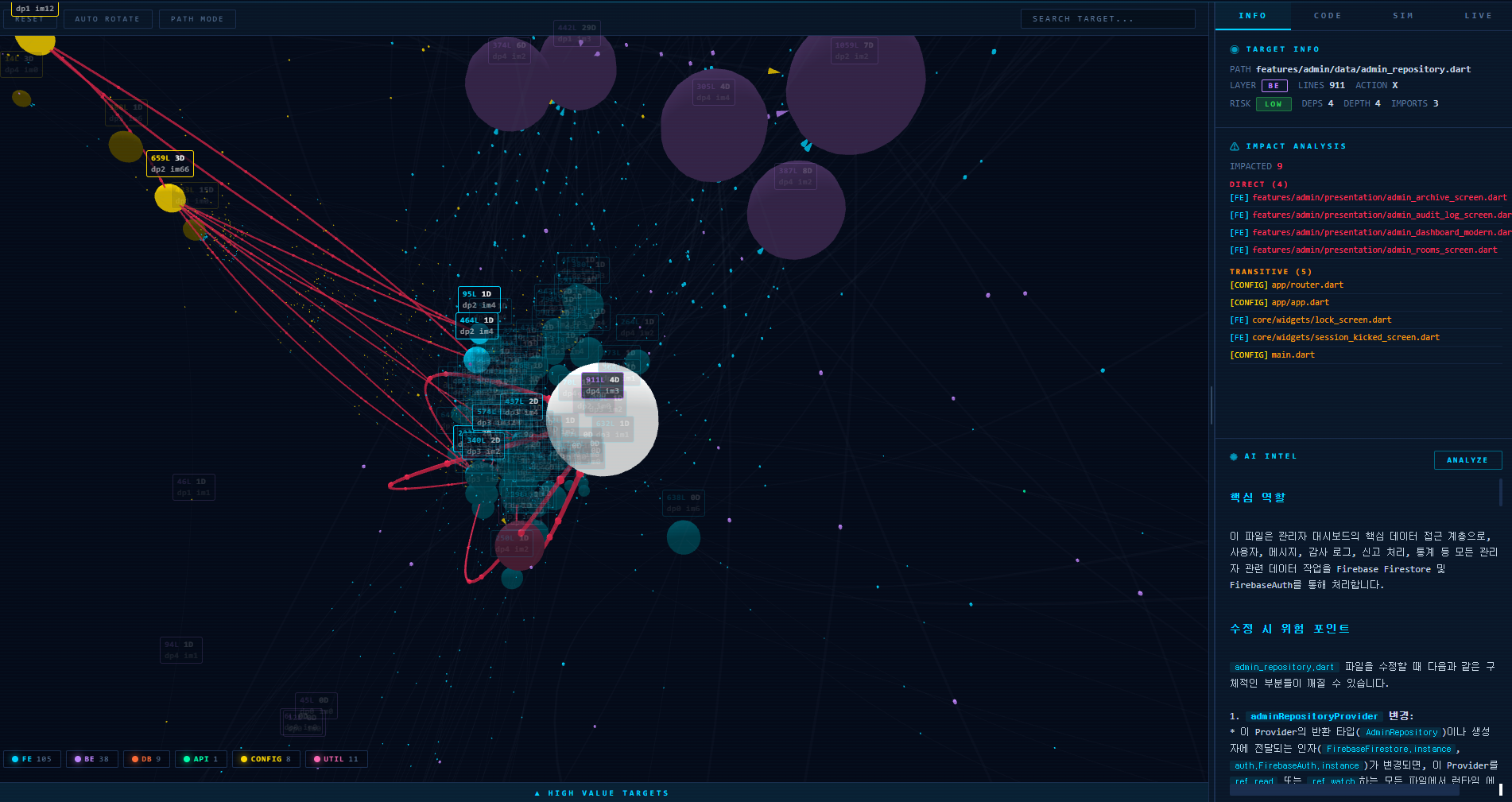
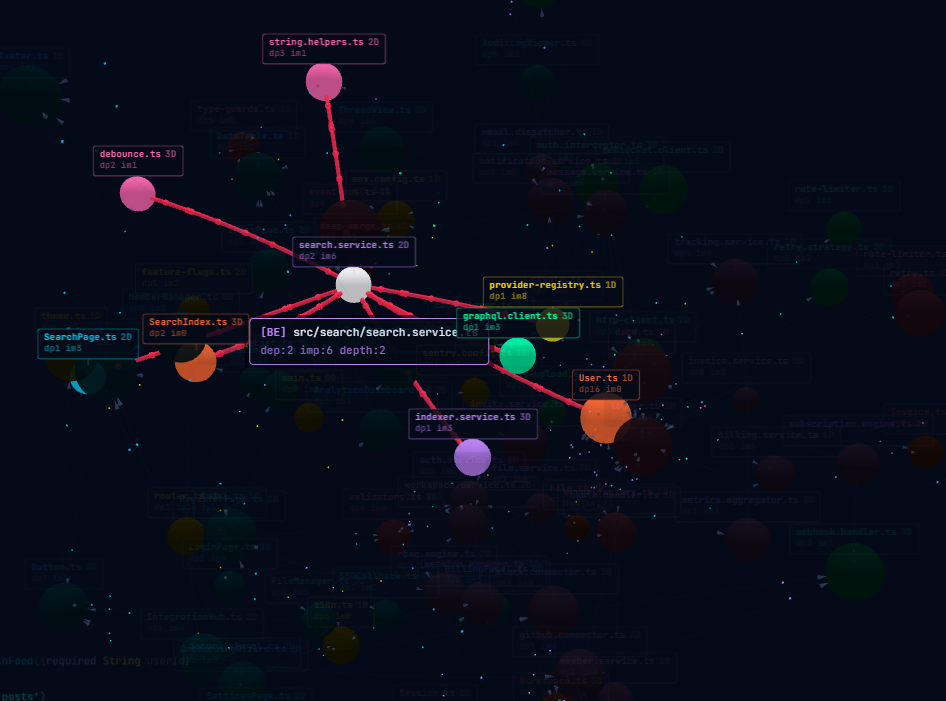
How It Works
- On startup, SYKE scans your source directory and builds a complete dependency graph using static import analysis.
- Your AI agent modifies files freely — no interruptions during normal work.
- Before build/deploy, the AI calls
gate_buildto check if all changes are safe. - If dependencies break, SYKE detects cascading failures and blocks the build with a
FAILverdict. - The dashboard shows a real-time visualization of your dependency graph with risk indicators.
SYKE is a safety net, not a gatekeeper. It doesn't block your AI while working — it catches what your AI missed before you ship.
Quick Start
1. Create config file
Create ~/.syke/config.json:
{
  "licenseKey": "SYKE-XXXX-XXXX-XXXX-XXXX",
  "geminiKey": "your-gemini-api-key"
}
Get your license key at syke.cloud/dashboard. You only need ONE AI key. Supported:
geminiKey,openaiKey,anthropicKey.
2. Register MCP server
Claude Code:
claude mcp add syke -- npx @syke1/mcp-server@latest
Cursor (.cursor/mcp.json):
{
  "mcpServers": {
    "syke": {
      "command": "npx",
      "args": ["@syke1/mcp-server@latest"]
    }
  }
}
Windsurf (~/.codeium/windsurf/mcp_config.json):
{
  "mcpServers": {
    "syke": {
      "command": "npx",
      "args": ["@syke1/mcp-server@latest"]
    }
  }
}
Windows note: If
npxis not found, use the full path:"command": "C:\\Program Files\\nodejs\\npx.cmd"
3. Add build gate to your project
Add this line to your project's CLAUDE.md (or equivalent AI instruction file):
After completing code changes, always run the gate_build MCP tool before committing or deploying.
This ensures your AI agent automatically runs SYKE's safety check after every task — no manual prompting needed.
4. Restart your AI agent
SYKE auto-detects your project language and builds the dependency graph on startup. Open http://localhost:3333 to see your live dashboard.
Features
8 MCP Tools
| Tool | Tier | Description |
|---|---|---|
gate_build |
Free | Mandatory pre-build check. Returns PASS/WARN/FAIL verdict before any build or deploy. |
check_safe |
Free | Quick one-line safety verdict: HIGH/MEDIUM/LOW/NONE risk. |
get_dependencies |
Free | Lists internal imports (forward dependencies) of a file. |
analyze_impact |
Pro | Full impact analysis with SCC, risk scoring, and git coupling. |
get_hub_files |
Pro | Ranks files by PageRank importance score. |
refresh_graph |
Pro | Re-scans all source files and rebuilds the dependency graph. |
ai_analyze |
Pro | AI semantic analysis (Gemini/OpenAI/Claude) of a file and its dependents. |
check_warnings |
Pro | Real-time monitoring alerts for file changes that may break dependents. |
Multi-AI Provider Support
SYKE supports three AI providers for semantic analysis. Bring your own key:
| Provider | Model | Config Key | Env Variable |
|---|---|---|---|
| Google Gemini | gemini-2.5-flash |
geminiKey |
GEMINI_KEY |
| OpenAI | gpt-4o-mini |
openaiKey |
OPENAI_KEY |
| Anthropic | claude-sonnet-4-20250514 |
anthropicKey |
ANTHROPIC_KEY |
Auto-selection: SYKE uses the first available key (Gemini > OpenAI > Anthropic).
Force provider: Set aiProvider in config (or SYKE_AI_PROVIDER env var) to override.
Advanced Graph Algorithms
SYKE goes beyond simple dependency counting. Five production-grade algorithms work together to deliver precise, fast, and context-rich impact analysis — all running locally with zero AI token cost.
1. SCC Condensation + Topological Sort
Circular dependencies are the #1 source of misleading impact analysis. SYKE uses Tarjan's algorithm to detect all Strongly Connected Components, condenses them into a clean DAG, then runs topological sort to compute correct cascade levels.
Before: "47 files affected" (inflated by cycles)
After:  "3 files in circular cluster (Level 0) → 5 files (Level 1) → 4 files (Level 2)"
- O(V+E) computation — runs in single-digit milliseconds
- Every SCC with size > 1 is flagged as a circular dependency cluster
- Cascade levels are accurate even in heavily cyclic codebases
2. Composite Risk Scoring
Five signals combined into a single 0–1 risk score:
| Signal | Weight | What it measures |
|---|---|---|
| Fan-in | 30% | How many files depend on this one |
| Stability Index | 20% | I = Ce/(Ca+Ce) — lower = foundation file = riskier to change |
| Cyclomatic Complexity | 20% | Internal branching complexity (regex-based, 8 languages) |
| Cascade Depth | 15% | How many layers deep the impact propagates |
| PageRank | 15% | Recursive importance in the dependency graph |
auth_service.ts → Risk: 0.82 (CRITICAL)
  Fan-in: 24, Stability: 0.12, Complexity: 47, Cascade: 4 levels, PageRank: 99th

string_utils.ts → Risk: 0.31 (LOW)
  Fan-in: 18, Stability: 0.85, Complexity: 3, Cascade: 1 level, PageRank: 42nd
AI agents can now make threshold decisions: proceed if < 0.3, warn if 0.3–0.7, block if > 0.7.
3. Historical Change Coupling
Static imports miss hidden dependencies — files that always change together but have no import relationship. SYKE mines your git history (last 500 commits) to find these logical couplings.
auth_service.ts changed →
  [Dependency Graph] auth_provider.ts, login_screen.ts
  [Git Coupling — Hidden Dependencies]
    config/auth_config.json (85% confidence, 12 co-changes)
    styles/auth.css (72% confidence, 8 co-changes)
- Catches 15–30% of impacted files that static analysis misses entirely
- Filters mega-commits (>20 files) to avoid noise
- 5-minute cache with auto-refresh
4. PageRank for File Importance
Simple fan-in counts treat all dependents equally. PageRank computes recursive importance — a file imported by many important files ranks higher than one imported by many leaf files.
Before: utils.ts ranked #1 (25 dependents — but all are leaf components)
After:  auth.ts ranked #1 (20 dependents — 15 of which are core modules)
- Standard Power Iteration with damping factor 0.85
- Precomputed at startup, incrementally updated on file changes
- Every file gets a rank position and percentile (e.g., "rank #3 of 245, 99th percentile")
5. Incremental Graph Updates + Memoized Queries
For large codebases (10K+ files), full graph rebuilds are too slow. SYKE now updates only the changed file's edges and invalidates only the affected cache entries.
Before: 1 file changed → re-parse all 500 files → 2+ seconds
After:  1 file changed → re-parse 1 file → edge diff → 50ms
        Same file queried again → cache hit → O(1) instant
- Reverse index enables O(affected) cache invalidation instead of O(cache_size)
- SCC and PageRank recompute after edge changes (still < 100ms for 10K files)
- 500-entry LRU cache with hit/miss diagnostics
Language Support
Auto-detected, zero-config: Dart/Flutter, TypeScript/JavaScript, Python, Go, Rust, Java, C++, Ruby.
Web Dashboard
Live dependency graph visualization at localhost:3333 with:
- Interactive 3D node graph (click any file to see its connections)
- Real-time cascade monitoring
- Risk level indicators
- Server offline detection with auto-reconnect
Configuration
SYKE reads from ~/.syke/config.json (primary) with environment variable overrides:
| Config Key | Env Variable | Description | Required |
|---|---|---|---|
licenseKey |
SYKE_LICENSE_KEY |
Pro license key from dashboard | No (Free tier works without) |
geminiKey |
GEMINI_KEY |
Google Gemini API key for ai_analyze |
No (any one AI key) |
openaiKey |
OPENAI_KEY |
OpenAI API key for ai_analyze |
No (any one AI key) |
anthropicKey |
ANTHROPIC_KEY |
Anthropic API key for ai_analyze |
No (any one AI key) |
aiProvider |
SYKE_AI_PROVIDER |
Force AI provider: gemini, openai, or anthropic |
No (auto-selects) |
port |
SYKE_WEB_PORT |
Dashboard port (default: 3333) | No |
Full config example (~/.syke/config.json):
{
  "licenseKey": "SYKE-XXXX-XXXX-XXXX-XXXX",
  "geminiKey": "AIza...",
  "openaiKey": "",
  "anthropicKey": "",
  "port": 3333
}
Recommended Workflow
You (developer)          AI Agent            SYKE
     |                      |                  |
     |-- "Add feature X" -->|                  |
     |                      |-- modifies files |
     |                      |-- modifies files |
     |                      |-- modifies files |
     |                      |                  |
     |                      |-- gate_build --->|
     |                      |                  |-- scans graph
     |                      |                  |-- checks impact
     |                      |<-- PASS/FAIL ----|
     |                      |                  |
     |<-- "Done. Safe to    |                  |
     |    build." ----------|                  |
Founding 100 — Free Pro for Early Adopters
We're giving the first 100 developers full Pro access for 30 days — no credit card, no strings.
What you get:
- All 8 MCP tools with advanced algorithms (SCC, PageRank, Risk Scoring, Git Coupling)
- Unlimited files, multi-project support
- Real-time cascade monitoring + web dashboard
- AI semantic analysis (BYOK — Gemini, OpenAI, or Claude)
How to claim:
- Sign up at syke.cloud
- Star this repo
- Click "I Starred" in your dashboard → 30 days Pro unlocked
Spots are limited. Once they're gone, they're gone.
Source CodeThis repository contains the Free tier source code — the core dependency graph engine, language plugins, and 3 free MCP tools (gate_build, check_safe, get_dependencies).Pro and Cortex features (advanced algorithms, AI analysis, real-time monitoring, web dashboard) are included in the npm package as compiled code.
License
You can use, modify, and distribute SYKE freely, with two limitations:
- No managed service — You cannot offer SYKE as a hosted/managed service to third parties.
- No license key circumvention — You cannot remove, disable, or bypass the license key functionality.
Recommended Servers

playwright-mcp
A Model Context Protocol server that enables LLMs to interact with web pages through structured accessibility snapshots without requiring vision models or screenshots.

Magic Component Platform (MCP)
An AI-powered tool that generates modern UI components from natural language descriptions, integrating with popular IDEs to streamline UI development workflow.

Audiense Insights MCP Server
Enables interaction with Audiense Insights accounts via the Model Context Protocol, facilitating the extraction and analysis of marketing insights and audience data including demographics, behavior, and influencer engagement.

VeyraX MCP
Single MCP tool to connect all your favorite tools: Gmail, Calendar and 40 more.

graphlit-mcp-server
The Model Context Protocol (MCP) Server enables integration between MCP clients and the Graphlit service. Ingest anything from Slack to Gmail to podcast feeds, in addition to web crawling, into a Graphlit project - and then retrieve relevant contents from the MCP client.

Kagi MCP Server
An MCP server that integrates Kagi search capabilities with Claude AI, enabling Claude to perform real-time web searches when answering questions that require up-to-date information.

E2B
Using MCP to run code via e2b.

Neon Database
MCP server for interacting with Neon Management API and databases

Exa Search
A Model Context Protocol (MCP) server lets AI assistants like Claude use the Exa AI Search API for web searches. This setup allows AI models to get real-time web information in a safe and controlled way.

Qdrant Server
This repository is an example of how to create a MCP server for Qdrant, a vector search engine.