
resume-markdown-mcp
Write your resume in Markdown and export to PDF with AI assistance, using a built-in stylesheet and tools for conversion.
README
resume-markdown-mcp
Write your resume in Markdown, export to PDF — powered by AI via MCP.
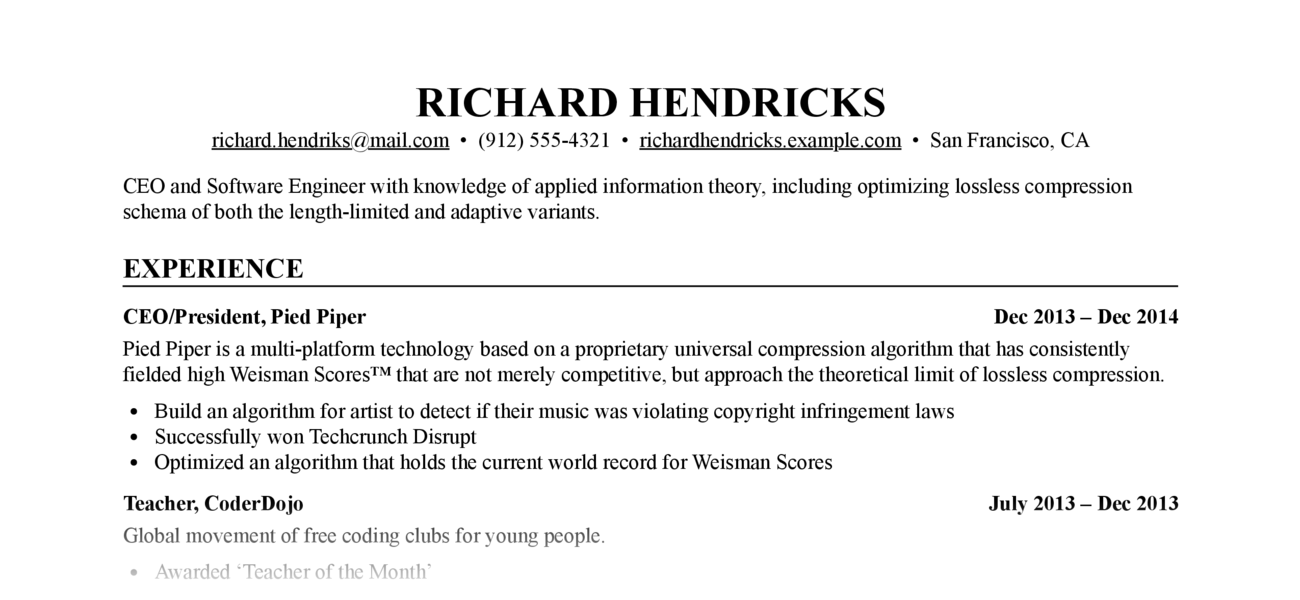
Let Claude write, edit, and format your resume. The MCP server handles Markdown-to-PDF conversion with a built-in stylesheet — no CSS knowledge required.
Requirements: Python ≥ 3.12, Google Chrome or Chromium (for PDF export)
Installation
As an MCP server (recommended)
Add to Claude Code with one command:
claude mcp add resume-markdown -- uvx resume-markdown-mcp@latest
For Claude Desktop, add to claude_desktop_config.json:
{
  "mcpServers": {
    "resume-markdown": {
      "command": "uvx",
      "args": ["resume-markdown-mcp@latest"]
    }
  }
}
As a CLI tool
# Install globally with uv
uv tool install resume-markdown-mcp

# Or with pip
pip install resume-markdown-mcp
MCP Tools & Resources
| Type | Name | Description |
|---|---|---|
| Tool | export_resume_pdf |
Convert a Markdown resume to PDF. Accepts a file path or raw Markdown text. CSS is applied automatically. |
| Resource | resume://template |
The built-in Markdown resume template. AI reads this to understand the required format. |
| Resource | resume://style |
The built-in CSS stylesheet. AI reads this when you want to customise the appearance. |
Example Prompts
- "Help me write a resume for a software engineer role and export it as a PDF to my Desktop"
- "Here's my resume at ~/resume.md — export it to PDF"
- "My resume.md doesn't follow the right format, fix it and export to /tmp/resume.pdf"
- "Make the font size smaller, save the custom CSS to ~/resume.css, and re-export"
Resume Markdown Format
The PDF renderer depends on these Markdown conventions:
# Full Name

- email@example.com
- Phone number
- City, Country

One-line summary (optional)

## Experience

### <span>Job Title, Company</span> <span>2022 – 2025</span>

- Achievement one
- Achievement two

## Education

### <span>Degree, University</span> <span>2018 – 2022</span>

## Skills

- Skill category: item, item, item
The <span> tags inside ### headings are required — they enable the left/right flexbox layout for title and date. AI handles this automatically when writing from scratch; if your existing file lacks them, ask Claude to reformat it before exporting.
CLI Usage
# Create template files (resume.md + resume.css) in the current directory
resume-markdown-mcp init

# Build HTML and PDF from resume.md
resume-markdown-mcp build

# Options
resume-markdown-mcp build --no-pdf          # HTML only
resume-markdown-mcp build --no-html         # PDF only
resume-markdown-mcp build myresume.md       # Custom input file
resume-markdown-mcp build --chrome-path=... # Specify Chrome path
If a resume.css file exists alongside the input file, it is used automatically; otherwise the built-in stylesheet is applied.
You can also run without installing via uvx:
uvx resume-markdown-mcp@latest init
uvx resume-markdown-mcp@latest build resume.md
Customising the Style
For iterative CSS editing, ask Claude to save the stylesheet to a local file:
"Increase the font size and save the custom CSS to ~/resume.css, then export"
Future exports can reference the same file without re-sending the CSS:
"Re-export my resume using ~/resume.css"
You can also edit ~/resume.css directly in any text editor between exports.
How It Works
- AI calls
export_resume_pdfwith Markdown content or a file path - The server converts Markdown to HTML using python-markdown, with the built-in CSS inlined
- Headless Chrome renders the HTML and prints it to PDF
- Chrome exits as soon as the PDF is written; the tool returns the output path
License
MIT
Recommended Servers

playwright-mcp
A Model Context Protocol server that enables LLMs to interact with web pages through structured accessibility snapshots without requiring vision models or screenshots.

Audiense Insights MCP Server
Enables interaction with Audiense Insights accounts via the Model Context Protocol, facilitating the extraction and analysis of marketing insights and audience data including demographics, behavior, and influencer engagement.

Magic Component Platform (MCP)
An AI-powered tool that generates modern UI components from natural language descriptions, integrating with popular IDEs to streamline UI development workflow.

VeyraX MCP
Single MCP tool to connect all your favorite tools: Gmail, Calendar and 40 more.

graphlit-mcp-server
The Model Context Protocol (MCP) Server enables integration between MCP clients and the Graphlit service. Ingest anything from Slack to Gmail to podcast feeds, in addition to web crawling, into a Graphlit project - and then retrieve relevant contents from the MCP client.

Kagi MCP Server
An MCP server that integrates Kagi search capabilities with Claude AI, enabling Claude to perform real-time web searches when answering questions that require up-to-date information.

E2B
Using MCP to run code via e2b.

Neon Database
MCP server for interacting with Neon Management API and databases

Exa Search
A Model Context Protocol (MCP) server lets AI assistants like Claude use the Exa AI Search API for web searches. This setup allows AI models to get real-time web information in a safe and controlled way.

Qdrant Server
This repository is an example of how to create a MCP server for Qdrant, a vector search engine.