
remem-mcp
Local memory MCP server that survives context compaction, learns from errors, injects fixes before the next attempt, and syncs to your git repo so your whole team shares it.
README
remem-mcp


Your coding agent stops repeating the same mistakes.
Local memory that survives context compaction — learns from every error, injects fixes before the next attempt, and syncs to your git repo so your whole team shares it.
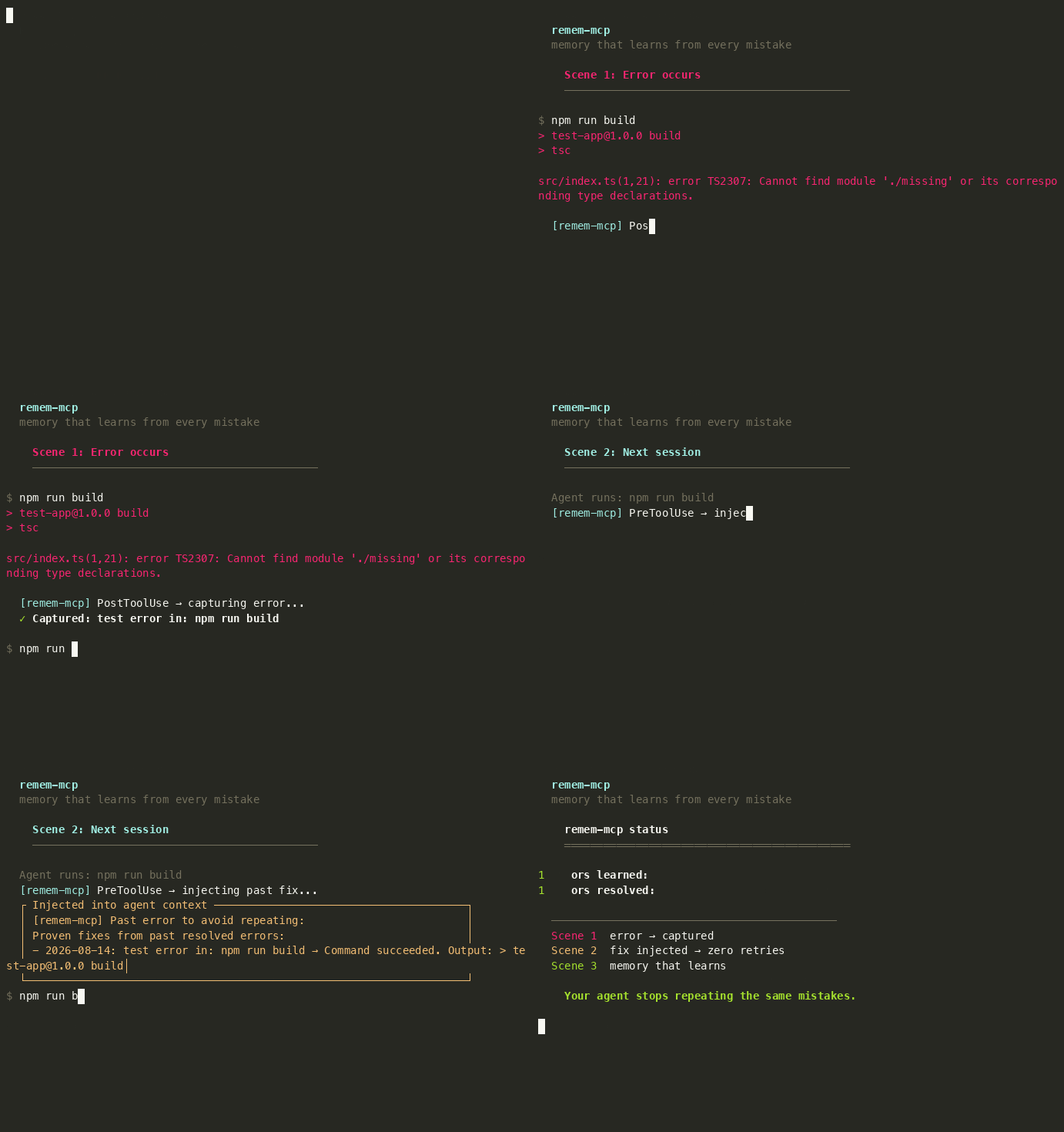
<video src="https://raw.githubusercontent.com/tinhien11/remem-mcp/main/docs/screenshots/demo-learning-loop.mp4" controls muted width="100%"></video>
Install
npx remem-mcp setup
That's it. Auto-detects Claude Code, Cursor, Devin, Codex. Registers MCP server + hooks. Restart your agent.
npx remem-mcp demo     # Live demo: real build, real errors, real hooks
npx remem-mcp demo-codegraph  # Live CodeGraph demo on facebook/react
npx remem-mcp status   # One dashboard: everything at a glance
The demo creates a real TypeScript project, runs real npm run build, captures real TS2307 errors, and shows the full learning loop — capture → inject → fix → upvote → cross-project inheritance. No hardcoded strings.
Why it's different
| remem-mcp | Mem0 | Claude MEMORY.md | Mneme | |
|---|---|---|---|---|
| Survives compaction | Yes — PreCompact hook saves checkpoint, re-injects after | Yes — cloud store | No — 200-line cap, silent truncation | Yes — PreCompact hook |
| Learns from errors | Yes — auto-captures, injects fixes | No | No | No |
| Semantic search | Hybrid BM25 + sqlite-vec | Vector only | No — LLM filename picker, max 5 files | Vector + graph |
| Setup | 1 command | API key + cloud | Built-in | Build from source (Rust) |
| Data location | Local SQLite | Cloud | Local markdown | Local SQLite |
| Team sharing | Git-native (commit, diff, merge) | Cloud sync | Copy-paste | Manual |
| API key | No | Yes | No | No |
| Cost | Free | $19–249/mo | Free | Free |
Per-agent install
<details> <summary>Claude Code</summary>
claude mcp add remem-mcp --scope user -- npx -y remem-mcp
npx remem-mcp install-hooks
</details>
<details> <summary>Cursor</summary>

Or add to ~/.cursor/mcp.json:
{
  "mcpServers": {
    "remem-mcp": { "command": "npx", "args": ["-y", "remem-mcp"] }
  }
}
</details>
<details> <summary>Devin CLI</summary>
devin mcp add remem-mcp --scope user -- npx -y remem-mcp
npx remem-mcp install-hooks
</details>
<details> <summary>Codex CLI</summary>
Add to ~/.codex/config.toml:
[mcp_servers.remem-mcp]
command = "npx"
args = ["-y", "remem-mcp"]

[mcp_servers.remem-mcp.env]
TDAI_GLOBAL_SESSION_KEY = "global"
Then run npx remem-mcp install-hooks.
MCP tools require
sandbox_mode = "danger-full-access". </details>
How it works
Memory lives in a local SQLite database — outside the agent's context window. When the agent compacts or starts a new session, memory is re-injected automatically. No more re-explaining what you already told it yesterday.
PreCompact hook: when the agent is about to compact context, remem-mcp saves a checkpoint (decisions made, approaches tried, what's verified working) to the DB. After compaction, the agent recalls it — so the compact doesn't destroy your session's learnings.
Two layers: automatic (runs via hooks, zero tool calls) and on-demand (you call when you need deeper context).
Automatic — three learning loops + compaction survival
All run via lifecycle hooks. The agent doesn't need to call any tool.
-
Error learning — command fails → capture → inject fix before next attempt → succeed → upvote.
-
Decision learning —
npm install,git commit, config → auto-capture → inject past decisions before similar commands. -
Pattern learning — Write/Edit → auto-capture code patterns → inject same-language patterns before editing.
-
Compaction survival — PreCompact hook fires before context compaction → saves checkpoint → agent recalls after compact. Memory survives.
On-demand — CodeGraph, Wiki, Search
When the automatic loops aren't enough, use these for deeper code navigation.
# 1. Index your codebase (one-time, rerun after major changes)
npx remem-mcp index --path src --repo .

# 2. Search symbols (auto-scoped to current directory)
npx remem-mcp search-code --query "parseTar"
# → parseTar  at  src/parse.ts:22

# 3. List symbols in a file
npx remem-mcp list-code src/reporters/fancy.ts
# → Class    L49-135  FancyReporter
# → Method   L86-134  formatLogObj

# 4. Trace callers / callees / impact (use symbol ID from step 2)
npx remem-mcp callers 01KZXPPHF93TS4HV8FWCSSK36A
npx remem-mcp impact  01KZXPPHF93TS4HV8FWCSSK36A

# Wiki + viewer
npx remem-mcp wiki ingest --path docs      # Index markdown docs + ADRs
npx remem-mcp wiki outdated                 # Find outdated wiki pages
npx remem-mcp viewer                        # Web UI at localhost:7331
- CodeGraph — symbol search, callers/callees, impact analysis. Auto-scoped to your project — no cross-project contamination.
- Wiki — markdown docs, ADRs, outdated detection.
- Search — hybrid BM25 + sqlite-vec vector search with RRF fusion.
explain_recallshows scores.

Daily commands
npx remem-mcp status           # Everything at a glance
npx remem-mcp viewer           # Web UI at localhost:7331
npx remem-mcp errors           # Error dashboard
npx remem-mcp decisions        # Decision dashboard
npx remem-mcp patterns         # Pattern dashboard
npx remem-mcp recent [N]       # Recent captures
npx remem-mcp help all         # Full list of 40+ subcommands
Configuration
All settings have defaults. Config file is optional: ~/.config/remem-mcp/config.json.
| Setting | Env var | Default |
|---|---|---|
| DB path | TDAI_DB_PATH |
~/.local/share/remem-mcp/memory.db |
| Cross-project memory | TDAI_GLOBAL_SESSION_KEY |
(unset) |
| Cross-project errors | TDAI_GLOBAL_ERRORS |
(unset, set to 1) |
| Suppress hook feedback | TDAI_QUIET |
(unset, set to 1) |
| Retro window (days) | TDAI_RETRO_DAYS |
7 |
| Core-only mode (disable advanced tools) | TDAI_CORE_ONLY |
(unset, set to 1) |
| LLM API key (pipeline) | TDAI_LLM_API_KEY |
(unset) |
Team sharing — npx remem-mcp sync-export writes .remem-mcp/memory-export.jsonl. Commit it to git. Team members get the same memory on git pull (auto-imports on startup).
TypeScript SDK
import { Memory } from "remem-mcp";

const memory = new Memory();
await memory.capture("We chose SQLite for storage.", "decision", ["arch"]);
const results = await memory.recall("storage decision");
Benchmark
remem-mcp is evaluated against the same benchmarks as TencentDB Agent Memory, plus the Agent Memory Benchmark (AMB) suite.
| Benchmark | remem-mcp | TencentDB Agent Memory | Without memory |
|---|---|---|---|
| AMB Layer 1 (basic recall) | 100 | — | — |
| AMB Layer 2 (multi-session) | 100 | — | — |
| AMB Layer 3 (scale + distractors) | 100 | — | — |
| LoCoMo (long conversation QA) | 85 | — | — |
| PersonaMem (personalization) | 80 | 76 | 48 |
| LongMemEval (long-term memory, ICLR 2025) | 92 | — | — |
- PersonaMem — bowen-upenn/PersonaMem (588 questions, 20 personas, multiple-choice QA). TencentDB reports 76% with memory enabled, 48% without. remem-mcp scores 80% using a search-recall proxy (no LLM API key needed).
- LoCoMo — long conversation multi-hop QA (19 sessions, 400+ turns). remem-mcp scores 85% with keyword-heuristic scoring.
- AMB — Agent Memory Benchmark (L1: 56 recall tests, L2: 5 multi-session scenarios, L3: 1K+ memories with distractors). remem-mcp scores 100/100/100.
- LongMemEval — xiaowu0162/LongMemEval (ICLR 2025, 500 questions, 5 memory abilities: temporal reasoning, multi-session, knowledge update, single-session recall, abstention). remem-mcp scores 92% on the oracle variant.
Run the benchmarks:
bash scripts/bench-all.sh           # Full: AMB + LoCoMo + PersonaMem (~5 min)
bash scripts/bench-all.sh --quick   # AMB only (~2 min)
Credits
Core based on TencentDB Agent Memory (MIT, Tencent 2026). Replaces the cloud backend with embedded SQLite + sqlite-vec + FTS5. Adds error/decision/pattern learning loops and lifecycle hooks.
License
MIT. See LICENSE.
Recommended Servers

playwright-mcp
A Model Context Protocol server that enables LLMs to interact with web pages through structured accessibility snapshots without requiring vision models or screenshots.

Magic Component Platform (MCP)
An AI-powered tool that generates modern UI components from natural language descriptions, integrating with popular IDEs to streamline UI development workflow.

Audiense Insights MCP Server
Enables interaction with Audiense Insights accounts via the Model Context Protocol, facilitating the extraction and analysis of marketing insights and audience data including demographics, behavior, and influencer engagement.

VeyraX MCP
Single MCP tool to connect all your favorite tools: Gmail, Calendar and 40 more.

graphlit-mcp-server
The Model Context Protocol (MCP) Server enables integration between MCP clients and the Graphlit service. Ingest anything from Slack to Gmail to podcast feeds, in addition to web crawling, into a Graphlit project - and then retrieve relevant contents from the MCP client.

Kagi MCP Server
An MCP server that integrates Kagi search capabilities with Claude AI, enabling Claude to perform real-time web searches when answering questions that require up-to-date information.

Neon Database
MCP server for interacting with Neon Management API and databases

E2B
Using MCP to run code via e2b.

Exa Search
A Model Context Protocol (MCP) server lets AI assistants like Claude use the Exa AI Search API for web searches. This setup allows AI models to get real-time web information in a safe and controlled way.

Qdrant Server
This repository is an example of how to create a MCP server for Qdrant, a vector search engine.