
PseudoLife-MCP
Enables persistent long-term memory for Claude Code across sessions, with tools for storing, searching, and managing facts, knowledge graphs, and procedural lessons.
README
Pseudolife-MCP
<!-- mcp-name: io.github.Pseudogiant-xr/pseudolife-mcp -->




Persistent long-term memory for Claude Code via the Model Context Protocol.
An MCP server that gives Claude (or any MCP-capable client) a long-term
memory that persists across sessions — surviving context compactions and
/clear resets. Claude is the LLM; this server is its memory on disk.
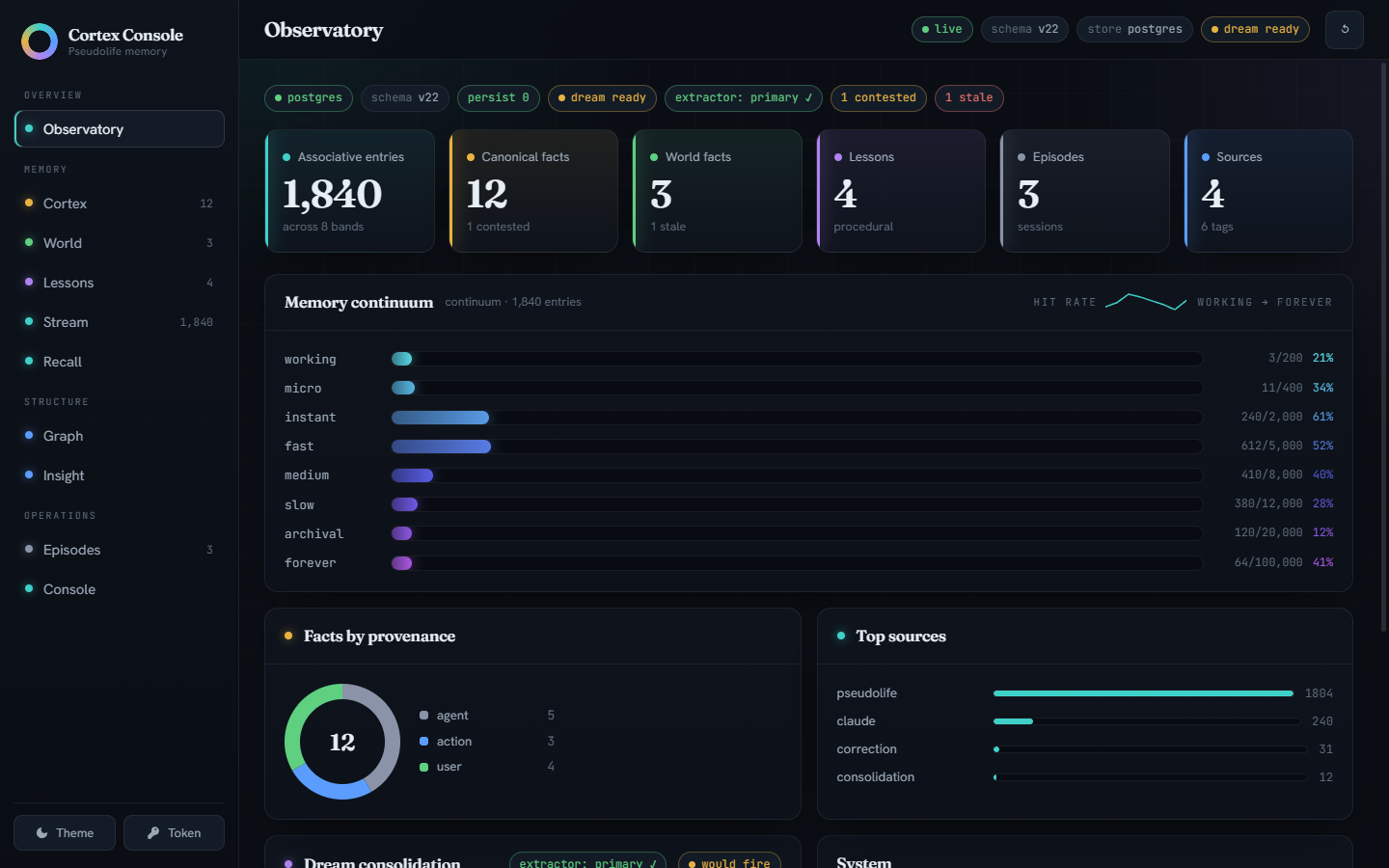
What you get:
- Associative memory that ages like memory should — an 8-band recency
continuum from
workingtoforever, ranked by cosine similarity, with contradiction detection and supersession. - Canonical facts, not vibes — one current value per
entity.attributeslot; corrections supersede rather than silently overwrite, and the full version history survives. - Dreams — a bundled extractor (or Claude Sonnet via your Max plan) consolidates the memory stream into facts and a knowledge graph while you're not looking.
- Lessons from its own work — successes, dead-ends, and your corrections become do/avoid guidance surfaced at the start of every session.
- A web console to watch it think — the Cortex Console above, plus cited world facts, session episodes, and document RAG.
Quickstart
Requires Docker and Claude Code. One command from clone to first memory:
git clone https://github.com/Pseudogiant-xr/Pseudolife-MCP.git
cd Pseudolife-MCP
ops/install.sh          # Linux / macOS
ops\install.ps1         # Windows (pwsh 7+)
The installer runs the preflight (one exact fix line per missing prerequisite), asks which dream extractor should consolidate memories —
- sonnet-only — the lightest install: Claude Sonnet via a CLI shim
(needs a logged-in Max-plan
claudeCLI); the sidecar image is never built or pulled (~9 GB lighter; dreams pause while the shim is down); - sonnet-fallback — Sonnet primary, the bundled sidecar as automatic fallback (Max-plan CLI plus the ~9 GB image);
- sidecar — the bundled local CPU model; no Claude plan needed, works for everyone (~9 GB image) —
then brings the stack up, installs the session hooks, offers to append the
memory-loop block to ~/.claude/CLAUDE.md (required for the loop to actually
fire), runs claude mcp add, and health-checks the daemon. Idempotent —
re-run any time; --extractor <mode> switches extractor setups, and
ops/install.sh --extractor sonnet-only --claude-md append runs
non-interactively. Linux (Docker Engine): your user must be in the docker
group — sudo usermod -aG docker $USER, then log out/in (the preflight
checks this).
<details> <summary>Manual install (the steps the installer automates)</summary>
ops/preflight.sh    # or ops\preflight.ps1 — checks docker/git/claude, prints the exact fix for anything missing
docker volume create pseudolife-mcp-bank
docker volume create pseudolife-mcp-state
docker compose -f ops/docker-compose.yml up -d --build   # first build, once

# Verify, then wire into Claude Code:
curl http://127.0.0.1:8765/health
claude mcp add --transport http --scope user pseudolife-memory http://127.0.0.1:8765/mcp

# Teach Claude the memory loop — REQUIRED, not optional: without a standing
# instruction the tools sit unused. Append the bundled block to your global
# CLAUDE.md (applies to every project):
cat examples/CLAUDE.memory.md >> ~/.claude/CLAUDE.md
# (PowerShell: Add-Content "$env:USERPROFILE\.claude\CLAUDE.md" (Get-Content examples\CLAUDE.memory.md -Raw))
Optional knobs live in ops/.env (cp ops/.env.example ops/.env — the
install/update scripts scaffold it too; every value is commented, a missing
file runs entirely on defaults).
</details>
Then in any Claude Code session: "remember that my staging box is
haze-02" → Claude calls memory_store; next session, "which box is
staging?" → memory_search finds it. Browse everything at the Cortex
Console: http://127.0.0.1:8765/ui/.
What this is
A memory engine exposed over MCP. There's no chat UI and no LLM doing the thinking — Claude is the intelligence; these are tools it calls to store and recall what matters. (Models are bundled as plumbing: baked embedding weights for retrieval, and the optional CPU extractor sidecar that consolidates memories into facts while you sleep.)
It layers several complementary stores: the associative continuum (an
8-tier recency-tiered embedding store, working → forever, ranked by cosine
similarity with novelty-gated storage, contradiction detection, and
supersession); the cortex (slot-keyed canonical facts — one current
value per entity.attribute — with provenance tiers and contender parking
instead of silent overwrites); a typed knowledge graph over those facts
with a closed relation vocabulary and on-read inference; the world
cortex (durable cited facts about external reality, age-decayed trust);
procedural lessons learned from the agent's own work; and a ChromaDB
reference bank for document RAG. The canonical layers in depth:
the memory model; the graph and multi-hop
recall: retrieval.
State lives in Postgres (the durable source of truth) behind a single long-lived daemon; every session attaches over HTTP (or, for host-process installs, a thin stdio shim). The result: Claude can pick up where it left off, correct itself when facts change, and reason over relationships — without you re-explaining context each session.
Documentation
This README is the front door — install, wiring, and the basic loop. The deep material lives in the user guide:
| Page | What's in it |
|---|---|
| Configuration | Env vars, tuned defaults, toolset tiers, stdio shim, LAN sharing, data layout, backups, schema history |
| Retrieval | Reranker, BM25 hybrid, abstention floors, ranking-trace debugging, memory_recall, the knowledge graph |
| Dreaming | Extractor tiers, the bundled sidecar, upgrading the extractor, Sonnet-fallback, cadence, deep dream, consolidation |
| Episodes & sessions | Daemon-owned session episodes, the briefing hook, nested sub-episodes, tags |
| The memory model | Cortex slots, provenance contenders, world cortex, lessons, temporal/HLC stamps |
| Benchmarks | LongMemEval results; why extraction quality dominates |
Plus evals/README.md (full benchmark methodology) and
CONTRIBUTING.
Tools exposed
The surface was consolidated 2026-07-02 (55 → 32 tools; now 33 with
memory_toolset): lifecycle families became verb-dispatched tools
(memory_dream, memory_forget, memory_graph_review), and
dump/introspection views moved to the Cortex Console (REST) — the manifest
is agent context every session, so it stays lean.
| Tool | Purpose |
|---|---|
memory_store(text, source?, tags?, origin?) |
Remember one durable fact / decision / observation (canonical facts reach the cortex via the dream pass or memory_fact_set) |
memory_search(query, top_k?, filters..., rerank?, bm25?, explain?, verbose?) |
Associative retrieval; canonical cortex facts surface ahead of recall hits; explain=True attaches a ranking trace |
memory_recent(n?, sources?, episodes?, tags?, verbose?) |
Newest stores, timestamp-ordered (debug + session catch-up) |
memory_supersede(old_text, new_text) |
Explicit correction — mark a memory obsolete, keep it as history |
memory_forget(scope, ...) |
Hard-delete from one store: memory (by text/substring/source/episode/tag), fact, world, or lesson (by entity/attribute) |
memory_stats() |
Per-band sizes, hit rates, totals |
memory_get(entry_id) / memory_reinforce(entry_id) |
Dereference a memory id to its full episode (+ consolidated_into); reinforce it after finding it useful |
memory_fact_get(entity, attribute) |
The one CURRENT canonical value at a slot (+ parked contenders); on an empty slot returns ranked candidates (same-entity, then similar slots) |
memory_fact_set(entity, attribute, value, origin?, confidence?) |
Assert a canonical fact deliberately (insert / confirm / supersede / contest) |
memory_fact_resolve(entity, attribute, accept) |
Settle a contested slot — adopt (true) or discard (false) the contender |
memory_history(entity, attribute?) |
With attribute: version timeline at a slot, with writer/temporal stamps. Without: the entity's causal chain — dated fact/entry/edge/lesson events ("what led to X") |
memory_world_set(entity, attribute, value, source_url?, ...) |
Assert a cited WORLD fact (external knowledge; age-decayed trust by freshness class) |
memory_world_search(query, top_k?, verbose?) |
Search world facts — each carries effective_confidence, a stale flag, and its citation |
memory_outcome(task, outcome, about?, detail?, polarity?) |
Record a procedural outcome signal (success/failure/correction); the dream distils signals into lessons |
memory_lesson_search(query, top_k?, verbose?) |
Recall learned lessons for the task at hand — heed polarity - dead-ends; re_verify flags lessons whose subject facts changed since |
memory_dream(action, limit?, cursor?, apply?, snippets?) |
Drive the dream: status / pull / commit / run (server-side extractor) / deep (full-corpus graph consolidation; dry-run unless apply, which snapshots the graph tables first; snippets=false omits candidate evidence; responses carry evidence-enriched merge_proposals for near-duplicate triage) |
memory_graph_review(action, proposal_id?, proposals?, scope?, src?, dst?) |
Work the review queue: list / propose / dismiss_pair / accept_link / reject_link / accept_merge / accept_junk / reject_entity (merge/entity decisions are audit-stamped decided_by=agent over MCP, human via Console) |
memory_session_title(title) |
Name THIS session's auto-opened episode (default titles are generic) |
memory_episode_start(title, hint?) / memory_episode_end() |
Open/close a nested sub-episode for a substantial task; entries stored while open carry its id |
memory_episode_summary(id) |
Stats + tag/source distribution + recent entries within an episode |
memory_consolidation_candidates(query?, episode?, ...) |
Cluster near-duplicate memories ripe for consolidation |
memory_consolidate(replaces, new_text, source?, tags?) |
Atomic supersede + store — replace a cluster with one canonical note |
memory_graph_relate(src, relation, dst, ...) |
Assert a typed edge (closed relation vocabulary; re-assertion bumps confidence) |
memory_graph_unrelate(src, relation, dst) |
Retract an edge (superseded, kept for audit) |
memory_alias(entity, alias) |
Bind an alternative name — lookups resolve aliases first |
memory_graph(entity, depth?, include_facts?, to?, relation_filter?) |
Entity neighborhood (≤3 hops) with derived transitive/inverse edges and per-edge EXTRACTED/INFERRED/AMBIGUOUS provenance tags; to returns the shortest path between two entities |
memory_recall(query, hops?, top_k?, verbose?) |
Multi-hop retrieval for relational questions; low_confidence: true → fall back to memory_search |
memory_relation_define(name, description, ...) |
Grow the closed relation vocabulary (deliberate, rare act) |
document_ingest(path, source?) |
Index a file (txt/md/pdf) in the reference bank |
document_search(query, top_k?) |
RAG search over the reference bank only |
memory_toolset(action) |
Check or change this session's visibility tier: status / expand / collapse |
Each tool returns plain JSON. See pseudolife_memory/mcp_server.py for
docstrings — those are what Claude reads to decide when to call which tool.
The five recall-path tools return compact entries by default (result
payloads are agent context on every retrieval); pass verbose=true for full
metadata. Full-table dumps and topology views live in the Cortex Console
(/api/*) and the pseudolife-mcp briefing CLI.
Toolset tiers. Three visibility tiers — minimal (7 tools), core
(20, the shipped default), full (33) — filtered per session at
tools/list; a session steps its own tier up or down with memory_toolset
before calling a hidden tool. Defaults, per-client mapping, and weak-model
deployments:
Configuration — toolset tiers.
Architecture
One memory daemon owns the bank and serves MCP over streamable HTTP
at /mcp; every Claude Code session (and any LAN agent) attaches to it.
Postgres 16 + pgvector (in Docker) is the durable source of truth —
the in-memory MIRAS bands are a write-through cache hydrated at startup
(a small weights.pt persists only band counters — there are no MLP weights).
The daemon runs either containerized (recommended — portable, no host Python) or as a host process. Claude Code attaches either directly over HTTP (recommended) or through a thin torch-free stdio shim:
Claude session A ─┐  HTTP (recommended)
Claude session B ─┼───────────────────► pseudolife-mcp daemon ─► Postgres (Docker)
LAN agent ────────┘  or stdio shim         (single writer)        pgvector
                     (per session)         host proc OR Docker
This kills two v0.1 hazards by construction: a single writer means
concurrent sessions can't clobber each other, and entries are transactional
so a crash can't wipe the bank. On top of the associative bands sit the
canonical layers — cortex, world facts, lessons, temporal/HLC stamps
(the memory model) — joined to a typed
knowledge graph walkable via memory_graph and multi-hop memory_recall
(retrieval & the graph).
Install — containerized (recommended, any OS)
The whole stack — Postgres and the memory daemon — runs in Docker.
No host Python, no torch install, no version skew; the daemon image bakes
in CPU-only torch and the all-MiniLM-L6-v2 weights, so it runs
identically on Windows / macOS / Linux. Requires only Docker; built once:
~3 GB daemon image + ~0.6 GB Postgres + ~9 GB extractor sidecar (skip the
sidecar entirely with the installer's sonnet-only mode).
git clone https://github.com/Pseudogiant-xr/Pseudolife-MCP.git
cd Pseudolife-MCP

# 1. One-time: create the two persistent volumes (bank + daemon state).
docker volume create pseudolife-mcp-bank
docker volume create pseudolife-mcp-state

# 2. Build + start all three services (Postgres, extractor, then the daemon).
docker compose -f ops/docker-compose.yml up -d --build
Upgrading from a pre-rename install (volumes
ops_pseudolife_pgdata/ops_pseudolife_data)? Don't rename those volumes — keep pointing at them by creatingops/.envwithPSEUDOLIFE_BANK_VOLUME=ops_pseudolife_pgdataandPSEUDOLIFE_STATE_VOLUME=ops_pseudolife_databeforeup. See the compose header.
Windows: Docker Desktop's WSL2 VM claims up to ~50% of host RAM by default; the stack needs ~6–7 GB under dream load with the default sidecar (~1 GB in
sonnet-onlymode) — cap the VM viaops/wslconfig.example(see Troubleshooting).
The daemon serves MCP at http://127.0.0.1:8765/mcp and restarts with
Docker — no logon task needed. First build downloads the model into the
image (once); every container start after that is offline and fast. Wire
Claude Code in over HTTP (below). Where the data actually lives, and
how to back it up:
Configuration — data layout.
Host-process install (Windows, for GPU / dev): run Postgres in Docker
but the daemon on host Python — for hacking on the daemon or running the
embedder on a local GPU. Steps, the pseudolife-mcp CLI modes, and the
logon autostart task:
Configuration — host-process install.
Updating
After a git pull (or local code change), redeploy the daemon only — safely,
without touching Postgres or the extractor:
.\ops\update.ps1 # Windows
./ops/update.sh # Linux / macOS
It backs up the bank (pg_dump + a state-volume tar), tags a rollback
image, rebuilds + recreates only the daemon, and waits for /health.
It never runs down -v. (Host-process install: just restart the daemon —
pip install -e . is editable.) Reclaim accumulated build cache now and
then with docker builder prune (safe — it only touches build layers);
never docker system prune --volumes, which deletes volumes.
Wire into Claude Code
Plugin (easiest). With the daemon running, two commands inside Claude
Code wire everything — the MCP server, the session-start briefing hook,
the memory-loop instructions, and the /dream + /memory-status commands:
/plugin marketplace add Pseudogiant-xr/Pseudolife-MCP
/plugin install pseudolife-memory@pseudolife-mcp
The plugin replaces the manual claude mcp add, the settings.json hook,
and the CLAUDE.md block below — the same standing instructions arrive as
session context from the daemon. Details, non-default ports/tokens, and
migration from manual wiring: plugin/README.md.
HTTP transport (manual equivalent). The daemon already serves MCP over HTTP, so point Claude Code straight at it — no shim, no host command, nothing OS-specific. One command:
claude mcp add --transport http --scope user pseudolife-memory http://127.0.0.1:8765/mcp
(--scope user registers it for every project; drop it to register for the
current project only.) Or write the equivalent JSON yourself — into
~/.claude.json under the top-level mcpServers key for user scope, or into
a .mcp.json at a project root for project scope:
{
  "mcpServers": {
    "pseudolife-memory": {
      "type": "http",
      "url": "http://127.0.0.1:8765/mcp"
    }
  }
}
If you ran the daemon with a PSEUDOLIFE_MCP_TOKEN, add a headers key:
"headers": { "Authorization": "Bearer <your-token>" }.
Verify: run claude mcp list (the server should report ✓ connected),
then ask Claude to "store a memory that this install works" and check it
appears in the Stream tab of the Console at http://127.0.0.1:8765/ui/.
Preferring stdio on a host-process install? A thin torch-free shim proxies stdio to the daemon: stdio shim · LAN sharing · backups & restore rehearsal.
Recommended agent setup (CLAUDE.md)
The server's value depends entirely on the agent using it well — this step
is what makes the memory loop actually fire; installs that skip it end up
with a healthy daemon whose tools are never called. Plugin users skip this
section: the plugin's SessionStart hook injects the same block every
session. Everyone else encodes the loop as a standing instruction: append the
bundled block to your global ~/.claude/CLAUDE.md (applies to every
project) or a per-project CLAUDE.md / AGENTS.md:
cat examples/CLAUDE.memory.md >> ~/.claude/CLAUDE.md
# PowerShell: Add-Content "$env:USERPROFILE\.claude\CLAUDE.md" (Get-Content examples\CLAUDE.memory.md -Raw)
The block (examples/CLAUDE.memory.md) teaches
the loop: RECALL at the start (memory_search / memory_lesson_search /
memory_fact_get / memory_world_search), CAPTURE as you go
(memory_store with an honest origin, memory_fact_set for canonical
facts, memory_world_set for cited external facts, source="status" for
verbose logs so they stay out of the dream), REFLECT at the end
(memory_outcome — the dream distils these signals into the lessons
surfaced at your next session start).
One command — ops\install-hook.ps1 (Windows, PowerShell 7) or
ops/install-hook.sh (Linux/macOS) — installs the SessionStart briefing
hook (what your memory is unsure about + lessons from past work +
verified world facts + where we left off, injected at every session start).
It backs up your settings.json and is idempotent. The manual hook JSON,
the briefing budget flags, and how session episodes open/close/resume
without any hooks: Episodes & sessions.
Usage patterns
At session start — loads what you've worked on before, persistent across compactions:
memory_search("project context for X")
During work — store real decisions; skip fleeting chatter (the shipped store gate is permissive, so deliberate, durable claims only):
memory_store("Decided to use stdio transport for the MCP because no port conflicts", source="pseudolife")
When corrected — marks the old fact superseded and stores the correction; both surface in future retrieval, the new one ranked higher:
memory_supersede(
  "Provider interface uses synchronous calls",
  "Provider interface uses async calls — sync version was the v0.7 prototype only"
)
Hygiene — hard-delete (at least one filter is required for scope
memory, preventing accidental wholesale deletion); for "keep the history
but mark it wrong" use memory_supersede instead:
memory_forget(scope="memory", source="test-noise")
memory_forget(scope="fact", entity="test-entity")
Discovering what's in the bank: open the Cortex Console — sources, tags, episodes, and full-table views all live there. Going deeper: reranking, BM25, abstention, and trace debugging · episodes + tags · canonical facts, contenders, world facts, lessons · the consolidation workflow.
Dreaming — consolidating memories into facts
A dream distils the recent associative stream into canonical cortex
facts while you're not looking: pull unconsolidated memories → extract
(entity, attribute, value) → advance a cursor so nothing is reprocessed.
Extraction is pluggable:
| Tier | How it runs | Needs | Quality |
|---|---|---|---|
| 0 — baseline | memory_dream(action="run") (regex floor) — headless, on-box, free |
nothing | weak |
| 1 — agent-driven | the agent itself is the gateway: the /dream command |
the agent you already run | highest |
| 2 — shipped default | daemon auto-sweep → the bundled CPU sidecar, or any OpenAI-compatible endpoint | nothing (sidecar) | high; free if local |
The stack ships tier 2 preconfigured (the bespoke Gemma 4 E4B extractor fine-tune in a llama.cpp sidecar, internal-only). The sweep cadence, pointing dreams at a bigger local model or at Claude Sonnet with automatic sidecar fallback, the full-corpus deep dream graph pass, and the privacy/cost trade-offs: Dreaming.
Benchmarks
On the knowledge-update subset of LongMemEval (oracle variant, local-ceiling extractor), the consolidated-facts posture beats naive RAG by 9 points while reading ~40% of the context:
| arm | accuracy | context tokens/question |
|---|---|---|
| naive RAG (top-6 turns) | 0.615 | 1638 |
| cortex facts only | 0.564 | 59 |
| hybrid (facts + top-3 turns) | 0.705 | 979 |
The fact spine alone delivers 92% of RAG's accuracy on 3.6% of its token
budget. Setup, caveats, and why extraction quality is the dominant
factor: Benchmarks; full methodology:
evals/README.md.
Cortex Console (web UI)
An operator dashboard served by the daemon itself — point a browser at
http://127.0.0.1:8765/ui/ (the /health and /mcp endpoints are
unchanged; the console is additive). It's a read-mostly instrument panel for
seeing and steering the memory a human otherwise can't observe:
Observatory (health, per-layer counts, the 8-band continuum, dream
gauges), Cortex (canonical facts with provenance, version-history
timelines, inline Accept/Discard for contested slots), World / Lessons /
Episodes, Stream (live search with rerank/BM25 toggles and a
ranking-trace debugger), Graph (interactive force-directed visualiser),
and Console (every safe config.yaml scalar with live-vs-restart
badges, diff-preview, and atomic save).
Auth mirrors /mcp: /ui (static shell) and /health are open; /api/*
requires the same PSEUDOLIFE_MCP_TOKEN bearer when one is set (the console
prompts for it and stores it locally). No build step, no CDN, fully offline —
vanilla ES modules + vendored OFL fonts served straight from the daemon.
Developing the UI? A fixture-backed dev server (no Postgres, no torch)
renders the real frontend against canned data:
python -m pseudolife_memory.web.devserver → http://127.0.0.1:8770/ui/.
Capabilities at a glance
| Capability | Status |
|---|---|
| Transport | Streamable-HTTP MCP daemon (/mcp); optional stdio shim for host-process installs |
| Storage | Postgres 16 + pgvector (source of truth); ChromaDB for the reference bank |
| Associative continuum | 8-tier cosine MIRAS bands, novelty-gated storage, contradiction detection, supersession |
| Canonical-fact cortex | Single-writer: LLM dream pass + memory_fact_* (regex auto-promote opt-in, default off) |
| Provenance contenders | Tier-rank guard user > action > agent; memory_fact_resolve |
| Knowledge graph | Typed entities/edges, closed relation vocab, on-read closure (Postgres + NetworkX, no AGE/Cypher) |
| World cortex | memory_world_* — cited external facts + age-decayed freshness (manual ingest) |
| Procedural memory | memory_outcome (signals) → dream-synthesised lessons via memory_lesson_search; prefers/avoids graph edges; single-writer |
| Sense of time + multi-writer | Per-write stamp (tx/valid time, HLC ordering, writer/session); memory_history; relative age on reads; write_mode seam (snapshot live, occ Phase-2) |
| Episodes + tags | Session episodes daemon-owned, keyed by stable per-session id; lazy-open + idle reaper + prune-empty; nested sub-episodes with subtree-expanded recall; multi-valued tags=[...] |
| Session briefing | SessionStart hook injects unsure-graph + lessons + verified world facts + last-session recap (pseudolife-mcp briefing) |
| Consolidation | memory_consolidation_candidates + memory_consolidate |
| Optional components | Cross-encoder reranker (rerank=True, ~80 MB); BM25 hybrid pool (bm25=True, stdlib only); ONNX embedding backend (pip install .[onnx] — ~3x faster CPU encode, bit-identical, auto-enabled when installed); NLI contradiction scorer (pip install .[nli], ~278 MB) |
| Web console | Cortex Console at /ui/ — health/stats, fact review + history, graph visualiser, search/trace, config editor (read-mostly, token-gated like /mcp) |
| Schema version | v22 (Postgres meta version) — additive ADD COLUMN IF NOT EXISTS migrations on daemon start; legacy file-mode .pt banks auto-migrate into Postgres; full version history |
Troubleshooting
Start with curl http://127.0.0.1:8765/health — it reports the schema
version, storage backend, auth state, and persist_errors (non-zero means
writes are failing to reach Postgres; check docker logs pseudolife-mcp-daemon).
- First build is slow / big. The daemon image bakes in CPU torch and the embedding model (~3 GB, several minutes; the extractor sidecar adds a ~5.3 GB model download on its first build). Every start after that is offline and fast — if a rebuild is re-downloading models, the Docker layer cache was pruned.
- Daemon unreachable after
wsl --shutdown(Windows): the host port forward is gone —docker restart pseudolife-mcp-daemonre-establishes it. - Docker eating RAM (Windows): the WSL2 VM (
Vmmem) claims up to ~50% of host memory by default. Copyops/wslconfig.exampleto%USERPROFILE%\.wslconfig, tunememory=, thenwsl --shutdown. - Port already in use: the stack binds
127.0.0.1:8765(daemon) and127.0.0.1:5433(Postgres). Change the host side inops/docker-compose.ymlif either collides. - Console shows "offline" / Unauthorized: "offline" means the daemon
isn't reachable (see above); a 401 prompt means it runs with
PSEUDOLIFE_MCP_TOKEN— paste that token into the Console's Token dialog. - Claude Code doesn't see the tools:
claude mcp listshould showpseudolife-memory✓ connected. If not, re-check the URL (http://127.0.0.1:8765/mcp— the/mcppath matters) and the bearer header when a token is set. A first call after a cold start loads the embedder (a few seconds, once per daemon start).
Uninstall
Deletion is deliberate at every step:
# 1. Optional: take a final backup first (ops/backup.ps1 or ops/backup.sh).
# 2. Stop and remove the containers (volumes survive this).
docker compose -f ops/docker-compose.yml down
# 3. Remove the MCP registration.
claude mcp remove pseudolife-memory
# 4. Only when you're sure: delete the data volumes (THIS is the memory).
docker volume rm pseudolife-mcp-bank pseudolife-mcp-state
Host-process installs: also unregister the logon task
(Unregister-ScheduledTask -TaskName "Pseudolife-MCP Daemon") and remove
the SessionStart briefing hook from ~/.claude/settings.json (a
timestamped .bak-* sits next to it).
Testing
pip install -e .[dev], then pytest tests/. The suite covers every
layer, from the MemoryService surface to the Cortex Console REST API;
model-heavy pieces are stubbed so it stays fast and offline. The PG-backed
suites target a throwaway pseudolife_memory_test database on the bundled
dev container (never your real bank) and skip cleanly without Postgres.
Full dev setup: CONTRIBUTING.
What's not built yet
- Reflection via MCP sampling — would let the dream borrow Claude itself as the extractor; Claude Code doesn't yet support it.
- Cross-machine sync — memory lives on one PC's disk; syncing via rclone / syncthing is left as an exercise.
- Automated world-knowledge ingestion — populating the world cortex
from the live web needs a web-fetch tool the standalone server doesn't
ship; an agent with web access can automate the fetch+cite step today
via
memory_world_set.
License
Recommended Servers

playwright-mcp
A Model Context Protocol server that enables LLMs to interact with web pages through structured accessibility snapshots without requiring vision models or screenshots.

Magic Component Platform (MCP)
An AI-powered tool that generates modern UI components from natural language descriptions, integrating with popular IDEs to streamline UI development workflow.

Audiense Insights MCP Server
Enables interaction with Audiense Insights accounts via the Model Context Protocol, facilitating the extraction and analysis of marketing insights and audience data including demographics, behavior, and influencer engagement.

VeyraX MCP
Single MCP tool to connect all your favorite tools: Gmail, Calendar and 40 more.

graphlit-mcp-server
The Model Context Protocol (MCP) Server enables integration between MCP clients and the Graphlit service. Ingest anything from Slack to Gmail to podcast feeds, in addition to web crawling, into a Graphlit project - and then retrieve relevant contents from the MCP client.

Kagi MCP Server
An MCP server that integrates Kagi search capabilities with Claude AI, enabling Claude to perform real-time web searches when answering questions that require up-to-date information.

Neon Database
MCP server for interacting with Neon Management API and databases

E2B
Using MCP to run code via e2b.

Exa Search
A Model Context Protocol (MCP) server lets AI assistants like Claude use the Exa AI Search API for web searches. This setup allows AI models to get real-time web information in a safe and controlled way.

Qdrant Server
This repository is an example of how to create a MCP server for Qdrant, a vector search engine.