
promem-mcp
Enables AI coding agents to maintain persistent project context, including rules, decisions, environment intelligence, and Git history, using a local-first MCP server with automatic project detection and token-efficient retrieval.
README
Promem-MCP
Project Memory MCP — persistent project context for AI coding agents. Built by DIP-RO.
pip install promem-mcp
No database setup. No cloud. No daemon. No manual config.
Promem-MCP is a local-first, MCP-native context runtime that gives AI coding agents persistent project understanding — architecture, rules, decisions, conventions, environment intelligence, and Git context — without repeated explanations or context waste.
Quick Start
pip install promem-mcp
That's it. On first run, Promem-MCP auto-detects and auto-configures all your installed AI coding clients (Cursor, Claude, VS Code, Cline, etc.). Just restart your AI client after install.
Prefer manual control?
# See which clients are detected
promem config

# Auto-configure all detected clients at once
promem config --all

# Configure a specific client
promem config cursor
promem config claude-code
promem config vscode
Or manually add to your client's MCP config:
{
  "mcpServers": {
    "promem-mcp": {
      "command": "promem",
      "args": []
    }
  }
}
VS Code note: VS Code uses
"servers"key, not"mcpServers". Runpromem config vscodefor the correct format.
How It Works
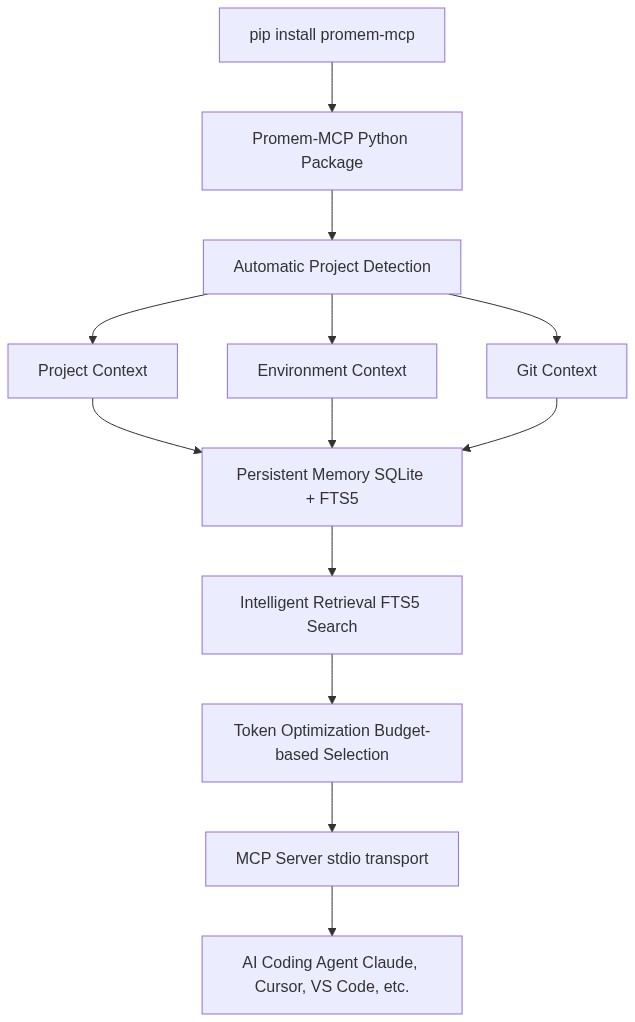
Features
- Zero-setup storage — SQLite database created automatically in OS-appropriate directory
- Automatic project detection — language, framework, package manager, test framework
- Persistent memory — rules, decisions, conventions, environment facts, Git intelligence
- Token-efficient retrieval — FTS5 search with token budgeting, returns only relevant context
- Provenance tracking — every memory knows where it came from and how confident it is
- Secret redaction — API keys, tokens, passwords are never stored or returned
- Project isolation — project memories never leak across projects
- Stale context detection — flags memories that conflict with current project state
- Contradiction detection — identifies conflicting project rules
- Session continuity — handoff summaries for switching between agents/sessions
- Git intelligence — recent commits, changed files, TODOs/FIXMEs
- Environment diagnostics — Python version, venv, .env completeness, Docker
- Local-first — no network requests, no cloud, no external services
MCP Tools
| Tool | Description |
|---|---|
ctx_search |
Search persistent project context with token budget |
ctx_get |
Get a specific memory by ID |
ctx_save |
Save a memory, decision, rule, or fact |
ctx_update |
Update an existing memory |
ctx_delete |
Delete a memory |
ctx_project |
Get current project information |
ctx_rules |
Get all project rules and conventions |
ctx_decisions |
Get all technical/architecture decisions |
ctx_recent |
Get recent memories and latest session |
ctx_git |
Get Git intelligence |
ctx_environment |
Get environment intelligence |
ctx_diagnostics |
Run environment diagnostics |
ctx_summary |
Get compact project summary for handoff |
CLI
contextmcp --version        # Version
promem status           # Project + storage status
promem doctor           # Health checks
promem stats            # Usage statistics
promem search "query"   # Search context
promem memory list      # List memories
promem decision "text"  # Save a decision
promem privacy          # Privacy info
promem config           # Client configuration
promem repair           # Rebuild index, optimize DB
promem reset            # Delete all data (with confirmation)
Client Support
| Client | Auto-config? | Config Key |
|---|---|---|
| Claude Code | promem config claude-code |
mcpServers |
| Claude Desktop | promem config claude-desktop |
mcpServers |
| Cursor | promem config cursor |
mcpServers |
| VS Code / Copilot | promem config vscode |
servers |
| OpenCode | promem config opencode |
mcp |
| Gemini CLI | promem config gemini-cli |
mcpServers |
| Windsurf | promem config windsurf |
mcpServers |
| Cline | promem config cline |
mcpServers |
| Roo Code | promem config roo-code |
mcpServers |
| Amazon Q | promem config amazon-q |
mcpServers |
| ZCode (GLM/Zhipu) | promem config zcode |
mcpServers |
| Tabnine | promem config tabnine |
mcpServers |
No client supports true zero-config auto-registration. ContextMCP detects installed clients, offers to write config (with backup + merge), and provides exact copy-paste snippets.
Privacy
- Local only — no network requests
- Project contents not uploaded
- Secrets redacted — never stored or returned
- No cloud dependencies
promem privacy
Storage Location
ContextMCP uses project-local storage — no centralized OS directory, no wasted space.
| Location | Path |
|---|---|
| Project-local (default) | <project-root>/.contextmcp/ |
Each project gets its own .contextmcp/contextmcp.db. Storage travels with the project. No global storage bloat.
Add .contextmcp/ to your .gitignore (already included by default in ContextMCP's ignore patterns).
Override with CONTEXTMCP_DATA_DIR environment variable if needed.
Installation
# pip
pip install promem-mcp

# uv
uv add contextmcp

# pipx (global CLI)
pipx install contextmcp
Works in venv, virtualenv, uv, pipx, and system Python.
Development
git clone https://github.com/contextmcp/contextmcp.git
cd contextmcp
pip install -e ".[dev]"
pytest
License
MIT
Recommended Servers

playwright-mcp
A Model Context Protocol server that enables LLMs to interact with web pages through structured accessibility snapshots without requiring vision models or screenshots.

Magic Component Platform (MCP)
An AI-powered tool that generates modern UI components from natural language descriptions, integrating with popular IDEs to streamline UI development workflow.

Audiense Insights MCP Server
Enables interaction with Audiense Insights accounts via the Model Context Protocol, facilitating the extraction and analysis of marketing insights and audience data including demographics, behavior, and influencer engagement.

VeyraX MCP
Single MCP tool to connect all your favorite tools: Gmail, Calendar and 40 more.

graphlit-mcp-server
The Model Context Protocol (MCP) Server enables integration between MCP clients and the Graphlit service. Ingest anything from Slack to Gmail to podcast feeds, in addition to web crawling, into a Graphlit project - and then retrieve relevant contents from the MCP client.

Kagi MCP Server
An MCP server that integrates Kagi search capabilities with Claude AI, enabling Claude to perform real-time web searches when answering questions that require up-to-date information.

E2B
Using MCP to run code via e2b.

Neon Database
MCP server for interacting with Neon Management API and databases

Exa Search
A Model Context Protocol (MCP) server lets AI assistants like Claude use the Exa AI Search API for web searches. This setup allows AI models to get real-time web information in a safe and controlled way.

Qdrant Server
This repository is an example of how to create a MCP server for Qdrant, a vector search engine.