
project-graph-mcp
Maximizes AI agent context window by enabling compact code reading and editing, reducing tokens by 40% for deeper codebase understanding.
README



project-graph-mcp
Maximize your AI agent's context window. An MCP server that lets agents read and edit your codebase in compact mode — minified source with all variable names preserved. Code tokens drop ↓40%, and .ctx documentation is injected only in the focus zone. Fewer tokens per file → more files fit in context → deeper understanding of your codebase.
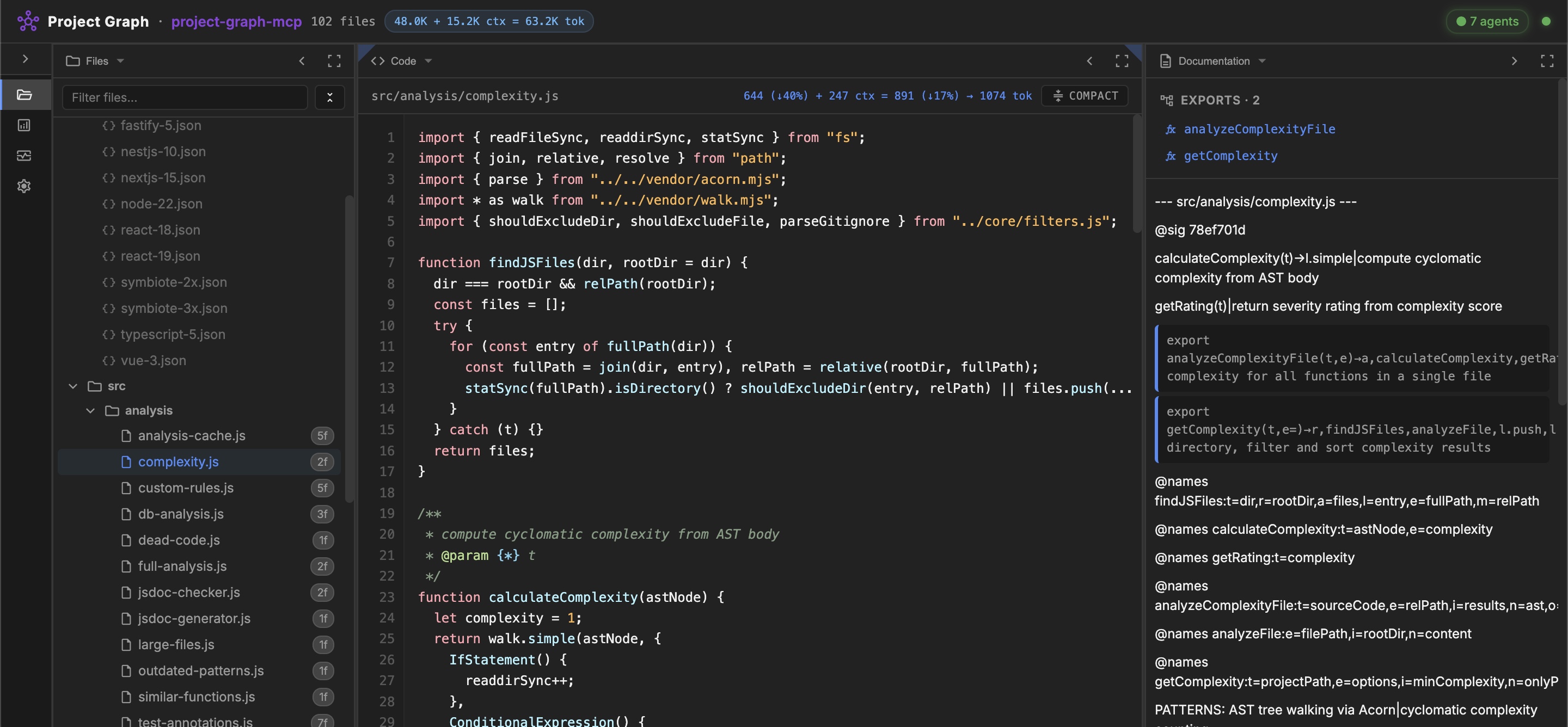
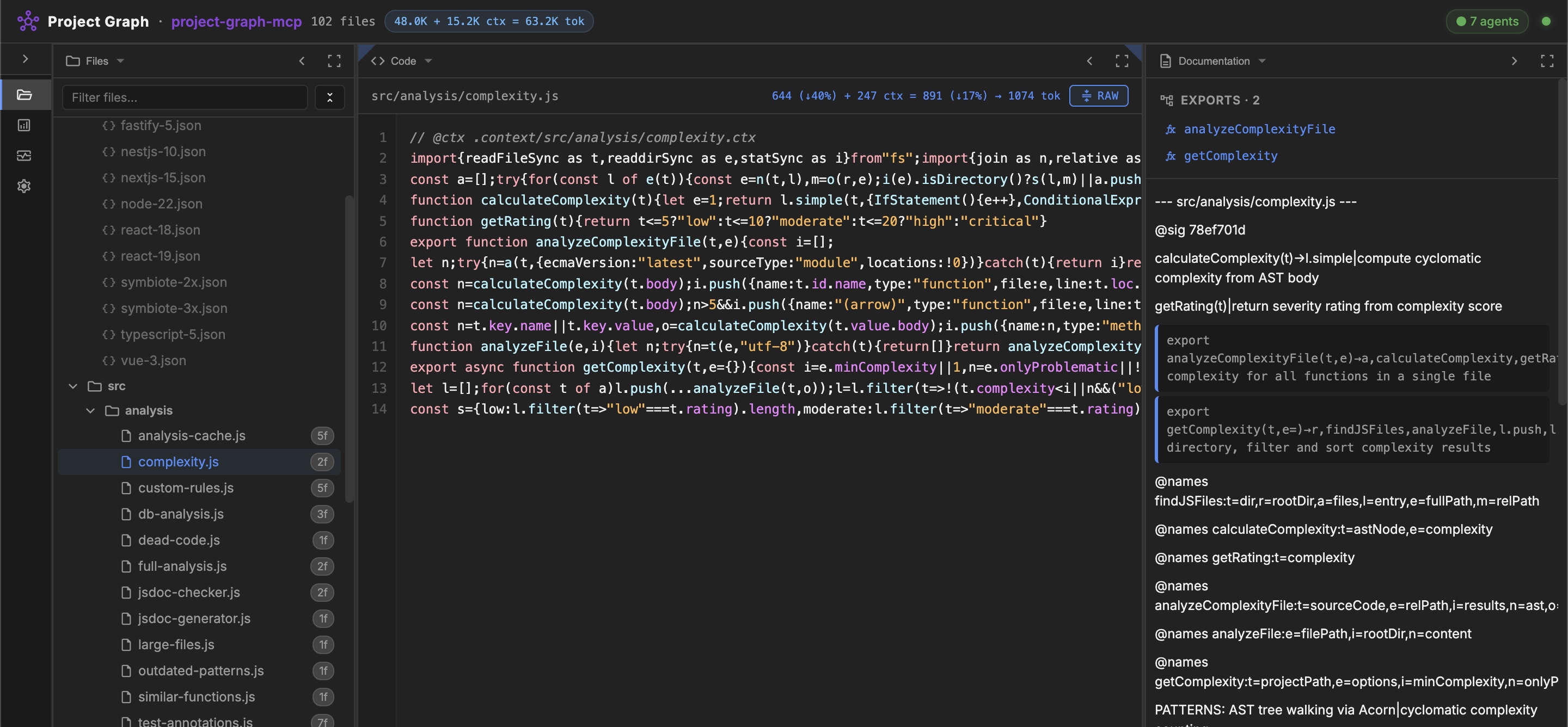
[!TIP] 18 MCP tools, zero config. Add one line to your MCP config and the server downloads itself on the next IDE restart.
Features
- Project Skeleton — AST-based graph with 10-50x compression, minified JSON representation of your entire codebase
- Compact Code Mode — project-wide
compact/beautify, agents read and edit minified source directly (↓40% tokens both ways) - AI Context Layer — one call loads skeleton + docs + compressed files; progressive loading (Overview → Focus)
- Code Quality Analysis — dead code, complexity, duplicates, large files, legacy patterns, JSDoc consistency, Health Score (0-100)
- Multi-Language Parsers — JavaScript (AST/Acorn), TypeScript, Python, Go (regex-based)
- Doc Dialect — auto-generated
.ctxdocumentation with AST signatures, staleness detection, self-enriching@enrichmarkers - Database Analysis — schema extraction from SQL migrations, table usage, dead tables
- Test Checklists — persistent test state in
.ctx.mdfiles, agent-drivenmark_test_passed - Monorepo Support — auto-discovery of sub-projects in
packages/,apps/,services/ - Framework Rules — 11 rulesets (86 rules) for React, Vue, Next.js, Express, NestJS, TypeScript, Node.js, Symbiote.js
- Security — path traversal protection on all operations
Quick Start
Generate the MCP config for your IDE (with correct paths):
npx -y project-graph-mcp config
Copy the output JSON into your IDE's MCP config file, then restart.
<details> <summary>Where is my MCP config file?</summary>
| IDE | Config path |
|---|---|
| Antigravity | ~/.gemini/antigravity/mcp_config.json |
| Gemini CLI | ~/.gemini/settings.json |
| Cursor | .cursor/mcp.json |
| Windsurf | .windsurf/mcp.json |
| Claude Code | Run: claude mcp add project-graph npx -y project-graph-mcp |
See CONFIGURATION.md for all supported IDEs.
</details>
<details> <summary>Alternative: from source</summary>
git clone --recursive https://github.com/rnd-pro/project-graph-mcp
cd project-graph-mcp
npm install
Note: The
--recursiveflag is required to fetch thevendor/symbiote-nodesubmodule.
</details>
CLI
npx project-graph-mcp skeleton src/       # Project skeleton
npx project-graph-mcp expand SN           # Expand minified symbol
npx project-graph-mcp deps SNG            # Get dependencies
npx project-graph-mcp deadcode src/       # Find unused code
npx project-graph-mcp complexity src/     # Cyclomatic complexity
npx project-graph-mcp analyze src/        # Full health analysis
npx project-graph-mcp compress src/f.js   # Compress file for AI
npx project-graph-mcp docs src/           # Project docs (doc-dialect)
npx project-graph-mcp generate-ctx src/   # Generate .context/ docs
npx project-graph-mcp compact src/ --dry-run  # Compact all files
npx project-graph-mcp mode .              # Show current editing mode
npx project-graph-mcp help                # All commands
Web Dashboard
[!NOTE]
project-graph-mcpis a pure stdio MCP server — it does not include a web server. For the visual UI (file tree, code viewer, dependency graph, live monitoring, marketplace), install mcp-agent-portal:npx mcp-agent-portal.
MCP Ecosystem
Best used as part of mcp-agent-portal — a unified MCP aggregator that combines all RND-PRO servers behind a single config entry:
{
  "mcpServers": {
    "agent-portal": {
      "command": "npx",
      "args": ["-y", "mcp-agent-portal"]
    }
  }
}
[!TIP] The Portal runs a singleton backend to prevent resource exhaustion when you open multiple IDE windows. It transparently spawns
project-graph-mcpandagent-pool-mcpas child processes and aggregates their tools. One entry replaces separate configs for all child servers.
Also works standalone or alongside agent-pool-mcp — multi-agent task delegation:
# Generate configs with correct paths for both servers:
npx -y project-graph-mcp config
npx -y agent-pool-mcp config
# Or use mcp-agent-portal which bundles both.
[!IMPORTANT] Each Gemini CLI worker will automatically spawn its own instance of
project-graph-mcp— workers navigate the codebase independently, without blocking the primary agent.
Documentation
- CONFIGURATION.md — Setup for all supported IDEs
- GUIDE.md — Comprehensive usage guide with all tools
- ARCHITECTURE.md — Source code structure
- AGENT_ROLE.md — Full system prompt for agents
- ROADMAP.md — Feature roadmap and backlog
Related Projects
- mcp-agent-portal — Unified MCP aggregator + web dashboard + AI agent runtime
- agent-pool-mcp — Multi-agent orchestration via Gemini CLI
- Symbiote.js — Isomorphic Reactive Web Components framework
- JSDA-Kit — SSG/SSR toolkit for modern web applications
License
MIT © RND-PRO.com
Made with ❤️ by the RND-PRO team
Recommended Servers

playwright-mcp
A Model Context Protocol server that enables LLMs to interact with web pages through structured accessibility snapshots without requiring vision models or screenshots.

Magic Component Platform (MCP)
An AI-powered tool that generates modern UI components from natural language descriptions, integrating with popular IDEs to streamline UI development workflow.

Audiense Insights MCP Server
Enables interaction with Audiense Insights accounts via the Model Context Protocol, facilitating the extraction and analysis of marketing insights and audience data including demographics, behavior, and influencer engagement.

VeyraX MCP
Single MCP tool to connect all your favorite tools: Gmail, Calendar and 40 more.

graphlit-mcp-server
The Model Context Protocol (MCP) Server enables integration between MCP clients and the Graphlit service. Ingest anything from Slack to Gmail to podcast feeds, in addition to web crawling, into a Graphlit project - and then retrieve relevant contents from the MCP client.

Kagi MCP Server
An MCP server that integrates Kagi search capabilities with Claude AI, enabling Claude to perform real-time web searches when answering questions that require up-to-date information.

E2B
Using MCP to run code via e2b.

Neon Database
MCP server for interacting with Neon Management API and databases

Exa Search
A Model Context Protocol (MCP) server lets AI assistants like Claude use the Exa AI Search API for web searches. This setup allows AI models to get real-time web information in a safe and controlled way.

Qdrant Server
This repository is an example of how to create a MCP server for Qdrant, a vector search engine.