
Pandoc Document Conversion
Enables document format conversion between various formats (Markdown, HTML, PDF, DOCX, LaTeX, EPUB, and more) using Pandoc, preserving formatting and structure while supporting both direct content transformation and file-based conversions.
README

mcp-pandoc: A Document Conversion MCP Server
Officially included in the Model Context Protocol servers open-source project. 🎉
Overview
A Model Context Protocol server for document format conversion using pandoc. This server provides tools to transform content between different document formats while preserving formatting and structure.
Please note that mcp-pandoc is currently in early development. PDF support is under development, and the functionality and available tools are subject to change and expansion as we continue to improve the server.
Credit: This project uses the Pandoc Python package for document conversion, forming the foundation for this project.
Demo
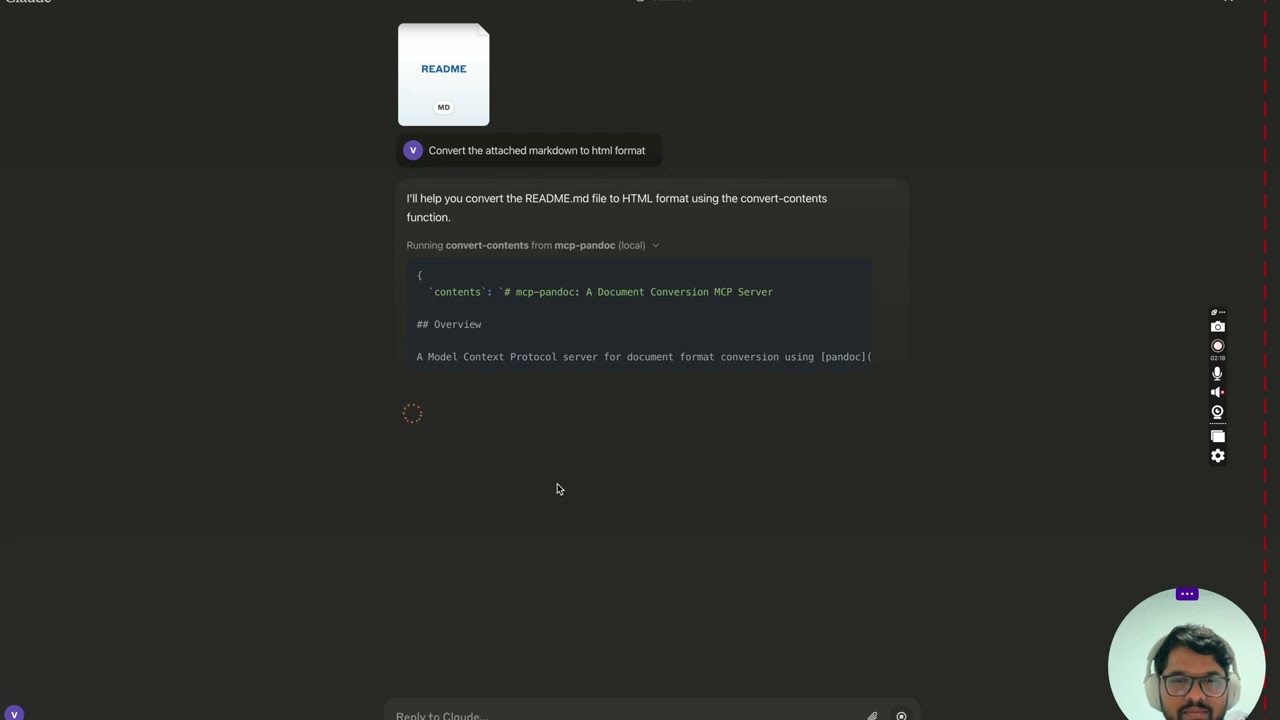
<details> <summary>Screenshots</summary>
<img width="2407" alt="Screenshot 2024-12-26 at 3 33 54 PM" src="https://github.com/user-attachments/assets/ce3f5396-252a-4bba-84aa-65b2a06b859e" /> <img width="2052" alt="Screenshot 2024-12-26 at 3 38 24 PM" src="https://github.com/user-attachments/assets/8c525ad1-b184-41ca-b068-7dd34b60b85d" /> <img width="1498" alt="Screenshot 2024-12-26 at 3 40 51 PM" src="https://github.com/user-attachments/assets/a1e0682d-fe44-40b6-9988-bf805627beeb" /> <img width="760" alt="Screenshot 2024-12-26 at 3 41 20 PM" src="https://github.com/user-attachments/assets/1d7f5998-6d7f-48fa-adcf-fc37d0521213" /> <img width="1493" alt="Screenshot 2024-12-26 at 3 50 27 PM" src="https://github.com/user-attachments/assets/97992c5d-8efc-40af-a4c3-94c51c392534" /> </details>
More to come...
Tools
convert-contents- Transforms content between supported formats
- Inputs:
contents(string): Source content to convert (required if input_file not provided)input_file(string): Complete path to input file (required if contents not provided)input_format(string): Source format of the content (defaults to markdown)output_format(string): Target format (defaults to markdown)output_file(string): Complete path for output file (required for pdf, docx, rst, latex, epub formats)
- Supported input/output formats:
- markdown
- html
- docx
- rst
- latex
- epub
- txt
- Note: For advanced formats (pdf, docx, rst, latex, epub), an output_file path is required
Supported Formats
Currently supported formats:
Basic formats (direct conversion):
- Plain text (.txt)
- Markdown (.md)
- HTML (.html)
Advanced formats (requires complete file paths):
- PDF (.pdf) - requires TeX Live installation
- DOCX (.docx)
- RST (.rst)
- LaTeX (.tex)
- EPUB (.epub)
Note: For advanced formats:
- Complete file paths with filename and extension are required
- PDF conversion requires TeX Live installation (see Critical Requirements section -> For macOS:
brew install texlive) - When no output path is specified:
- Basic formats: Displays converted content in the chat
- Advanced formats: May save in system temp directory (/tmp/ on Unix systems)
Usage & configuration
NOTE: Ensure to complete installing required packages mentioned below under "Critical Requirements".
To use the published one
{
  "mcpServers": {
    "mcp-pandoc": {
      "command": "uvx",
      "args": ["mcp-pandoc"]
    }
  }
}
⚠️ Important Notes
Critical Requirements
- Pandoc Installation
- Required: Install
pandoc- the core document conversion engine - Installation:
# macOS brew install pandoc # Ubuntu/Debian sudo apt-get install pandoc # Windows # Download installer from: https://pandoc.org/installing.html - Verify:
pandoc --version
- UV package installation
- Required: Install
uvpackage (includesuvxcommand) - Installation:
# macOS brew install uv # Windows/Linux pip install uv - Verify:
uvx --version
- PDF Conversion Prerequisites: Only needed if you need to convert & save pdf
- TeX Live must be installed before attempting PDF conversion
- Installation commands:
# Ubuntu/Debian
sudo apt-get install texlive-xetex

# macOS
brew install texlive

# Windows
# Install MiKTeX or TeX Live from:
# https://miktex.org/ or https://tug.org/texlive/
- File Path Requirements
- When saving or converting files, you MUST provide complete file paths including filename and extension
- The tool does not automatically generate filenames or extensions
Examples
✅ Correct Usage:
# Converting content to PDF
"Convert this text to PDF and save as /path/to/document.pdf"

# Converting between file formats
"Convert /path/to/input.md to PDF and save as /path/to/output.pdf"
❌ Incorrect Usage:
# Missing filename and extension
"Save this as PDF in /documents/"

# Missing complete path
"Convert this to PDF"

# Missing extension
"Save as /documents/story"
Common Issues and Solutions
-
PDF Conversion Fails
- Error: "xelatex not found"
- Solution: Install TeX Live first (see installation commands above)
-
File Conversion Fails
- Error: "Invalid file path"
- Solution: Provide complete path including filename and extension
- Example:
/path/to/document.pdfinstead of just/path/to/
-
Format Conversion Fails
- Error: "Unsupported format"
- Solution: Use only supported formats:
- Basic: txt, html, markdown
- Advanced: pdf, docx, rst, latex, epub
Quickstart
Install
Option 1: Installing manually via claude_desktop_config.json config file
- On MacOS:
open ~/Library/Application\ Support/Claude/claude_desktop_config.json - On Windows:
%APPDATA%/Claude/claude_desktop_config.json
a) Only for local development & contribution to this repo <details> <summary>Development/Unpublished Servers Configuration</summary>
ℹ️ Replace <DIRECTORY> with your locally cloned project path
"mcpServers": {
  "mcp-pandoc": {
    "command": "uv",
    "args": [
      "--directory",
      "<DIRECTORY>/mcp-pandoc",
      "run",
      "mcp-pandoc"
    ]
  }
}
</details>
b) Published Servers Configuration - Consumers should use this config
"mcpServers": {
  "mcp-pandoc": {
    "command": "uvx",
    "args": [
      "mcp-pandoc"
    ]
  }
}
Option 2: To install Published Servers Configuration automatically via Smithery
Run the following bash command to install published mcp-pandoc pypi for Claude Desktop automatically via Smithery:
npx -y @smithery/cli install mcp-pandoc --client claude
- If you face any issue, use the "Published Servers Configuration" above directly instead of this cli.
Note: To use locally configured mcp-pandoc, follow "Development/Unpublished Servers Configuration" step above.
Development
Building and Publishing
To prepare the package for distribution:
- Sync dependencies and update lockfile:
uv sync
- Build package distributions:
uv build
This will create source and wheel distributions in the dist/ directory.
- Publish to PyPI:
uv publish
Note: You'll need to set PyPI credentials via environment variables or command flags:
- Token:
--tokenorUV_PUBLISH_TOKEN - Or username/password:
--username/UV_PUBLISH_USERNAMEand--password/UV_PUBLISH_PASSWORD
Debugging
Since MCP servers run over stdio, debugging can be challenging. For the best debugging experience, we strongly recommend using the MCP Inspector.
You can launch the MCP Inspector via npm with this command:
npx @modelcontextprotocol/inspector uv --directory /Users/vivekvells/Desktop/code/ai/mcp-pandoc run mcp-pandoc
Upon launching, the Inspector will display a URL that you can access in your browser to begin debugging.
Contributing
We welcome contributions to enhance mcp-pandoc! Here's how you can get involved:
- Report Issues: Found a bug or have a feature request? Open an issue on our GitHub Issues page.
- Submit Pull Requests: Improve the codebase or add features by creating a pull request.
Recommended Servers

playwright-mcp
A Model Context Protocol server that enables LLMs to interact with web pages through structured accessibility snapshots without requiring vision models or screenshots.

Magic Component Platform (MCP)
An AI-powered tool that generates modern UI components from natural language descriptions, integrating with popular IDEs to streamline UI development workflow.

Audiense Insights MCP Server
Enables interaction with Audiense Insights accounts via the Model Context Protocol, facilitating the extraction and analysis of marketing insights and audience data including demographics, behavior, and influencer engagement.

VeyraX MCP
Single MCP tool to connect all your favorite tools: Gmail, Calendar and 40 more.

graphlit-mcp-server
The Model Context Protocol (MCP) Server enables integration between MCP clients and the Graphlit service. Ingest anything from Slack to Gmail to podcast feeds, in addition to web crawling, into a Graphlit project - and then retrieve relevant contents from the MCP client.

Kagi MCP Server
An MCP server that integrates Kagi search capabilities with Claude AI, enabling Claude to perform real-time web searches when answering questions that require up-to-date information.

Neon Database
MCP server for interacting with Neon Management API and databases

E2B
Using MCP to run code via e2b.

Exa Search
A Model Context Protocol (MCP) server lets AI assistants like Claude use the Exa AI Search API for web searches. This setup allows AI models to get real-time web information in a safe and controlled way.

Qdrant Server
This repository is an example of how to create a MCP server for Qdrant, a vector search engine.