
omarchy-mcp
Enables AI assistants to manage Omarchy desktop themes, including listing, switching, previewing, installing, removing, and rotating backgrounds.
README
Omarchy MCP
A Model Context Protocol (MCP) server for integrating Omarchy desktop environment theme management with AI assistants like Claude.
Overview
Omarchy MCP enables AI assistants to manage themes in Omarchy - a Linux desktop environment that supports extensive theme customization including color schemes, backgrounds, and UI elements.
With this MCP server, AI assistants can:
- List themes with flexible filtering (installed, available, built-in, removable)
- Query the currently active theme
- Switch between installed themes
- Preview theme images before applying them
- Install new themes from GitHub repositories
- Remove installed extra themes
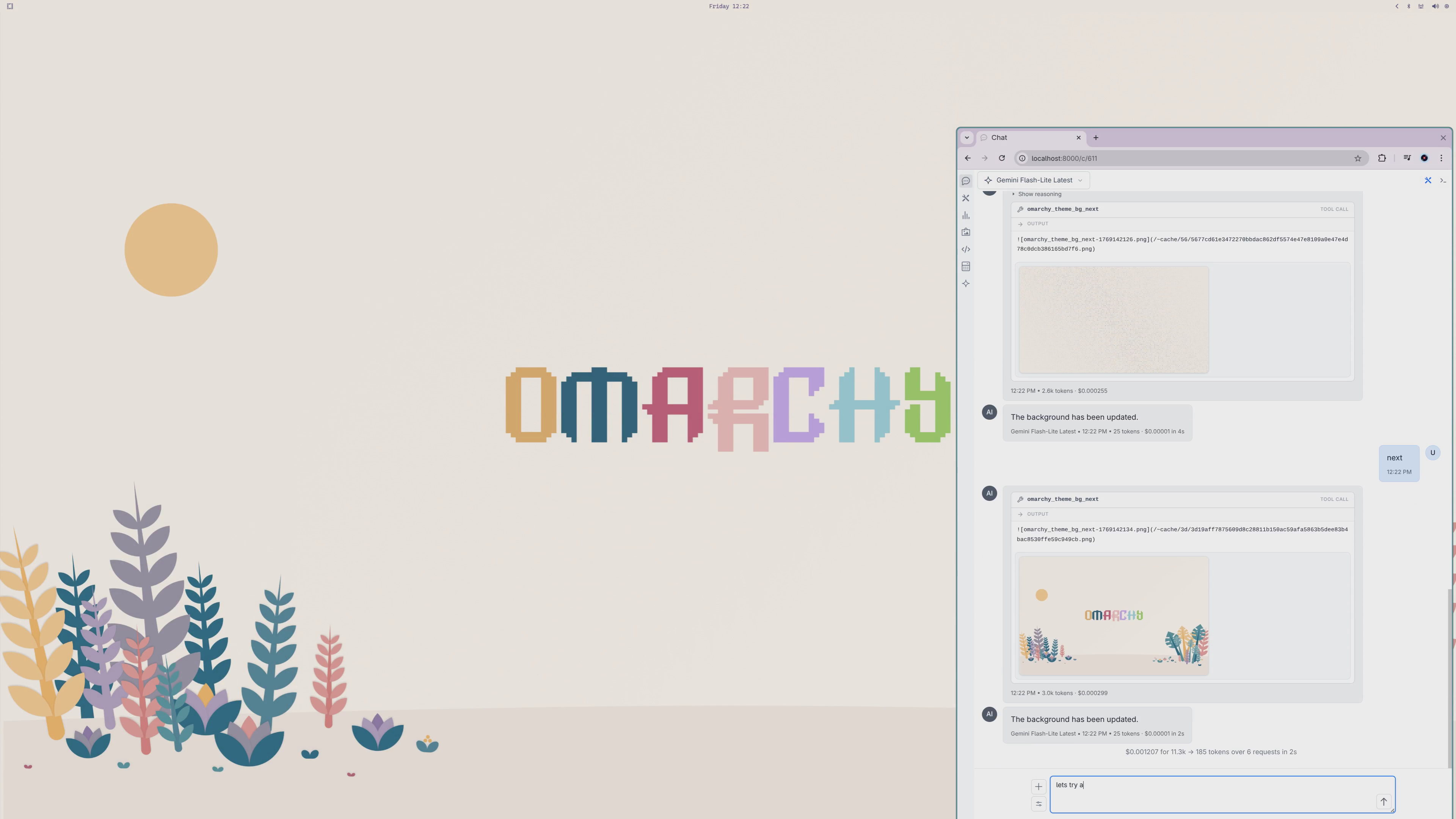
- Rotate background images
Installation
Using in llms .py
Or paste server configuration into llms .py MCP Servers:
Name: omarchy-mcp
{
  "description": "Manage Omarchy Desktop Themes",
  "command": "uvx",
  "args": [
    "omarchy-mcp"
  ]
}
Development Server
For development, you can run this server using uv:
{
  "mcpServers": {
    {
      "command": "uv",
      "args": [
        "run",
        "--directory",
        "/path/to/ServiceStack/omarchy-mcp",
        "omarchy-mcp"
      ]
    }
  }
}
Claude Desktop
Add to your Claude Desktop configuration file:
- macOS:
~/Library/Application Support/Claude/claude_desktop_config.json - Windows:
%APPDATA%\Claude\claude_desktop_config.json - Linux:
~/.config/Claude/claude_desktop_config.json
{
  "mcpServers": {
    "omarchy": {
      "description": "Manage Omarchy Desktop Themes",
      "command": "uvx",
      "args": [
        "omarchy-mcp"
      ]
    }
  }
}
System Prompt
You can make your AI a more pleasant and personable Omarchy assistant by configuring it with a custom system prompt. The linked system prompt below creates "Archy" - a friendly, conversational assistant that knows Omarchy well and responds naturally to voice commands.
Available Tools
omarchy_theme_list
Lists Omarchy themes with flexible filtering options.
Parameters:
filter(optional): Filter themes by type"INSTALLED"(default) - All installed themes"ALL"- All available themes (installed and not installed)"CURRENT"- Only the currently active theme"BUILT_IN"- Only built-in themes"CAN_REMOVE"- Only installed extra themes that can be removed"CAN_INSTALL"- Only themes available for installation
scheme(optional): Filter by color scheme"ANY"(default) - All color schemes"LIGHT"- Light themed only"DARK"- Dark themed only
Returns: List of theme names with status indicators (current, built-in, installed)
omarchy_theme_set
Applies a theme to the Omarchy desktop.
Parameters:
theme(required): Theme name to apply (supports partial/case-insensitive matching)
Returns: Preview image of the applied theme
omarchy_theme_bg_next
Rotates to the next background image in the current theme.
Returns: The new background image
omarchy_preview_theme
Downloads and returns a preview image for a theme without applying it.
Parameters:
name(required): Theme name (supports partial/case-insensitive matching)
Returns: Theme preview image
omarchy_install_theme
Installs a new extra/community theme from its GitHub repository. Installing a theme automatically sets it as the current theme.
Parameters:
name(required): Theme name to install
Returns: Theme preview image after installation
omarchy_remove_theme
Uninstalls a previously installed extra/community theme. Built-in themes cannot be removed.
Parameters:
name(required): Theme name to uninstall
Returns: Status message
Theme Matching
Theme names support flexible matching:
- Case-insensitive: "tokyo night", "TOKYO NIGHT", and "Tokyo Night" all match
- Partial matching: "tokyo" matches "Tokyo Night"
- Punctuation-insensitive: "tokyo-night", "tokyo_night", and "tokyonight" all match
Requirements
- Python: 3.10, 3.11, or 3.12
- Omarchy: Must be installed on the system
- Linux: With Wayland display server
Dependencies
fastmcp>=0.1.0- MCP server frameworkaiohttp- Async HTTP client for downloading preview images
Built-in Themes
Omarchy comes with 14 built-in themes:
- Tokyo Night
- Catppuccin
- Ethereal
- Everforest
- Gruvbox
- Hackerman
- Osaka Jade
- Kanagawa
- Nord
- Matte Black
- Ristretto
- Flexoki Light
- Rose Pine
- Catppuccin Latte
Extra Themes
Over 100 additional community themes are available for installation, including various color schemes for both dark and light preferences.
Development
Setup
git clone https://github.com/ServiceStack/omarchy-mcp.git
cd omarchy-mcp
pip install -e ".[dev]"
Running Tests
pytest tests -v
Linting and Formatting
ruff check .
ruff format .
Building
python -m build
License
BSD-3-Clause
Recommended Servers

playwright-mcp
A Model Context Protocol server that enables LLMs to interact with web pages through structured accessibility snapshots without requiring vision models or screenshots.

Magic Component Platform (MCP)
An AI-powered tool that generates modern UI components from natural language descriptions, integrating with popular IDEs to streamline UI development workflow.

Audiense Insights MCP Server
Enables interaction with Audiense Insights accounts via the Model Context Protocol, facilitating the extraction and analysis of marketing insights and audience data including demographics, behavior, and influencer engagement.

VeyraX MCP
Single MCP tool to connect all your favorite tools: Gmail, Calendar and 40 more.

graphlit-mcp-server
The Model Context Protocol (MCP) Server enables integration between MCP clients and the Graphlit service. Ingest anything from Slack to Gmail to podcast feeds, in addition to web crawling, into a Graphlit project - and then retrieve relevant contents from the MCP client.

Kagi MCP Server
An MCP server that integrates Kagi search capabilities with Claude AI, enabling Claude to perform real-time web searches when answering questions that require up-to-date information.

Neon Database
MCP server for interacting with Neon Management API and databases

E2B
Using MCP to run code via e2b.

Exa Search
A Model Context Protocol (MCP) server lets AI assistants like Claude use the Exa AI Search API for web searches. This setup allows AI models to get real-time web information in a safe and controlled way.

Qdrant Server
This repository is an example of how to create a MCP server for Qdrant, a vector search engine.