
okama MCP
MCP (Model Context Protocol) server that exposes the okama investment portfolio toolkit to AI assistants — Claude Desktop, Claude Code, Cursor, Codex, and any other MCP-compatible client.
README
okama-mcp
<!-- mcp-name: io.github.mbk-dev/okama-mcp -->




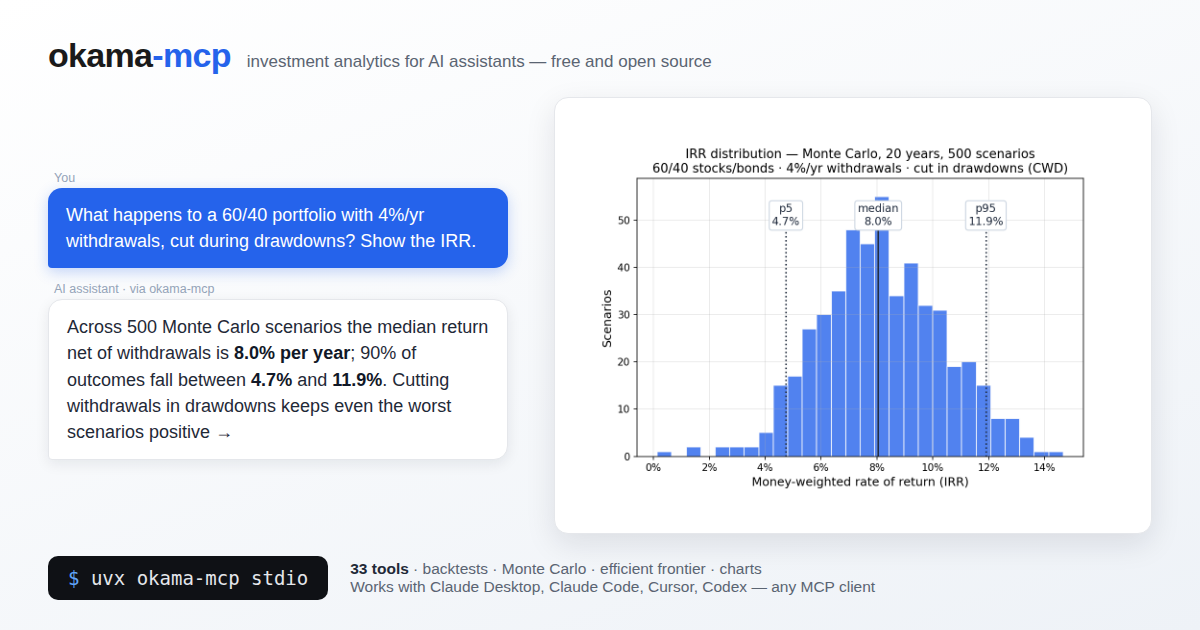
MCP (Model Context Protocol) server that exposes the okama investment portfolio toolkit to AI assistants — Claude Desktop, Claude Code, Cursor, Codex, and any other MCP-compatible client.
With okama-mcp installed, you can ask an AI things like:
"Backtest a portfolio of 30% gold and 70% real estate over the last 15 years."
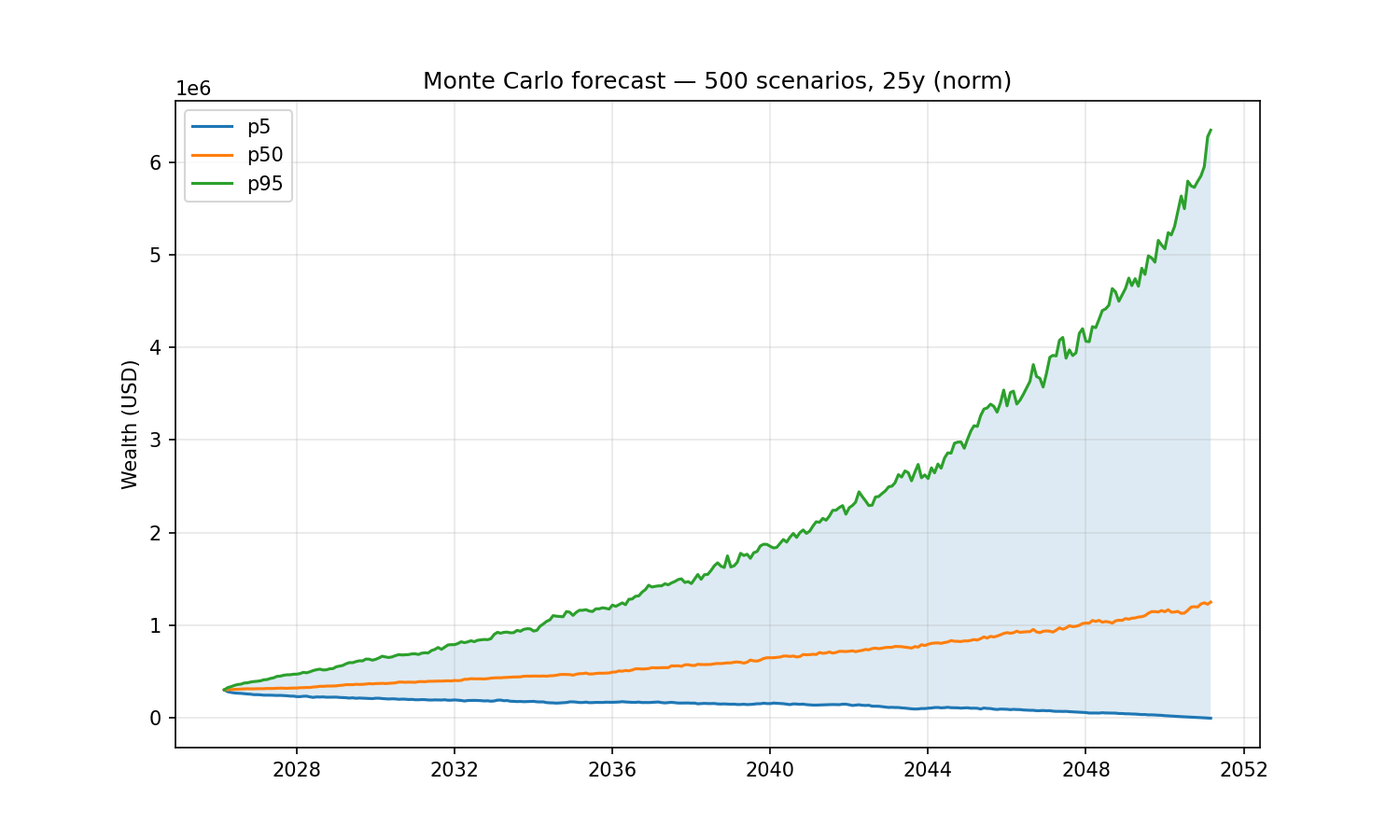
"Run a Monte Carlo retirement forecast on that portfolio, withdrawing $1,000/month indexed to inflation, over 25 years."
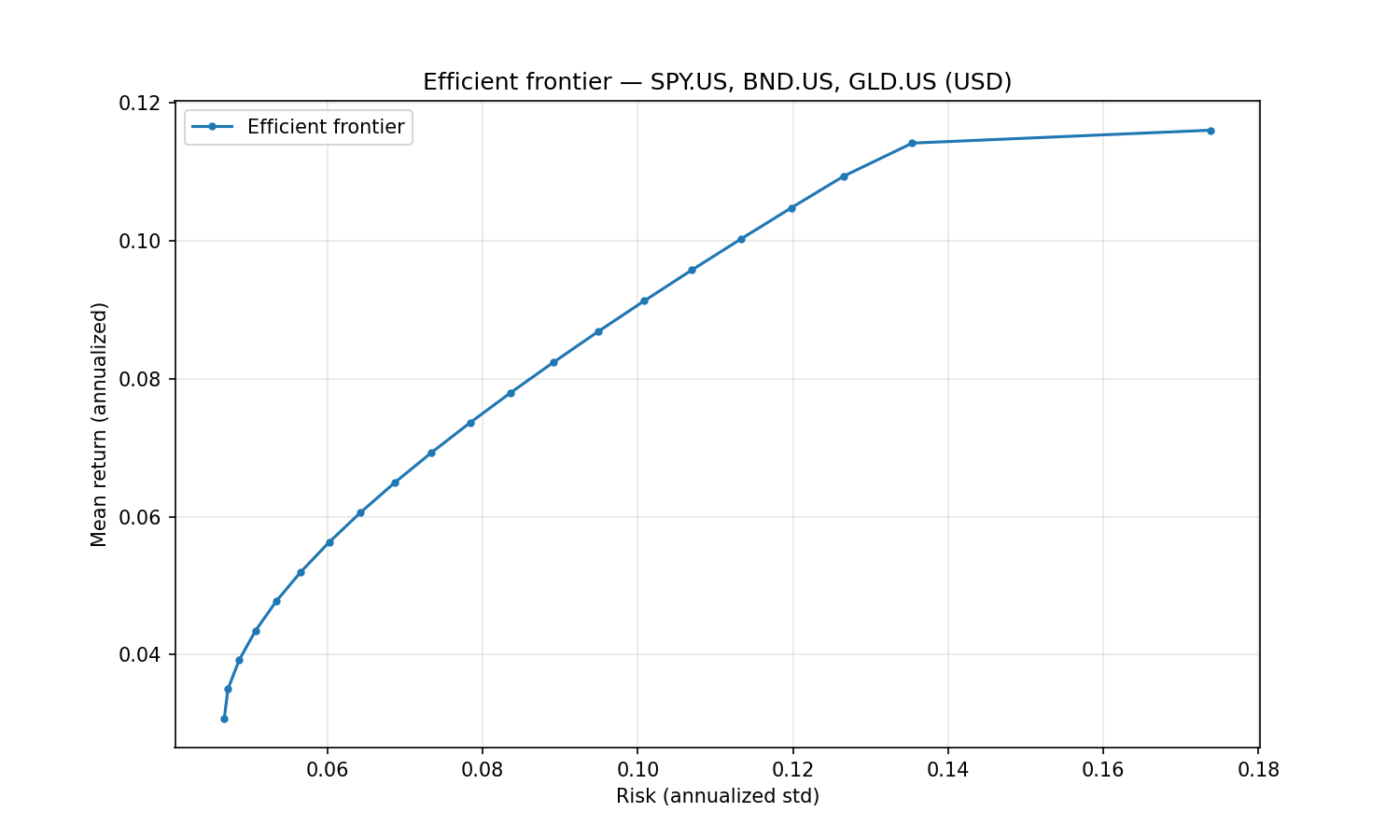
"What's the tangency portfolio of SPY, BND, and GLD with a 3% risk-free rate?"
…and the AI uses the MCP tools to call okama directly — no Python code needed.
Built on FastMCP. Single codebase, two transports:
stdio (for local clients) and streamable-http (for self-hosting).
okama-mcp is free and open source — no hosted service, no registration; you run it
yourself, locally or on your own server.
Install
Requires Python ≥ 3.11 (same floor as okama itself); okama ≥ 2.2.0 is installed automatically.
The easiest way — no clone, no venv — is uv or pipx:
uvx okama-mcp stdio          # run straight from PyPI
# or
pipx install okama-mcp
Plain pip works too:
pip install okama-mcp
[!WARNING] <sub>With pip, prefer a dedicated virtual environment: on most modern Linux distros the system Python is marked externally managed (PEP 668), so
pip installoutside a venv fails, and a shared environment risks dependency conflicts. In your MCP client config, pointcommandat the absolute path of theokama-mcpscript inside the venv — GUI clients don't see your shellPATH.uvxandpipxavoid all of this by isolating the install automatically.</sub>
To work on the code, install from source instead:
git clone https://github.com/mbk-dev/okama-mcp
cd okama-mcp
poetry install
Run
# stdio — for Claude Desktop, Claude Code, Cursor (local IPC)
okama-mcp stdio

# streamable HTTP — for self-hosting on your own server
okama-mcp http --host 127.0.0.1 --port 8765
When running from a source checkout, prefix each command with poetry run.
Connect a client
Claude Desktop
Edit ~/Library/Application Support/Claude/claude_desktop_config.json (macOS) or
%APPDATA%\Claude\claude_desktop_config.json (Windows):
{
  "mcpServers": {
    "okama": {
      "command": "uvx",
      "args": ["okama-mcp", "stdio"]
    }
  }
}
Restart Claude Desktop; the server appears in the tools menu.
Claude Code
To make the server available in every project (works from any directory):
claude mcp add --scope user okama -- uvx okama-mcp stdio
Developers running from a source checkout can use claude mcp add okama -- poetry run okama-mcp stdio from the project root instead.
Or commit a .mcp.json at the project root so the whole team picks it up:
{
  "mcpServers": {
    "okama": {
      "command": "uvx",
      "args": ["okama-mcp", "stdio"]
    }
  }
}
Cursor
Add the server to .cursor/mcp.json in your project (or ~/.cursor/mcp.json to make
it global):
{
  "mcpServers": {
    "okama": {
      "command": "uvx",
      "args": ["okama-mcp", "stdio"]
    }
  }
}
Codex (CLI & Desktop)
Add the server with one command:
codex mcp add okama -- uvx okama-mcp stdio
Or declare it in ~/.codex/config.toml (or a project-scoped .codex/config.toml
in trusted projects):
[mcp_servers.okama]
command = "uvx"
args = ["okama-mcp", "stdio"]
The Codex CLI, desktop app, and IDE extension share this configuration — set it up once and it works in all three.
Self-hosting (streamable HTTP)
Run okama-mcp on your own server and share it across your MCP clients:
okama-mcp http --host 127.0.0.1 --port 8765 --path /mcp
(From source: poetry run okama-mcp http ...)
Then point your MCP client at http://<your-server>:8765/mcp. For a production
setup put nginx + TLS in front; ready-made examples live in deploy/:
deploy/systemd/okama-mcp.service— systemd unit (hardened, runs as a dedicated user)deploy/nginx/self-hosted.conf— nginx vhost: TLS, SSE-friendly proxying of/mcp
The server is open by design — free to run, no registration. If your instance must not be public, restrict access at the nginx level (allow-list, VPN, or HTTP basic auth).
Tool catalog
A Monte Carlo retirement forecast (30% gold / 70% real estate, withdrawing $1,000/month indexed to inflation over 25 years) and the efficient frontier of SPY/BND/GLD — the exact examples from the top of this page:
All tools are stateless — pass the full portfolio specification with every call.
The server caches expensive okama objects (Portfolio, EfficientFrontier) by content
hash, so repeated calls on the same spec are fast.
Nested portfolios. Wherever a list of assets is accepted — the assets field of
PortfolioSpec/FrontierSpec, or the portfolios argument on the comparison tools —
an entry may be a ticker string or a nested portfolio object (the same spec shape).
This lets you treat a whole portfolio as a single component: e.g. compare a 60/40
portfolio against gold, or put a sub-portfolio on the efficient frontier.
Search & metadata
| Tool | Purpose |
|---|---|
search_assets(query, namespace?) |
Free-text search across all okama symbols by name / ticker / ISIN. |
list_namespaces(kind="all"|"assets"|"macro") |
Show the available okama namespaces. |
get_asset_info(symbol) |
Metadata for one symbol — name, country, currency, type, date range. |
Single asset & comparisons
| Tool | Purpose |
|---|---|
get_asset_history(symbol, kind, first_date?, last_date?) |
Time series for one asset. kind ∈ {close_monthly, close_daily, adj_close, ror, dividends}. |
compare_assets(symbols, ccy, ..., portfolios?, rf_return?, t_return?) |
Side-by-side statistics (describe() table: CAGR, risk, drawdowns by period) plus Sharpe & Sortino per asset. |
get_correlations(symbols, ccy, ..., portfolios?) |
Correlation matrix of monthly returns. |
get_rolling_risk(symbols, ccy, window_months=12, ..., portfolios?) |
Rolling annualized risk per asset. |
get_asset_returns(symbols, ccy, ..., portfolios?, period?, real=False) |
Return metrics per asset: CAGR, cumulative return, mean / real mean return, monthly geometric mean, annual returns table. |
get_rolling_returns(symbols, ccy, window_months=12, real=False, ..., portfolios?) |
Rolling CAGR and rolling cumulative return per asset. |
get_benchmark_metrics(benchmark, symbols, ccy, ..., portfolios?, rolling_window?) |
Beta, correlation, annualized tracking difference and tracking error of each asset vs a benchmark/index. |
get_dividend_info(symbols, ccy, ...) |
LTM dividend yield, 5y mean yield, paying/growing streaks per asset. |
Portfolio backtest
| Tool | Purpose |
|---|---|
analyze_portfolio(portfolio, rf_return=0, t_return=0) |
Headline metrics (CAGR, annual mean/risk, Sharpe, Sortino) + full describe() for a PortfolioSpec. |
get_portfolio_drawdowns(portfolio) |
Drawdown time series + max drawdown / recovery period. |
get_portfolio_var_cvar(portfolio, time_frame=12, level=1) |
Historical Value at Risk and CVaR. |
get_portfolio_wealth_index(portfolio, full=False) |
Wealth-index series (cumulative growth of 1000). |
get_rolling_cagr(portfolio, window_months=12, real=False) |
Rolling CAGR time series (optionally inflation-adjusted). |
get_cagr_probability(portfolio, years, cagr_target) |
Historical probability of CAGR below a target (e.g. of a loss) over N-year periods. |
Monte Carlo DCF
| Tool | Purpose |
|---|---|
monte_carlo_forecast(portfolio, mc, cashflow) |
Forward simulation with one of five cash-flow strategies (indexation, percentage, time_series, vanguard, cut_if_drawdown). Returns percentile wealth bands, terminal-wealth stats, survival metrics. Includes the money-weighted IRR distribution (percentiles + mean). |
get_portfolio_irr(portfolio, cashflow) |
Historical money-weighted return (IRR) for a contribution/withdrawal plan. |
find_the_largest_withdrawals_size(portfolio, mc, cashflow, goal, ...) |
Largest sustainable withdrawal (Monte Carlo) for a goal: keep real purchasing power, keep nominal balance, or survive N years. |
get_monte_carlo_cash_flow(portfolio, mc, cashflow, discounting?) |
Monte Carlo distribution of future cash flows over time (percentile bands). |
The mc argument accepts distribution_parameters to override the fitted distribution (e.g. a fixed Student-t df); see the MCSpec shape below.
Distribution diagnostics
| Tool | Purpose |
|---|---|
get_distribution_fit(portfolio, mc) |
Goodness-of-fit for the return distribution: fitted parameters, Jarque-Bera, Kolmogorov-Smirnov (chosen + all distributions), and backtesting error (theoretical vs empirical mean/VaR/CVaR). |
get_return_moments(portfolio, mc, rolling_window?) |
Skewness & kurtosis time series — expanding, or rolling when a window (months) is given. |
optimize_students_df(portfolio, mc, var_level?) |
Degrees of freedom for a Student-t that best matches empirical VaR/CVaR. |
get_cagr_distribution(portfolio, mc, percentiles?, score?) |
Simulated CAGR at each percentile, plus the probability of a CAGR at/below score (e.g. score=0 → probability of a loss). |
DCF (historical cash-flow analysis)
| Tool | Purpose |
|---|---|
get_dcf_wealth_index(portfolio, cashflow, discounting?, include_negative_values?, discount_rate?) |
Historical wealth index with the cash-flow plan (FV nominal or PV discounted). |
get_dcf_cash_flow_ts(portfolio, cashflow, discounting?, remove_if_wealth_index_negative?, discount_rate?) |
Historical contribution/withdrawal time series (FV or PV). |
get_dcf_wealth_with_assets(portfolio, cashflow) |
Historical wealth index for the portfolio and each underlying asset. |
get_survival_period(portfolio, cashflow, threshold?, discount_rate?) |
Historical longevity: survival period (years) and depletion date. |
get_initial_investment_values(portfolio, cashflow, discount_rate?) |
Present value (PV) and future value (FV) of the initial investment. |
Efficient Frontier
| Tool | Purpose |
|---|---|
build_efficient_frontier(frontier) |
Full EF point table (Risk / Mean return / CAGR + per-asset weights). |
get_tangency_portfolio(frontier, rf_return, rate_of_return) |
Max-Sharpe portfolio on the EF. |
get_min_variance_portfolio(frontier) |
Global Minimum Variance portfolio. |
get_most_diversified_portfolio(frontier, target_return?) |
Most Diversified Portfolio (maximises the diversification ratio) on the EF. |
Macro
| Tool | Purpose |
|---|---|
get_inflation(currency, first_date?, last_date?, include_cumulative?, include_rolling?, include_describe?) |
Inflation series for a currency (USD, EUR, RUB, …). Optional: cumulative inflation, 12-month rolling inflation, describe() table. |
get_central_bank_rate(country, first_date?, last_date?, frequency="monthly"|"daily", include_describe?) |
Central-bank policy rate (US→US_EFFR, EU/ECB→EU_MRO, RUS→RUS_CBR, UK/GB→UK_BR, ISR→ISR_IR, CN/CHN→CHN_LPR1, or full symbol). Monthly or daily series; optional describe() table. |
get_indicator(symbol, first_date?, last_date?, include_describe?) |
Macro indicator from the RATIO namespace (e.g. USA_CAPE10.RATIO); bare country code defaults to that country's CAPE10. |
Charts
Each tool renders a PNG (default 1500×900) and returns it as MCP image content —
clients like Claude Desktop display it inline. Every chart tool also accepts
optional width / height (pixels, 300–4000) for custom sizes and aspect ratios,
and an optional save_path — the chart is then also written to that file and the
path reported back. Use save_path in clients that don't render MCP images in
their UI (e.g. Claude Code's terminal): ask for a chart "saved to /tmp/chart.png"
and open the file reference. Note: in self-hosted (streamable-http) deployments
save_path is written on the server's filesystem, not the client's machine.
| Tool | Chart |
|---|---|
plot_wealth_index(portfolio) |
Portfolio wealth index (+ inflation line). |
plot_drawdowns(portfolio) |
Drawdown depth over time. |
plot_monte_carlo(portfolio, mc, cashflow) |
Monte Carlo forecast fan (percentile bands). |
plot_irr_distribution(portfolio, mc, cashflow) |
Histogram of IRR across Monte Carlo scenarios (percentile markers). |
plot_qq(portfolio, mc) |
Q-Q plot of historical returns against the fitted distribution (norm/lognorm/t). |
plot_hist_fit(portfolio, mc, bins?) |
Histogram of historical returns with the fitted distribution PDF overlaid. |
plot_efficient_frontier(frontier) |
EF curve with individual asset points. |
plot_transition_map(frontier, x_axe="risk") |
Transition map: asset weights along the efficient frontier (x-axis = risk or CAGR). |
plot_assets(symbols, ccy, ..., portfolios?) |
Wealth-index comparison of individual assets. |
plot_macro(symbols, first_date?, last_date?, frequency="monthly"|"daily") |
Line chart of inflation / central-bank rate / CAPE10 series. Overlay multiple symbols (e.g. ["USA_CAPE10.RATIO", "EUR_CAPE10.RATIO"]). frequency='daily' valid only for .RATE symbols. |
Spec shapes
The complex tools take typed dicts validated by pydantic. The full schemas live in
src/okama_mcp/schemas.py; here are the headline shapes:
// PortfolioSpec
{
  "assets":   ["GLD.US", "VNQ.US"],  // each entry: a ticker OR a nested PortfolioSpec
  "weights":  [0.3, 0.7],            // optional, must sum to 1.0
  "ccy":      "USD",
  "first_date": "2010-01",
  "last_date":  "2024-12",
  "rebalancing_strategy": {            // mirrors okama.Rebalance
    "period": "year",                  // month | quarter | half-year | year | none
    "abs_deviation": 0.05,             // optional, |actual - target| threshold, 0 < x <= 1
    "rel_deviation": 0.1               // optional, |actual / target - 1| threshold, > 0
  },
  "inflation": true
}

// MCSpec
{
  "distribution":  "norm",            // norm | lognorm | t
  "period_years":  25,
  "scenarios":     500,                // ≥ 1, no upper limit
  "percentiles":   [5, 50, 95],
  "random_seed":   42,                 // optional, for reproducibility
  "distribution_parameters": null      // optional; null = fit from history (MLE). Lengths: norm [mu, sigma]; lognorm/t [shape|df, loc, scale]. Any element null = fit that one (e.g. [4, null, null])
}

// CashflowSpec — discriminated by `type`
{ "type": "indexation",       "initial_investment": 1000000, "frequency": "month", "amount": -1000, "indexation": "inflation" }
{ "type": "percentage",       "initial_investment": 1000000, "frequency": "year",  "percentage": -0.04 }
{ "type": "time_series",      "initial_investment": 100000,  "events":    { "2030-06": -50000 }, "time_series_discounted_values": false }
{ "type": "vanguard",         "initial_investment": 1000000, "percentage": -0.04, "floor_ceiling": [-0.025, 0.05], "indexation": "inflation" }
{ "type": "cut_if_drawdown",  "initial_investment": 1000000, "frequency": "year",  "amount": -60000, "indexation": "inflation",
  "crash_threshold_reduction": [[0.2, 0.4], [0.5, 1.0]] }

// FrontierSpec
{
  "assets":   ["SPY.US", "BND.US", "GLD.US"],
  "ccy":      "USD",
  "bounds":   [[0.0, 0.7], [0.1, 1.0], [0.0, 0.3]],   // optional
  "n_points": 20,
  "rebalancing_strategy": { "period": "year" },
  "inflation": false
}

// Nesting — a portfolio used as a single component (works in PortfolioSpec /
// FrontierSpec `assets`, and the `portfolios` argument of the comparison tools):
{
  "assets": [
    "GLD.US",
    { "assets": ["SPY.US", "AGG.US"], "weights": [0.6, 0.4], "symbol": "bench6040.PF" }
  ],
  "weights": [0.3, 0.7]              // one weight per top-level entry
}
Development
The project follows TDD (see AGENTS.md). After every code change run:
poetry run pytest -q
poetry run ruff check .
To run the live-API integration test (hits api.okama.io):
poetry run pytest -m integration
Project layout
src/okama_mcp/
├── server.py          # FastMCP instance + registration entry point
├── transport.py       # CLI: `okama-mcp stdio | http`
├── schemas.py         # PortfolioSpec, MCSpec, CashflowSpec, FrontierSpec
├── cache.py           # TTL+LRU cache keyed by sha256 of canonical spec
├── serialization.py   # pandas → JSON-safe with smart truncation
├── errors.py          # Translate okama exceptions to actionable MCP errors
└── tools/
    ├── search.py, asset.py, asset_list.py
    ├── portfolio.py, monte_carlo.py
    ├── frontier.py, macro.py
    └── plots.py
License
MIT — same license as okama itself.
Recommended Servers

playwright-mcp
A Model Context Protocol server that enables LLMs to interact with web pages through structured accessibility snapshots without requiring vision models or screenshots.

Magic Component Platform (MCP)
An AI-powered tool that generates modern UI components from natural language descriptions, integrating with popular IDEs to streamline UI development workflow.

Audiense Insights MCP Server
Enables interaction with Audiense Insights accounts via the Model Context Protocol, facilitating the extraction and analysis of marketing insights and audience data including demographics, behavior, and influencer engagement.

VeyraX MCP
Single MCP tool to connect all your favorite tools: Gmail, Calendar and 40 more.

graphlit-mcp-server
The Model Context Protocol (MCP) Server enables integration between MCP clients and the Graphlit service. Ingest anything from Slack to Gmail to podcast feeds, in addition to web crawling, into a Graphlit project - and then retrieve relevant contents from the MCP client.

Kagi MCP Server
An MCP server that integrates Kagi search capabilities with Claude AI, enabling Claude to perform real-time web searches when answering questions that require up-to-date information.

Neon Database
MCP server for interacting with Neon Management API and databases

E2B
Using MCP to run code via e2b.

Exa Search
A Model Context Protocol (MCP) server lets AI assistants like Claude use the Exa AI Search API for web searches. This setup allows AI models to get real-time web information in a safe and controlled way.

Qdrant Server
This repository is an example of how to create a MCP server for Qdrant, a vector search engine.