
Nutrition MCP
A remote MCP server for personal nutrition tracking that lets you log meals, track macros, water, and body weight, and review your nutrition history through conversation.
README
Nutrition MCP
A remote MCP server for personal nutrition tracking — log meals, track macros, log water and body weight, and review nutrition history through conversation.
Help me pay for the servers on Patreon
Quick Start
Already hosted and ready to use — just connect it to your MCP client:
https://nutrition-mcp.com/mcp
On Claude.ai: Customize → Connectors → + → Add custom connector → paste the URL → Connect
On first connect you'll be asked to register with an email and password. Your data persists across reconnections.
Demo
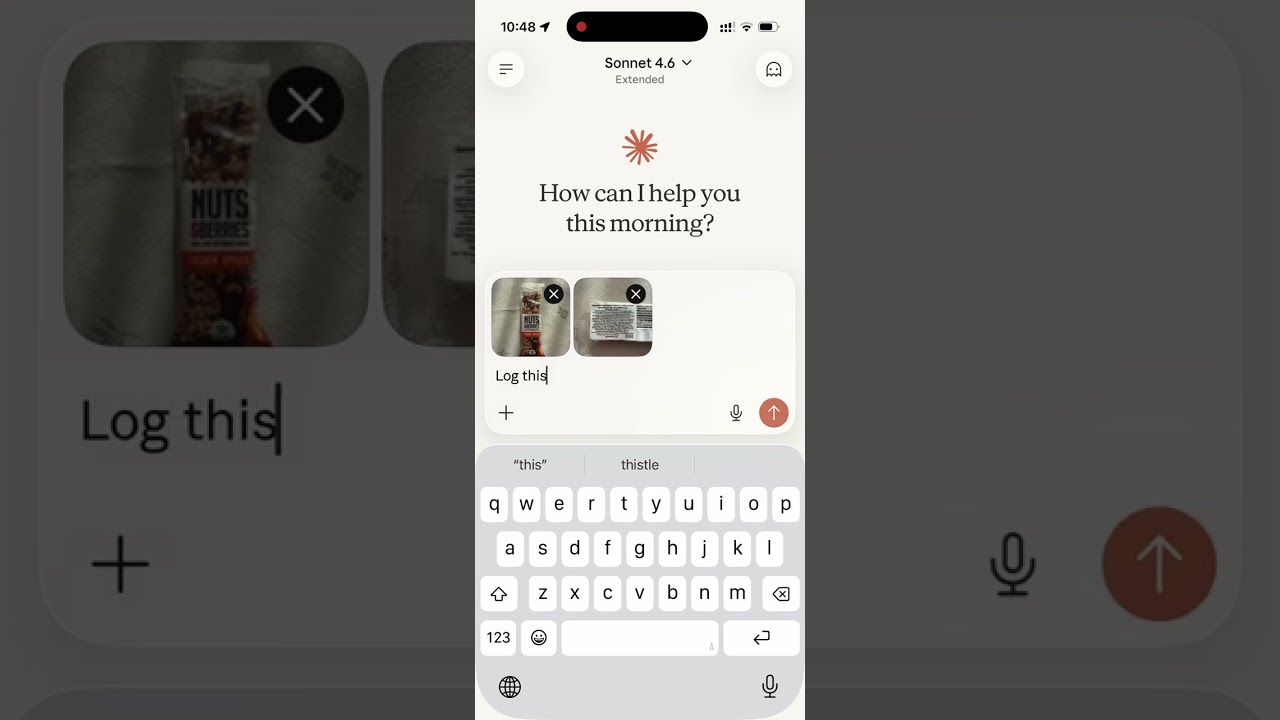
Read the story behind it: How I Replaced MyFitnessPal and Other Apps with a Single MCP Server
Tech Stack
- Bun — runtime and package manager
- Hono — HTTP framework
- MCP SDK — Model Context Protocol over Streamable HTTP
- Supabase — PostgreSQL database + user authentication
- OAuth 2.0 — authentication for Claude.ai connectors
MCP Tools
| Tool | Description |
|---|---|
log_meal |
Log a meal with description, type, calories, macros, notes |
lookup_barcode |
Look up a packaged product's verified macros by barcode via Open Food Facts (read from a photo or typed) |
get_meals_today |
Get all meals logged today |
get_meals_by_date |
Get meals for a specific date (YYYY-MM-DD) |
get_meals_by_date_range |
Get meals between two dates (inclusive) |
get_nutrition_summary |
Daily nutrition totals + goal progress for a date range |
update_meal |
Update any fields of an existing meal |
delete_meal |
Delete a meal by ID |
set_nutrition_goals |
Set daily calorie, macro, and water targets, plus an optional target weight |
get_nutrition_goals |
Get the current daily targets |
get_goal_progress |
Get intake vs. targets for a given day (default: today), plus latest weight vs. target |
log_water |
Log a hydration entry in milliliters |
get_water_today |
Get today's water intake total and entries |
get_water_by_date |
Get water intake for a specific date |
delete_water |
Delete a water log entry by ID |
log_weight |
Log a body-weight measurement in kg or lb (converted and stored server-side) |
get_weight_today |
Get today's weight entries |
get_weight_by_date |
Get weight entries for a specific date |
get_weight_by_date_range |
Get weight entries between two dates (inclusive), grouped by day |
get_weight_trends |
Weight trend: latest, overall change, 7/14/30-day moving averages, min/max, and goal progress |
update_weight |
Update an existing weight entry |
delete_weight |
Delete a weight entry by ID |
set_weight_unit |
Set the preferred weight unit (kg or lb; null to clear) |
get_weight_unit |
Get the preferred weight unit |
get_trends |
7/14/30-day averages, std dev, streaks, day-of-week, best/worst day |
get_meal_patterns |
Pre-aggregated behavioural patterns (breakfast effect, late dinner, weekend vs weekday, outliers) |
export_meals |
Export all meals as a CSV and return a 60-minute download link |
set_timezone |
Set the user's IANA timezone (e.g. America/Los_Angeles) |
get_timezone |
Get the user's configured timezone |
delete_account |
Permanently delete account and all associated data |
MCP Resources
| URI | Description |
|---|---|
nutrition://weekly-summary |
Rolling 7-day digest (averages vs targets, best/roughest day) for proactive pulls |
Self-hosting
1. Supabase setup
-
Create a Supabase project.
-
Enable Email Auth (Authentication → Providers → Email) and disable email confirmation.
-
Apply the schema. The full schema lives in
supabase/migrations/. With the Supabase CLI:supabase link --project-ref <your-project-ref> supabase db pushThis creates every table, index, RLS policy, and foreign key the app needs. No local Postgres is involved — migrations run against your hosted project.
-
Copy the service role key from Project Settings → API and use it as
SUPABASE_SECRET_KEY.
2. Environment variables
| Variable | Description |
|---|---|
SUPABASE_URL |
Your Supabase project URL |
SUPABASE_SECRET_KEY |
Supabase service role key (bypasses RLS) |
OAUTH_CLIENT_ID |
Random string for OAuth client identification |
OAUTH_CLIENT_SECRET |
Random string for OAuth client authentication |
GOOGLE_CLIENT_ID |
(optional) Google OAuth client ID for "Sign in with Google" |
GOOGLE_CLIENT_SECRET |
(optional) Google OAuth client secret |
OFF_USER_AGENT |
Open Food Facts User-Agent for barcode lookups, in the form AppName (email) |
PORT |
Server port (default: 8080) |
Making it yours: The public site includes the maintainer's personal bits — Google Analytics, Patreon/GitHub/contact links, and the
nutrition-mcp.comdomain. Runbun run depersonalizeto strip them all in one pass (analytics + CSP, the Support/Contact sections, social links, and the domain → ayour-domain.complaceholder). Usebun run depersonalize --dryto preview without writing. Afterwards, swap in your ownpublic/og.png,favicon.ico, andapple-touch-icon.png, and replace the domain placeholder with your real domain.
Generate OAuth credentials:
openssl rand -hex 16   # use as OAUTH_CLIENT_ID
openssl rand -hex 32   # use as OAUTH_CLIENT_SECRET
3. Google sign-in (optional)
Email/password works out of the box. To also offer "Continue with Google",
follow docs/google-auth-setup.md to create a
Google OAuth client, enable the Google provider in Supabase, and set
GOOGLE_CLIENT_ID / GOOGLE_CLIENT_SECRET.
Development
bun install
cp .env.example .env   # fill in your credentials
bun run dev             # starts with hot reload on http://localhost:8080
Connect to Claude.ai
- Open Claude.ai and click Customize
- Click Connectors, then the + button
- Click Add custom connector
- Fill in:
- Name: Nutrition Tracker
- Remote MCP Server URL:
https://nutrition-mcp.com/mcp
- Click Connect — sign in or register when prompted
- After signing in, Claude can use your nutrition tools. If you reconnect later, sign in with the same email and password to keep your data.
API Endpoints
| Endpoint | Description |
|---|---|
GET /health |
Health check |
GET /.well-known/oauth-authorization-server |
OAuth metadata discovery |
POST /register |
Dynamic client registration |
GET /authorize |
OAuth authorization (shows login page) |
POST /approve |
Login/register handler |
POST /token |
Token exchange |
GET /favicon.ico |
Server icon |
ALL /mcp |
MCP endpoint (authenticated) |
Deploy
The project includes a Dockerfile for container-based deployment.
- Push your repo to a hosting provider (e.g. DigitalOcean App Platform)
- Set the environment variables listed above
- The app auto-detects the Dockerfile and deploys on port
8080 - Point your domain to the deployed URL
License
Recommended Servers

playwright-mcp
A Model Context Protocol server that enables LLMs to interact with web pages through structured accessibility snapshots without requiring vision models or screenshots.

Magic Component Platform (MCP)
An AI-powered tool that generates modern UI components from natural language descriptions, integrating with popular IDEs to streamline UI development workflow.

Audiense Insights MCP Server
Enables interaction with Audiense Insights accounts via the Model Context Protocol, facilitating the extraction and analysis of marketing insights and audience data including demographics, behavior, and influencer engagement.

VeyraX MCP
Single MCP tool to connect all your favorite tools: Gmail, Calendar and 40 more.

graphlit-mcp-server
The Model Context Protocol (MCP) Server enables integration between MCP clients and the Graphlit service. Ingest anything from Slack to Gmail to podcast feeds, in addition to web crawling, into a Graphlit project - and then retrieve relevant contents from the MCP client.

Kagi MCP Server
An MCP server that integrates Kagi search capabilities with Claude AI, enabling Claude to perform real-time web searches when answering questions that require up-to-date information.

E2B
Using MCP to run code via e2b.

Neon Database
MCP server for interacting with Neon Management API and databases

Exa Search
A Model Context Protocol (MCP) server lets AI assistants like Claude use the Exa AI Search API for web searches. This setup allows AI models to get real-time web information in a safe and controlled way.

Qdrant Server
This repository is an example of how to create a MCP server for Qdrant, a vector search engine.