
no_human
From ticket to reviewed pull request, on your own machine
README
<div align="center">
<img src="docs/assets/nh-mark.png" alt="" width="140" height="140">
no_human
<!-- mcp-name: io.github.no-human-ai/no_human -->
From ticket to reviewed pull request.<br>Free and open-source, on your machine.


getnohuman.com · Quickstart · Docs · Watch it work a sprint



<a href="https://getnohuman.com/"><img src="docs/assets/hero-loop-poster.jpg" alt="The no_human board: one task waiting on a question in Needs answer, four tasks working in parallel, one pull request ready for review." width="880"></a>
<sub>▶ <a href="https://getnohuman.com/">Watch the loop</a> — a ticket in, a reviewed pull request out; the whole loop in 57 seconds.</sub>
</div>
The AI coding factory you <ins>can trust</ins>:
- A plan before any code, from the ticket plus what it finds in your repo.
- An adversarial review. A different model, fresh context, read-only tools, told to refute "done". You get a pass/fail checklist citing file and line — never a numeric self-score.
- A tamper guard. Deleted tests, new skips, an assertion turned into a tautology — blocked before a reviewer token is spent.
- Proof the fix fixed the bug. For a bug fix, the tests offered as evidence must fail at the merge base and pass on the new tree — the reproduction gate enforces that, and you can require it for every change.
- Your tests run, locally and optionally through your CI.
- An honest stop. When it cannot finish, it parks with one specific question instead of inventing a plausible diff.
Install
Whichever way you install, you need a Claude credential: an OAuth token
from claude setup-token (personal subscription or enterprise), so install the
Claude Code CLI first — npm install -g @anthropic-ai/claude-code, or
curl -fsSL https://claude.ai/install.sh | bash. The desktop app also calls
that CLI for every task. To pay Anthropic directly instead, set
llm.auth_mode: "api_key" and put your ANTHROPIC_API_KEY in
~/.no_human/.env.
One line (CLI + board)
uv tool install no-human   # or: pipx install no-human — the wheel ships the board
nh init && nh doctor       # token, config, first repo; then prove the install is real
Desktop app
Each release ships a SHA-256 alongside the artifact. Platform notes and the first-run walk-through: docs/quickstart.md.
From source
git clone https://github.com/no-human-ai/no_human.git && cd no_human
uv sync                 # installs the `nh` entry point into .venv
(cd web && npm install && npm run build)   # builds the board (cold first install can take minutes)
uv run nh init          # token, config, first repo (about 2 minutes)
uv run nh doctor        # verify the install is real before relying on it
The web build is not optional if you want the board: a source checkout ships
no web/dist, so without it nh start serves the API only and renders no UI.
Needs Python 3.12+, uv, git, and Node with
npm for the board build.
Run one task
Run nh with no arguments for the shell: your lanes, a live event tail, and an
intake you describe a task to in plain English. Every command below still works.
nh                                   # the shell
nh start                             # board + worker on 127.0.0.1:8420
nh task add https://github.com/org/repo/issues/42 --repo ~/git/repo
nh status                            # needs-you / working / waiting / done
nh review <id>                       # the reviewer's evidence checklist
nh diff <id>                         # the diff it wants to ship
nh approve <id>                      # your approval squash-lands the PR (git.approve_identity)
nh reject <id> --reason "..."        # send it back with feedback
Integrations
Point no_human at the tracker you already use and it pulls the tickets to your board — a tracker's filter lives in your config, never in a task's own text, and a transport error logs and retries on the next tick instead of crashing the pool.
| Tracker | How tickets arrive | Filter you configure |
|---|---|---|
| Jira Cloud | Polled via REST search/jql (HTTP Basic email:token) |
integrations.jira.jql |
| Linear | Polled via the GraphQL API | integrations.linear.team_key + state_types + label |
| monday.com | Polled via GraphQL v2 | integrations.monday.board_id + status_column + todo_labels |
With write-back on (write_back, off by default), the ticket moves with the
task — matched by status category, type, or the label you name, never a
hard-coded transition id — and gets the PR link; a task that needs a human is commented on, never
transitioned. GitHub and
GitLab issues import as tasks by URL, and PRs or MRs open on your own host;
Slack and Teams get a message when a task needs you; Jenkins and CircleCI can
run your test layers and gate the loop. Setup for each:
docs/adapters.md.
Watch the Jira flow end to end — tickets synced from a Jira board, scoped, implemented, and delivered as a review-passed pull request (click for the full video with every step):
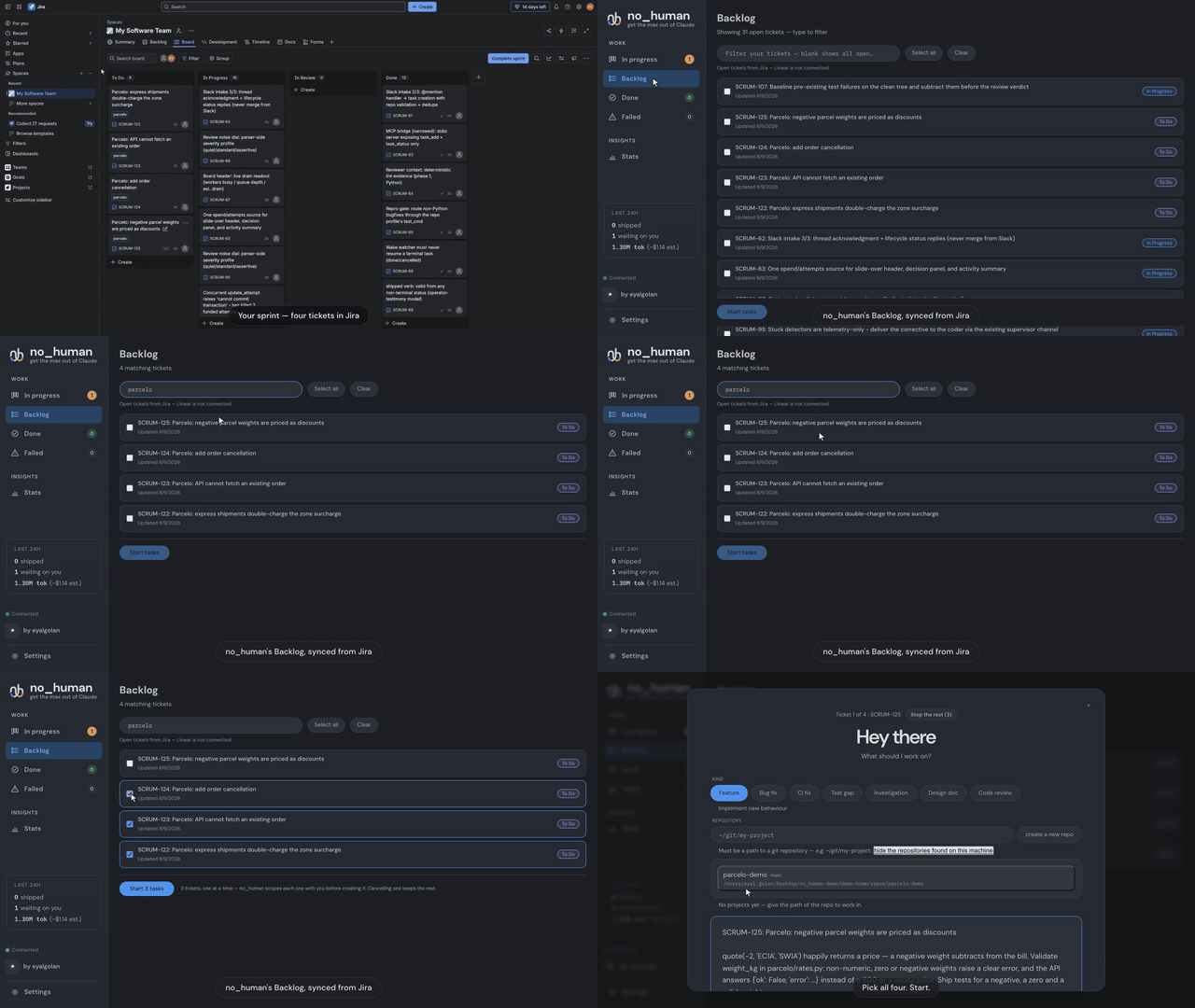
<p align="center">▶️ <strong><a href="https://getnohuman.com/assets/demo-jira.mp4">Play the full demo</a></strong> — 1:33, from Jira board to review-passed PR</p>
MCP server — hand it work from the agent you are already in
no_human ships an MCP (Model Context Protocol) server: a stdio bridge, built on the official Python MCP SDK, that lets Claude Code, Cursor or any MCP client file work with your local no_human and check on it.
nh mcp-serve # the MCP server, over stdio
Two tools, and no more:
| Tool | What it does |
|---|---|
task_add(title, description, repo_path) |
Files a task. no_human then plans it, writes the change, runs your tests, has a second model review it, and opens the pull request. |
task_status(task_id_or_external_id) |
Returns that task's current state — status, attempts, the PR link once there is one. |
It talks to your own no_human at http://127.0.0.1:8420 and nothing else: no
auth, because that address is localhost, and no service of ours in between. For
Claude Code, the same server ships as a plugin — point it at
plugins/no-human/ and the two tools appear in your
session.
// .mcp.json
{ "mcpServers": { "no_human": { "command": "nh", "args": ["mcp-serve"] } } }
Docs
| quickstart.md | Zero to first task, per platform |
| configuration.md | Every setting and default |
| verification.md | The gates, the bounded loop, the limits |
| security.md | Auth boundary, the never-merge rule, guards |
| blockers.md | Escalation, wake watcher, nh reply |
| adapters.md | Intake, context, VCS and CI backends |
| eval.md | Golden set, replay scoring, shadow mode |
| CHANGELOG.md | What changed, per release |
Development
uv sync
uv run pytest -q
uv run nh --help
Issues and pull requests welcome; run uv run pytest -q before submitting.
If no_human saved you a review cycle, a star helps other people find it:

License
MIT — see LICENSE. The licence covers the code, not the name: TRADEMARK.md is the policy on using "no_human" and the logo. Packaging a binary carries obligations the source tree does not, listed in THIRD-PARTY-NOTICES.md.
Recommended Servers

playwright-mcp
A Model Context Protocol server that enables LLMs to interact with web pages through structured accessibility snapshots without requiring vision models or screenshots.

Magic Component Platform (MCP)
An AI-powered tool that generates modern UI components from natural language descriptions, integrating with popular IDEs to streamline UI development workflow.

Audiense Insights MCP Server
Enables interaction with Audiense Insights accounts via the Model Context Protocol, facilitating the extraction and analysis of marketing insights and audience data including demographics, behavior, and influencer engagement.

VeyraX MCP
Single MCP tool to connect all your favorite tools: Gmail, Calendar and 40 more.

graphlit-mcp-server
The Model Context Protocol (MCP) Server enables integration between MCP clients and the Graphlit service. Ingest anything from Slack to Gmail to podcast feeds, in addition to web crawling, into a Graphlit project - and then retrieve relevant contents from the MCP client.

Kagi MCP Server
An MCP server that integrates Kagi search capabilities with Claude AI, enabling Claude to perform real-time web searches when answering questions that require up-to-date information.

E2B
Using MCP to run code via e2b.

Neon Database
MCP server for interacting with Neon Management API and databases

Exa Search
A Model Context Protocol (MCP) server lets AI assistants like Claude use the Exa AI Search API for web searches. This setup allows AI models to get real-time web information in a safe and controlled way.

Qdrant Server
This repository is an example of how to create a MCP server for Qdrant, a vector search engine.