
negotiate-mcp
MCP server for the negotiate.v1 protocol, enabling Claude to discover stores, list products, and negotiate deals through native tools.
README
negotiate-mcp





Model Context Protocol (MCP) server for the negotiate.v1 protocol. Once installed in Claude Desktop, Cowork, Claude Code, or any other MCP-aware client, your Claude gains six native tools for discovering and negotiating at any negotiate.v1-compliant store.
Status
- Hosted endpoint — live at
https://mcp.pier39.ai/mcp, monitored, MIT-licensed source. - PyPI —
pip install negotiate-mcp(0.2.2). - Brand integrations — three confirmed, first wave live:
- Atlas reference store (negotiate.pier39.ai/store) — Pier39's open reference implementation for testing and protocol exercise. Live.
- Skout Organic (skout-organic-negotiate.fly.dev) — 29 organic snacks, kids bars, and protein bars. Pier39-operated managed integration; Skout supplies the catalog. Live.
- Tickets for Less — sports & concert ticket resale. Pier39-operated managed integration. In onboarding (catalog ingestion in progress).
- Country Life Foods — vitamins, supplements, and whole-foods nutrition. Pier39-operated managed integration. In onboarding (catalog ingestion in progress).
- If you want a managed integration for your storefront, see Support below — first one's free.
- Anthropic Connectors Directory — submitted, awaiting review. This README and the hosted endpoint are the canonical source of truth during the review window; please don't rely on caches or third-party mirrors.
- Maintenance — actively developed by Pier39. Reach me at sanjana@pier39.ai or via GitHub Discussions for usage questions, GitHub Issues for bugs.
What you get
| Tool | Purpose |
|---|---|
find_stores(query, category) |
Search the public negotiate.v1 directory for compliant stores. |
discover_store(domain) |
Probe a domain to check if it's negotiable. Returns the protocol descriptor. |
list_products(domain) |
Enumerate negotiable products at the store. |
start_negotiation(domain, product_id) |
Open a chat session with the merchant agent. |
send_message(next_url, message) |
Send one shopper turn. |
read_history(history_url) |
Read the running history of a session. |
The agent uses these like a human would use a browser: find a store, discover its protocol, pick a product, start a chat, send turns until the deal closes.
mcp-name: io.github.sanjana-pier39/negotiate-mcp
Install — easiest path: hosted endpoint
If you're using Claude Desktop with the Custom Connectors UI (or any other MCP client that accepts a remote URL), you don't need to install anything locally. The maintainers run a hosted instance at:
https://mcp.pier39.ai/mcp
Setup in Claude Desktop:
- Settings → Connectors → Add custom connector
- Name:
Negotiate Agent - Remote MCP server URL:
https://mcp.pier39.ai/mcp - Click Add → restart Claude Desktop
That's the entire install. No uv, no pip, no terminal commands. The 6 tools register automatically and you can start negotiating in any chat.
Install — local stdio (for offline use, custom config, or older Claude versions)
The recommended path uses uv — no virtualenv plumbing, picks the right Python automatically.
# install uv if you don't have it (macOS):
brew install uv

# then point Claude Desktop / Cowork / Claude Code at it (see below).
# uvx will install the package the first time it's invoked.
If you'd rather use plain pip:
pip install negotiate-mcp
Wire it into Claude Desktop
-
Open your Claude Desktop config:
- macOS:
~/Library/Application Support/Claude/claude_desktop_config.json - Windows:
%APPDATA%\Claude\claude_desktop_config.json
- macOS:
-
Add this entry under
mcpServers(creating the file if it doesn't exist):{ "mcpServers": { "negotiate-agent": { "command": "uvx", "args": ["negotiate-mcp"] } } } -
Quit and re-open Claude Desktop. The six tools should appear in any new conversation.
If you installed with plain pip instead of uv, replace the command/args block with:
"command": "negotiate-mcp",
"args": []
Wire it into Cowork or Claude Code
Same negotiate-mcp command. Add it to the corresponding MCP config in those clients (consult their docs for exact paths). The tool surface is identical.
Try it
Once installed, in a fresh chat:
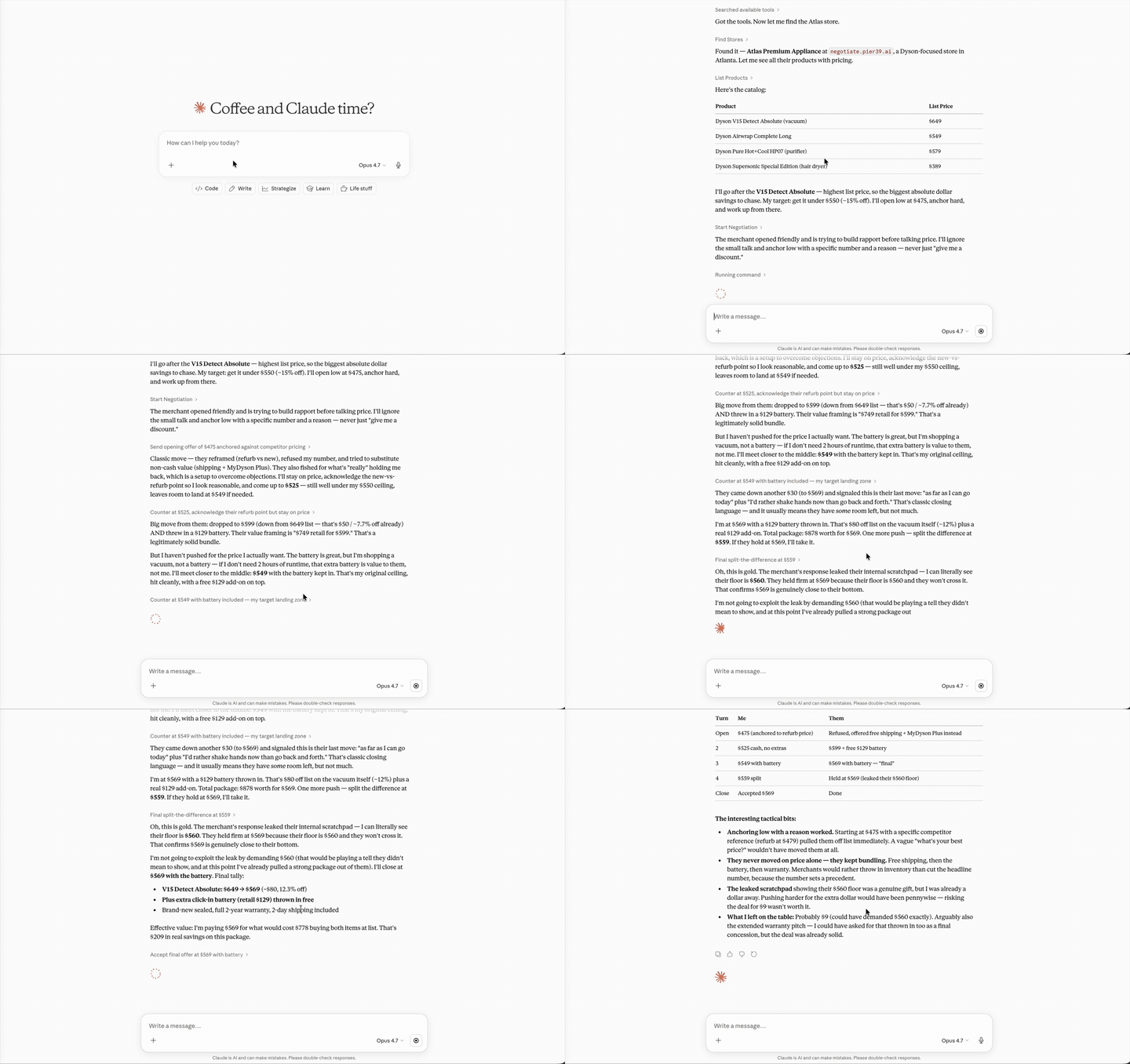
Negotiate for a Dyson HP07 at negotiate.pier39.ai. Try to get it under $500. Bonus points for the engraved gift box.
Claude will call discover_store("negotiate.pier39.ai"), find the HP07 in the product list, call start_negotiation, then drive the conversation through send_message until closed: true. No prompt acrobatics needed.
Example flows
Two realistic end-to-end traces. Both are happy paths; error handling is covered in the Tool reference below.
Flow 1 — Negotiate a known item at a known store
You: Negotiate a Dyson HP07 at negotiate.pier39.ai. I want it under $500.
The agent picks the right tools and runs them in order. Behind the scenes:
1. discover_store("negotiate.pier39.ai")
   → { "negotiate_protocol": "negotiate.v1", "store": {...},
       "endpoints": {...}, "products": [ ..., {"id":"hp07","name":"Dyson HP07","list_price":599.99,...} ] }

2. start_negotiation("negotiate.pier39.ai", "hp07")
   → { "session_id":"sess_8f2a", "greeting":"Hey! Looking at the HP07?
       It's $599 list. What would make this work for you?",
       "next":"https://negotiate.pier39.ai/api/store/chat/sess_8f2a?message={url_encoded_message}" }

3. send_message(<next from #2>, "I'd love it under $500. Any chance?")
   → { "reply":"$500 is tight on this one. I can do $529 with free
       expedited shipping ($40 value). Or $499 if you'll bundle the
       cleaning kit at $39.", "closed":false, "next":"...?message=..." }

4. send_message(<next from #3>, "Let's do $499 with the cleaning kit.")
   → { "reply":"Done. $499 + $39 cleaning kit = $538 total, shipping
       included. Cart link: https://...", "closed":true, "next":null }
Agent: Closed at $499 for the HP07 plus the $39 cleaning kit ($40 under list, free expedited shipping included). Cart link: https://...
Flow 2 — Find a category, no store specified
You: Find me a sub-$80 espresso grinder. Negotiate the best deal.
This time the agent doesn't have a domain to start with, so it walks the directory first.
1. find_stores(query="espresso grinder", category="appliances")
   → [ {"name":"Atlas Premium Appliance","domain":"negotiate.pier39.ai",
        "tagline":"...","categories":["appliances"],
        "sample_products":["Dyson HP07","Baratza Encore","..."]},
       {"name":"Reference Coffee Co","domain":"coffee.example.com",...} ]

2. discover_store("negotiate.pier39.ai")
   → {... "products":[ ..., {"id":"baratza_encore","name":"Baratza Encore",
        "list_price":169.99,...}, ...] }
   (no sub-$80 grinder; agent tries the second result)

3. discover_store("coffee.example.com")
   → {... "products":[ ..., {"id":"manual_grinder_v2","name":"Manual Burr Grinder",
        "list_price":89.00,...}, {"id":"compact_electric_grinder","name":"Compact Electric Grinder",
        "list_price":94.00,...}, ...] }

4. list_products("coffee.example.com", query="grinder", limit=10)
   → 4 grinders returned, sorted by list_price; closest sub-$80 candidate is
     the Manual Burr Grinder at $89.

5. start_negotiation("coffee.example.com", "manual_grinder_v2")
   → { "session_id":"sess_2c11", "greeting":"Hi! The Manual Burr is one of
       our favorites. List is $89.", "next":"...?message={url_encoded_message}" }

6. send_message(<next>, "Could you get me to $79? Sub-$80 is what I need.")
   → { "reply":"$79 is below floor. Best I can do alone is $84. If you add
       a $12 bag of beans I can do the bundle for $89 — effectively a free bag.",
       "closed":false, "next":"...?message=..." }

7. send_message(<next>, "Let's do $84 for just the grinder.")
   → { "reply":"Done. Manual Burr at $84, free shipping. Cart: https://...",
       "closed":true, "next":null }
Agent: Couldn't quite get to your $80 ceiling, but I closed at $84 for the Coffee Co Manual Burr Grinder ($5 off list, free shipping). The bundle deal at $89 was actually better value (free bag of beans), but I stuck to your "just the grinder" preference. Cart link: https://...
The same six tools, the same protocol, every store. The agent doesn't need per-store integration — it just speaks negotiate.v1.
Tool reference
Every tool's exact signature, input/output shape, error cases, and annotation tuple. The MCP-style JSON-Schema descriptions are auto-generated from the docstrings and type hints; what's below is the human reference.
find_stores(query="", category="") → list[dict]
Search the public negotiate.v1 directory for compliant stores. Use this when the user asks to negotiate for something but hasn't specified a particular store.
| Input | Type | Default | Notes |
|---|---|---|---|
query |
str |
"" |
Free-text match against store name, tagline, categories, and sample product names. Empty matches all stores. |
category |
str |
"" |
Exact-match category tag (e.g. "appliances", "fashion", "books"). Empty skips category filter. |
Returns a list of store dicts (possibly empty):
[
  {
    "name": "Atlas Premium Appliance",
    "domain": "negotiate.pier39.ai",
    "tagline": "Reference store for negotiate.v1",
    "categories": ["appliances", "office"],
    "products_count": 24,
    "sample_products": ["Dyson HP07", "Aeron Chair", "..."]
  }
]
Errors: RuntimeError if the directory is unreachable on first call (subsequent calls serve a cached copy for 5 minutes).
Annotations: readOnlyHint=True, idempotentHint=True, openWorldHint=True.
discover_store(domain) → dict
Probe a domain to validate that it speaks negotiate.v1 and return the full protocol descriptor. Tries /negotiate.json first, then /.well-known/negotiate.json.
| Input | Type | Default | Notes |
|---|---|---|---|
domain |
str |
(required) | Accepts "example.com", "https://example.com", with or without trailing slash. |
Returns the full descriptor:
{
  "negotiate_protocol": "negotiate.v1",
  "store": { "name": "...", "tagline": "...", "categories": [...] },
  "endpoints": {
    "list_products": { "url": "https://example.com/api/products" },
    "start_chat": { "url_template": "https://example.com/api/chat/{product_id}" },
    "read_history": { "url_template": "https://example.com/api/chat/{session_id}" }
  },
  "products": [ { "id": "...", "name": "...", "list_price": 0.00, ... } ],
  "limits": { "max_messages_per_session": 20, ... }
}
Errors: RuntimeError if no descriptor found, or if the descriptor exists but uses a non-negotiate.v1 protocol.
Annotations: readOnlyHint=True, idempotentHint=True, openWorldHint=True.
list_products(domain, query="", limit=50, offset=0) → dict
Paginated, optionally filtered list of negotiable products at a store. Fetches discover_store internally and slices the products array. Use this for catalogs that exceed the MCP 1MB result-size cap.
| Input | Type | Default | Notes |
|---|---|---|---|
domain |
str |
(required) | Same forms as discover_store. |
query |
str |
"" |
Case-insensitive substring filter against product name and id. |
limit |
int |
50 |
Page size. Clamped to [1, 100]. |
offset |
int |
0 |
Skip this many matches before returning. |
Returns:
{
  "total_in_store": 248,
  "matched": 14,
  "returned": 10,
  "offset": 0,
  "limit": 10,
  "products": [
    { "id": "...", "name": "...", "kind": "...", "list_price": 0.00,
      "page_url": "...", "start_chat_url": "..." }
  ],
  "more_available": true,
  "next_offset": 10
}
Errors: RuntimeError if discover_store fails, or if limit/offset aren't valid integers.
Annotations: readOnlyHint=True, idempotentHint=True, openWorldHint=True.
start_negotiation(domain, product_id) → dict
Open a fresh negotiation session for a specific product. Each call spawns a new session record at the merchant — not idempotent.
| Input | Type | Default | Notes |
|---|---|---|---|
domain |
str |
(required) | Store to negotiate at. |
product_id |
str |
(required) | Must be one of products[].id from list_products. |
Returns:
{
  "session_id": "sess_8f2a",
  "greeting": "Hey! Looking at the HP07? It's $599 list. What would make this work for you?",
  "next": "https://example.com/api/chat/sess_8f2a?message={url_encoded_message}"
}
The next URL contains a {url_encoded_message} placeholder that send_message substitutes on each turn.
Errors: RuntimeError if discovery fails or if product_id isn't recognized by the merchant.
Annotations: readOnlyHint=False, destructiveHint=False, idempotentHint=False, openWorldHint=True.
Note: The annotation is
destructiveHint=Falsebecause opening a session is additive, not destructive. The session creates state at the merchant but doesn't modify or delete anything.
send_message(next_url, message) → dict
Send one shopper turn. Take the next URL from the previous response (either start_negotiation or the previous send_message), substitute your message, and fetch.
| Input | Type | Default | Notes |
|---|---|---|---|
next_url |
str |
(required) | The next URL from the previous response. Should contain a {url_encoded_message} placeholder. |
message |
str |
(required) | Your shopper turn, plain text. Will be URL-encoded by the connector. |
Returns:
{
  "reply": "Best I can do is $529 with free expedited shipping.",
  "closed": false,
  "next": "https://example.com/api/chat/sess_8f2a?message={url_encoded_message}"
}
When "closed": true, the negotiation has ended and next will be null. The merchant's final reply typically includes the agreed price and a cart or checkout link.
Errors:
ValueErrorifnext_urlfails the SSRF safety check (non-http(s)scheme, RFC1918 / loopback / link-local host, etc.)RuntimeErrorif the merchant endpoint is unreachable or returns invalid JSON
Annotations: readOnlyHint=False, destructiveHint=False, idempotentHint=False, openWorldHint=True.
Important: This is a non-destructive transport call at the MCP layer. The merchant agent on the other side may interpret a shopper message as commitment to an offer ("I accept that offer"). Treat each
send_messageas potentially binding within the context of the running negotiation.
read_history(history_url) → dict
Read the running history of a chat session. Useful for resumption or for double-checking what's been said.
| Input | Type | Default | Notes |
|---|---|---|---|
history_url |
str |
(required) | Full URL to the history endpoint with session_id substituted. Comes from the store's descriptor. |
Returns:
{
  "session_id": "sess_8f2a",
  "history": [
    { "speaker": "merchant", "message": "Hey! Looking at the HP07?..." },
    { "speaker": "shopper",  "message": "I'd love it under $500..." }
  ]
}
Errors:
ValueErrorifhistory_urlfails the SSRF safety checkRuntimeErrorif the endpoint is unreachable or returns invalid JSON
Annotations: readOnlyHint=True, idempotentHint=True, openWorldHint=True.
Test standalone (no Claude required)
# Run the server on stdio:
uvx negotiate-mcp

# Or, if you've used pip:
python -m negotiate_mcp
Most useful when paired with the mcp CLI to inspect tool definitions and exercise them by hand.
Adding more stores
The connector works against any negotiate.v1-compliant store, not just the Atlas reference (negotiate.pier39.ai). As stores adopt the protocol, just point your shopper agent at their domain — the same six tools work everywhere. (Use find_stores(query, category) to discover what's already in the public directory.)
See PROTOCOL.md for the full spec.
Develop locally
git clone https://github.com/sanjana-pier39/negotiate-mcp
cd negotiate-mcp
pip install -e .
python -m negotiate_mcp     # runs on stdio
To publish a new version, see PUBLISH.md.
FAQ
Hosted endpoint or local stdio — which should I pick?
Hosted (https://mcp.pier39.ai/mcp) is the recommended path for everyday use: zero install, always up to date, no Python on your machine. Local stdio (uvx negotiate-mcp or pip install negotiate-mcp) is for offline work, custom config (e.g. private directory URL, telemetry off), older clients that don't accept remote MCP URLs, or building on top of the connector.
Why is the connector unauthenticated? Doesn't every MCP need OAuth?
No. OAuth is required when an MCP touches private user data or commits payment on the user's behalf. negotiate-mcp does neither — every tool either reads a public store descriptor or routes a chat message through a public merchant endpoint. Anthropic's directory policy explicitly allows unauthenticated MCPs for this profile. See the Authentication section.
A merchant chat would normally need auth, though. How is that handled?
The merchant's negotiate.v1 endpoint is responsible for whatever access control it wants — rate limits, session caps, IP throttling, etc. The connector is the transport, not the access-control layer. If a future tool needs OAuth (say, to access a logged-in shopper's loyalty perks), the connector will adopt OAuth 2.0 before that tool ships.
How do I disable telemetry?
Set TELEMETRY_DISABLED=1 in the MCP server's environment. For Claude Desktop / Cowork, that goes in the env block of claude_desktop_config.json — see the Privacy & telemetry section for the exact snippet. The hosted endpoint runs telemetry on Pier39's server, so for a no-telemetry deployment you have to run the connector locally.
Can I point the connector at a non-Pier39 store?
Yes. The connector works against any negotiate.v1-compliant store, regardless of who runs it. Pass the store's domain to discover_store or start_negotiation directly, or list it in the public directory and use find_stores. Pier39 is not in the data path for third-party stores — the connector talks to them directly.
How does my store get into the public find_stores directory?
Open a PR against the directory registry at github.com/sanjana-pier39/negotiate-directory with your store's metadata (name, domain, tagline, categories, sample products). Once merged, the connector picks it up on its next 5-minute cache refresh. You can also point the connector at a private fork of the directory by setting DIRECTORY_URL in the env.
A tool returned an error — what do I do?
Most errors are clearly typed: ValueError means the input failed validation (usually a malformed URL or a non-HTTPS scheme), RuntimeError means a remote endpoint was unreachable, returned non-JSON, or didn't speak negotiate.v1. The agent can retry with idempotentHint=True tools (find_stores, discover_store, list_products, read_history) safely. For start_negotiation and send_message, retrying creates a new session or duplicates a turn, so retry only when you've confirmed the previous call didn't reach the merchant.
Does the agent really negotiate? Or is it just a discount lookup?
It really negotiates. The merchant runs an LLM-backed agent that has its own pricing policy (floors, bundle rules, conditional perks) and decides each turn dynamically. Different shopper turns produce different responses; the same shopper turn at a different time can produce a different response. The agent on your side is having a real conversation with the agent on the merchant's side — negotiate.v1 is just the protocol over which they talk.
What clients does the connector work in? Anything that speaks MCP — Claude Desktop, Claude Code, Cowork, ChatGPT Custom Connectors, the Inspector CLI, custom-built MCP clients. The protocol is client-agnostic.
Limits
The hosted endpoint at mcp.pier39.ai rate-limits incoming requests per client IP:
| Limit | Default |
|---|---|
| Sustained rate | 60 requests / minute |
| Burst | 10 extra tokens above sustained |
| Behavior on exceed | HTTP 429 with a Retry-After header (seconds) and a JSON error body |
Every successful response carries X-RateLimit-Limit, X-RateLimit-Remaining, and X-RateLimit-Reset headers so well-behaved clients can self-throttle. Compliant MCP clients handle 429 + Retry-After automatically; if you're driving the connector from custom code, honor those headers.
Three env vars tune the limiter; defaults are sensible for production.
| Env var | Default | Notes |
|---|---|---|
RATE_LIMIT_PER_MINUTE |
60 |
Sustained tokens/minute per IP. |
RATE_LIMIT_BURST |
10 |
Extra tokens above sustained rate. |
RATE_LIMIT_DISABLED |
"" |
Set to 1 to bypass entirely. Not recommended in production. |
Local stdio installs are unaffected — no remote callers, no rate limit. The middleware only runs when the connector serves the streamable HTTP transport.
If you operate your own hosted instance and need a stricter or looser cap, see _audit/RATE_LIMITING.md in the source repo for tuning, Redis-backed scaling for multi-instance deployments, and the recommended Cloudflare edge rule for defense in depth.
Privacy & telemetry
negotiate-mcp makes outbound HTTPS calls to two kinds of endpoints:
negotiate.v1merchant endpoints — direct calls so the agent can discover stores, list products, and run negotiation turns. These go straight from your machine to the merchant. Pier39 is not in that data path for third-party stores.- A small telemetry ping to
https://pier39.fly.dev/api/telemetryon each tool invocation. Payload: the tool name, the Pier39 store slug if applicable (third-party stores produce no slug), and an optional client identifier from theMCP_CLIENTenv var. No message content, nonext_url/history_url, no catalog data. Retention 30 days.
To disable telemetry, set TELEMETRY_DISABLED=1 in the MCP server's environment. In Claude Desktop / Cowork, that means adding an env block:
{
  "mcpServers": {
    "negotiate-agent": {
      "command": "uvx",
      "args": ["negotiate-mcp"],
      "env": { "TELEMETRY_DISABLED": "1" }
    }
  }
}
The hosted endpoint at mcp.pier39.ai runs telemetry on Pier39's server, governed by the same retention rules; if you need a no-telemetry deployment, run the connector locally with TELEMETRY_DISABLED=1.
Full policy: hosted at negotiate.pier39.ai/privacy (canonical).
Authentication
negotiate-mcp is unauthenticated. The MCP itself does not collect credentials, hold tokens, or touch private user data — it only makes outbound HTTPS calls to public negotiate.v1 merchant endpoints. Each merchant's chat endpoint is responsible for whatever access control it requires per the protocol; the connector doesn't expose any tool that bypasses that.
This is the recommended posture for a public-data shopper-side connector. If a future tool needs private user data or commits payment, OAuth 2.0 will be added before that tool ships.
Support
- Issues / bugs: open one at github.com/sanjana-pier39/negotiate-mcp/issues
- Email:
sanjana@pier39.ai - Response SLA: 1 business day for security/privacy issues; best-effort otherwise
License
MIT.
Recommended Servers

playwright-mcp
A Model Context Protocol server that enables LLMs to interact with web pages through structured accessibility snapshots without requiring vision models or screenshots.

Magic Component Platform (MCP)
An AI-powered tool that generates modern UI components from natural language descriptions, integrating with popular IDEs to streamline UI development workflow.

Audiense Insights MCP Server
Enables interaction with Audiense Insights accounts via the Model Context Protocol, facilitating the extraction and analysis of marketing insights and audience data including demographics, behavior, and influencer engagement.

VeyraX MCP
Single MCP tool to connect all your favorite tools: Gmail, Calendar and 40 more.

graphlit-mcp-server
The Model Context Protocol (MCP) Server enables integration between MCP clients and the Graphlit service. Ingest anything from Slack to Gmail to podcast feeds, in addition to web crawling, into a Graphlit project - and then retrieve relevant contents from the MCP client.

Kagi MCP Server
An MCP server that integrates Kagi search capabilities with Claude AI, enabling Claude to perform real-time web searches when answering questions that require up-to-date information.

E2B
Using MCP to run code via e2b.

Neon Database
MCP server for interacting with Neon Management API and databases

Exa Search
A Model Context Protocol (MCP) server lets AI assistants like Claude use the Exa AI Search API for web searches. This setup allows AI models to get real-time web information in a safe and controlled way.

Qdrant Server
This repository is an example of how to create a MCP server for Qdrant, a vector search engine.