
n8n Workflow Builder
Converts natural language descriptions into validated, production-ready n8n workflows with automatic error fixing and architecture recommendations.
README


n8n Workflow Builder MCP Server
Build n8n workflows from text using AI - Built by FlowEngine
Turn natural language into production-ready, validated n8n workflows. This isn't just another n8n context provider, it's a complete workflow generation engine with built-in validation, auto-fixing, and architectural intelligence.
this MCP is built to provide validated n8n workflows — not just context.
- 13-Point Validation Engine - Catches errors before you import
- Auto-Fix Malformed Workflows — Automatically repairs common issues
- Architecture Recommendations — Suggests optimal workflow patterns
- Security Scanning — Detects credential leaks and vulnerabilities
- Performance Analysis — Identifies bottlenecks and optimization opportunities
- Real Parameter Schemas — Loaded directly from n8n packages for accuracy
- 600+ Registered Node Types — Only real nodes, no hallucinations
Result: Workflows that actually import and run on first try.
Quick Start
Local Install | Remote Server (no install)
Video Demo
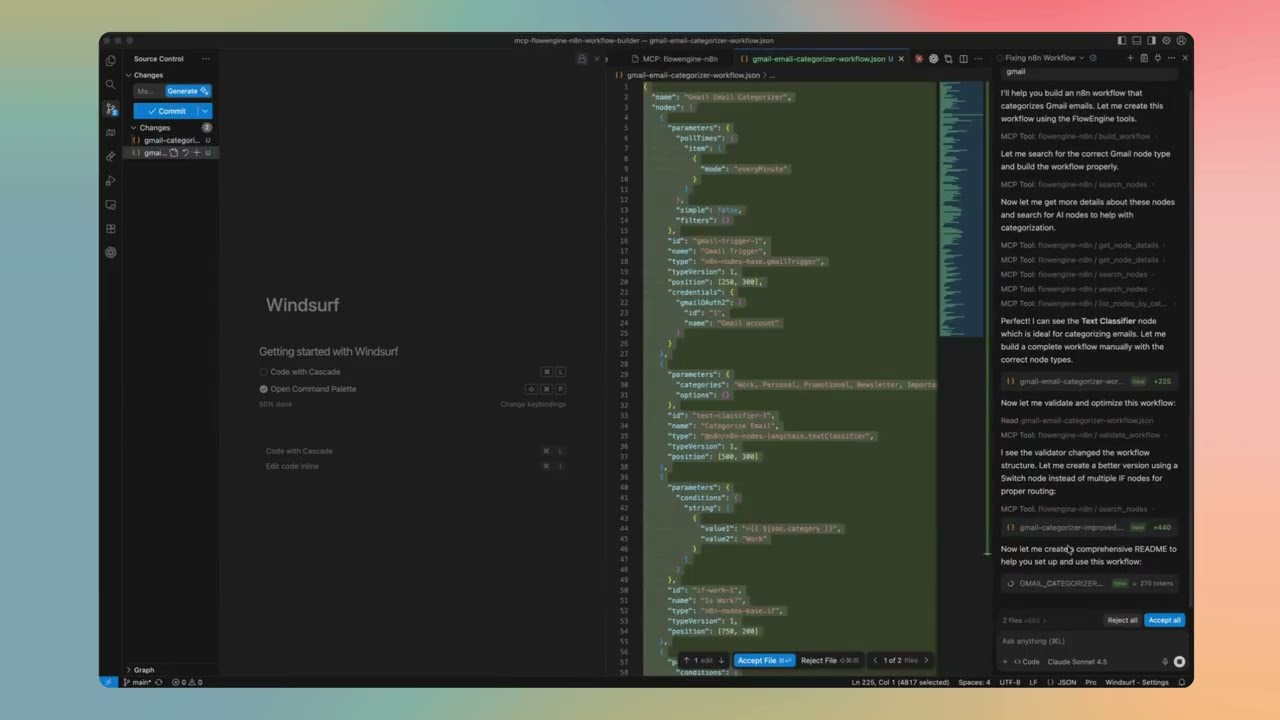
Feature Details
13-Point Validation Engine
Every workflow passes through 13 validation checks before output:
- Node Type Validation — Verifies every node type exists in n8n
- Connection Integrity — Ensures all connections reference existing nodes
- Parameter Type Checking — Validates parameter types match node schemas
- Required Fields — Checks all required parameters are present
- Credential References — Validates credential configurations
- Expression Syntax — Checks n8n expression syntax (
={{ }}) - Position Validation — Ensures nodes have valid canvas positions
- Duplicate Detection — Catches duplicate node names
- Orphan Node Detection — Finds disconnected nodes
- Trigger Validation — Ensures workflows have proper entry points
- Loop Detection — Identifies potential infinite loops
- Output Mapping — Validates data flow between nodes
- Version Compatibility — Checks node version compatibility
Auto-Fix Malformed Workflows
When validation finds issues, the engine automatically repairs them:
- Missing positions → Auto-calculates layout on canvas
- Invalid node names → Generates unique, valid names
- Missing connections array → Initializes proper structure
- Incorrect typeVersion → Updates to current supported version
- Malformed parameters → Applies sensible defaults
- Broken JSON structure → Attempts recovery and repair
Architecture Recommendations
Based on your task description, the engine analyzes keywords and intent to suggest the optimal pattern. Here's when each is recommended:
Regular Workflows (Deterministic)
Linear Pipeline
- When: Simple, predictable data transformations
- Example: "Get data from API → Transform → Save to database"
- Best for: ETL, data sync, scheduled reports
- Why not AI: No decision-making needed, faster execution, lower cost
Conditional Branching
- When: Known decision points with clear rules
- Example: "If order > $100, send to manager; else auto-approve"
- Best for: Approval flows, routing, rule-based automation
- Why not AI: Rules are explicit, no reasoning required
Parallel Processing
- When: Independent operations that can run simultaneously
- Example: "Send email AND update CRM AND log to Slack"
- Best for: Notifications, multi-system updates, batch processing
- Why not AI: No dependencies between branches
Event-Driven
- When: Reacting to external triggers
- Example: "When webhook received → process → respond"
- Best for: API endpoints, real-time integrations, chatbots
- Why not AI: Response is formulaic, not conversational
AI Agent Workflows (Autonomous)
When to use AI Agents instead of regular workflows:
| Use AI Agent When... | Use Regular Workflow When... |
|---|---|
| Task requires reasoning | Steps are predictable |
| Input is unstructured (natural language) | Input is structured (JSON, forms) |
| Multiple tools might be needed dynamically | Tool sequence is known |
| Conversation/context matters | Stateless processing |
| Decision logic is complex or fuzzy | Rules are explicit |
Single AI Agent
- When: One autonomous entity with access to tools
- Example: "Customer support bot that can search docs, create tickets, and escalate"
- Architecture: Chat Trigger → AI Agent (with tools) → Response
- Tools: Calculator, Code, HTTP Request, custom tools
- Memory: Optional conversation memory for context
AI Agent with Memory
- When: Conversation context matters across messages
- Example: "Personal assistant that remembers user preferences"
- Architecture: Chat Trigger → Memory Load → AI Agent → Memory Save → Response
- Memory types: Buffer (recent), Window (last N), Summary (compressed)
Multi-Agent Workflows
For complex tasks, multiple specialized agents can collaborate:
Sequential Multi-Agent
- When: Task has distinct phases requiring different expertise
- Example: "Research Agent → Analysis Agent → Writing Agent"
- Flow: Agent 1 output becomes Agent 2 input
- Best for: Content pipelines, multi-step reasoning
Supervisor Pattern
- When: Need coordination between specialist agents
- Example: "Supervisor routes to: Sales Agent, Support Agent, or Technical Agent"
- Flow: Supervisor Agent decides which specialist handles the task
- Best for: Customer service, complex routing
Parallel Agents
- When: Multiple perspectives needed simultaneously
- Example: "Analyst Agent AND Risk Agent AND Compliance Agent all review"
- Flow: Split → Multiple Agents → Merge results
- Best for: Review processes, multi-criteria evaluation
Hierarchical Agents
- When: Complex orchestration with sub-tasks
- Example: "Manager Agent delegates to Team Agents who use Tool Agents"
- Flow: Top-level agent breaks down task, delegates, aggregates
- Best for: Large-scale automation, enterprise workflows
How the Engine Decides
The recommendation engine analyzes your description for:
- AI keywords: "chat", "conversation", "understand", "decide", "reason" → suggests AI Agent
- Automation keywords: "sync", "transform", "schedule", "trigger" → suggests Regular Workflow
- Complexity signals: Multiple conditions, dynamic routing → suggests Conditional or Agent
- Tool mentions: "search", "calculate", "call API" → adds appropriate tools to Agent
- Memory signals: "remember", "context", "history" → adds memory to Agent
Security Scanning
Detects vulnerabilities before deployment:
- Hardcoded credentials — API keys, passwords, tokens in plain text
- Insecure protocols — HTTP instead of HTTPS
- Missing authentication — API calls without auth headers
- Sensitive data exposure — PII in logs or outputs
- Code injection risks — Unsafe code node patterns
Performance Analysis
Identifies bottlenecks and optimization opportunities:
- Execution time estimates — Per-node and total workflow
- Parallel path detection — Opportunities for concurrent execution
- API call optimization — Batch vs. individual requests
- Memory usage patterns — Large data handling concerns
- Rate limiting risks — High-frequency API calls
Real Parameter Schemas
Parameters are loaded directly from n8n packages, not guessed:
- Accurate defaults — Real default values from node definitions
- Correct types — String, number, boolean, options validated
- Required vs optional — Knows which fields are mandatory
- Nested structures — Complex parameter objects handled correctly
600+ Registered Node Types
No hallucinations. The AI can only use nodes that actually exist:
- Every node type is loaded from the official
n8n-nodes-basepackage - LangChain nodes from
@n8n/n8n-nodes-langchainincluded - Node registry is generated directly from n8n source code
- If a node doesn't exist in the registry, it won't be used
- Prevents the common AI problem of inventing fake node types
Quick Start
Installation Methods
Choose the method that works best for you:
1. Smithery (One-Click Install)
Easy local installation for Claude Desktop. View on Smithery
npx @smithery/cli install @Ami3466/mcp-flowengine-n8n-workflow-builder --client claude
Note: Smithery has a 50 uses/day limit. For unlimited access, use the remote server below.
2. Remote Server (More Stable - Unlimited) ⭐
Connect to our hosted server - no installation required!
Add this to your Claude Desktop config:
Mac: ~/Library/Application Support/Claude/claude_desktop_config.json
Windows: %APPDATA%/Claude/claude_desktop_config.json
{
  "mcpServers": {
    "flowengine-n8n": {
      "url": "https://mcp-flowengine-n8n-workflow-builder.onrender.com/mcp",
      "transport": "http"
    }
  }
}
Benefits:
- ✅ More stable - Dedicated hosting infrastructure
- ✅ Unlimited usage - No daily limits
- ✅ Always up-to-date - Automatically updated
- ✅ Zero installation - Just add config and restart Claude
- ✅ Free - Community hosted
3. npm (Manual Install)
For all other MCP clients:
npm install -g flowengine-n8n-workflow-builder
Setup by Platform
Claude Desktop
Option A: Smithery (Local Install)
npx @smithery/cli install @Ami3466/mcp-flowengine-n8n-workflow-builder --client claude
Restart Claude Desktop after installation.
Note: Limited to 50 uses/day. For unlimited access, use the remote server below.
Option B: Remote Server (More Stable - Unlimited) ⭐
No installation required! Just add config and restart.
-
Edit Claude Desktop config:
- Mac:
~/Library/Application Support/Claude/claude_desktop_config.json - Windows:
%APPDATA%/Claude/claude_desktop_config.json
- Mac:
-
Add this configuration:
{ "mcpServers": { "flowengine-n8n": { "url": "https://mcp-flowengine-n8n-workflow-builder.onrender.com/mcp", "transport": "http" } } } -
Restart Claude Desktop (fully quit and reopen)
-
Verify connection:
- Look for the 🔌 MCP icon in Claude Desktop
- You should see "flowengine-n8n" listed with green status
Benefits: More stable, unlimited usage, no local installation, always updated.
Option C: Manual Local Install
-
Install the package:
npm install -g flowengine-n8n-workflow-builder -
Edit Claude Desktop config:
- Mac:
~/Library/Application Support/Claude/claude_desktop_config.json - Windows:
%APPDATA%/Claude/claude_desktop_config.json
- Mac:
-
Add this configuration:
{ "mcpServers": { "flowengine-n8n": { "command": "flowengine-n8n" } } } -
Restart Claude Desktop (fully quit and reopen)
Claude Code (VS Code Extension)
-
Install the package globally:
npm install -g flowengine-n8n-workflow-builder -
Open VS Code Settings (Cmd/Ctrl + ,)
-
Search for "MCP"
-
Add MCP Server:
- Click "Edit in settings.json"
- Add to
claude.mcpServers:
{ "claude.mcpServers": { "flowengine-n8n": { "command": "flowengine-n8n" } } } -
Reload VS Code (Cmd/Ctrl + Shift + P → "Developer: Reload Window")
-
Start using:
- Open Claude Code panel
- Ask Claude to build n8n workflows
- The MCP server will be automatically available
Cursor
-
Install the package:
npm install -g flowengine-n8n-workflow-builder -
Open Cursor Settings:
- Mac: Cursor → Settings → Features
- Windows/Linux: File → Preferences → Features
-
Navigate to MCP Settings:
- Scroll to "Model Context Protocol"
- Click "Edit Config"
-
Add configuration:
{ "mcpServers": { "flowengine-n8n": { "command": "flowengine-n8n" } } } -
Restart Cursor
-
Verify:
- Open Cursor's AI chat
- The MCP server should be available
- Try: "Create an n8n workflow for me"
Cline (VS Code)
-
Install the package:
npm install -g flowengine-n8n-workflow-builder -
Open Cline Settings in VS Code:
- Open Command Palette (Cmd/Ctrl + Shift + P)
- Type "Cline: Open Settings"
-
Add MCP Server:
- In Cline settings, find "MCP Servers"
- Add new server:
{ "flowengine-n8n": { "command": "flowengine-n8n" } } -
Reload VS Code
Continue.dev
-
Install the package:
npm install -g flowengine-n8n-workflow-builder -
Open Continue config:
- Open Command Palette (Cmd/Ctrl + Shift + P)
- Type "Continue: Open config.json"
-
Add MCP server to config:
{ "mcpServers": { "flowengine-n8n": { "command": "flowengine-n8n" } } } -
Reload Continue extension
What This Does
🤖 Turns Text into Workflows
Describe what you want in plain language:
- "Monitor my email and notify me on Slack"
- "Build an AI chatbot with memory and tools"
- "Sync data between Google Sheets and my database"
- "Create a customer support automation workflow"
Your AI assistant generates complete, working n8n workflows.
🧠 Expert n8n Knowledge
Your AI gets access to:
- 600+ Node Types - All n8n-nodes-base and LangChain nodes
- Real Parameter Schemas - Loaded directly from n8n packages
- Best Practices - Workflow design patterns and optimizations
- Intelligent Validation - Automatic error detection and fixing
✨ Powerful Features
Workflow Generation:
- Build workflows from natural language descriptions
- Add, edit, and delete nodes programmatically
- Connect nodes and manage workflow structure
- Get detailed workflow analysis
Intelligence & Suggestions:
- Architecture recommendations (linear, conditional, AI agent, etc.)
- Node suggestions for specific tasks
- Workflow analysis and improvements
- Natural language explanations
Quality & Security:
- Comprehensive workflow validation
- Security vulnerability scanning
- Performance analysis and bottleneck detection
- Dry-run workflow testing
Templates & Search:
- Pre-built workflow templates
- Search 600+ nodes by keyword
- Browse nodes by category
- Get detailed node documentation
Usage Examples
Once installed, ask your AI assistant to help with workflows:
Create a New Workflow
"Create an n8n workflow that monitors Gmail for emails with 'urgent' in the subject and sends a Slack notification to #alerts"
Analyze Existing Workflow
"Analyze this workflow and suggest improvements"
[paste your workflow JSON]
Get Node Recommendations
"What nodes should I use to build a customer onboarding automation?"
Validate and Fix
"Validate this workflow and fix any errors"
[paste workflow JSON]
Security Scan
"Scan this workflow for security issues"
[paste workflow JSON]
Available Tools
Your AI assistant gets access to 23 powerful tools:
Workflow Building:
build_workflow- Generate workflows from descriptionsadd_node- Add nodes to existing workflowsedit_node- Modify node parametersdelete_node- Remove nodesadd_connection- Connect nodesget_workflow_details- Analyze workflow structure
Validation & Quality:
validate_workflow- Comprehensive validation with auto-fixtest_workflow- Dry-run simulationscan_security- Security vulnerability detectionanalyze_performance- Performance and bottleneck analysis
Intelligence:
suggest_architecture- Recommend workflow patternssuggest_nodes- Node recommendations for tasksanalyze_workflow- Deep workflow insightssuggest_improvements- Optimization suggestionsexplain_workflow- Natural language explanations
Node Library:
search_nodes- Search 600+ nodeslist_nodes_by_category- Browse by categoryget_node_details- Detailed node documentation
Templates:
list_templates- Browse workflow templatesget_template- Get specific templatessearch_templates- Search templates
Utilities:
extract_workflow_json- Extract JSON from textfix_json- Repair malformed JSON
Deploy Your Workflows
Option 1: FlowEngine.cloud (Recommended)
Build for free, deploy instantly:
- Generate workflow using this MCP server
- Visit flowengine.cloud
- Import your workflow JSON
- Test and deploy - no infrastructure needed
Why FlowEngine.cloud?
- ✅ No server setup or management
- ✅ Built-in monitoring and logs
- ✅ Automatic scaling
- ✅ Visual workflow editor
- ✅ Free tier available
Option 2: Self-Hosted n8n
- Generate workflow using this MCP server
- Open your n8n instance
- Import JSON (
...→Import from File) - Configure credentials and activate
Troubleshooting
MCP Server Not Showing Up?
-
Verify installation:
which flowengine-n8n # Should show: /usr/local/bin/flowengine-n8n (or similar) -
Test the server manually:
flowengine-n8n # Should start the MCP server -
Check Claude Desktop logs:
- Mac:
~/Library/Logs/Claude/mcp*.log - Windows:
%APPDATA%/Claude/logs/mcp*.log
- Mac:
-
Restart your AI client completely (fully quit and reopen)
Package Not Found?
# Update npm
npm install -g npm@latest

# Reinstall the package
npm uninstall -g flowengine-n8n-workflow-builder
npm install -g flowengine-n8n-workflow-builder
Permission Issues?
Mac/Linux:
sudo npm install -g flowengine-n8n-workflow-builder
Windows: Run PowerShell/CMD as Administrator
Smithery Installation Issues?
# Clear npm cache
npm cache clean --force

# Try manual installation instead
npm install -g flowengine-n8n-workflow-builder
How It Works
This MCP server connects your AI assistant to expert n8n knowledge:
You describe what you want
         ↓
Your AI Tool (Claude/Cursor/etc.)
         ↓
   MCP Protocol
         ↓
FlowEngine n8n Builder
         ↓
Expert n8n Knowledge + Validation
         ↓
Complete, Working Workflow
What Your AI Gets:
- Deep n8n expertise
- 600+ node definitions with real schemas
- Workflow patterns and best practices
- Validation and auto-fixing capabilities
- Security and performance analysis
What You Get:
- Production-ready workflows
- Properly validated JSON
- Working configurations
- Best practice implementations
Features
✅ Build workflows from text - Natural language to working n8n workflows ✅ 600+ Node Types - Full n8n-nodes-base and LangChain support ✅ Real Parameter Schemas - Loaded directly from n8n packages ✅ Intelligent validation - Automatic error detection and fixing ✅ Security scanning - Detect vulnerabilities and sensitive data ✅ Performance analysis - Find bottlenecks and optimize ✅ Works with any LLM - Universal MCP protocol support ✅ No API keys needed - Works completely offline ✅ Built by FlowEngine - Production-tested technology ✅ Deploy anywhere - FlowEngine.cloud or self-hosted
About FlowEngine
FlowEngine is a platform for building and deploying n8n workflows with AI:
- 🎨 Visual Builder - Drag-and-drop editor at flowengine.cloud
- 🤖 AI-Powered - Generate workflows with natural language
- ☁️ Managed Hosting - Deploy instantly, no DevOps needed
- 📈 Production Ready - Monitoring, logs, and scaling included
- 🆓 Free Tier - Try and build workflows for free
This MCP server brings FlowEngine's workflow generation technology to your local development environment.
Use Cases
For Developers:
- Generate boilerplate workflows quickly
- Prototype automation ideas fast
- Learn n8n patterns and best practices
- Build complex workflows with AI assistance
For Teams:
- Accelerate workflow development
- Standardize workflow patterns
- Reduce learning curve for n8n
- Scale automation initiatives
For Businesses:
- Automate repetitive tasks
- Connect systems and tools
- Build custom integrations
- Deploy AI-powered workflows
Support & Resources
- FlowEngine Platform: flowengine.cloud
- Documentation: docs.flowengine.cloud
- npm Package: View on npm
- Smithery Registry: Install via Smithery
- GitHub Repository: View Source
- Report Issues: Contact FlowEngine support
License
MIT License with Commons Clause
✅ You CAN:
- Use for personal projects (free forever)
- View and study the source code
- Modify for your own personal use
- Contribute improvements back
❌ You CANNOT:
- Sell this software
- Offer as a commercial/paid service
- Build competing products using this code
- Use in any commercial product or service
For commercial licensing: flowengine.cloud
Full license: LICENSE
Built by FlowEngine - Enterprise-grade n8n workflow automation platform
Website • Documentation • npm • Smithery
Recommended Servers

playwright-mcp
A Model Context Protocol server that enables LLMs to interact with web pages through structured accessibility snapshots without requiring vision models or screenshots.

Magic Component Platform (MCP)
An AI-powered tool that generates modern UI components from natural language descriptions, integrating with popular IDEs to streamline UI development workflow.

Audiense Insights MCP Server
Enables interaction with Audiense Insights accounts via the Model Context Protocol, facilitating the extraction and analysis of marketing insights and audience data including demographics, behavior, and influencer engagement.

VeyraX MCP
Single MCP tool to connect all your favorite tools: Gmail, Calendar and 40 more.

graphlit-mcp-server
The Model Context Protocol (MCP) Server enables integration between MCP clients and the Graphlit service. Ingest anything from Slack to Gmail to podcast feeds, in addition to web crawling, into a Graphlit project - and then retrieve relevant contents from the MCP client.

Kagi MCP Server
An MCP server that integrates Kagi search capabilities with Claude AI, enabling Claude to perform real-time web searches when answering questions that require up-to-date information.

E2B
Using MCP to run code via e2b.

Neon Database
MCP server for interacting with Neon Management API and databases

Exa Search
A Model Context Protocol (MCP) server lets AI assistants like Claude use the Exa AI Search API for web searches. This setup allows AI models to get real-time web information in a safe and controlled way.

Qdrant Server
This repository is an example of how to create a MCP server for Qdrant, a vector search engine.