
MIDL MCP Server
Enables AI assistants to interact with the MIDL blockchain, supporting smart contract deployment, balance queries, asset bridging, Bitcoin Rune management, and more through natural language.
README
<div align="center"> <img src="https://raw.githubusercontent.com/midl-ai/assets/master/midl-ai-wordmark.svg" alt="MIDL.AI Logo" width="200"/>
MIDL MCP Server
Model Context Protocol server for MIDL Protocol — Bitcoin L1 + EVM L2 hybrid blockchain.
Bring AI-powered blockchain interaction to Claude Desktop, Cursor, and any MCP client.


Documentation • Main Website • GitHub
</div>
What is This?
The MIDL MCP Server brings full MIDL Protocol capabilities to your AI assistant. Install once, and Claude (or any MCP client) can:
- Deploy smart contracts with Solidity templates
- Check balances on both Bitcoin L1 and EVM L2
- Bridge BTC between L1 and L2
- Manage Bitcoin Runes (etch, transfer, bridge to ERC20)
- Transfer tokens and native assets
- Read contract state and event logs
- Query network info and system contracts
- And 20+ more operations
All through natural conversation in Claude Desktop or Cursor.
Features
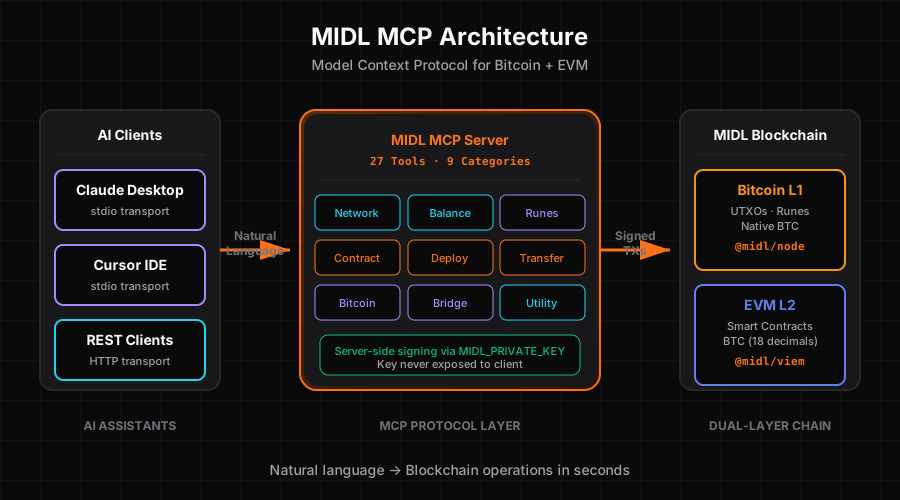
27 Tools Across 9 Categories
| Category | Tools | Description |
|---|---|---|
| Network | 3 tools | Get network info, system contracts, block data |
| Balance | 3 tools | Query EVM balance, BTC balance, token balance |
| Transfer | 3 tools | Transfer EVM, transfer tokens, send raw transactions |
| Deploy | 1 tool | Compile and deploy Solidity contracts with templates |
| Contract | 3 tools | Read contracts, verify contracts, get event logs |
| Bridge | 2 tools | Bridge BTC↔EVM (deposit and withdrawal) |
| Runes | 4 tools | Rune balance, transfer, bridge to/from ERC20 |
| Bitcoin | 4 tools | UTXO queries, transaction tracking, fee rates |
| Utility | 3 tools | Convert units, lookup addresses, estimate gas |
Dual Transport Architecture
- stdio: For Claude Desktop and Cursor (local development)
- HTTP: For remote clients and web integrations — live at
https://mcp.midl-ai.xyz/mcp
Plugin-Based Design
Each category is a self-contained plugin with its own tools. Easy to extend, easy to maintain.
MCP UI Cards
Rich visual feedback with formatted HTML cards showing:
- Transaction details with syntax highlighting
- Status indicators (pending/confirmed/failed)
- Explorer links for transparency
- Formatted addresses and amounts
Server-Side Signing
Secure transaction signing using MIDL_PRIVATE_KEY environment variable. No private keys exposed to the client.
Installation
Prerequisites
- Node.js 18+
- pnpm (recommended) or npm
- MIDL Protocol RPC access
- Private key for transaction signing
Quick Start
# Clone repository
git clone https://github.com/midl-ai/mcp-server
cd midl-mcp-server

# Install dependencies
pnpm install

# Set up environment variables
cp .env.example .env
# Edit .env and add your MIDL_PRIVATE_KEY

# Build
pnpm build

# Test (optional)
pnpm test
Configuration
Environment Variables
Create a .env file:
# Required: Private key for signing transactions
MIDL_PRIVATE_KEY=0x...

# Optional: Custom RPC endpoint (defaults to staging)
MIDL_RPC_URL=https://rpc.staging.midl.xyz

# Optional: Network selection (mainnet or testnet)
MIDL_NETWORK=testnet
Claude Desktop Setup
Add to your Claude Desktop config file:
macOS: ~/Library/Application Support/Claude/claude_desktop_config.json
Windows: %APPDATA%\Claude\claude_desktop_config.json
Linux: ~/.config/Claude/claude_desktop_config.json
{
  "mcpServers": {
    "midl": {
      "command": "node",
      "args": [
        "/absolute/path/to/midl-mcp-server/dist/index.js"
      ],
      "env": {
        "MIDL_PRIVATE_KEY": "your-private-key-here",
        "MIDL_NETWORK": "testnet"
      }
    }
  }
}
Important: Use absolute paths, not relative paths like ~/.
Cursor Setup
Add to .cursor/config.json in your project:
{
  "mcpServers": {
    "midl": {
      "command": "node",
      "args": [
        "/absolute/path/to/midl-mcp-server/dist/index.js"
      ],
      "env": {
        "MIDL_PRIVATE_KEY": "your-private-key-here"
      }
    }
  }
}
Restart Claude Desktop or Cursor after configuration.
Usage Examples
Once installed, you can use natural language in Claude:
Deploy a Contract
User: Deploy an ERC20 token called MyToken with symbol MTK and 1 million initial supply

Claude: I'll deploy that contract for you...
[Uses midl_deploy_contract tool]
Contract deployed at 0xabc...
Check Balances
User: What's my balance on MIDL?

Claude: Let me check both layers...
[Uses midl_get_btc_balance and midl_get_evm_balance]
Bitcoin L1: 1.5 BTC
EVM L2: 0.3 BTC
Bridge Assets
User: Bridge 0.1 BTC from L1 to L2

Claude: I'll initiate the bridge transaction...
[Uses midl_bridge_btc_to_evm]
Bridge initiated. Transaction ID: 0x...
Waiting for confirmations...
Complete! Your L2 balance has been updated.
Manage Runes
User: Transfer 50 UNCOMMON•GOODS rune to kaspa:qr...

Claude: Transferring rune...
[Uses midl_transfer_rune]
Rune transferred. TX: abc123...
Read Contracts
User: Read the totalSupply from the ERC20 at 0x123...

Claude: Reading contract...
[Uses midl_read_contract]
Total Supply: 1,000,000 tokens
Project Structure
midl-mcp-server/
├── src/
│   ├── plugins/              # All 9 plugin categories
│   │   ├── base/             # Base classes (PluginBase, ToolBase)
│   │   ├── network/          # 3 network tools
│   │   ├── balance/          # 3 balance tools
│   │   ├── transfer/         # 3 transfer tools
│   │   ├── deploy/           # 1 deploy tool + templates
│   │   ├── contract/         # 3 contract tools
│   │   ├── bridge/           # 2 bridge tools
│   │   ├── runes/            # 4 runes tools
│   │   ├── bitcoin/          # 4 bitcoin tools
│   │   └── utility/          # 3 utility tools
│   ├── ui/                   # MCP UI card generators
│   │   ├── index.ts          # Base card creators
│   │   ├── tx-cards.ts       # Transaction cards
│   │   └── card-generators.ts # Maps tools to UI
│   ├── wallet.ts             # EVM wallet client (viem)
│   ├── btc-wallet.ts         # Bitcoin wallet client (@midl/node)
│   ├── config.ts             # Constants and configuration
│   ├── types.ts              # Shared TypeScript types
│   └── server.ts             # MCP server entry point
├── dist/                     # Built artifacts (generated)
├── tests/                    # Unit tests
├── .env.example              # Environment template
├── package.json              # Dependencies
├── tsconfig.json             # TypeScript config
└── vitest.config.ts          # Test configuration
Development
Build
# Type check
pnpm typecheck

# Build for production
pnpm build

# Watch mode (rebuilds on changes)
pnpm build:watch
Testing
# Run all tests
pnpm test

# Watch mode
pnpm test:watch

# Coverage report
pnpm test:coverage
Linting
# Check for issues
pnpm lint

# Auto-fix
pnpm lint:fix
Tool Reference
Network Tools
midl_get_network_info- Get chain ID, block height, RPC endpointsmidl_get_system_contracts- Query system contract addressesmidl_get_block- Fetch block data by number or hash
Balance Tools
midl_get_evm_balance- Query EVM native balancemidl_get_btc_balance- Query Bitcoin UTXO balancemidl_get_token_balance- Query ERC20 token balance
Transfer Tools
midl_transfer_evm- Send native BTC on EVM L2midl_transfer_token- Send ERC20 tokensmidl_send_raw_transaction- Submit pre-signed transaction
Deploy Tools
midl_deploy_contract- Compile and deploy Solidity contracts
Templates:
erc20- Standard fungible tokencounter- Simple counter contractstorage- Key-value storage
Contract Tools
midl_read_contract- Call read-only contract methodsmidl_get_logs- Query contract event logsmidl_verify_contract- Verify contract on explorer
Bridge Tools
midl_bridge_btc_to_evm- Deposit BTC from L1 to L2midl_bridge_evm_to_btc- Withdraw BTC from L2 to L1
Runes Tools
midl_get_runes- List all runesmidl_get_rune_balance- Check rune balancemidl_transfer_rune- Transfer runesmidl_bridge_rune_to_erc20- Bridge rune to ERC20 token
Bitcoin Tools
midl_get_utxos- Query UTXOs for addressmidl_get_transaction- Get transaction detailsmidl_get_transaction_receipt- Get transaction receiptmidl_get_fee_rate- Get current fee rate
Utility Tools
midl_convert_btc_to_evm- Convert BTC units to weimidl_get_rune_erc20_address- Lookup rune's ERC20 addressmidl_estimate_gas- Estimate gas for transaction
Architecture Details
Plugin System
Each plugin extends PluginBase and uses the @Tool decorator:
export class NetworkPlugin extends PluginBase {
  @Tool({
    name: 'midl_get_network_info',
    description: 'Get MIDL network information',
    inputSchema: networkInfoSchema,
    readOnlyHint: true,
    destructiveHint: false
  })
  async getNetworkInfo(): Promise<ToolResponse<NetworkInfo>> {
    // Implementation
  }
}
Wallet Clients
EVM Wallet (src/wallet.ts):
- Uses viem for EVM operations
- Custom MIDL chain configuration
- Transaction signing with private key
Bitcoin Wallet (src/btc-wallet.ts):
- Uses @midl/node for Bitcoin operations
- UTXO selection and transaction building
- KeyPair connector for signing
Error Handling
All tools return standardized responses:
type ToolResponse<T> = {
  success: true;
  data: T;
} | {
  success: false;
  error: string;
  code?: ErrorCode;
};
Type Safety
Full TypeScript strict mode. No any types. All inputs validated with Zod schemas.
Security
Private Key Management
- Never commit
.envto version control - Use environment variables for production
- Consider hardware wallets for mainnet
- Rotate keys regularly
RPC Security
- Use secure HTTPS endpoints only
- Consider rate limiting for production
- Monitor for unusual activity
Input Validation
All tool inputs are validated using Zod schemas before execution.
Troubleshooting
Server Not Starting
Issue: Claude Desktop can't connect to the MCP server
Solutions:
- Check absolute paths in config (no
~/) - Verify Node.js is in PATH
- Check
dist/index.jsexists (runpnpm build) - Review Claude Desktop logs
Private Key Issues
Issue: "Invalid private key" error
Solutions:
- Ensure key starts with
0x - Check key length (64 hex characters +
0x) - Verify key has testnet funds
- Test key with a simple transaction
Network Connection
Issue: "Failed to connect to RPC" error
Solutions:
- Check
MIDL_RPC_URLis correct - Verify network connectivity
- Test RPC with curl:
curl https://rpc.staging.midl.xyz - Check firewall settings
Tool Execution Failures
Issue: Tools return errors
Solutions:
- Check transaction has sufficient gas
- Verify address formats are correct
- Ensure wallet has sufficient balance
- Review error message for specifics
Contributing
We welcome contributions! Here's how:
- Fork the repository
- Create a feature branch (
git checkout -b feature/amazing-tool) - Add your tool or fix
- Write tests
- Submit a pull request
Adding a New Tool
- Create tool file in appropriate plugin directory
- Extend
ToolBaseand use@Tooldecorator - Add Zod schema for input validation
- Implement
execute()method - Add unit tests
- Update plugin's
index.ts
Related Projects
- MIDL Frontend - AI chat interface
- MIDL Protocol - Bitcoin+EVM hybrid chain
- @midl-js - Official MIDL SDK
Resources
License
MIT License - 100% open source.
Acknowledgments
Built for MIDL VibeHack 2026 hackathon (Feb 9-28, 2026).
Special thanks to:
- MIDL Protocol Team - For the hybrid chain architecture
- @midl-js - For the comprehensive SDK
- Anthropic - For Claude and MCP specification
- Community - For feedback and testing
<div align="center">


Website • Documentation • GitHub
MIDL MCP Server: Bring AI to Your Blockchain
</div>
Recommended Servers

playwright-mcp
A Model Context Protocol server that enables LLMs to interact with web pages through structured accessibility snapshots without requiring vision models or screenshots.

Magic Component Platform (MCP)
An AI-powered tool that generates modern UI components from natural language descriptions, integrating with popular IDEs to streamline UI development workflow.

Audiense Insights MCP Server
Enables interaction with Audiense Insights accounts via the Model Context Protocol, facilitating the extraction and analysis of marketing insights and audience data including demographics, behavior, and influencer engagement.

VeyraX MCP
Single MCP tool to connect all your favorite tools: Gmail, Calendar and 40 more.

graphlit-mcp-server
The Model Context Protocol (MCP) Server enables integration between MCP clients and the Graphlit service. Ingest anything from Slack to Gmail to podcast feeds, in addition to web crawling, into a Graphlit project - and then retrieve relevant contents from the MCP client.

Kagi MCP Server
An MCP server that integrates Kagi search capabilities with Claude AI, enabling Claude to perform real-time web searches when answering questions that require up-to-date information.

E2B
Using MCP to run code via e2b.

Neon Database
MCP server for interacting with Neon Management API and databases

Exa Search
A Model Context Protocol (MCP) server lets AI assistants like Claude use the Exa AI Search API for web searches. This setup allows AI models to get real-time web information in a safe and controlled way.

Qdrant Server
This repository is an example of how to create a MCP server for Qdrant, a vector search engine.