
mdymcp
Unified MCP server for Mingdao platform, providing 98 tools for collaboration APIs (v1) and HAP gateway. Enables AI IDEs to interact with Mingdao's features like schedules, workflows, knowledge bases, etc.
README
mdymcp
一键安装
macOS / Linux
curl -LsSf https://raw.githubusercontent.com/andyleimc-source/mdymcp/main/install.sh | sh
Windows(PowerShell)
powershell -c "irm https://raw.githubusercontent.com/andyleimc-source/mdymcp/main/install.ps1 | iex"
脚本做三件事:
- 检测
uv,没装就从官方源装上(uv 会自己拉合适的 Python,你机器上是 3.14 / 3.9 还是没装都没关系) uv tool install mdymcp- 启动
mdymcp-install交互向导 —— 浏览器 OAuth 拿 v1 凭据 → 自动跳出 HAP 授权页拿 HAP token → 让你选范围(用户级/项目级/两个都要)+ 编号多选要注册的 IDE
配置写在 ~/.mdymcp/.env(Windows: %USERPROFILE%\.mdymcp\.env),跨目录都能用。
装完后想重跑:mdymcp-install
功能
明道(Mingdao)统一 MCP Server —— 一次安装,98 个工具:
- v1 协作 API(50 个,本地实现):动态 / 日程 / 私信 / 收件箱 / 群组 / 用户 / 组织 / 个人账户
- HAP 网关(48 个,透明代理
api2.mingdao.com/mcp):应用 / 工作表 / 记录 / 角色成员 / 工作流审批 / 图表 / 选项集 / 知识库 / 地区组织
HAP 工具由远端网关动态提供;具体参数 schema 以启动时 tools/list 返回的为准。
支持的 AI IDE
| IDE | 配置文件 | 支持范围 |
|---|---|---|
| Claude Code | ~/.claude.json(通过 claude mcp add) |
用户级 + 项目级 .mcp.json |
| Codex CLI | ~/.codex/config.toml |
用户级 |
| Cursor | ~/.cursor/mcp.json |
用户级 + 项目级 .cursor/mcp.json |
| Windsurf | ~/.codeium/windsurf/mcp_config.json |
用户级 |
| Gemini Antigravity | ~/.gemini/antigravity/mcp_config.json |
用户级 |
| Trae(含国内版 Trae CN) | mac: ~/Library/Application Support/Trae/User/mcp.json<br>win: %APPDATA%\Trae\User\mcp.json<br>linux: ~/.config/Trae/User/mcp.json |
用户级 |
| VS Code(Copilot Chat) | .vscode/mcp.json |
项目级 |
mdymcp-install 会自动检测已装的 IDE,范围 + 客户端两个问题你挑完即可。手动指定:mdymcp-install --client=cursor,windsurf,trae(--client=all 全装)。
Antigravity:写完后去 IDE 里「Manage MCP Servers → Refresh」一下才能看到 mdymcp。
Cursor / Windsurf / Trae / VS Code:通常需要重启 IDE 或在 MCP 设置里手动刷新。
怎么拿 HAP 的 refresh_token 和 access_token
mdymcp-install走到 HAP 步骤时会自动开浏览器到授权页,你按下面截图复制粘贴即可,此段是备份参考。
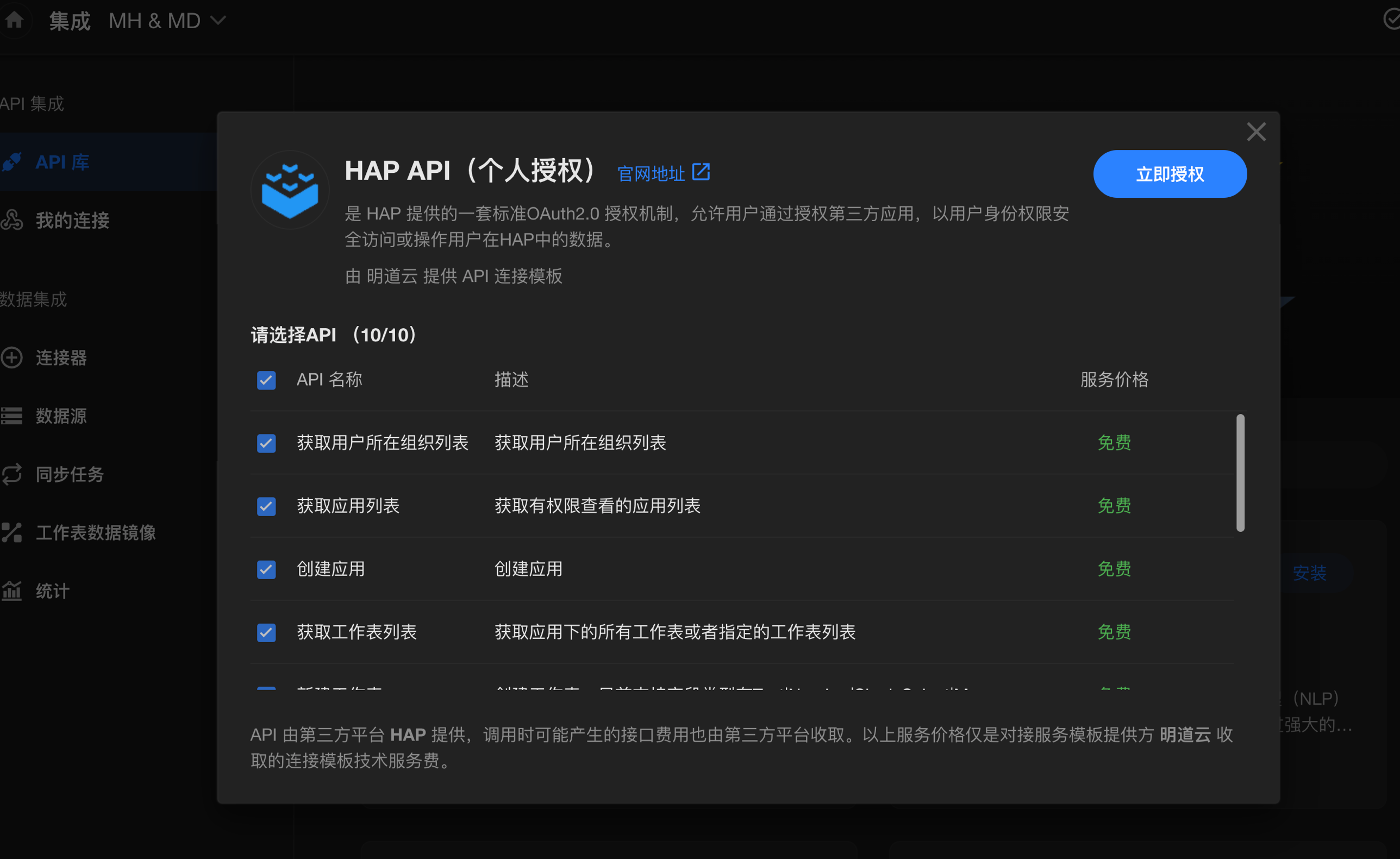
授权页:https://www.mingdao.com/integrationConnect/69bcae07257900ec41aa2733
第 1 步:集成中心 → API 库 → HAP API(个人授权)→ 立即授权
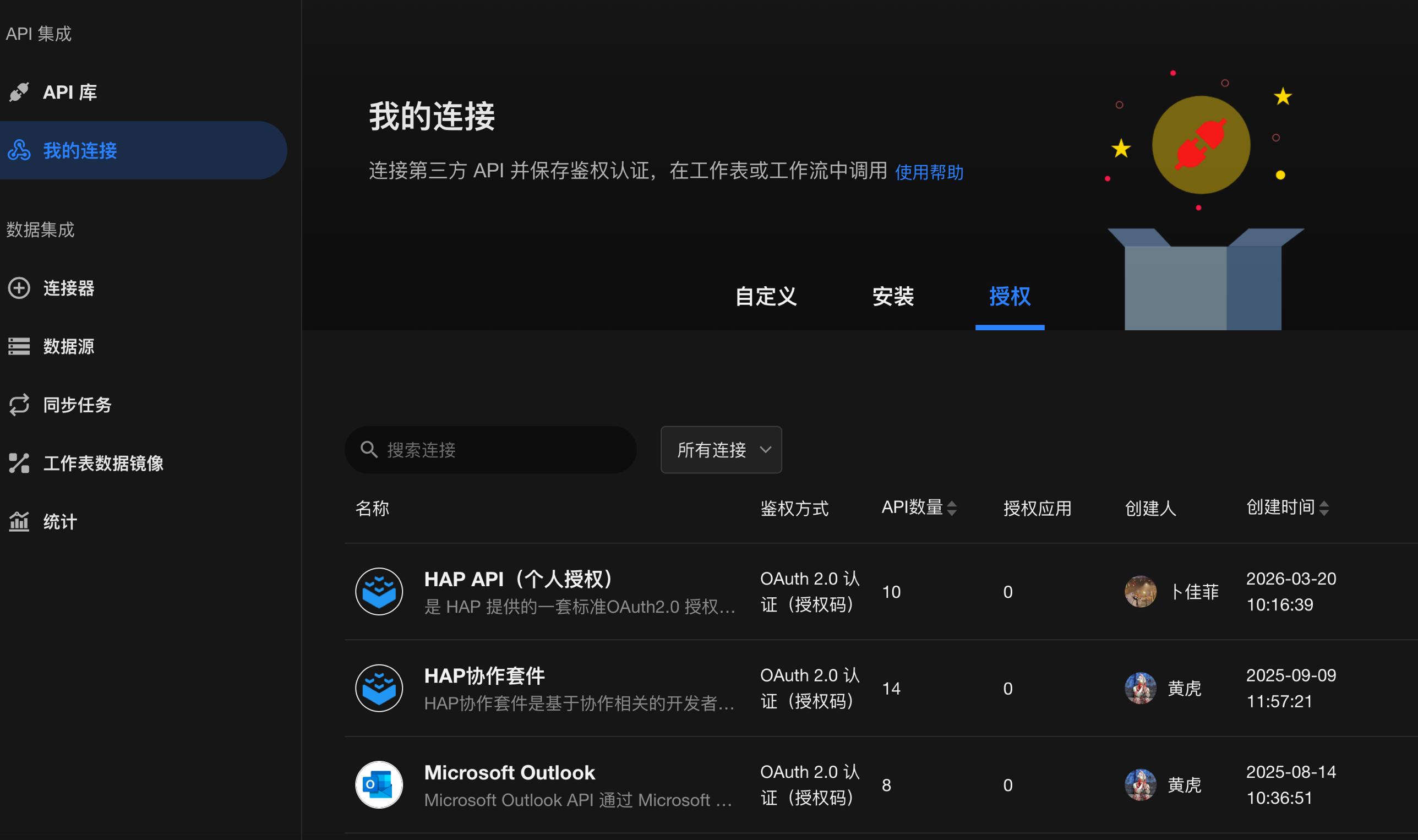
第 2 步:「我的连接 → 授权」tab,找到刚授权的连接
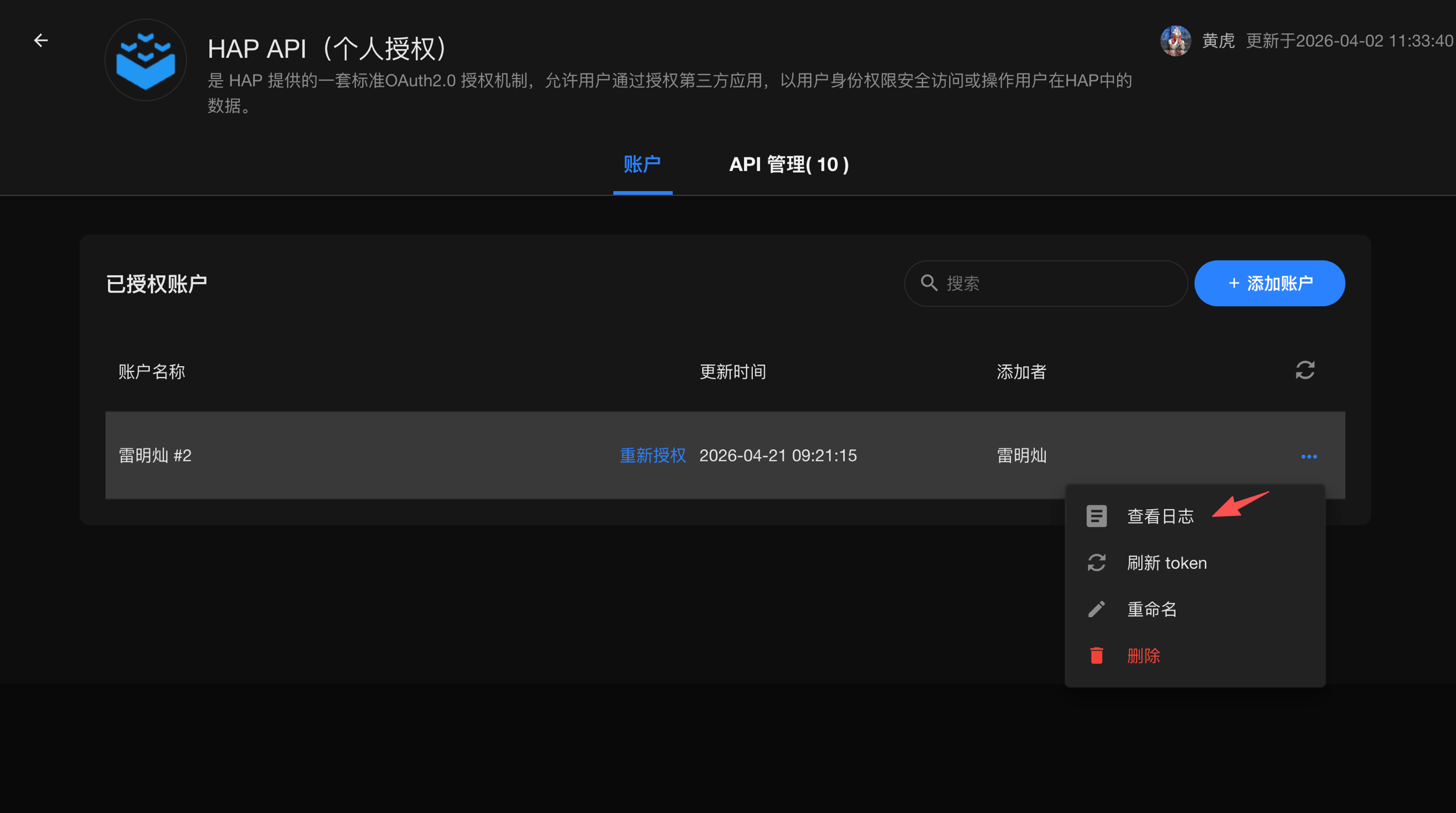
第 3 步:进入连接,在账户行点 ... → 查看日志
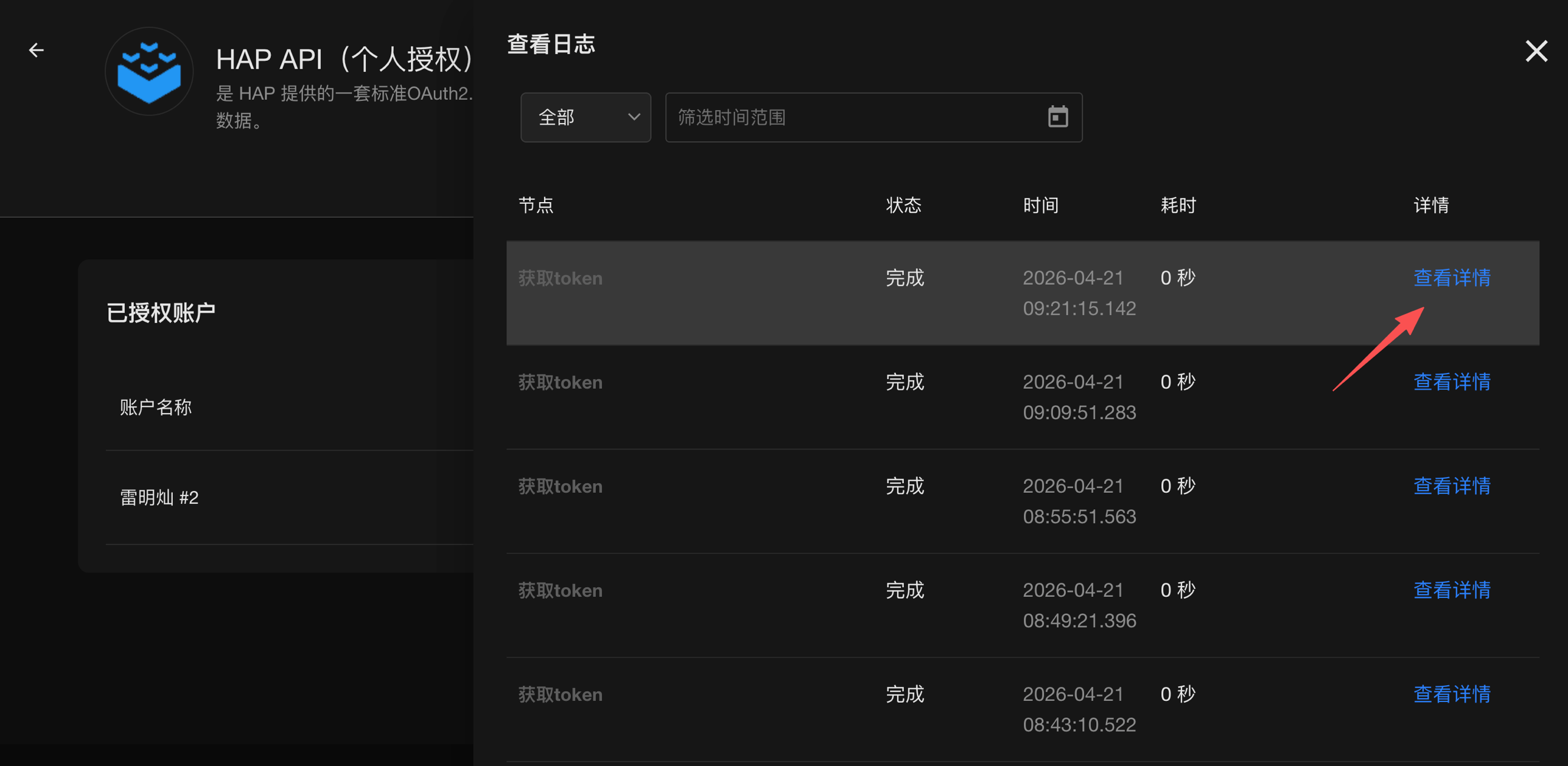
第 4 步:在日志列表中找一条「获取 token」→ 点查看详情
第 5 步:在「返回值」标签里复制 access_token 和 refresh_token
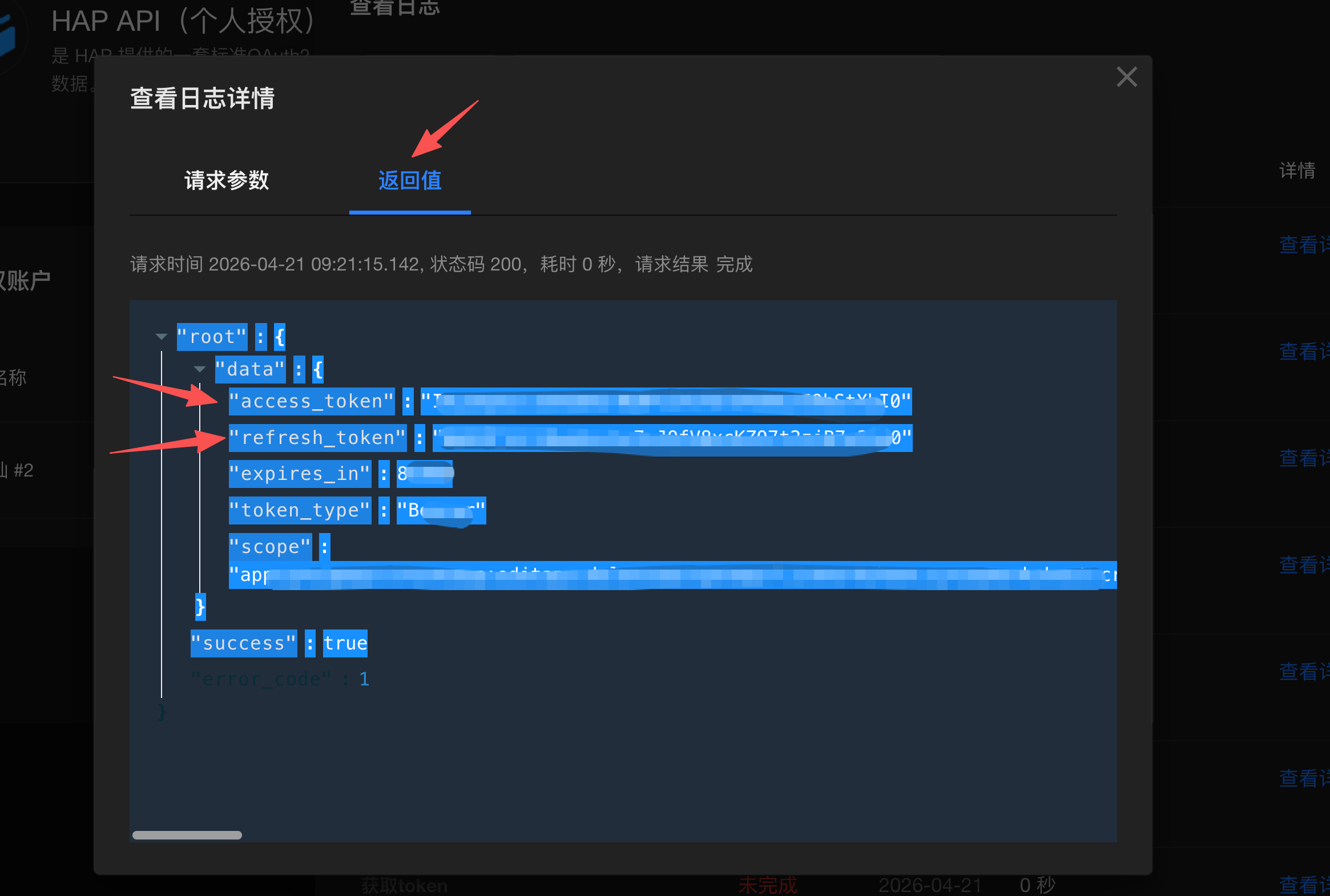
在向导提示时分别粘到:
MD_HAP_TOKEN:← 粘access_tokenMD_HAP_REFRESH_TOKEN:← 粘refresh_token
这两个 token 只在装机时用一次(把你的账号绑定到服务端,换出长期
hap_key)。绑定完成后运行时只用hap_key+account_id,不再需要它们。
架构与 Token
┌──────────────────────┐ stdio ┌──────────────────────────────┐
│ Claude Code / Cursor │──────▶│        mdymcp.server         │
│ / Codex / Windsurf / │       ├──────────────────────────────┤
│ Antigravity / Trae / │       │ [静态注册] 50 个 v1 工具     │──┐
│ VS Code Copilot      │       ├──────────────────────────────┤  │HTTP
└──────────────────────┘       │ [动态注册] HapGateway        │──┤
                               │ 48 个 HAP 工具(透明代理)   │  │
                               └──────────────────────────────┘  ▼
                             ┌──────────────────────────────────────┐
                             │ api.mingdao.com/v1/*   (v1 API)      │
                             │ api2.mingdao.com/mcp   (HAP gateway) │
                             └──────────────────────────────────────┘
| v1 access_token | HAP token | |
|---|---|---|
| install 时 | OAuth → MD_KEY 写入 .env |
register(一次性)→ MD_HAP_KEY 写入 .env |
| 运行时 | 1 次请求:v1 token hook | 1 次请求:HAP token hook |
| 缓存 TTL | 到本地次日 00:00 | 到本地次日 00:00 |
每天首次调用时拉一次 token、缓存到本地次日 00:00;不持久化到磁盘。HAP 网关握手失败时不崩 server,仅跳过远端工具注册,v1 工具仍可用。
配置
~/.mdymcp/.env(或各 IDE 的 MCP JSON 里的 env 块):
# 必填:v1 协作 API
MD_ACCOUNT_ID=你的明道账号 UUID
MD_KEY=你的接入 key

# HAP 网关(mdymcp-install 自动写入)
MD_HAP_REFRESH_TOKEN=  # install 时粘贴
MD_HAP_TOKEN=          # install 时粘贴
MD_HAP_KEY=            # mdymcp-install 自动写入

# 可选(通常不用动)
# MD_HOOK_URL=<自部署 v1 token hook>
# MD_HAP_REGISTER_HOOK=<自部署 HAP register hook>
# MD_HAP_TOKEN_HOOK=<自部署 HAP token hook>
# MD_APP_KEY=<自定义 OAuth app_key>
# MD_REGISTER_URL=<自定义 v1 OAuth 注册 hook>
# MD_CALLBACK_PORT=8080
故障排查
| 现象 | 解决 |
|---|---|
command not found: uv |
重开终端;或 export PATH="$HOME/.local/bin:$PATH" |
| curl / irm 拉 astral.sh 失败 | 走代理;或从 https://github.com/astral-sh/uv/releases 下载 tarball 手动解压到 ~/.local/bin/ |
Windows 下 irm | iex 报执行策略错误 |
管理员 PowerShell:Set-ExecutionPolicy -Scope CurrentUser RemoteSigned |
Missing MD_ACCOUNT_ID or MD_KEY |
重跑 mdymcp-install |
Missing MD_ACCOUNT_ID or MD_HAP_KEY |
重跑 mdymcp-install 走 HAP 步骤 |
| IDE 里看不到 mdymcp | 重启 IDE;或在 IDE 的 MCP 设置里点 Refresh。GUI 启动找不到 uvx 时改从终端启动 IDE(默认写绝对路径应该已规避这个) |
HAP token 接口返回空 |
hap_key 在服务端失效,重新拿一对 token 并重跑 mdymcp-install |
启动显示 HAP 网关工具 0 个 |
/mcp 握手失败(多半是网络);v1 工具不受影响 |
HAP 工具返回 Http Headers verification failed |
HAP 后端既有问题(Node 版也有),非 mdymcp bug |
API 参考
明道开放平台:https://open.mingdao.com/document
License
MIT
Recommended Servers

playwright-mcp
A Model Context Protocol server that enables LLMs to interact with web pages through structured accessibility snapshots without requiring vision models or screenshots.

Magic Component Platform (MCP)
An AI-powered tool that generates modern UI components from natural language descriptions, integrating with popular IDEs to streamline UI development workflow.

Audiense Insights MCP Server
Enables interaction with Audiense Insights accounts via the Model Context Protocol, facilitating the extraction and analysis of marketing insights and audience data including demographics, behavior, and influencer engagement.

VeyraX MCP
Single MCP tool to connect all your favorite tools: Gmail, Calendar and 40 more.

graphlit-mcp-server
The Model Context Protocol (MCP) Server enables integration between MCP clients and the Graphlit service. Ingest anything from Slack to Gmail to podcast feeds, in addition to web crawling, into a Graphlit project - and then retrieve relevant contents from the MCP client.

Kagi MCP Server
An MCP server that integrates Kagi search capabilities with Claude AI, enabling Claude to perform real-time web searches when answering questions that require up-to-date information.

Neon Database
MCP server for interacting with Neon Management API and databases

E2B
Using MCP to run code via e2b.

Exa Search
A Model Context Protocol (MCP) server lets AI assistants like Claude use the Exa AI Search API for web searches. This setup allows AI models to get real-time web information in a safe and controlled way.

Qdrant Server
This repository is an example of how to create a MCP server for Qdrant, a vector search engine.