
mcp-test-utils
Desktop UI automation for AI agents: screenshots, window management, mouse, keyboard, UI Automation tree, OCR. Single Windows x64 binary, no dependencies.
README
MCP Test Utils
100% AI Code · Human Reviewed



MCP server for automated desktop UI testing. A single binary — no runtime, no dependencies, no installation.
Windows x64 only. macOS and Linux support is planned.
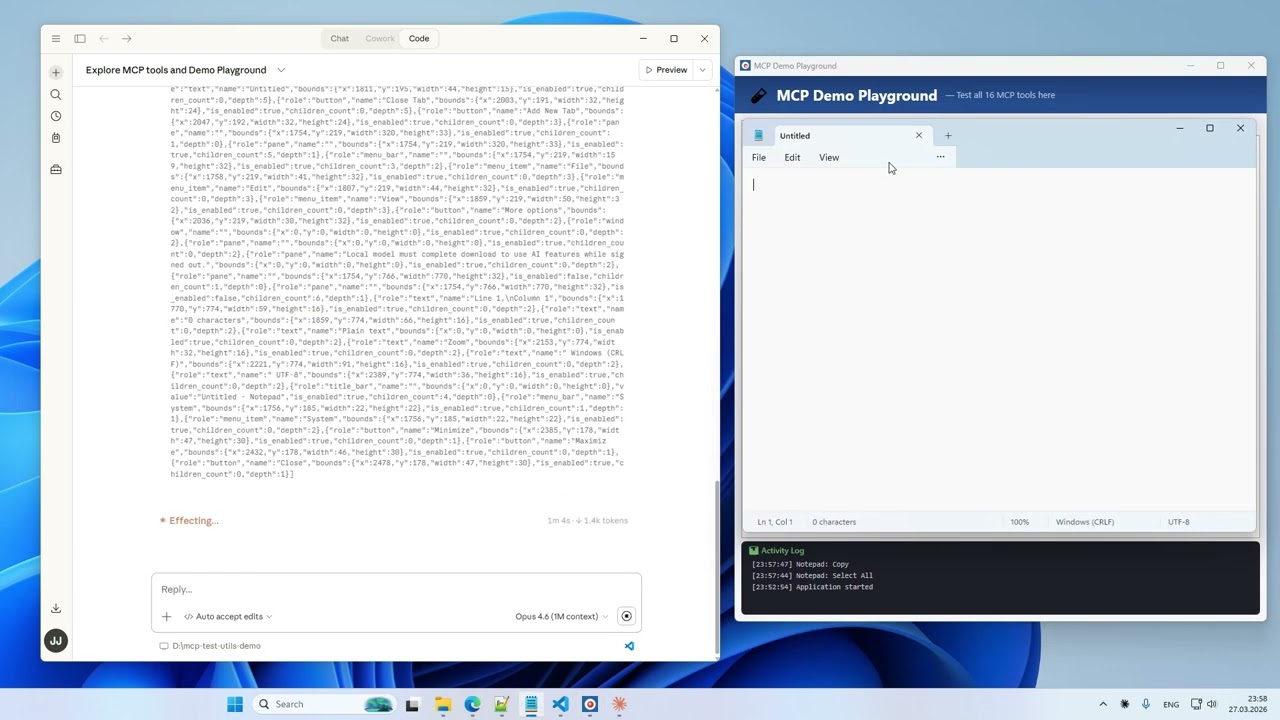
Gives AI agents eyes and hands: screenshots, window management, mouse, keyboard, UI Automation, OCR.
Why
AI agents can trigger actions in applications but can't see the screen. This server bridges that gap:
Agent triggers action → takes screenshot → sees the result →
switches window → clicks a button → verifies → writes report
Fully autonomous, no user involvement required.
Demo
17 tools. 10 tasks. One take. Watch on YouTube →
Platforms
| Platform | Status |
|---|---|
| Windows x64 | ✅ Full support |
| macOS arm64 | ⏳ Planned |
| Linux x64 | ⏳ Planned |
Tools (17)
Vision
| Tool | Description |
|---|---|
take_screenshot |
Screenshot of the entire desktop with configurable quality |
take_window_screenshot |
Screenshot of a specific window (screen or window capture mode) |
read_screen_text |
OCR the entire screen (Windows.Media.Ocr) |
read_region_text |
OCR a screen region with precise word coordinates |
Window Management
| Tool | Description |
|---|---|
list_windows |
List windows with id, title, app, position, size, minimized, focused |
focus_window |
Bring a window to front, restore if minimized |
Input
| Tool | Description |
|---|---|
mouse_click |
Click (left / right / middle) at screen or window-relative coordinates |
mouse_move |
Move cursor to a point |
mouse_drag |
Drag from point A to point B |
mouse_scroll |
Scroll the mouse wheel |
keyboard_type |
Type text (full Unicode — Latin, Cyrillic, CJK, emoji) |
keyboard_press |
Press a key (Enter, Tab, F1–F12, arrows, etc.) |
keyboard_shortcut |
Key combinations (Ctrl+S, Alt+F4, Ctrl+Shift+P, etc.) |
Structured UI Access
| Tool | Description |
|---|---|
list_ui_elements |
UI Automation tree — buttons, fields, menus with exact coordinates |
Agent Guide
| Tool | Description |
|---|---|
get_usage_guide |
Compact workflow guide for LLM agents — precision clicking, coordinate metadata, quality tips |
Session Logging
| Tool | Description |
|---|---|
enable_logging |
Start recording tool calls to JSONL + screenshots (opt-in) |
disable_logging |
Stop recording, get session stats |
Installation
- Download the binary from Releases.
- Add it to your MCP client config. Example below is for Claude Desktop — for other clients, refer to their documentation.
Claude Desktop: %APPDATA%\Claude\claude_desktop_config.json
{
  "mcpServers": {
    "test-utils": {
      "command": "D:\\path\\to\\mcp-test-utils.exe"
    }
  }
}
- Restart Claude Desktop.
- In chat, try: "Take a screenshot" — the agent will return an image of your desktop.
With Logging (optional)
{
  "mcpServers": {
    "test-utils": {
      "command": "D:\\path\\to\\mcp-test-utils.exe",
      "env": {
        "MCP_LOG_DIR": "D:\\path\\to\\logs",
        "MCP_LOG_MAX_MB": "500",
        "MCP_LOG_RETAIN_DAYS": "30"
      }
    }
  }
}
Quality Presets
Screenshots support configurable quality to balance detail and token cost:
| Preset | Scale | Format | Use Case |
|---|---|---|---|
full |
100% | JPEG q90 | Maximum detail |
standard |
50% | JPEG q70 | Balanced (default) |
compact |
50% | PNG | When PNG is needed |
minimal |
25% | Grayscale | Lowest token cost |
custom |
10–100% | JPEG / PNG / Grayscale | Full control |
Environment Variables
| Variable | Description | Default |
|---|---|---|
MCP_LOG_DIR |
Path for log sessions. Without it, logging tools are hidden | — |
MCP_LOG_MAX_MB |
Session size limit (warning on exceed) | 500 |
MCP_LOG_RETAIN_DAYS |
Auto-delete sessions older than N days. 0 to disable |
30 |
How It Works
MCP Test Utils is a JSON-RPC 2.0 server communicating over stdin/stdout. Any MCP-compatible client launches the binary, sends tool calls, and receives structured responses (text, base64 images). Tested with Claude Desktop.
The server uses native Windows APIs directly — Win32 GDI for screenshots, SendInput for mouse and keyboard, UI Automation COM API for element inspection, WinRT Windows.Media.Ocr for text recognition. No PowerShell, no external tools, no network access.
Use Cases
- Automated QA — agent navigates the app, clicks through flows, takes screenshots at each step, writes a test report
- Desktop automation — fill forms, copy data between windows, run workflows
- Accessibility audit — scan UI Automation tree for missing labels or roles
- Visual regression — screenshot comparison across releases
- Data extraction — OCR text from applications that don't expose APIs
Security
- Responds only to requests from the MCP client
- Opens no network ports
- Writes nothing to disk (except opt-in logging)
- Sends no data externally
- Screenshots capture the entire screen — make sure no sensitive information is visible
Support us
Free and unrestricted. If you find it useful — jeenyjai.github.io
License
Copyright 2026 JeenyJAI. All rights reserved.
<!-- mcp-name: io.github.JeenyJAI/mcp-test-utils -->
🚀 Created with Claude
Recommended Servers

playwright-mcp
A Model Context Protocol server that enables LLMs to interact with web pages through structured accessibility snapshots without requiring vision models or screenshots.

Audiense Insights MCP Server
Enables interaction with Audiense Insights accounts via the Model Context Protocol, facilitating the extraction and analysis of marketing insights and audience data including demographics, behavior, and influencer engagement.

Magic Component Platform (MCP)
An AI-powered tool that generates modern UI components from natural language descriptions, integrating with popular IDEs to streamline UI development workflow.

VeyraX MCP
Single MCP tool to connect all your favorite tools: Gmail, Calendar and 40 more.

graphlit-mcp-server
The Model Context Protocol (MCP) Server enables integration between MCP clients and the Graphlit service. Ingest anything from Slack to Gmail to podcast feeds, in addition to web crawling, into a Graphlit project - and then retrieve relevant contents from the MCP client.

Kagi MCP Server
An MCP server that integrates Kagi search capabilities with Claude AI, enabling Claude to perform real-time web searches when answering questions that require up-to-date information.

E2B
Using MCP to run code via e2b.

Neon Database
MCP server for interacting with Neon Management API and databases

Exa Search
A Model Context Protocol (MCP) server lets AI assistants like Claude use the Exa AI Search API for web searches. This setup allows AI models to get real-time web information in a safe and controlled way.

Qdrant Server
This repository is an example of how to create a MCP server for Qdrant, a vector search engine.