
mcp-codemap
Provides coding agents with a mental map of codebases via progressive disclosure, enabling efficient exploration of project structure and entity relationships.
README
mcp-codemap


MCP server that gives coding agents a mental map of your codebase with progressive disclosure - like foldable code sections in an IDE, but for LLMs.
The first run parses every source file using tree-sitter and builds a
graph of entities (classes, functions, interfaces, etc.) and their
relationships (imports, extends, implements). This is stored in a local
SQLite database (.codemap/graph.db) so subsequent sessions read from
the index instantly - no re-parsing needed.
It exposes three tools. map builds the big picture - every file, class,
and function at a chosen detail level, from a quick outline to full
signatures with docstrings and dependency edges. query zooms into
a single entity for its source code, members, and relationships without
a separate file read. reindex keeps things fresh after edits,
auto-detecting changes via git diff.
Supported languages:


Why
Typical exploration to understand a backend directory (44 files, ~420 entities):
Without codemap - Glob/Read/Grep or an Explore subagent:
| Step | Tool calls | Chars consumed |
|---|---|---|
| Glob to find files | 1 | ~500 |
| Read models.py (572 lines) | 1 | ~15K |
| Read world_service.py (628 lines) | 1 | ~18K |
| Read ws.py (570 lines) | 1 | ~15K |
| Read events.py (299 lines) | 1 | ~8K |
| Read 4-5 API route files | 4-5 | ~60K |
| Grep for cross-file imports/usage | 3-5 | ~10K |
| Total | ~12-15 calls | ~125K+ |
And that's optimistic - an Explore subagent often does 15-25 tool calls across multiple turns, each with its own overhead, and still misses things.
With codemap - one or two calls:
| Level | Tool calls | Chars consumed |
|---|---|---|
names (quick orient) |
1 | ~6K |
signatures (working knowledge) |
1 | ~25K |
That's 5-6x fewer tokens, 12-20x fewer tool calls, and complete coverage - every entity in every file, not just the ones the agent guessed to read.
Setup
Claude Code
# npx
claude mcp add codemap -- npx mcp-codemap

# docker
claude mcp add codemap -- docker run --rm -i -v .:/project:z ghcr.io/breca/mcp-codemap
The project directory is auto-detected via MCP roots. To set it explicitly:
npx mcp-codemap serve -p /path/to/your/project
The first run indexes the project automatically. The index is stored in
.codemap/graph.db inside the project directory. Subsequent calls to map
or query auto-detect changed files via git diff and refresh the index
before returning results — no manual reindexing needed.
Other clients
Add the MCP server config to your client's config file:
| Client | Config file |
|---|---|
| Claude Code | .mcp.json in project root |
| Cursor | .cursor/mcp.json in project root |
| Crush | .crush.json in project root |
| Continue | .continue/config.yaml |
| OpenCode | opencode.json in project root |
.mcp.json (Claude Code, Cursor):
{
  "mcpServers": {
    "codemap": {
      "command": "npx",
      "args": ["mcp-codemap"]
    }
  }
}
{
  "mcpServers": {
    "codemap": {
      "command": "docker",
      "args": ["run", "--rm", "-i", "-v", ".:/project:z", "ghcr.io/breca/mcp-codemap"]
    }
  }
}
<details> <summary>Crush / OpenCode / Continue configs</summary>
.crush.json:
{
  "mcp": {
    "codemap": {
      "type": "stdio",
      "command": "npx",
      "args": ["mcp-codemap"]
    }
  }
}
{
  "mcp": {
    "codemap": {
      "type": "stdio",
      "command": "docker",
      "args": ["run", "--rm", "-i", "-v", ".:/project:z", "ghcr.io/breca/mcp-codemap"]
    }
  }
}
opencode.json:
{
  "mcp": {
    "codemap": {
      "type": "local",
      "command": ["npx", "mcp-codemap"]
    }
  }
}
{
  "mcp": {
    "codemap": {
      "type": "local",
      "command": ["docker", "run", "--rm", "-i", "-v", ".:/project:z", "ghcr.io/breca/mcp-codemap"]
    }
  }
}
.continue/config.yaml:
mcpServers:
  - name: codemap
    command: npx
    args:
      - mcp-codemap
mcpServers:
  - name: codemap
    command: docker
    args:
      - run
      - --rm
      - -i
      - -v
      - .:/project:z
      - ghcr.io/breca/mcp-codemap
</details>
Tools
Response structure:
| Element | Meaning |
|---|---|
| Header line | PROJECT: <files> | <entities> | <languages> - project summary |
=== dir/ [N files, M entities] === |
Directory section with aggregate counts |
C/F/M/I/P/E |
Kind prefix: Class, Function, Method, Interface, Property, Enum |
:10-342 |
Line range (start-end) |
exp |
Exported / public symbol |
> imports: |
Files this file imports from (resolved paths) |
> used-by: |
Files that import from this file |
map - structural overview
Returns files, entities, signatures, and relationships as a compact text map.
map(scope?, detail?, max_depth?)
detail controls output density (default: "signatures"):
| Level | Content | Relative size |
|---|---|---|
"outline" |
Files + entity counts | ~1% |
"names" |
Entity names, kinds, line ranges + docstrings on top-level entities | ~8% |
"signatures" |
Full signatures, docstrings, imports/used-by | ~25% |
"full" |
Signatures + cross-file relationships | ~40% |
scope limits output to a directory or file prefix (e.g., "src/api").
Typical workflow:
map(detail="names")                          # orient on the whole project
map(scope="src/api", detail="signatures")    # drill into a module
map(detail="full")                           # inspect dependency graph
Example: map(scope="src/tools", detail="names")
PROJECT: 53 files | 642 entities | csharp/go/java/javascript/kotlin/php/python/ruby/rust/typescript
INDEXED: just now
C=class F=function M=method I=interface P=property E=enum V=variable T=type N=namespace

=== src/tools/ [5 files, 13 entities] ===

  src/tools/describe-entity.ts
    I DescribeEntityParams :6-9
      "Parameters for the describe-entity tool."
    F describeEntity :12-27
      "Generate or retrieve a natural-language description for a named entity."
    F formatDescribeResult :29-37

  src/tools/get-context.ts
    I GetContextParams :5-9
      "Parameters for the map tool: optional scope, depth limit, and detail level."
    F getContext :12-18
      "Build and return the compact text map of the codebase."

  src/tools/query.ts
    I QueryParams :6-8
      "Parameters for the query tool: entity name or qualified name."
    F queryEntity :11-104
      "Deep-dive on a single entity: signature, source, callers, callees, and members."

  src/tools/reindex.ts
    I ReindexParams :6-9
      "Parameters for the reindex tool: optional file paths and force flag."
    F reindex :12-52
      "Re-index changed files; auto-detects via git diff when no paths given."

  src/tools/update-context.ts
    I UpdateContextParams :6-10
      "Parameters for the update-context tool."
    F updateContext :13-55
      "Incrementally update the index; falls back to full rescan if requested."
Detail levels
outline - file list with entity counts:
PROJECT: 53 files | 642 entities | csharp/go/java/javascript/kotlin/php/python/ruby/rust/typescript
INDEXED: just now
C=class F=function M=method I=interface P=property E=enum V=variable T=type N=namespace

=== src/parser/languages/ [11 files, 162 entities] ===

  src/parser/languages/base.ts (10 entities)
  src/parser/languages/python.ts (12 entities)
  src/parser/languages/typescript.ts (10 entities)
names - adds entity names with kind prefix, line ranges, and docstrings on top-level entities:
  src/parser/languages/base.ts
    I ExtractedEntity :4-17
      "A code entity (class, function, variable, etc.) extracted from a parse tree."
    I FileParseResult :29-33
      "Complete extraction output for a single source file."
    I LanguageExtractor :45-50
      "Contract for language-specific extractors that turn parse trees into entities."
    F getDocComment :53-68
      "Extract a JSDoc-style comment immediately preceding a node."
    F getSignature :82-140
      "Build a human-readable signature string from a class, function, or interface node."
signatures - adds full signatures, docstrings, export markers, and dependency info:
  src/parser/languages/python.ts
    C class PythonExtractor implements LanguageExtractor :11-343  exp
      "Extracts classes, functions, and imports from Python source files."
      P language :12-12
      P extensions :13-13
      M extract(tree: Parser.Tree, sourceCode: string, filePath: string): FileParseResult :15-23
      M walkNode(
    node: Parser.SyntaxNode,
    sourceCode: string,
    filePath: string,
    entities: ExtractedEntity[],
    ...
  ): void :25-97
      M extractEntity(...): ExtractedEntity | null :99-171
    > imports: src/parser/languages/base.ts

  src/parser/languages/typescript.ts
    C class TypeScriptExtractor implements LanguageExtractor :15-352  exp
      "Extracts classes, functions, interfaces, and relationships from TypeScript/TSX files."
      ...
    > imports: src/parser/languages/base.ts
    > used-by: src/parser/languages/javascript.ts
full - adds a cross-file relationships section:
=== RELATIONSHIPS ===
src/parser/languages/javascript.ts -> src/parser/languages/typescript.ts [extends: TypeScriptExtractor]
src/parser/languages/python.ts -> src/parser/languages/base.ts [implements: LanguageExtractor]
src/parser/languages/typescript.ts -> src/parser/languages/base.ts [implements: LanguageExtractor]
query - deep dive on one entity
Returns signature, source code, callers, callees, and members for a single class, function, or method. Accepts simple or qualified names.
query(entity)
query(entity="UserService")             # find by name
query(entity="UserService.createUser")  # find by qualified name
Output includes the actual source code, so the agent doesn't need a separate file read to see the implementation.
Example output
class PythonExtractor [exported]
src/parser/languages/python.ts:10-342

SIGNATURE: class PythonExtractor implements LanguageExtractor

MEMBERS:
  property language :11-11
  property extensions :12-12
  method extract(tree, sourceCode, filePath): FileParseResult :14-22
  method walkNode(...): void :24-96
  method extractEntity(...): ExtractedEntity | null :98-170
  method extractDocstring(...): string | null :172-187

DEPENDS ON:
  imports ExtractedEntity (src/parser/languages/base.ts:3)
  imports FileParseResult (src/parser/languages/base.ts:26)
  implements LanguageExtractor (src/parser/languages/base.ts:40)

USED BY:
  imports ScanResult (src/parser/pipeline.ts:15)

SOURCE:
  10 | export class PythonExtractor implements LanguageExtractor {
  11 |   language = 'python';
  12 |   extensions = ['.py'];
  ...
Response structure:
| Section | Content |
|---|---|
| Header | Entity kind, name, export status, file location |
SIGNATURE |
Full type signature |
MEMBERS |
Properties and methods with signatures and line ranges |
DEPENDS ON |
Entities this one imports, extends, or implements (with source locations) |
USED BY |
Entities that depend on this one |
SOURCE |
Full source code with line numbers |
reindex - refresh after edits
Note: map and query automatically refresh the index before returning
results, so explicit reindexing is only needed for a forced full rescan.
Re-indexes changed files. Auto-detects changes via git diff when called with no arguments.
reindex(paths?, force?)
reindex()                               # auto-detect via git diff
reindex(paths=["src/foo.ts"])           # specific files
reindex(force=true)                     # full rescan, ignore cache
Example output
Git diff update (30 changed files)
  Processed: 18
  Skipped (unchanged): 11
  Errors: 1
    src/broken.js: TypeError: Cannot read properties of undefined
Configuration
Place a config.json in the .codemap/ directory to override defaults:
{
  "excludePatterns": [
    "**/node_modules/**",
    "**/dist/**",
    "**/build/**",
    "**/.git/**",
    "**/vendor/**",
    "**/__pycache__/**",
    "**/target/**",
    "**/*.min.js",
    "**/*.bundle.js",
    "**/*.generated.*",
    "**/.codemap/**"
  ],
  "maxFileSize": 1000000
}
| Option | Type | Default | Description |
|---|---|---|---|
excludePatterns |
string[] |
See above | Glob patterns for files/directories to skip |
includePatterns |
string[] |
["**/*.{ts,tsx,js,...,c,h,cpp,hpp,...}"] |
Glob patterns for files to include (non-git repos only) |
languages |
string[] |
[] (all supported) |
Restrict parsing to specific languages |
maxFileSize |
number |
1000000 |
Skip files larger than this (bytes) |
updateGitignore |
boolean |
true |
Auto-add .codemap/ to .gitignore on init |
In git repos, file discovery uses git ls-files and respects .gitignore
automatically - includePatterns is only used in non-git repos as a
fallback. The exclude patterns act as a secondary filter in both cases.
CLI
The same binary works as a standalone CLI:
# npx
npx mcp-codemap map [-s scope] [--detail level]     # print the map
npx mcp-codemap query <entity>                      # inspect an entity
npx mcp-codemap reindex [paths...]                  # re-index
npx mcp-codemap stats                               # show project stats
npx mcp-codemap web [--port 3333]                   # interactive web UI
npx mcp-codemap install-hooks                       # git hooks for auto re-indexing
npx mcp-codemap uninstall-hooks                     # remove installed git hooks

# docker (mount your project at /project)
docker run --rm -v .:/project:z ghcr.io/breca/mcp-codemap map -p /project
docker run --rm -v .:/project:z ghcr.io/breca/mcp-codemap stats -p /project
docker run --rm -v .:/project:z ghcr.io/breca/mcp-codemap query <entity> -p /project
docker run --rm -v .:/project:z -p 3333:3333 ghcr.io/breca/mcp-codemap web -p /project
Web UI
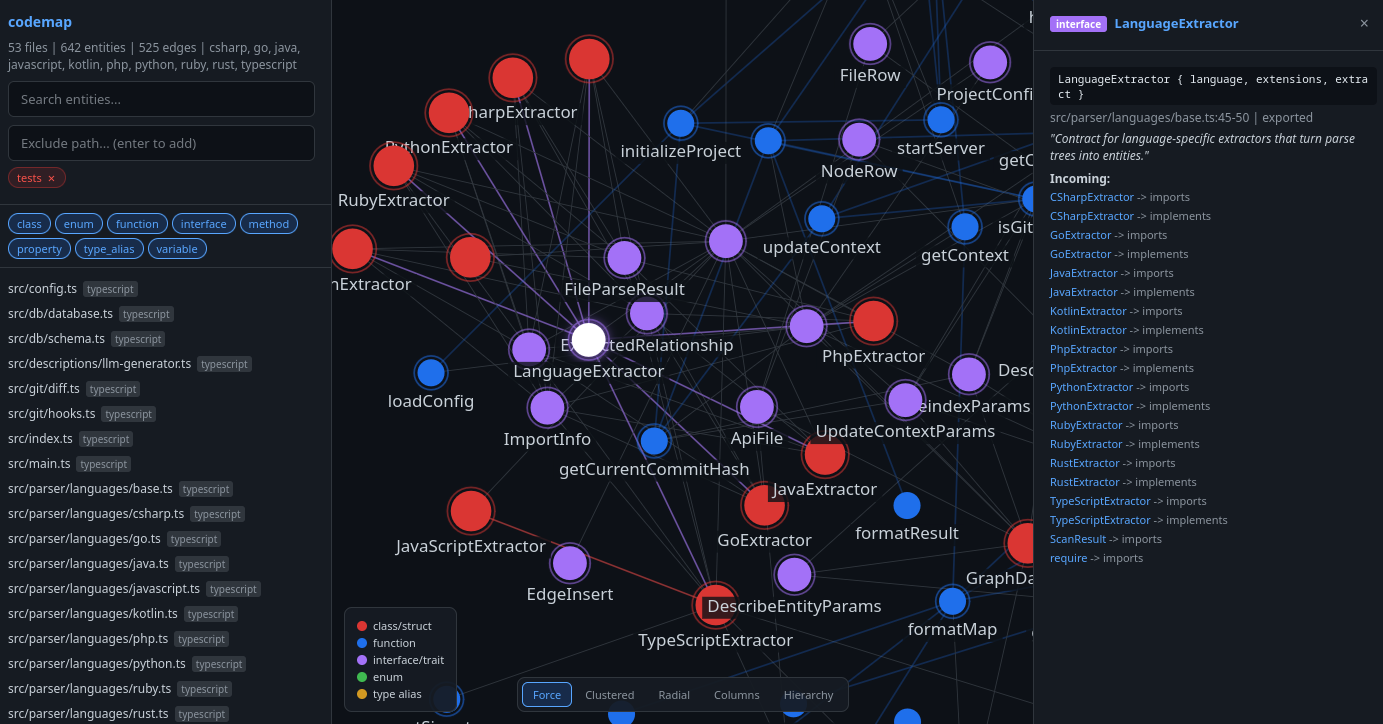
codemap web launches an interactive graph explorer in your browser - a
visualization of every entity and relationship in the index.
codemap web [--port 3333]
Features:
- Graph canvas - entities rendered as color-coded nodes (red = class, blue = function, purple = interface, green = enum), sized by kind, with edges drawn between them. Pan, zoom, and drag nodes to explore.
- Layout modes - switch between five layouts via the top-right toolbar: Force (default), Clustered (grouped by file), Radial (most-connected at center), Columns (by directory), and Hierarchy (dependency depth top-to-bottom). Transitions are animated.
- Sidebar - searchable file tree with kind filters. Type a path prefix
in the exclude input to hide irrelevant directories (e.g.,
tests). - Detail panel - click any node or file to open a right-side panel showing its signature, file location, docstring, members, and incoming/outgoing edges. Click linked entities to navigate the graph.
Design decisions
Only path-resolved relationships (imports, extends, implements) are included
in output. Name-based "calls" edges are excluded because global name lookup
produces too many false positives (get, split, etc. matching unrelated
symbols). See CONSTRAINTS.md for details.
Recommended Servers

playwright-mcp
A Model Context Protocol server that enables LLMs to interact with web pages through structured accessibility snapshots without requiring vision models or screenshots.

Magic Component Platform (MCP)
An AI-powered tool that generates modern UI components from natural language descriptions, integrating with popular IDEs to streamline UI development workflow.

Audiense Insights MCP Server
Enables interaction with Audiense Insights accounts via the Model Context Protocol, facilitating the extraction and analysis of marketing insights and audience data including demographics, behavior, and influencer engagement.

VeyraX MCP
Single MCP tool to connect all your favorite tools: Gmail, Calendar and 40 more.

graphlit-mcp-server
The Model Context Protocol (MCP) Server enables integration between MCP clients and the Graphlit service. Ingest anything from Slack to Gmail to podcast feeds, in addition to web crawling, into a Graphlit project - and then retrieve relevant contents from the MCP client.

Kagi MCP Server
An MCP server that integrates Kagi search capabilities with Claude AI, enabling Claude to perform real-time web searches when answering questions that require up-to-date information.

Neon Database
MCP server for interacting with Neon Management API and databases

E2B
Using MCP to run code via e2b.

Exa Search
A Model Context Protocol (MCP) server lets AI assistants like Claude use the Exa AI Search API for web searches. This setup allows AI models to get real-time web information in a safe and controlled way.

Qdrant Server
This repository is an example of how to create a MCP server for Qdrant, a vector search engine.