
LibreSprite MCP
A Model Context Protocol server that enables prompt-assisted editing, designing, and scripting inside LibreSprite, allowing users to create pixel art through natural language interactions.
README
LibreSprite-MCP


Prompt your way into LibreSprite
Model Context Protocol (MCP) server for prompt-assisted editing, designing, and scripting inside LibreSprite.
https://github.com/user-attachments/assets/71440bba-16a5-4ee2-af10-2c346978a290
Prerequisites
uv is the recommended way to install and use this server. Here are quick one-liners to install it if you haven't:
-
Windows: (run as administrator)
powershell -ExecutionPolicy ByPass -c "irm https://astral.sh/uv/install.ps1 | iex" -
Unix:
curl -LsSf https://astral.sh/uv/install.sh | sh
More on installing uv.
The package is published on PyPI, so feel free to consume it any other way you prefer (pipx, etc)
Usage
Step 1: Setting up the client
Add the MCP server with the following entrypoint command (or something else if you are not using uv) to your MCP client:
uvx libresprite-mcp
Examples:
-
Claude Desktop & Cursor
Edit Claude > Settings > Developer > Edit Config > claude_desktop_config.json or .cursor > mcp.json to include the server:
{
    "mcpServers": {
        // ...existing servers...
        "libresprite": {
            "type": "stdio",
            "command": "uvx",
            "args": [
                "libresprite-mcp"
            ]
        }
        // ...existing servers...
    }
}
You can also use this fancy badge to make it quick:

[!NOTE] You will have to restart Claude Desktop to load the MCP Server.
Step 2: Setting up LibreSprite
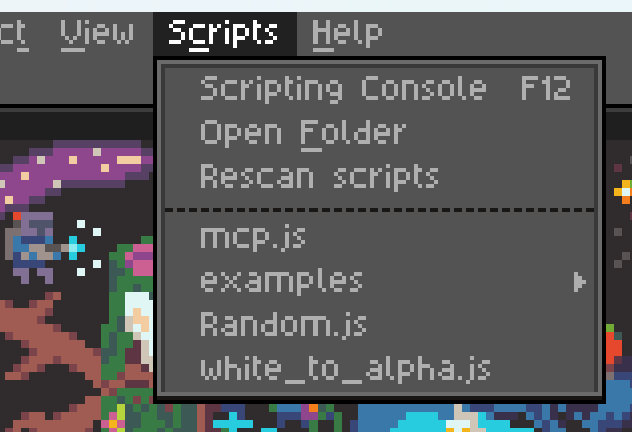
Download the latest stable remote script mcp.js from releases and add it to LibreSprite's scripts folder:
Step 3: Connect and use
Run the mcp.js script (that you see in the screenshot above), and make sure your MCP server is running (Claude Desktop/Cursor is loaded and running). If all went well, you should see the following screen:

Click the "Connect" button and you can now start talking to Claude about your next big pixel-art project!
Some pointers
- You can only run one instance of the MCP server at a time.
- The server expects port
64823to be free. - The server has a hacky and brittle implementation (see ARCHITECTURE), and is not extensively tested.
- The MCP resources are kinda low quality with unclear API reference and limited examples, leaving the LLM confused at times. If you're a LibreSprite expert, we need your help.
Recommended Servers

playwright-mcp
A Model Context Protocol server that enables LLMs to interact with web pages through structured accessibility snapshots without requiring vision models or screenshots.

Magic Component Platform (MCP)
An AI-powered tool that generates modern UI components from natural language descriptions, integrating with popular IDEs to streamline UI development workflow.

Audiense Insights MCP Server
Enables interaction with Audiense Insights accounts via the Model Context Protocol, facilitating the extraction and analysis of marketing insights and audience data including demographics, behavior, and influencer engagement.

VeyraX MCP
Single MCP tool to connect all your favorite tools: Gmail, Calendar and 40 more.

graphlit-mcp-server
The Model Context Protocol (MCP) Server enables integration between MCP clients and the Graphlit service. Ingest anything from Slack to Gmail to podcast feeds, in addition to web crawling, into a Graphlit project - and then retrieve relevant contents from the MCP client.

Kagi MCP Server
An MCP server that integrates Kagi search capabilities with Claude AI, enabling Claude to perform real-time web searches when answering questions that require up-to-date information.

E2B
Using MCP to run code via e2b.

Neon Database
MCP server for interacting with Neon Management API and databases

Exa Search
A Model Context Protocol (MCP) server lets AI assistants like Claude use the Exa AI Search API for web searches. This setup allows AI models to get real-time web information in a safe and controlled way.

Qdrant Server
This repository is an example of how to create a MCP server for Qdrant, a vector search engine.