
Kaspa MCP
Enables users to manage Kaspa wallets, check balances, and send KAS tokens directly on the Kaspa blockDAG. It provides tools for transaction fee estimation and retrieving detailed transaction history across mainnet and testnet environments.
README
Kaspa MCP
MCP server for sending KAS on the Kaspa blockDAG.
About Kaspa
Kaspa is a fast, scalable Layer-1 cryptocurrency built on proof-of-work (PoW) and powered by the GHOSTDAG protocol — a novel consensus mechanism that extends Nakamoto's original design. Unlike traditional blockchains that discard competing blocks, GHOSTDAG allows parallel blocks to coexist and orders them within a Directed Acyclic Graph (blockDAG), enabling high throughput while preserving decentralization and security.
Key Features:
- 10 blocks per second with sub-second finality (Crescendo upgrade, May 2025)
- Proof of Work using kHeavyHash algorithm
- Fair launch - no premine, no ICO, no token allocations
- Decentralized - runs on standard hardware
Installation
npm install
npm run build
Configuration
Set these environment variables:
| Variable | Required | Description |
|---|---|---|
KASPA_MNEMONIC |
Yes* | BIP39 mnemonic phrase (24 words) |
KASPA_PRIVATE_KEY |
Yes* | Hex-encoded private key (alternative to mnemonic) |
KASPA_NETWORK |
No | Network: mainnet, testnet-10, testnet-11. Defaults to mainnet |
KASPA_ACCOUNT_INDEX |
No | BIP44 account index when using mnemonic. Defaults to 0 |
*Either KASPA_MNEMONIC or KASPA_PRIVATE_KEY must be set.
Usage with Claude Desktop
Add to your Claude Desktop config (~/Library/Application Support/Claude/claude_desktop_config.json):
{
  "mcpServers": {
    "kaspa": {
      "command": "npx",
      "args": ["kaspa-mcp"],
      "env": {
        "KASPA_MNEMONIC": "your twenty four word mnemonic phrase here ...",
        "KASPA_NETWORK": "mainnet"
      }
    }
  }
}
Tools
get_my_address
Get the Kaspa address derived from your configured private key or mnemonic.
Returns: { address: string }
get_balance
Get balance for a Kaspa address.
Parameters:
address(optional): Address to check. Defaults to your wallet address.
Returns: { address: string, balance: string, utxoCount: number }
get_fee_estimate
Get current fee estimates from the network.
Returns: { priorityFee: string, normalFee: string, lowFee: string }
send_kaspa
Send KAS tokens to a recipient.
Parameters:
to: Recipient Kaspa address (must match wallet network)amount: Amount in KAS as string (e.g., "10.5", max 8 decimal places)priorityFee(optional): Priority fee in sompi
Returns: { txId: string, fee: string }
Validations:
- Address format and network prefix validation
- Amount must be a valid positive decimal number
- Maximum 8 decimal places (1 sompi = 0.00000001 KAS)
- Insufficient balance check before broadcast
get_transaction
Get transaction details including inputs and outputs.
Parameters:
txId: Transaction ID
Returns:
{
  txId: string,
  accepted: boolean,
  blockHash?: string,
  blockTime?: number,
  inputs: Array<{ transactionId: string, index: number }>,
  outputs: Array<{ index: number, amount: string, address: string }>
}
Example
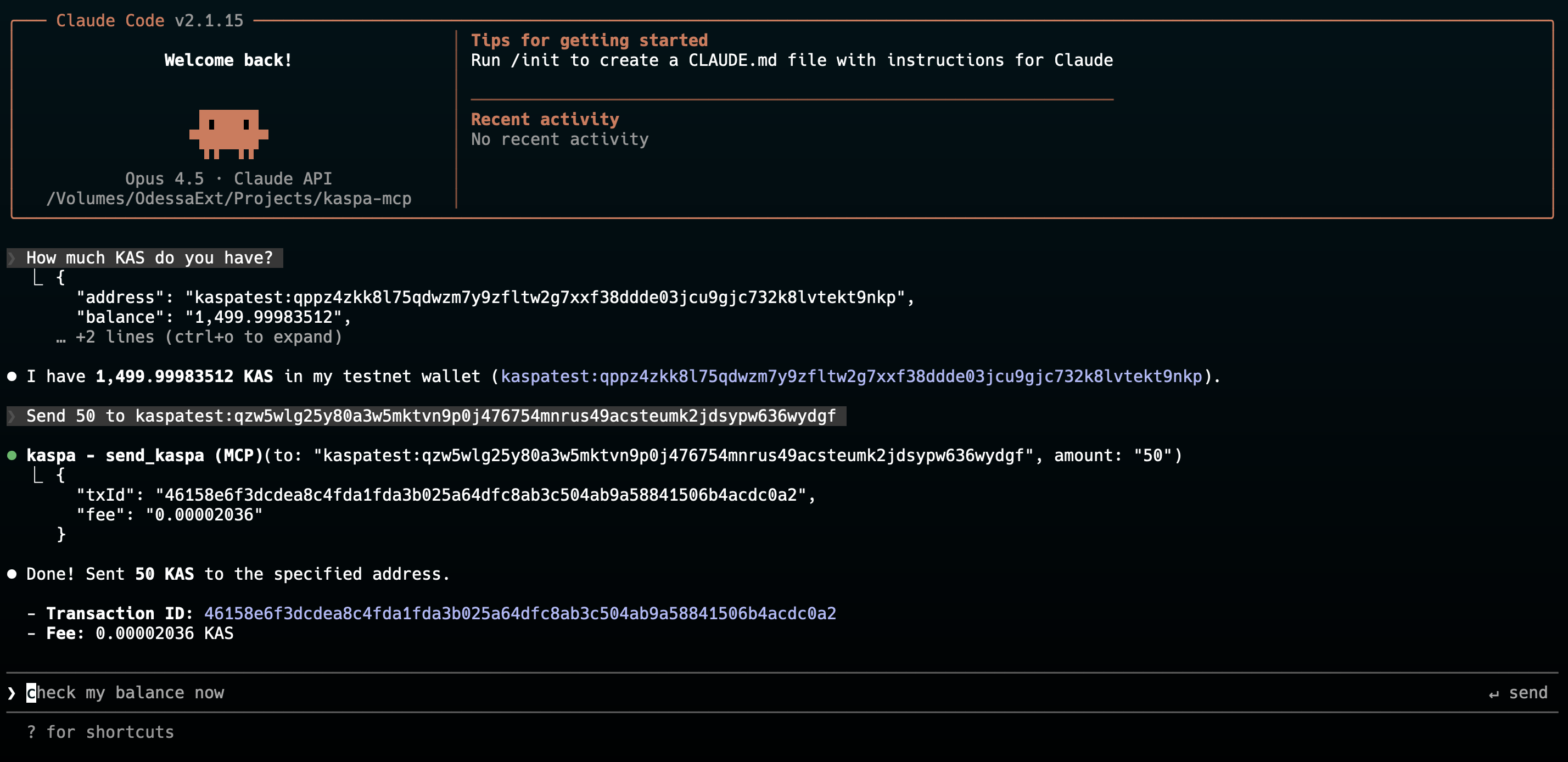
Test Prompts
Try these prompts to verify your MCP is working:
"What is my Kaspa address?"
"How much KAS do I have?"
"What are the current network fees?"
"Send 5 KAS to kaspa:qz..."
The MCP will:
- Validate the recipient address matches your network
- Check your balance is sufficient
- Build the transaction with KIP-9 compliant fees
- Sign with your private key
- Broadcast to the network via public nodes
- Return the transaction ID
Technical Details
- Uses kaspa-wasm for cryptographic operations
- Connects to public nodes via Resolver for automatic node discovery
- Implements BIP44 derivation path
m/44'/111111'/account'for mnemonic wallets - Transaction building uses Generator for KIP-9 compliant UTXO management
Security
- Private keys and mnemonics are only used locally for signing
- Keys are never sent to any external service
- Error messages are sanitized to prevent secret leakage
- All transactions require explicit user action via MCP tools
Networks
| Network | Address Prefix | API Endpoint |
|---|---|---|
mainnet |
kaspa: |
api.kaspa.org |
testnet-10 |
kaspatest: |
api-tn10.kaspa.org |
testnet-11 |
kaspatest: |
api-tn11.kaspa.org |
License
ISC
Recommended Servers

playwright-mcp
A Model Context Protocol server that enables LLMs to interact with web pages through structured accessibility snapshots without requiring vision models or screenshots.

Magic Component Platform (MCP)
An AI-powered tool that generates modern UI components from natural language descriptions, integrating with popular IDEs to streamline UI development workflow.

Audiense Insights MCP Server
Enables interaction with Audiense Insights accounts via the Model Context Protocol, facilitating the extraction and analysis of marketing insights and audience data including demographics, behavior, and influencer engagement.

VeyraX MCP
Single MCP tool to connect all your favorite tools: Gmail, Calendar and 40 more.

graphlit-mcp-server
The Model Context Protocol (MCP) Server enables integration between MCP clients and the Graphlit service. Ingest anything from Slack to Gmail to podcast feeds, in addition to web crawling, into a Graphlit project - and then retrieve relevant contents from the MCP client.

Kagi MCP Server
An MCP server that integrates Kagi search capabilities with Claude AI, enabling Claude to perform real-time web searches when answering questions that require up-to-date information.

E2B
Using MCP to run code via e2b.

Neon Database
MCP server for interacting with Neon Management API and databases

Exa Search
A Model Context Protocol (MCP) server lets AI assistants like Claude use the Exa AI Search API for web searches. This setup allows AI models to get real-time web information in a safe and controlled way.

Qdrant Server
This repository is an example of how to create a MCP server for Qdrant, a vector search engine.