
Jupyter MCP Server
Enables interaction with Jupyter notebooks through the Model Context Protocol, supporting code execution and markdown insertion within JupyterLab environments.
datalayer
README
<!-- ~ Copyright (c) 2023-2024 Datalayer, Inc. ~ ~ BSD 3-Clause License -->


🪐 ✨ Jupyter MCP Server


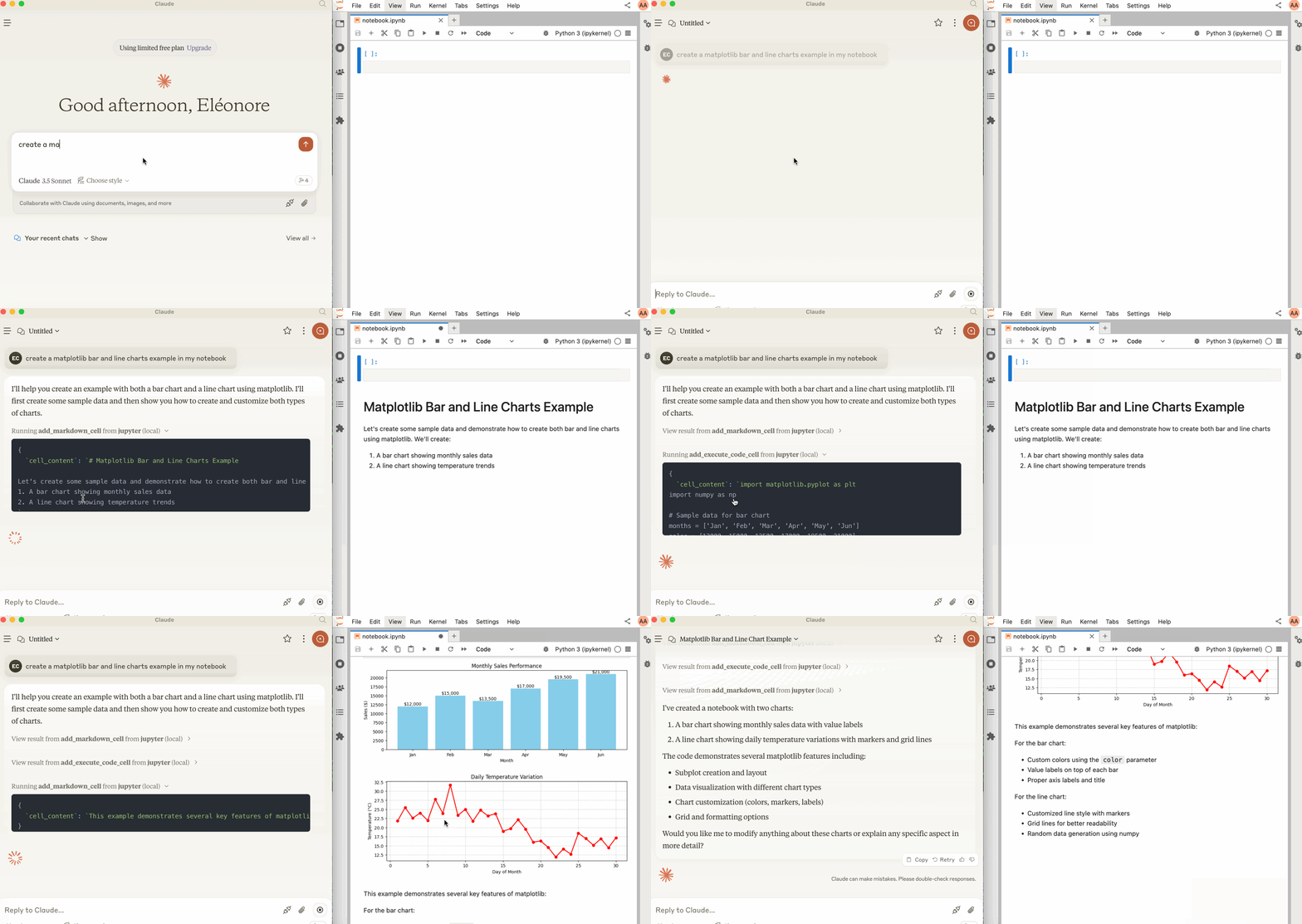
Jupyter MCP Server is a Model Context Protocol (MCP) server implementation that provides interaction with 📓 Jupyter notebooks running in any JupyterLab (works also with your 💻 local JupyterLab).
Start JupyterLab
Make sure you have the following installed. The collaboration package is needed as the modifications made on the notebook can be seen thanks to Jupyter Real Time Collaboration.
pip install jupyterlab jupyter-collaboration ipykernel
pip uninstall -y pycrdt datalayer_pycrdt
pip install datalayer_pycrdt
Then, start JupyterLab with the following command.
jupyter lab --port 8888 --IdentityProvider.token MY_TOKEN --ip 0.0.0.0
You can also run make jupyterlab.
[!NOTE]
The
--ipis set to0.0.0.0to allow the MCP server running in a Docker container to access your local JupyterLab.
Use with Claude Desktop
Claude Desktop can be downloaded from this page for macOS and Windows.
For Linux, we had success using this UNOFFICIAL build script based on nix
# ⚠️ UNOFFICIAL
# You can also run `make claude-linux`
NIXPKGS_ALLOW_UNFREE=1 nix run github:k3d3/claude-desktop-linux-flake \
  --impure \
  --extra-experimental-features flakes \
  --extra-experimental-features nix-command
To use this with Claude Desktop, add the following to your claude_desktop_config.json (read more on the MCP documentation website).
[!IMPORTANT]
Ensure the port of the
SERVER_URLandTOKENmatch those used in thejupyter labcommand.The
NOTEBOOK_PATHshould be relative to the directory where JupyterLab was started.
Claude Configuration on macOS and Windows
{
  "mcpServers": {
    "jupyter": {
      "command": "docker",
      "args": [
        "run",
        "-i",
        "--rm",
        "-e",
        "SERVER_URL",
        "-e",
        "TOKEN",
        "-e",
        "NOTEBOOK_PATH",
        "datalayer/jupyter-mcp-server:latest"
      ],
      "env": {
        "SERVER_URL": "http://host.docker.internal:8888",
        "TOKEN": "MY_TOKEN",
        "NOTEBOOK_PATH": "notebook.ipynb"
      }
    }
  }
}
Claude Configuration on Linux
CLAUDE_CONFIG=${HOME}/.config/Claude/claude_desktop_config.json
cat <<EOF > $CLAUDE_CONFIG
{
  "mcpServers": {
    "jupyter": {
      "command": "docker",
      "args": [
        "run",
        "-i",
        "--rm",
        "-e",
        "SERVER_URL",
        "-e",
        "TOKEN",
        "-e",
        "NOTEBOOK_PATH",
        "--network=host",
        "datalayer/jupyter-mcp-server:latest"
      ],
      "env": {
        "SERVER_URL": "http://localhost:8888",
        "TOKEN": "MY_TOKEN",
        "NOTEBOOK_PATH": "notebook.ipynb"
      }
    }
  }
}
EOF
cat $CLAUDE_CONFIG
Components
Tools
The server currently offers 3 tools:
add_execute_code_cell
- Add and execute a code cell in a Jupyter notebook.
- Input:
cell_content(string): Code to be executed.
- Returns: Cell output.
add_markdown_cell
- Add a markdown cell in a Jupyter notebook.
- Input:
cell_content(string): Markdown content.
- Returns: Success message.
-
download_earth_data_granules⚠️ We plan to migrate this tool to a separate repository in the future as it is specific to Geospatial analysis.
- Add a code cell in a Jupyter notebook to download Earth data granules from NASA Earth Data.
- Input:
folder_name(string): Local folder name to save the data.short_name(string): Short name of the Earth dataset to download.count(int): Number of data granules to download.temporal(tuple): (Optional) Temporal range in the format (date_from, date_to).bounding_box(tuple): (Optional) Bounding box in the format (lower_left_lon, lower_left_lat, upper_right_lon, upper_right_lat).
- Returns: Cell output.
Building
You can build the Docker image it from source.
make build-docker
Installing via Smithery
To install Jupyter MCP Server for Claude Desktop automatically via Smithery:
npx -y @smithery/cli install @datalayer/jupyter-mcp-server --client claude
Recommended Servers

playwright-mcp
A Model Context Protocol server that enables LLMs to interact with web pages through structured accessibility snapshots without requiring vision models or screenshots.

Neon Database
MCP server for interacting with Neon Management API and databases

Qdrant Server
This repository is an example of how to create a MCP server for Qdrant, a vector search engine.

AIO-MCP Server
🚀 All-in-one MCP server with AI search, RAG, and multi-service integrations (GitLab/Jira/Confluence/YouTube) for AI-enhanced development workflows. Folk from
React MCP
react-mcp integrates with Claude Desktop, enabling the creation and modification of React apps based on user prompts

Perplexity Server
Interacting with Perplexity API.

Atlassian Integration
Model Context Protocol (MCP) server for Atlassian Cloud products (Confluence and Jira). This integration is designed specifically for Atlassian Cloud instances and does not support Atlassian Server or Data Center deployments.

Any OpenAI Compatible API Integrations
Integrate Claude with Any OpenAI SDK Compatible Chat Completion API - OpenAI, Perplexity, Groq, xAI, PyroPrompts and more.

MySQL Server
Allows AI assistants to list tables, read data, and execute SQL queries through a controlled interface, making database exploration and analysis safer and more structured.
Browser Use (used by Deploya.dev)
AI-driven browser automation server that implements the Model Context Protocol to enable natural language control of web browsers for tasks like navigation, form filling, and visual interaction.