
Jimeng MCP Server
A Model Context Protocol server for AI image and video generation using Jimeng AI, enabling text-to-image, image composition, text-to-video, and image-to-video through Claude Desktop and other MCP clients.
README
即梦 MCP 服务器
用于即梦 AI 的模型上下文协议 (MCP) 服务器 - 通过 Claude 和其他 LLM 应用提供强大的图像和视频生成能力


项目介绍
即梦 MCP 服务器是一个专业的 AI 图像和视频生成 MCP 服务器,基于 jimeng-free-api-all 开源项目构建,通过 Claude Desktop、Cherry Studio 和 Claude Code 等 MCP 客户端提供强大的 AI 创作能力。
核心依赖
本项目基于 jimeng-free-api-all 开源项目构建,该项目提供了即梦 AI 的逆向接口实现,支持文生图、图生视频等多种 AI 生成能力。
核心特性
- 文生图: 使用即梦 4.5 根据文本描述生成高质量图像
- 图像合成: 基于文本指令将多张图像智能融合
- 文生视频: 使用即梦视频 3.0 根据文本描述生成短视频片段
- 图生视频: 为静态图像添加动画效果
- MCP 协议支持: 标准 MCP 协议,支持多种通信模式
- 多客户端兼容: 支持 Claude Desktop、Cherry Studio、Claude Code 等
更新日志
v0.2.0 (2024-12-14) - 参数格式同步更新
- 同步上游 v4.7 更新: 适配 jimeng-free-api-all 最新 API 参数格式
- 图片接口参数变更:
- 移除
width、height参数 - 新增
ratio参数:支持1:1、4:3、3:4、16:9、9:16、3:2、2:3、21:9 - 新增
resolution参数:支持1k、2k(默认)、4k
- 移除
- 视频接口参数变更:
- 移除
width、height参数 - 新增
ratio参数:支持1:1(默认)、4:3、3:4、16:9、9:16 resolution参数:支持480p、720p(默认)、1080p- 新增
duration参数:视频时长,支持 5 或 10 秒
- 移除
- 默认模型升级: 默认图像模型从
jimeng-4.0升级为jimeng-4.5
功能清单
| 功能名称 | 功能说明 | 技术栈 | 状态 |
|---|---|---|---|
| 文本生成图像 | 从详细文本提示创建高质量图像 | jimeng-4.5 | ✅ 稳定 |
| 图像合成 | 合成 1-10 张图像,风格迁移和混合 | jimeng-4.5 | ✅ 稳定 |
| 文本生成视频 | 从文本创建动画视频 | jimeng-video-3.0 | ✅ 稳定 |
| 图像生成视频 | 让静态图像动起来 | jimeng-video-3.0 | ✅ 稳定 |
| stdio 模式 | 标准输入/输出通信 | MCP 协议 | ✅ 稳定 |
| SSE 模式 | Server-Sent Events 事件流 | Starlette | ✅ 稳定 |
| HTTP 模式 | RESTful API 接口 | FastAPI | ✅ 稳定 |
| 多图生成 | jimeng-4.x 支持智能多图生成 | 即梦 AI | ✅ 稳定 |
技术架构
| 技术 | 版本 | 用途 |
|---|---|---|
| Python | 3.10+ | 主要开发语言 |
| MCP | 1.0+ | 模型上下文协议 |
| httpx | 0.27+ | HTTP 客户端 |
| Starlette | 0.37+ | ASGI 框架 |
| Uvicorn | 0.27+ | ASGI 服务器 |
| sse-starlette | 1.6+ | SSE 支持 |
架构说明
┌─────────────────────────────────────────────────┐
│            Claude Desktop / MCP Client           │
└────────────────────┬────────────────────────────┘
                     │ MCP Protocol
                     ↓
┌─────────────────────────────────────────────────┐
│          jimengmcp (本 MCP 服务器)               │
│    ┌──────────────────────────────────────┐     │
│    │  MCP Protocol Handler (stdio/sse)   │     │
│    └───────────────┬──────────────────────┘     │
│                    ↓                             │
│    ┌──────────────────────────────────────┐     │
│    │     Tool Implementations             │     │
│    │  - text_to_image                     │     │
│    │  - image_composition                 │     │
│    │  - text_to_video                     │     │
│    │  - image_to_video                    │     │
│    └───────────────┬──────────────────────┘     │
└────────────────────┼────────────────────────────┘
                     │ HTTP API Calls
                     ↓
┌─────────────────────────────────────────────────┐
│       jimeng-free-api-all 逆向接口服务            │
│  (https://github.com/wwwzhouhui/                │
│         jimeng-free-api-all)                    │
│    ┌──────────────────────────────────────┐     │
│    │    OpenAI Compatible API Endpoints   │     │
│    │  - POST /v1/images/generations       │     │
│    │  - POST /v1/images/compositions      │     │
│    │  - POST /v1/videos/generations       │     │
│    └───────────────┬──────────────────────┘     │
└────────────────────┼────────────────────────────┘
                     │ 逆向调用
                     ↓
┌─────────────────────────────────────────────────┐
│           即梦 AI 官方服务                        │
│       (https://jimeng.duckcloud.fun)            │
└─────────────────────────────────────────────────┘
安装说明
环境要求
- Python 3.10+
- 部署 jimeng-free-api-all 服务
- 从 duckcloud.fun 获取即梦 API SessionID
第一步:部署 jimeng-free-api-all 服务
本 MCP 服务器需要先部署底层的 API 服务。
方式一:Docker 部署(推荐)
# 拉取镜像
docker pull wwwzhouhui569/jimeng-free-api-all:latest

# 运行容器
docker run -it -d --init --name jimeng-free-api-all \
  -p 8001:8000 \
  -e TZ=Asia/Shanghai \
  wwwzhouhui569/jimeng-free-api-all:latest
方式二:源码部署
# 克隆 jimeng-free-api-all 项目
git clone https://github.com/wwwzhouhui/jimeng-free-api-all.git
cd jimeng-free-api-all

# 使用 Docker Compose 启动
docker-compose up -d
获取 SessionID:
- 访问 即梦官网 并登录
- 按
F12打开浏览器开发者工具 - 进入
Application>Cookies - 找到并复制
sessionid的值 - 在后续配置中使用:
Authorization: Bearer [your_sessionid]
验证部署:
# 测试 API 是否正常运行
curl http://localhost:8001/v1/models
第二步:安装 jimengmcp MCP 服务器
# 克隆此仓库
git clone https://github.com/wwwzhouhui/jimeng-mcp-server
cd jimeng-mcp-server
基础安装(stdio 模式)
pip install -e .
SSE 模式
pip install -e ".[sse]"
HTTP 模式
pip install -e ".[http]"
完整安装(所有模式)
pip install -e ".[all]"
配置环境变量
cp .env.example .env
编辑 .env 文件:
# 必需: 您的即梦 SessionID (从浏览器 Cookie 中获取)
JIMENG_API_KEY=your_sessionid_here

# 必需: jimeng-free-api-all 服务地址
JIMENG_API_URL=http://localhost:8001

# 可选: 默认使用的模型
JIMENG_MODEL=jimeng-4.5
使用说明
Claude Code 配置
使用 cc-switch 配置:
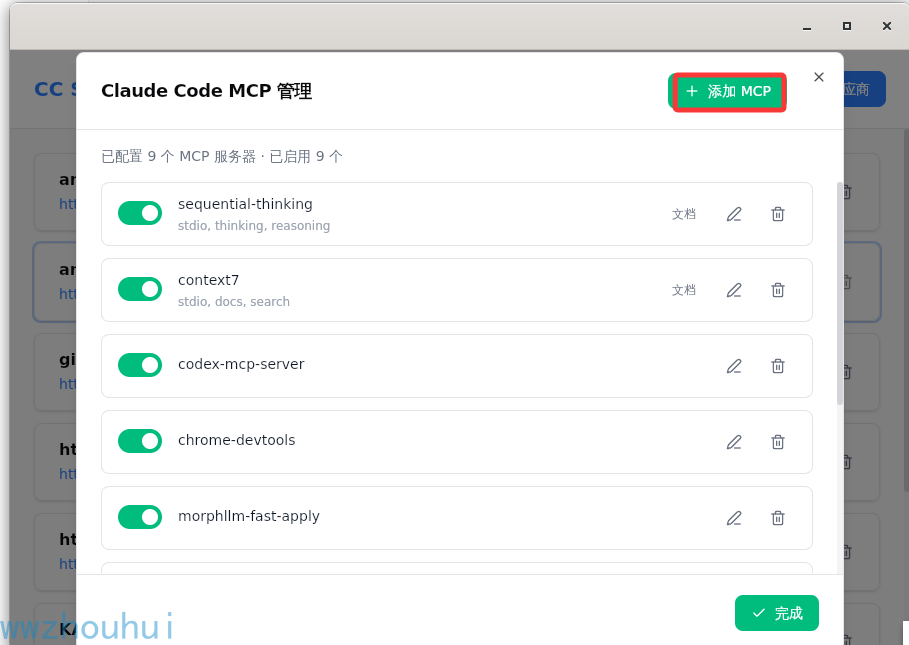
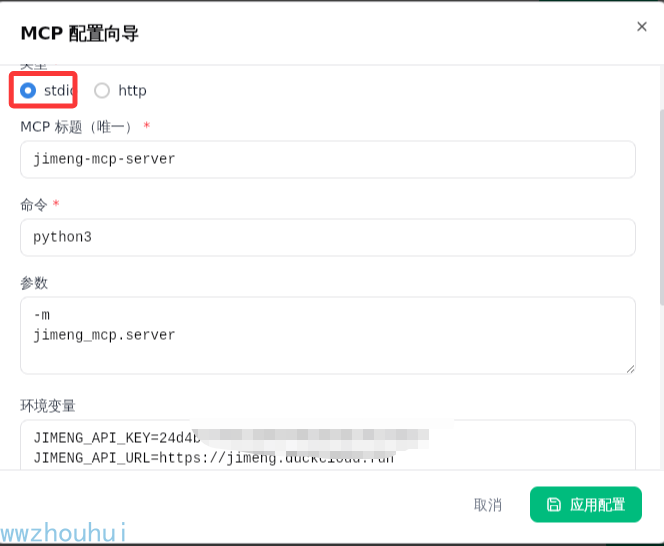
配置完成后,点击保存。
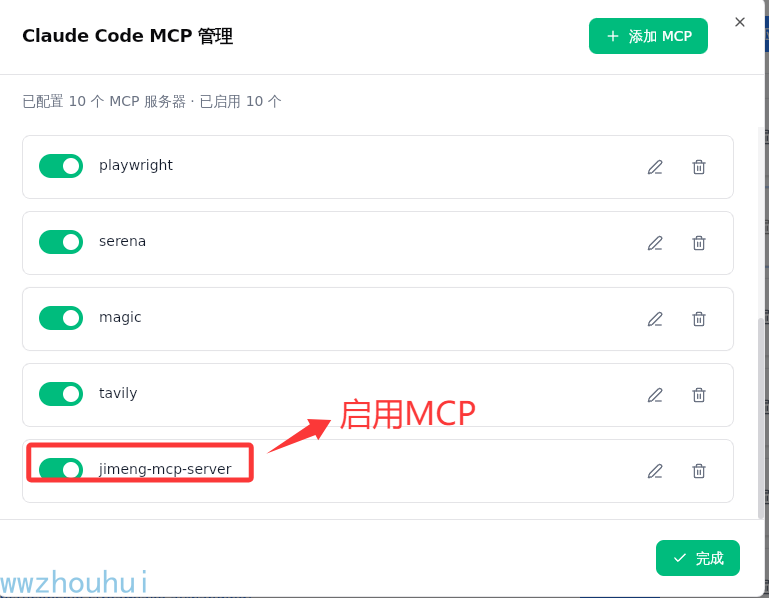
使用 mcp list 查看:
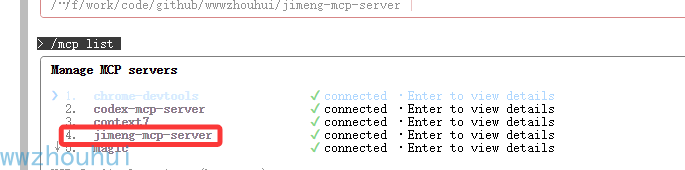
在 Claude Code 中使用
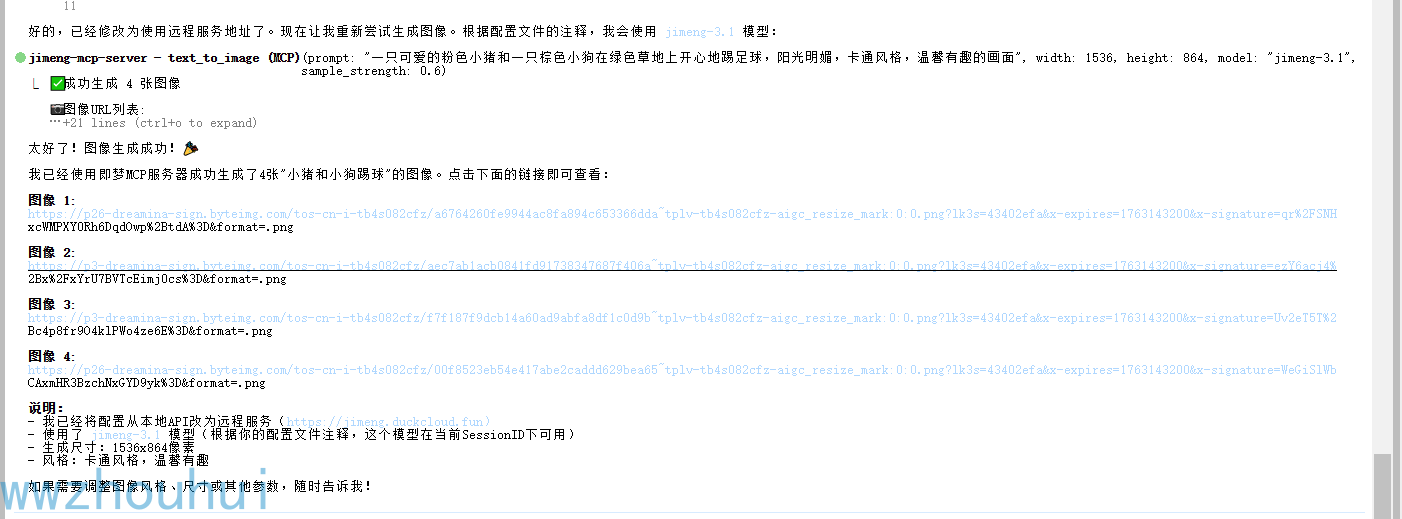
文本生成图像示例:
请使用jimeng-mcp-server 生成一张图像:小猪和小狗踢球
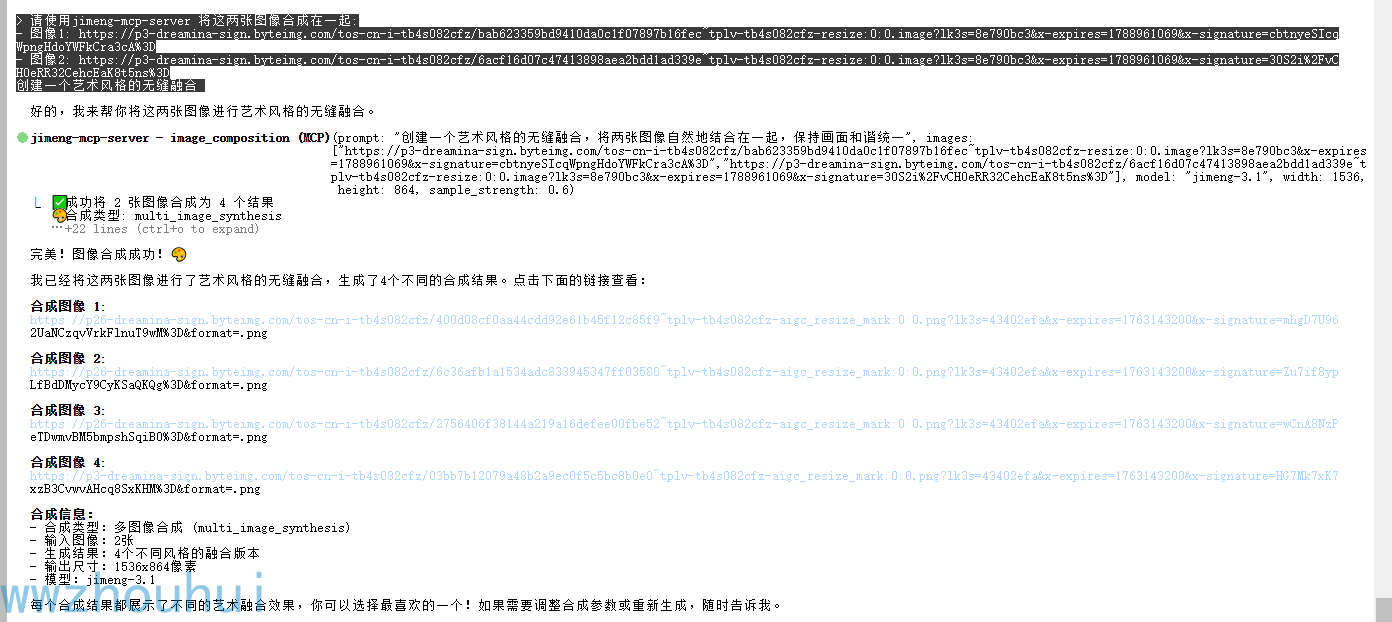
图像合成示例:
请使用jimeng-mcp-server 将这两张图像合成在一起:
- 图像1: https://p3-dreamina-sign.byteimg.com/tos-cn-i-tb4s082cfz/bab623359bd9410da0c1f07897b16fec~tplv-tb4s082cfz-resize:0:0.image
- 图像2: https://p3-dreamina-sign.byteimg.com/tos-cn-i-tb4s082cfz/6acf16d07c47413898aea2bdd1ad339e~tplv-tb4s082cfz-resize:0:0.image
创建一个艺术风格的无缝融合
文本生成视频示例:
请使用jimeng-mcp-server 创建一个视频:小马过河
运行模式
本 MCP 服务器支持三种通信模式:
1. stdio 模式(默认)
stdio 模式通过标准输入/输出通信,适合与 Claude Desktop 等 MCP 客户端集成。
python -m jimeng_mcp.server
# 或
python -m jimeng_mcp.server --mode stdio
2. SSE 模式 (Server-Sent Events)
SSE 模式提供基于 HTTP 的事件流,适合 Web 应用集成。
python -m jimeng_mcp.server --mode sse --host 0.0.0.0 --port 8000
连接端点:http://localhost:8000/sse

3. HTTP REST API 模式
HTTP 模式提供标准的 RESTful API 接口,适合各种编程语言调用。
python -m jimeng_mcp.server --mode http --host 0.0.0.0 --port 8000
可用端点:
GET /health- 健康检查GET /tools- 获取可用工具列表POST /text-to-image- 文本生成图像POST /image-composition- 图像合成POST /text-to-video- 文本生成视频POST /image-to-video- 图像生成视频
配置说明
环境变量配置
| 变量名 | 说明 | 默认值 |
|---|---|---|
JIMENG_API_KEY |
即梦 API SessionID(必填) | 无 |
JIMENG_API_URL |
jimeng-free-api-all 服务地址 | https://jimeng1.duckcloud.fun |
JIMENG_MODEL |
图像生成的默认模型 | jimeng-4.5 |
Cherry Studio 配置
将此服务器添加到 Cherry Studio 配置文件:
MacOS: ~/Library/Application Support/Claude/claude_desktop_config.json
Windows: %APPDATA%\Claude\claude_desktop_config.json
{
  "mcpServers": {
    "jimeng": {
      "command": "python",
      "args": ["-m", "jimeng_mcp.server"],
      "env": {
        "JIMENG_API_KEY": "您的API密钥"
      }
    }
  }
}
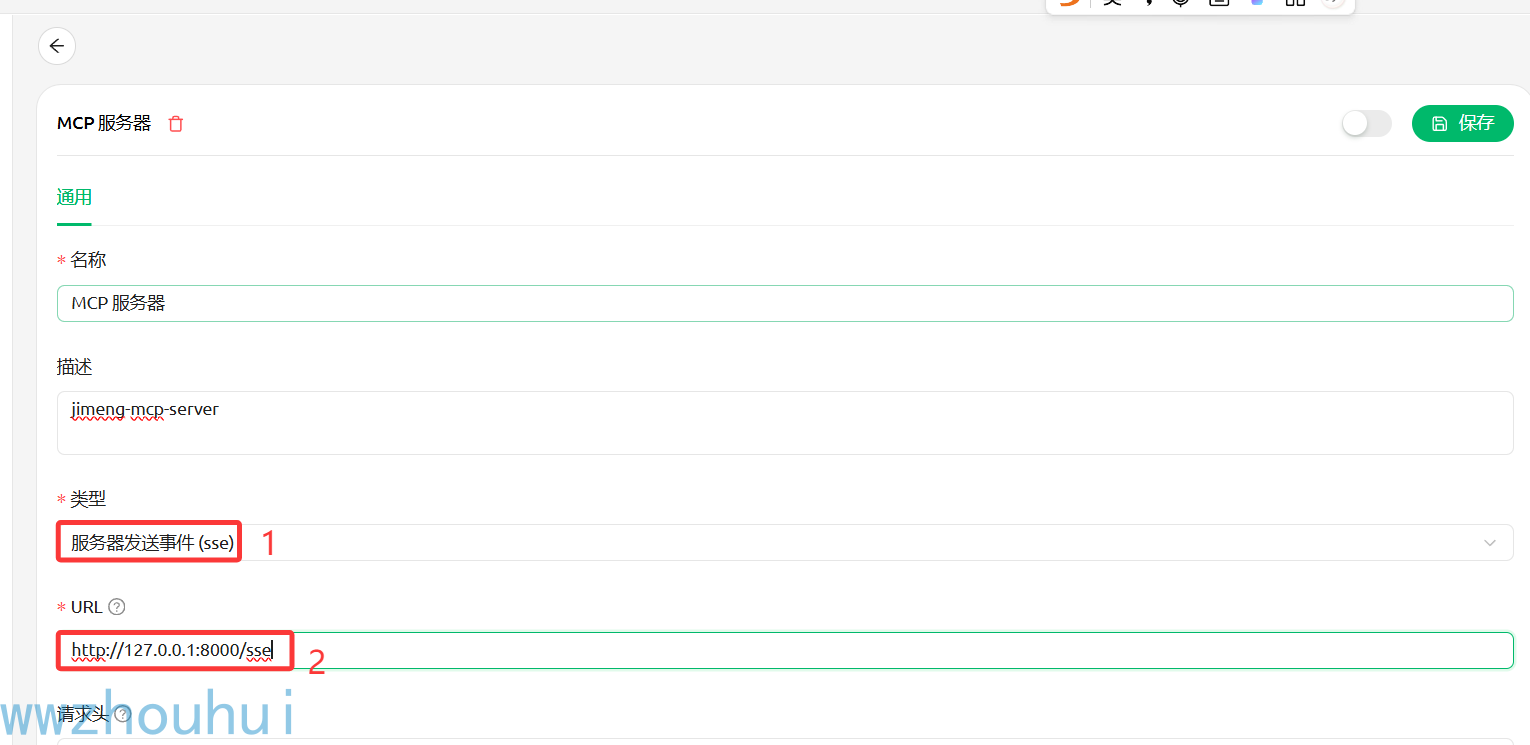
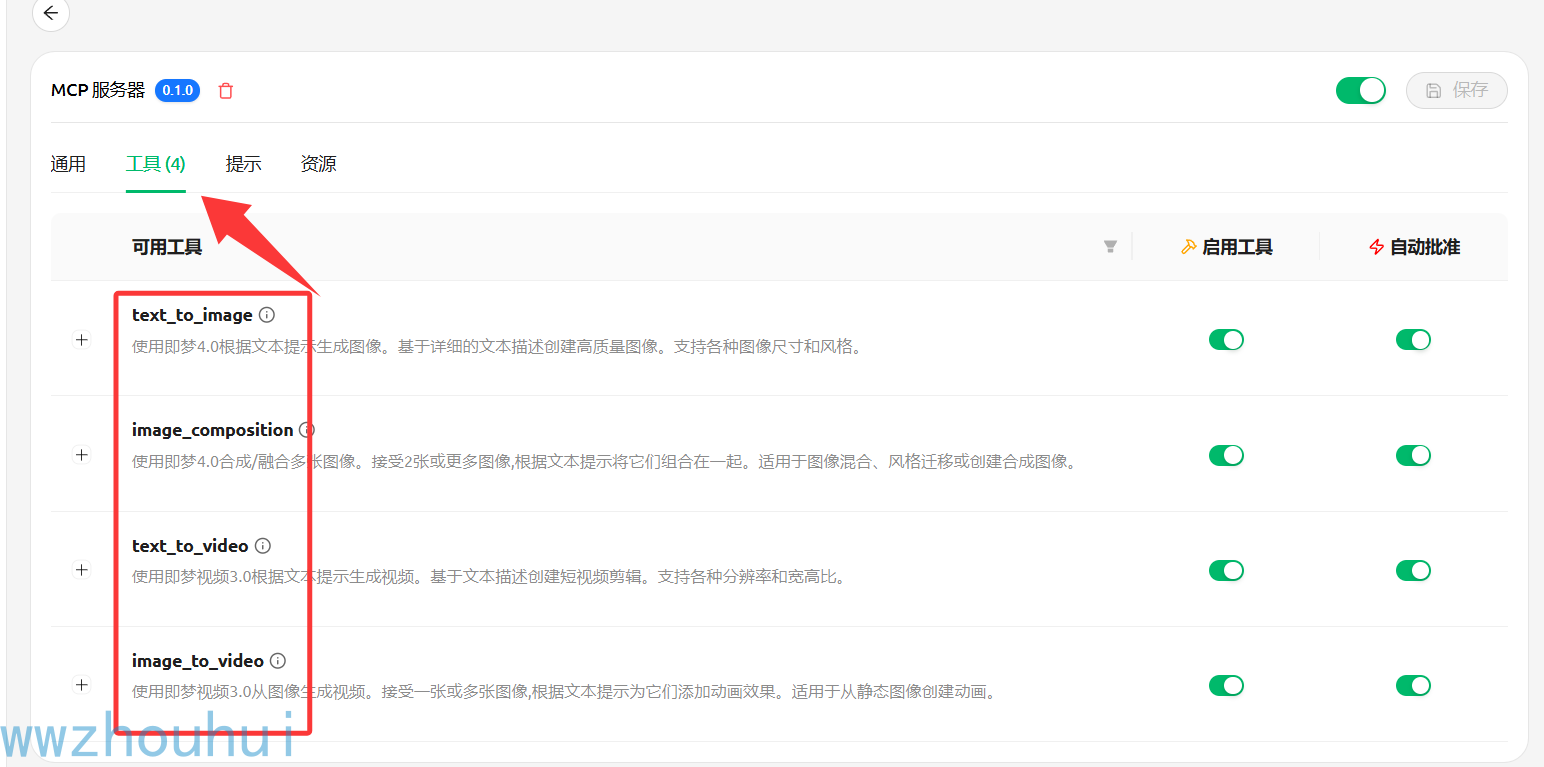
SSE 配置:
API 工具参数
text_to_image (文本生成图像)
| 参数 | 类型 | 必需 | 默认值 | 描述 |
|---|---|---|---|---|
| prompt | string | 是 | - | 图像的详细描述,jimeng-4.x 支持多图生成 |
| negative_prompt | string | 否 | "" | 要在图像中避免的内容 |
| ratio | string | 否 | 1:1 | 宽高比 (1:1, 4:3, 3:4, 16:9, 9:16, 3:2, 2:3, 21:9) |
| resolution | string | 否 | 2k | 分辨率 (1k, 2k, 4k) |
| sample_strength | float | 否 | 0.5 | 精细度 (0.0-1.0) |
| model | string | 否 | jimeng-4.5 | 使用的模型 |
image_composition (图像合成)
| 参数 | 类型 | 必需 | 默认值 | 描述 |
|---|---|---|---|---|
| prompt | string | 是 | - | 如何合成图像 |
| images | array | 是 | - | 图像 URL 数组(1-10 张) |
| ratio | string | 否 | 1:1 | 输出宽高比 |
| resolution | string | 否 | 2k | 输出分辨率 (1k, 2k, 4k) |
| sample_strength | float | 否 | 0.5 | 精细度 (0.0-1.0) |
| model | string | 否 | jimeng-4.5 | 使用的模型 |
text_to_video (文本生成视频)
| 参数 | 类型 | 必需 | 默认值 | 描述 |
|---|---|---|---|---|
| prompt | string | 是 | - | 视频描述 |
| ratio | string | 否 | 1:1 | 宽高比 (1:1, 4:3, 3:4, 16:9, 9:16) |
| resolution | string | 否 | 720p | 分辨率 (480p, 720p, 1080p) |
| duration | integer | 否 | 5 | 视频时长 (5 或 10 秒) |
| model | string | 否 | jimeng-video-3.0 | 使用的模型 |
image_to_video (图像生成视频)
| 参数 | 类型 | 必需 | 默认值 | 描述 |
|---|---|---|---|---|
| prompt | string | 是 | - | 动画描述 |
| file_paths | array | 是 | - | 首帧/尾帧图像 URL 数组 |
| ratio | string | 否 | 1:1 | 宽高比 (1:1, 4:3, 3:4, 16:9, 9:16) |
| resolution | string | 否 | 720p | 分辨率 (480p, 720p, 1080p) |
| duration | integer | 否 | 5 | 视频时长 (5 或 10 秒) |
| model | string | 否 | jimeng-video-3.0 | 使用的模型 |
开发指南
运行测试
pytest
直接运行服务器
python -m jimeng_mcp.server
常见问题
<details> <summary>Q: API 密钥错误?</summary>
A: 确保 .env 文件中的 JIMENG_API_KEY 设置正确,验证您的 API 密钥是否有效且有足够的额度。
</details>
<details> <summary>Q: 连接错误?</summary>
A: 检查您的网络连接,验证 API 基础 URL 是否可访问,检查是否有防火墙限制。 </details>
<details> <summary>Q: 超时错误?</summary>
A: 视频生成可能需要几分钟时间,服务器已为视频操作自动设置较长超时时间(10 分钟),考虑生成更短的视频或更低的分辨率。 </details>
<details> <summary>Q: jimeng-free-api-all 服务无法启动?</summary>
A: 确保 Docker 已安装并运行,检查端口 8001 是否被占用,查看容器日志排查问题。 </details>
<details> <summary>Q: Claude Code 无法识别 MCP 服务器?</summary>
A: 确保 .env 文件配置正确,使用 mcp list 命令检查 MCP 服务器状态,确认环境变量已正确加载。
</details>
技术交流群
欢迎加入技术交流群,分享你的使用心得和反馈建议:

作者联系
- 微信: laohaibao2025
- 邮箱: 75271002@qq.com
打赏
如果这个项目对你有帮助,欢迎请我喝杯咖啡 ☕
微信支付

Star History
如果觉得项目不错,欢迎点个 Star ⭐
License
MIT License
免责声明
本项目仅供学习和研究使用,基于 jimeng-free-api-all 项目构建。
重要提示:
- ⚠️ 本项目使用的是逆向接口,仅限个人学习研究使用
- ⚠️ 禁止将本项目用于商业用途或对外提供服务
- ⚠️ 逆向接口可能随官方更新而失效,请关注项目更新
- ⚠️ 使用时请遵守即梦 AI 官方的服务条款和使用限制
- ⚠️ 建议使用官方 API 进行生产环境部署
相关项目
本项目依赖并感谢以下开源项目:
核心依赖
- jimeng-free-api-all - 即梦 AI 逆向接口实现
- 提供完整的图像和视频生成 API
- OpenAI 兼容的接口设计
- 支持 Docker 一键部署
- 开源协议: GPL-3.0
技术框架
- 模型上下文协议 (MCP) - 统一的 AI 工具协议标准
- Python MCP SDK - MCP 的 Python 实现
- 即梦 AI - 底层的 AI 生成服务
特别致谢
- wwwzhouhui - jimeng-free-api-all 项目作者,提供了稳定可靠的即梦 AI 逆向接口
- Anthropic - 开发了强大的 Claude AI 和 MCP 协议
- 即梦 AI 团队 - 提供优秀的图像和视频生成能力
Recommended Servers

playwright-mcp
A Model Context Protocol server that enables LLMs to interact with web pages through structured accessibility snapshots without requiring vision models or screenshots.

Magic Component Platform (MCP)
An AI-powered tool that generates modern UI components from natural language descriptions, integrating with popular IDEs to streamline UI development workflow.

Audiense Insights MCP Server
Enables interaction with Audiense Insights accounts via the Model Context Protocol, facilitating the extraction and analysis of marketing insights and audience data including demographics, behavior, and influencer engagement.

VeyraX MCP
Single MCP tool to connect all your favorite tools: Gmail, Calendar and 40 more.

graphlit-mcp-server
The Model Context Protocol (MCP) Server enables integration between MCP clients and the Graphlit service. Ingest anything from Slack to Gmail to podcast feeds, in addition to web crawling, into a Graphlit project - and then retrieve relevant contents from the MCP client.

Kagi MCP Server
An MCP server that integrates Kagi search capabilities with Claude AI, enabling Claude to perform real-time web searches when answering questions that require up-to-date information.

E2B
Using MCP to run code via e2b.

Neon Database
MCP server for interacting with Neon Management API and databases

Exa Search
A Model Context Protocol (MCP) server lets AI assistants like Claude use the Exa AI Search API for web searches. This setup allows AI models to get real-time web information in a safe and controlled way.

Qdrant Server
This repository is an example of how to create a MCP server for Qdrant, a vector search engine.