
iRacing Data MCP Server
Provides seamless access to iRacing's racing simulation data, enabling AI assistants to retrieve driver profiles, career statistics, and team information. It features automatic authentication and tools for real-time driver lookups and season performance analysis.
README
iRacing Data MCP Server 🏎️
A Node.js Model Context Protocol (MCP) server that provides seamless access to iRacing's racing simulation data API. This project serves as both a standalone CLI tool and an MCP server for AI assistant integration.


🌟 Features
🤖 MCP Server Integration
- AI Assistant Ready: Seamlessly integrate with Claude, ChatGPT, and other AI assistants
- Real-time Data Access: Live access to iRacing's comprehensive racing data
- Automatic Authentication: Handles login and session management automatically
- Type-safe Operations: Full TypeScript support with Zod schema validation
📊 Data Access
- Member Profiles: Detailed driver information including licenses and ratings
- Team Information: Comprehensive team data and statistics
- Career Statistics: Complete racing career history and achievements
- Season Recaps: Detailed season performance and progression
- Driver Lookup: Search and find drivers by name
- API Documentation: Built-in access to iRacing's API documentation
🛠️ Dual Interface
- MCP Server: For AI assistant integration
- CLI Tool: For direct command-line access and automation
📖 Usage
As MCP Server
Configuration for LLM Clients
To use this MCP server with AI assistants like Claude Desktop, add the following configuration to your MCP settings file:
For Claude Desktop (~/Library/Application Support/Claude/claude_desktop_config.json on macOS):
{
  "mcpServers": {
    "iracing-data-mcp-server": {
      "command": "npx",
      "args": [
        "iracing-data-mcp-server@latest",
        "@modelcontextprotocol/server-filesystem",
        "/path/to/your/cookie-jar-file"
      ]
      "env": {
        "COOKIE_JAR": "/path/to/your/cookie-jar-file",
        "EMAIL": "your.email@example.com",
        "API_KEY": "your_api_key_here"
      }
    }
  }
}
Available MCP Tools
The server will run and provide the following tools to AI assistants:
| Tool | Description | Parameters |
|---|---|---|
login |
Authenticate with iRacing | None |
get_members_profile |
Get member profile data | member_ids: number[] |
get_team |
Retrieve team information | team_id: string |
get_member_recap |
Get season recap data | member_id: number, year?: number, season?: number |
get_member_career |
Get career statistics | member_id: number |
driver_lookup |
Search for drivers | driver_name: string |
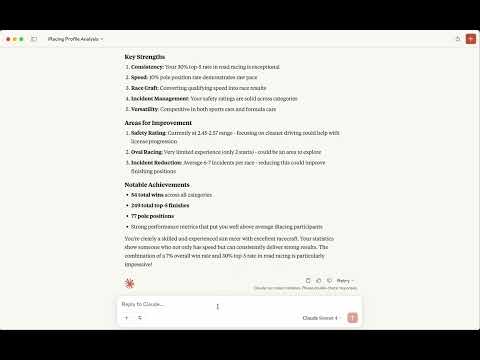
📹 Watch the video
As CLI Tool
Environment Setup
Create a .env file in your project directory:
# Required: Path to store authentication cookies
COOKIE_JAR=./cookies.txt

# Required: Your iRacing account credentials
EMAIL=your.email@example.com

# Option 1: Use your iRacing password
PASSWORD=your_password

# Option 2: Use pre-generated API key (recommended for security)
# API_KEY=your_api_key_here
Initial Authentication
Before using the cli, authenticate with iRacing:
npm run login
Use the command-line interface for direct data access:
Get Member Profile
# Single member
npm run api member 123456

# Multiple members
npm run api member 123456,789012
Get Team Information
npm run api team 123456
Get Member Career Data
npm run api member-career 123456
Get Season Recap
# Current season recap
npm run api member-recap --member-id 123456

# Specific year and season
npm run api member-recap --member-id 123456 --year 2024 --season 1
Driver Lookup
npm run api driver-lookup "Max Verstappen"
API Documentation
npm run api documentation
🔧 Development Setup
Prerequisites
- Node.js 24+
- npm
- iRacing account with active subscription
Clone and Install
git clone https://github.com/yourusername/iracing-data-mcp-server.git
cd iracing-data-mcp-server
npm install
🔐 Authentication & Security
API Key vs Password
Recommended: Use an API key for enhanced security:
-
Generate API Key:
const crypto = require('crypto'); const apiKey = crypto.createHash('sha256') .update(password + email) .digest('base64'); -
Set in Environment:
API_KEY=your_generated_api_key
# Remove PASSWORD variable when using API_KEY
Cookie Management
The server automatically manages authentication cookies:
- Stores cookies in the path specified by
COOKIE_JAR - Automatically refreshes expired sessions
- Handles authentication errors gracefully
<p align="center"> <strong>Built with ❤️ for the racing community</strong> </p>
<p align="center"> <a href="https://www.buymeacoffee.com/emiliosp" target="_blank"> <img src="https://cdn.buymeacoffee.com/buttons/v2/default-yellow.png" alt="Buy Me A Coffee" style="height: 60px !important;width: 217px !important;" > </a> </p>
Recommended Servers

playwright-mcp
A Model Context Protocol server that enables LLMs to interact with web pages through structured accessibility snapshots without requiring vision models or screenshots.

Magic Component Platform (MCP)
An AI-powered tool that generates modern UI components from natural language descriptions, integrating with popular IDEs to streamline UI development workflow.

Audiense Insights MCP Server
Enables interaction with Audiense Insights accounts via the Model Context Protocol, facilitating the extraction and analysis of marketing insights and audience data including demographics, behavior, and influencer engagement.

VeyraX MCP
Single MCP tool to connect all your favorite tools: Gmail, Calendar and 40 more.

graphlit-mcp-server
The Model Context Protocol (MCP) Server enables integration between MCP clients and the Graphlit service. Ingest anything from Slack to Gmail to podcast feeds, in addition to web crawling, into a Graphlit project - and then retrieve relevant contents from the MCP client.

Kagi MCP Server
An MCP server that integrates Kagi search capabilities with Claude AI, enabling Claude to perform real-time web searches when answering questions that require up-to-date information.

E2B
Using MCP to run code via e2b.

Neon Database
MCP server for interacting with Neon Management API and databases

Qdrant Server
This repository is an example of how to create a MCP server for Qdrant, a vector search engine.

Exa Search
A Model Context Protocol (MCP) server lets AI assistants like Claude use the Exa AI Search API for web searches. This setup allows AI models to get real-time web information in a safe and controlled way.