
Iconsult MCP
An architecture consulting server that reviews multi-agent systems against a knowledge graph of patterns derived from expert literature. It provides grounded recommendations with chapter citations, maturity scoring, and interactive architecture diagrams to identify and fix structural gaps.
README
Iconsult MCP
Architecture consulting for multi-agent systems, grounded in the textbook.
Iconsult is an MCP server that reviews your multi-agent architecture against a knowledge graph of 141 concepts and 462 relationships extracted from Agentic Architectural Patterns for Building Multi-Agent Systems (Arsanjani & Bustos, Packt 2026). Every recommendation comes with chapter numbers, page references, and concrete code-level changes — not abstract advice.
See It In Action
We pointed Iconsult at OpenAI's Financial Research Agent — a 5-stage multi-agent pipeline from their Agents SDK — and asked it to find architectural gaps.
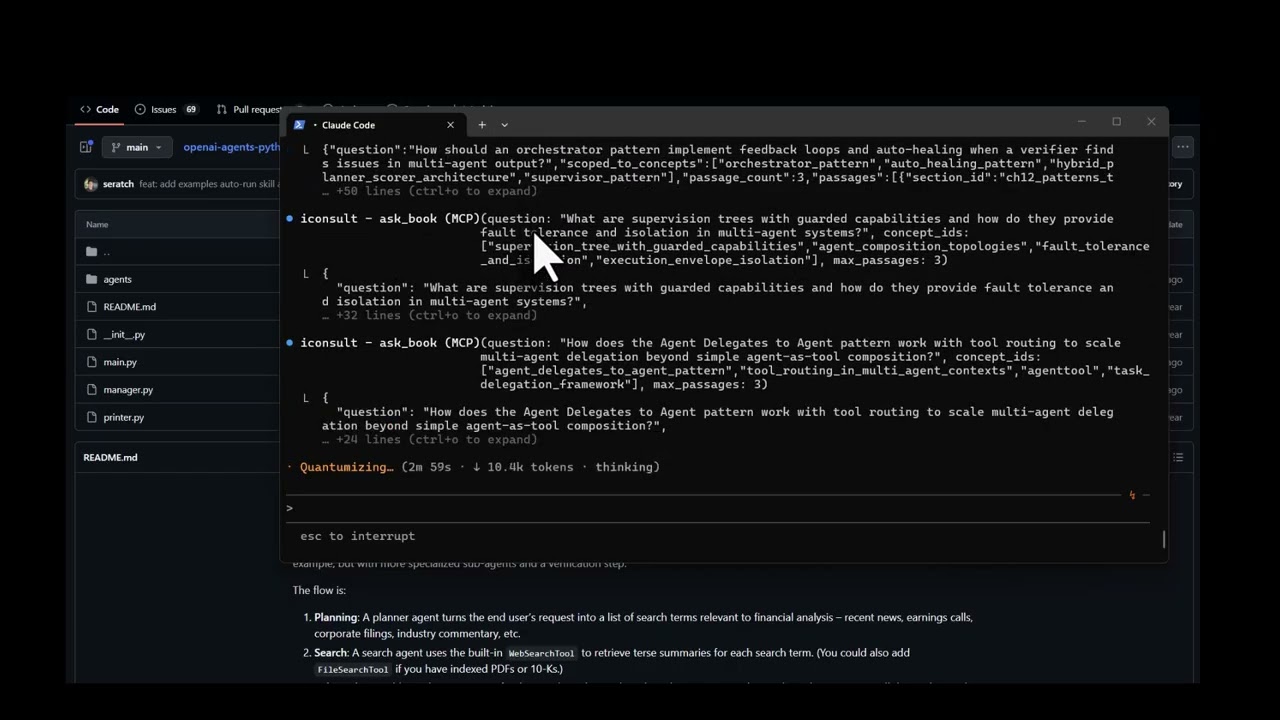
View the full interactive architecture review →
The agent's current architecture
The Financial Research Agent uses a 5-stage sequential pipeline orchestrated by FinancialResearchManager. Search is the only concurrent stage — everything else runs in sequence, and the verifier is a terminal dead end:
flowchart TD
    Q["User Query"] --> MGR["FinancialResearchManager"]
    MGR --> PLAN["PlannerAgent (o3-mini)"]
    PLAN -->|"FinancialSearchPlan"| FAN{"Fan-out N searches"}
    FAN --> S1["SearchAgent"]
    FAN --> S2["SearchAgent"]
    FAN --> SN["SearchAgent"]
    S1 --> W["WriterAgent (gpt-5.2)"]
    S2 --> W
    SN --> W
    W -.-> FA["FundamentalsAgent (.as_tool)"]
    W -.-> RA["RiskAgent (.as_tool)"]
    W --> V["VerifierAgent"]
    V --> OUT["Output"]
What Iconsult found
Solid foundation, but Iconsult's knowledge graph traversal uncovered 4 critical gaps:
| # | Gap | Missing Pattern | Book Reference |
|---|---|---|---|
| R1 | Verifier flags issues but pipeline terminates — no self-correction | Auto-Healing Agent Resuscitation | Ch. 7, p. 216 |
| R2 | Raw search results pass unfiltered to writer | Hybrid Planner+Scorer | Ch. 12, pp. 387-390 |
| R3 | All agents share same trust level — no capability boundaries | Supervision Tree with Guarded Capabilities | Ch. 5, pp. 142-145 |
| R4 | Zero reliability patterns composed (book recommends 2-3 minimum) | Shared Epistemic Memory + Persistent Instruction Anchoring | Ch. 6, p. 203 |
Recommended architecture
Adding a feedback loop, quality gate, shared memory, and retry logic:
flowchart TD
    Q["User Query"] --> SUP["SupervisorManager"]
    SUP --> MEM[("Shared Epistemic Memory")]
    SUP --> PLAN["PlannerAgent"]
    PLAN --> FAN{"Fan-out + Retry Logic"}
    FAN --> S1["SearchAgent"]
    FAN --> S2["SearchAgent"]
    S1 & S2 --> SCR["ScorerAgent (quality gate)"]
    SCR --> W["WriterAgent"]
    W -.-> FA["FundamentalsAgent"]
    W -.-> RA["RiskAgent"]
    W --> V["VerifierAgent"]
    V -->|"issues found"| W
    V -->|"verified"| OUT["Output"]
    MEM -.-> W
    MEM -.-> V
How it got there
The consultation followed Iconsult's guided workflow:
-
Read the codebase — Fetched all source files from
manager.py,agents/*.py. Identified the orchestrator pattern inFinancialResearchManager, the.as_tool()composition, the silentexcept Exception: return Nonein search, and the terminal verifier. -
Match concepts —
match_conceptsembedded the project description and deterministically ranked the most relevant patterns: Orchestrator, Planner-Worker, Agent Delegates to Agent, Tool Use, and Supervisor.
2b. Plan — plan_consultation assessed complexity and generated an adaptive plan — how many concepts to traverse, whether to use subagents, and which critique steps to include.
-
Traverse the graph —
get_subgraphexplored each seed concept's neighborhood. Therequiresedges revealed that the Supervisor pattern requires Auto-Healing — which was entirely missing. Thecomplementsedges surfaced Hybrid Planner+Scorer as a natural addition.log_pattern_assessmentrecorded each finding for deterministic scoring. -
Retrieve book passages —
ask_bookscoped to the discovered concepts returned exact citations: chapter numbers, page ranges, and quotes grounding each recommendation. -
Score + stress test + synthesize —
score_architecturecomputed the maturity scorecard from logged assessments.generate_failure_scenariosproduced concrete cascading failure traces for each gap — showing exactly what breaks and how failures propagate. Then generated the interactive before/after architecture diagram with specific file-level changes, prerequisite checks, and conflict analysis. All recommended patterns are complementary — no conflicts detected.
What It Does
Point it at a codebase (or describe your architecture), and it runs a structured consultation: matching concepts, traversing the knowledge graph for prerequisites and conflicts, scoring maturity against a 6-level model, and generating an interactive HTML review with before/after architecture diagrams.
Tools (17)
Consultation workflow:
| Tool | Role | What it does |
|---|---|---|
match_concepts |
Entry point | Embeds a project description → deterministic concept ranking + consultation_id for session tracking |
plan_consultation |
Planning | Assesses complexity (simple/moderate/complex) and generates an adaptive step-by-step plan |
get_subgraph |
Graph traversal | Priority-queue BFS from seed concepts — discovers alternatives, prerequisites, conflicts, complements |
log_pattern_assessment |
Assessment | Records whether each pattern is implemented, partial, missing, or not applicable |
ask_book |
Deep context | RAG search against the book — returns passages with chapter, page numbers, and full text |
consultation_report |
Coverage | Computes concept/relationship coverage, identifies gaps, optionally diffs two sessions |
score_architecture |
Scoring | Deterministic maturity scorecard (L1–L6) from logged pattern assessments |
generate_failure_scenarios |
Stress test | Cascading failure traces for each gap — code-grounded or book-grounded, with Ch. 7 recovery chain mapping |
critique_consultation |
Quality | Structural critique of consultation completeness with actionable fix suggestions |
supervise_consultation |
Supervision | Tracks workflow progress across 9 phases, suggests next action with tool + params |
Coordination:
| Tool | What it does |
|---|---|
write_state / read_state |
Shared key-value state for subagent coordination during traversal |
emit_event / get_events |
Event-driven reactivity — emit events like gap_found, poll with filters, get reactive suggestions |
Utility:
| Tool | What it does |
|---|---|
list_concepts |
Browse/filter the full 138-concept catalogue |
validate_subagent |
Schema validation for scatter-gather subagent responses |
health_check |
Server health + graph stats |
Prompt
| Prompt | What it does |
|---|---|
consult |
Kick off a full architecture consultation — provide your project context and get the guided workflow |
The Knowledge Graph
141 concepts · 786 sections · 462 relationships · 1,248 concept-section mappings
Relationship types span uses, extends, alternative_to, component_of, requires, enables, complements, specializes, precedes, and conflicts_with — discovered through five extraction phases including cross-chapter semantic analysis.
Explore the interactive knowledge graph →
Setup
Prerequisites
- Python 3.10+
- A MotherDuck account (free tier works)
- OpenAI API key (for embeddings used by
ask_book) - Claude Code with the visual-explainer skill installed (required for architecture diagram rendering — see below)
Database Access
The knowledge graph is hosted on MotherDuck and shared publicly. The server automatically detects whether you own the database or need to attach the public share — no extra configuration needed. Just provide your MotherDuck token and it works.
Install visual-explainer (Claude Code skill)
Iconsult renders architecture diagrams as interactive HTML pages using the visual-explainer skill. Install it once:
git clone https://github.com/nicobailon/visual-explainer.git ~/.claude/skills/visual-explainer
mkdir -p ~/.claude/commands
cp ~/.claude/skills/visual-explainer/prompts/*.md ~/.claude/commands/
This gives Claude Code the /generate-web-diagram command used during consultations. Diagrams are written to ~/.agent/diagrams/ and opened in your browser automatically.
Install
pip install git+https://github.com/marcus-waldman/Iconsult_mcp.git
For development:
git clone https://github.com/marcus-waldman/Iconsult_mcp.git
cd Iconsult_mcp
pip install -e .
Environment Variables
export MOTHERDUCK_TOKEN="your-token"    # Required — database
export OPENAI_API_KEY="sk-..."          # Required — embeddings for ask_book
MCP Configuration
Add to your Claude Desktop config (claude_desktop_config.json) or Claude Code settings:
{
  "mcpServers": {
    "iconsult": {
      "command": "iconsult-mcp",
      "env": {
        "MOTHERDUCK_TOKEN": "your-token",
        "OPENAI_API_KEY": "sk-..."
      }
    }
  }
}
Verify
iconsult-mcp --check
License
MIT
Recommended Servers

playwright-mcp
A Model Context Protocol server that enables LLMs to interact with web pages through structured accessibility snapshots without requiring vision models or screenshots.

Magic Component Platform (MCP)
An AI-powered tool that generates modern UI components from natural language descriptions, integrating with popular IDEs to streamline UI development workflow.

Audiense Insights MCP Server
Enables interaction with Audiense Insights accounts via the Model Context Protocol, facilitating the extraction and analysis of marketing insights and audience data including demographics, behavior, and influencer engagement.

VeyraX MCP
Single MCP tool to connect all your favorite tools: Gmail, Calendar and 40 more.

graphlit-mcp-server
The Model Context Protocol (MCP) Server enables integration between MCP clients and the Graphlit service. Ingest anything from Slack to Gmail to podcast feeds, in addition to web crawling, into a Graphlit project - and then retrieve relevant contents from the MCP client.

Kagi MCP Server
An MCP server that integrates Kagi search capabilities with Claude AI, enabling Claude to perform real-time web searches when answering questions that require up-to-date information.

E2B
Using MCP to run code via e2b.

Neon Database
MCP server for interacting with Neon Management API and databases

Exa Search
A Model Context Protocol (MCP) server lets AI assistants like Claude use the Exa AI Search API for web searches. This setup allows AI models to get real-time web information in a safe and controlled way.

Qdrant Server
This repository is an example of how to create a MCP server for Qdrant, a vector search engine.