
ibkr-mcp-server
Expose IBKR account data, portfolio positions, orders, executions, contracts, and market data snapshots via MCP to Claude or Codex.
README
IBKR MCP Server
Expose IBKR account data, portfolio positions (best-effort P&L), orders, executions, contracts, and market data snapshots via MCP to Claude or Codex. Tested with Interactive Brokers Trader Workstation. WARNING: You can lose real money if you do not understand what you are doing.
Requirements
- Docker (and Docker Compose v2)
- TWS or IB Gateway running locally with API access enabled
Configure TWS
In TWS, enable API access and allow local connections.
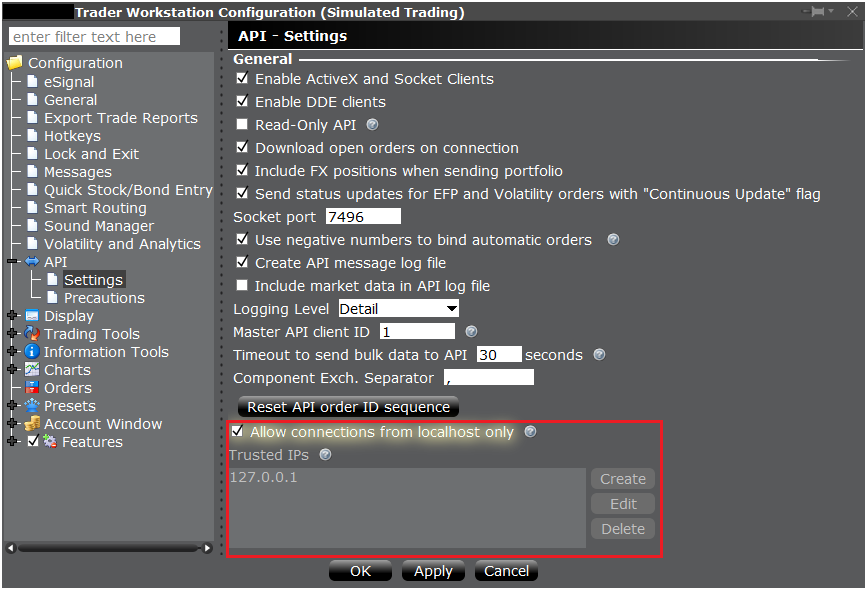
This setup expects TWS/IB Gateway to be running on the same machine as the Docker host.
Installation
git clone https://github.com/patrickpxp/ibkr-mcp-server
cd ibkr-mcp-server
Configuration
Create .env (ignored by git) as needed:
IBKR_HOST=host.docker.internal # from the container, this reaches the host TWS/IB Gateway; 127.0.0.1 would point to the container itself
IBKR_PORT=7496 # live trading port (paper is 7497)
IBKR_CLIENT_ID=100 # choose a unique client ID for this server instance
IBKR_ACCOUNT=
IBKR_TIMEOUT_SECONDS=10
IBKR_ENABLE_TRADING=false # keep false by default; set true only for explicit trading actions
IBKR_FLEX_TOKEN=
IBKR_FLEX_QUERY_ID=
MCP_BIND_HOST=0.0.0.0 # bind all interfaces so Docker port mapping is reachable; 127.0.0.1 would be container-only
MCP_PORT=8000
MCP_JSON_RESPONSE=true
MCP_STATELESS_HTTP=true
TZ=Europe/Madrid
Set MCP_JSON_RESPONSE=false or MCP_STATELESS_HTTP=false to enable streamable
HTTP/session behavior when needed.
If you run multiple IBKR API clients at the same time, each one must use a different
IBKR_CLIENT_ID. For example, a paper deployment could use:
IBKR_PORT=7497
IBKR_CLIENT_ID=300
See CLIENT_ID_POLICY.md for a deterministic client ID allocation plan.
If you want to validate the Flex reporting tools locally, keep the Flex credentials in a separate env file such as .env.flexquery:
IBKR_FLEX_TOKEN=
IBKR_FLEX_QUERY_ID=
WSL Note
If the runtime is WSL and TWS is running on Windows, 127.0.0.1 from WSL may not reach the Windows TWS API even when localhost works from Windows itself.
Use the Windows host IP from WSL for IBKR_HOST:
ip route show | grep default | awk '{print $3}'
In this setup, using a higher IBKR_TIMEOUT_SECONDS such as 30 may also be necessary for the IB API handshake.
Run
docker compose up -d --build
Health Check
curl http://localhost:${MCP_PORT:-8000}/health
Expected response:
{"status":"ok","ibkrTimeoutSeconds":10}
MCP Tool Invocation Example
curl -s -X POST http://localhost:${MCP_PORT:-8000}/mcp \
  -H 'Accept: application/json' \
  -H 'Content-Type: application/json' \
  -d '{"jsonrpc":"2.0","id":1,"method":"tools/call","params":{"name":"ibkr_get_portfolio","arguments":{}}}'
Tools
ibkr_get_portfolio: Positions with best-effort P&L.ibkr_get_account_summary: Account summary values (NetLiquidation, BuyingPower, etc.).ibkr_get_account_values: Account values snapshot (uses a short refresh; may fall back to cached values).ibkr_get_open_orders: Open orders with contract details and status.ibkr_get_executions: Executions/fills with basic execution details.ibkr_get_transactions: Transaction history derived from executions, with commissions and net cash flow when available.ibkr_search_symbols: Symbol lookup via matching symbols.ibkr_get_contract_details: Contract details for a given contract input.ibkr_get_market_data_snapshot: One-shot market data snapshot for contracts (includes option greeks such as delta when available; supports optionalmarket_data_typeoverride; IBIS requests are normalized to SMART + primaryExchange=IBIS). If IBKR reports live market data subscription errors, the tool retries once with delayed market data type3and includes guidance innotes; plain snapshot timeouts return retryableMARKET_DATA_TIMEOUT.ibkr_debug_market_data_snapshot: Diagnostic snapshot that compares raw vs SMART+primaryExchange requests.ibkr_get_historical_bars: Historical OHLCV bars for a contract.ibkr_get_historical_ticks: Historical ticks (bid/ask/trades/midpoint) for a contract.ibkr_get_head_timestamp: Earliest available historical data timestamp for a contract.ibkr_get_market_depth_snapshot: One-shot market depth (L2) snapshot for a contract.ibkr_get_option_chain: Option chain metadata (expirations/strikes) for an underlying. Useibkr_get_market_data_snapshoton specific option contracts to retrieve greeks.ibkr_get_news_providers: Available news provider codes/names.ibkr_get_historical_news: Historical news headlines for a contract.ibkr_get_news_article: News article body for a provider/article id.ibkr_get_fundamental_data: Fundamental data report (JSON by default, XML optional).ibkr_get_scanner_params: Scanner parameters (JSON by default, XML optional).ibkr_get_flex_statement: Fetch a Flex statement/report for a configured Flex query id.ibkr_get_cash_activity: Extract normalized cash activity from a Flex statement.ibkr_get_statement_summary: Return a compact summary of a Flex statement.ibkr_get_dividends: Extract dividends and withholding tax from a Flex statement.ibkr_get_trade_confirmations: Extract historical trade confirmations from a Flex statement.ibkr_get_statement_topics: Inspect the topic names and row counts present in a Flex statement.ibkr_run_scanner: Run a market scanner subscription and return ranked results.ibkr_preview_order: What-if margin/commission preview for an order.ibkr_place_order: Place one order (defaults:dry_run=true,transmit=false).ibkr_cancel_order: Cancel one order byorderId(requiresconfirm=true).ibkr_global_cancel: Cancel all active orders (requiresconfirm=true).ibkr_bracket_order: Place bracket entry/take-profit/stop-loss orders (defaults:dry_run=true,transmit=false).ibkr_oca_group: Place OCA grouped orders (defaults:dry_run=true,transmit=false).ibkr_exercise_options: Exercise/lapse options contract (requiresconfirm=true).
Batch 2 tool examples: docs/batch2_examples.md.
Batch 3 safety rules:
- Live mutating tools are disabled unless
IBKR_ENABLE_TRADING=true. - Mutating tools require
confirm=true. - Order placement flows default to
dry_run=trueandtransmit=false.
Statement retrieval note:
ibkr_get_transactionsis TWS/API-backed execution history, not an official IBKR account statement archive.ibkr_get_flex_statementusesib_async.flexreport.FlexReport, which wraps the IBKR Flex Web Service separately from the live TWS session.- Official statements, cash activity, dividends, and tax-style reports should continue to be treated as reporting features, not inferred from the live TWS socket state.
Flex Query Setup
For the reporting tools, create an Activity Flex Query in IBKR that includes at least:
TradesCash TransactionsChange in Dividend AccrualsEquity Summary by Report Date in BaseStatement of Funds
ibkr_get_statement_topics is useful for validating which topics your Flex query actually returns.
Schemas and Errors
tools/list includes title, description, inputSchema, and outputSchema for every tool. Input schemas include per-parameter descriptions, and output schemas describe the structured response payloads.
tools/call returns structured content that matches each tool's outputSchema. When a tool returns an error payload, the server sets isError=true and includes the structured error object in structuredContent.
Register MCP Server with Codex
codex mcp add ibkr-portfolio \
  --transport http \
  --url http://localhost:${MCP_PORT:-8000}/mcp
Once registered, ask Codex for your IBKR portfolio to invoke the tool.
Install the Skill
Copy the provided skill into your Codex skills directory:
mkdir -p ~/.codex/skills
cp -R .codex/skills/ibkr-portfolio ~/.codex/skills/
Tests
Create the local virtual environment first if needed:
python3 -m venv .venv
.venv/bin/python -m pip install -e .[test]
Run the suite with the repo virtual environment:
.venv/bin/python -m pytest -q
Future: Auth
FastMCP includes built-in OAuth provider integrations. A future iteration can wrap the
existing /mcp endpoint with FastMCP OAuth configuration (e.g., GitHub or Google) and
add token validation middleware before exposing the server publicly. No authentication
is implemented yet.
Recommended Servers

playwright-mcp
A Model Context Protocol server that enables LLMs to interact with web pages through structured accessibility snapshots without requiring vision models or screenshots.

Audiense Insights MCP Server
Enables interaction with Audiense Insights accounts via the Model Context Protocol, facilitating the extraction and analysis of marketing insights and audience data including demographics, behavior, and influencer engagement.

Magic Component Platform (MCP)
An AI-powered tool that generates modern UI components from natural language descriptions, integrating with popular IDEs to streamline UI development workflow.

VeyraX MCP
Single MCP tool to connect all your favorite tools: Gmail, Calendar and 40 more.

graphlit-mcp-server
The Model Context Protocol (MCP) Server enables integration between MCP clients and the Graphlit service. Ingest anything from Slack to Gmail to podcast feeds, in addition to web crawling, into a Graphlit project - and then retrieve relevant contents from the MCP client.

Kagi MCP Server
An MCP server that integrates Kagi search capabilities with Claude AI, enabling Claude to perform real-time web searches when answering questions that require up-to-date information.

Neon Database
MCP server for interacting with Neon Management API and databases

Exa Search
A Model Context Protocol (MCP) server lets AI assistants like Claude use the Exa AI Search API for web searches. This setup allows AI models to get real-time web information in a safe and controlled way.

Qdrant Server
This repository is an example of how to create a MCP server for Qdrant, a vector search engine.

E2B
Using MCP to run code via e2b.