
HUMAN Security MCP Server
Enables AI applications to access HUMAN Security's cybersecurity intelligence for threat detection, attack analysis, and security monitoring.
README



This is the official MCP Server for HUMAN Security.
HUMAN Security MCP Server
Supercharge your AI workflows with comprehensive cybersecurity intelligence from HUMAN Security. This Model Context Protocol (MCP) server provides access to HUMAN's industry-leading threat detection, attack analysis, and security monitoring capabilities directly within your AI-powered applications.
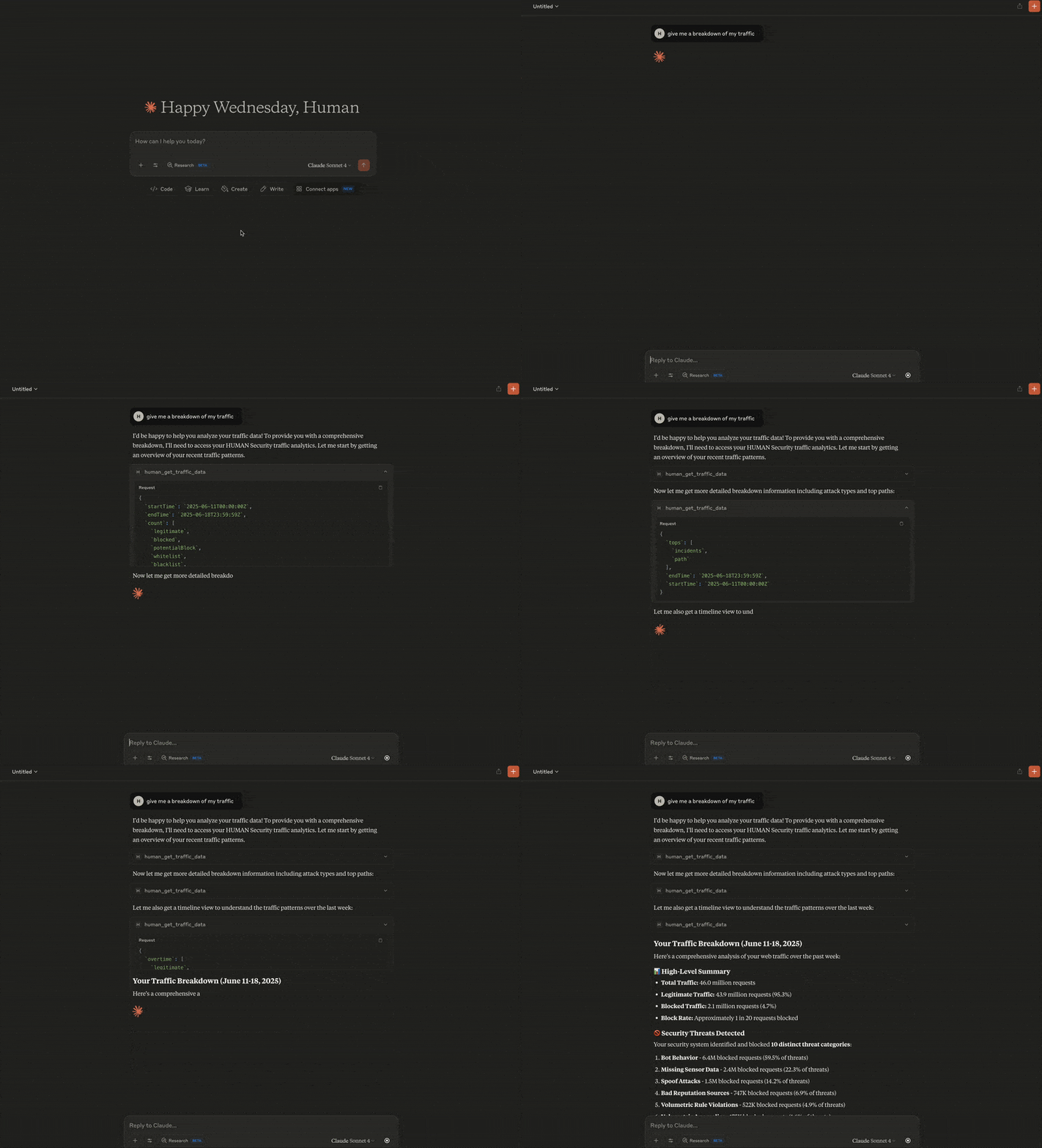
🛡️ What You Can Do
Cyberfraud Protection & Analytics
- Traffic Analysis: Monitor web and mobile traffic patterns with comprehensive security metrics
- Real-time Attack Monitoring: Track sophisticated attack campaigns with time-series analytics and threat intelligence
- Attack Investigation: Deep-dive into specific attack clusters with detailed forensics and attribution
- Account Security: Investigate suspicious account behavior, fraud patterns, and security incidents
- Custom Security Rules: Manage and audit your custom mitigation policies and security controls
Code Defender - Client-Side Security
- Supply Chain Protection: Monitor third-party scripts and vendors on your payment and sensitive pages
- PCI DSS Compliance: Automated compliance validation and security assessment for payment environments
- Security Incident Response: Track client-side attacks, XSS attempts, and code injection threats
- HTTP Security Headers: Comprehensive security posture analysis and misconfiguration detection
🚀 Quick Start
Add this configuration to your MCP server file:
{
  "mcpServers": {
    "human-security": {
      "command": "npx",
      "args": ["-y", "@humansecurity/human-mcp-server"],
      "env": {
        "HUMAN_CYBERFRAUD_API_TOKEN": "your-cyberfraud-token",
        "HUMAN_CODE_DEFENDER_API_TOKEN": "your-code-defender-token"
      }
    }
  }
}
- For Claude Desktop, navigate to Claude > Settings > Developer > Edit Config. This will take you to the location of the
claude_desktop_config.jsonfile. Edit this file in your preferred editor. - For Cursor, navigate to Cursor > Settings > Cursor Settings > Tools & Integrations. The MCP Tools section will take you to the
mcp.jsonfile, which you can edit directly in the Cursor editor.
You'll need API tokens from your HUMAN Security account to access the services. The server automatically detects which services you have access to and enables the corresponding tools.
Required Tokens
HUMAN_CYBERFRAUD_API_TOKEN: Enables attack monitoring, traffic analysis, account investigation, and custom rules managementHUMAN_CODE_DEFENDER_API_TOKEN: Enables supply chain monitoring, PCI compliance, and client-side security analysis
🐳 Run with Docker
If you prefer Docker over NPM, run the MCP server container directly:
docker run --rm -i \
  -e HUMAN_CYBERFRAUD_API_TOKEN=<value> \
  -e HUMAN_CODE_DEFENDER_API_TOKEN=<value> \
  us-docker.pkg.dev/hmn-registry-public/containers/human-mcp-server:latest
To use Docker from your MCP client config (e.g., Cursor or Claude Desktop), replace the NPM command with a Docker invocation:
{
  "mcpServers": {
    "human-security": {
      "command": "docker",
      "args": [
        "run", "--rm", "-i",
        "-e", "HUMAN_CYBERFRAUD_API_TOKEN",
        "-e", "HUMAN_CODE_DEFENDER_API_TOKEN",
        "us-docker.pkg.dev/hmn-registry-public/containers/human-mcp-server:latest"
      ],
      "env": {
        "HUMAN_CYBERFRAUD_API_TOKEN": "your-cyberfraud-token",
        "HUMAN_CODE_DEFENDER_API_TOKEN": "your-code-defender-token"
      }
    }
  }
}
Optional Configuration
HUMAN_API_HOST: Use a different API endpoint (default:api.humansecurity.com)HUMAN_API_VERSION: Specify API version (default:v1)HTTP_TIMEOUT_MS: Request timeout in milliseconds (default:30000)
💡 Usage Examples
Ask your AI assistant questions like:
- "Show me attack trends over the last 24 hours"
- "Investigate suspicious activity for account ID XXXXX"
- "What third-party scripts are running on our payment pages?"
- "Are we PCI DSS compliant based on our current security headers?"
- "Analyze the effectiveness of our custom security rules"
- "Show me details about attack cluster XXXXX"
📊 Available Tools
Cyberfraud Protection
- Traffic Data: Comprehensive traffic analytics with security metrics
- Attack Reporting (Overtime): Time-series attack analytics and trend analysis
- Attack Reporting (Overview): Detailed attack cluster intelligence and forensics
- Account Information: Individual account security analysis and incident tracking
- Custom Rules: Security policy management and effectiveness analysis
Code Defender Security
- Security Incidents: Client-side attack detection and investigation
- Script Inventory: Third-party script monitoring and PCI compliance
- Header Inventory: HTTP security header analysis and optimization
🔗 Integration Options
Single Service Setup
If you only need one service, you can configure just that token:
Cyberfraud Only:
{
  "human-security": {
    "command": "npx",
    "args": ["-y", "@humansecurity/human-mcp-server"],
    "env": {
      "HUMAN_CYBERFRAUD_API_TOKEN": "your-token-here"
    }
  }
}
Code Defender Only:
{
  "human-security": {
    "command": "npx",
    "args": ["-y", "@humansecurity/human-mcp-server"],
    "env": {
      "HUMAN_CODE_DEFENDER_API_TOKEN": "your-token-here"
    }
  }
}
🆘 Support
- Documentation: HUMAN Security Documentation
- API Tokens:
- Technical Support: Available through your HUMAN Security support channels
📄 License
MIT
Recommended Servers

playwright-mcp
A Model Context Protocol server that enables LLMs to interact with web pages through structured accessibility snapshots without requiring vision models or screenshots.

Magic Component Platform (MCP)
An AI-powered tool that generates modern UI components from natural language descriptions, integrating with popular IDEs to streamline UI development workflow.

Audiense Insights MCP Server
Enables interaction with Audiense Insights accounts via the Model Context Protocol, facilitating the extraction and analysis of marketing insights and audience data including demographics, behavior, and influencer engagement.

VeyraX MCP
Single MCP tool to connect all your favorite tools: Gmail, Calendar and 40 more.

graphlit-mcp-server
The Model Context Protocol (MCP) Server enables integration between MCP clients and the Graphlit service. Ingest anything from Slack to Gmail to podcast feeds, in addition to web crawling, into a Graphlit project - and then retrieve relevant contents from the MCP client.

Kagi MCP Server
An MCP server that integrates Kagi search capabilities with Claude AI, enabling Claude to perform real-time web searches when answering questions that require up-to-date information.

Neon Database
MCP server for interacting with Neon Management API and databases

E2B
Using MCP to run code via e2b.

Exa Search
A Model Context Protocol (MCP) server lets AI assistants like Claude use the Exa AI Search API for web searches. This setup allows AI models to get real-time web information in a safe and controlled way.

Qdrant Server
This repository is an example of how to create a MCP server for Qdrant, a vector search engine.