
Gemini Research MCP Server
MCP server for AI-powered research using Gemini. Provides fast grounded web search, deep autonomous research, URL extraction, and session management.
README
Gemini Research MCP Server


MCP server for AI-powered research using Gemini. Fast grounded search, URL extraction, comprehensive Deep Research, and session management.
FastMCP 3.1 now exposes a compact BM25 tool-search surface by default. Clients see research_web, research_deep, search_tools, and call_tool; utility tools such as URL reading, follow-up, resume, sessions, templates, and export are discovered on demand.
Architecture
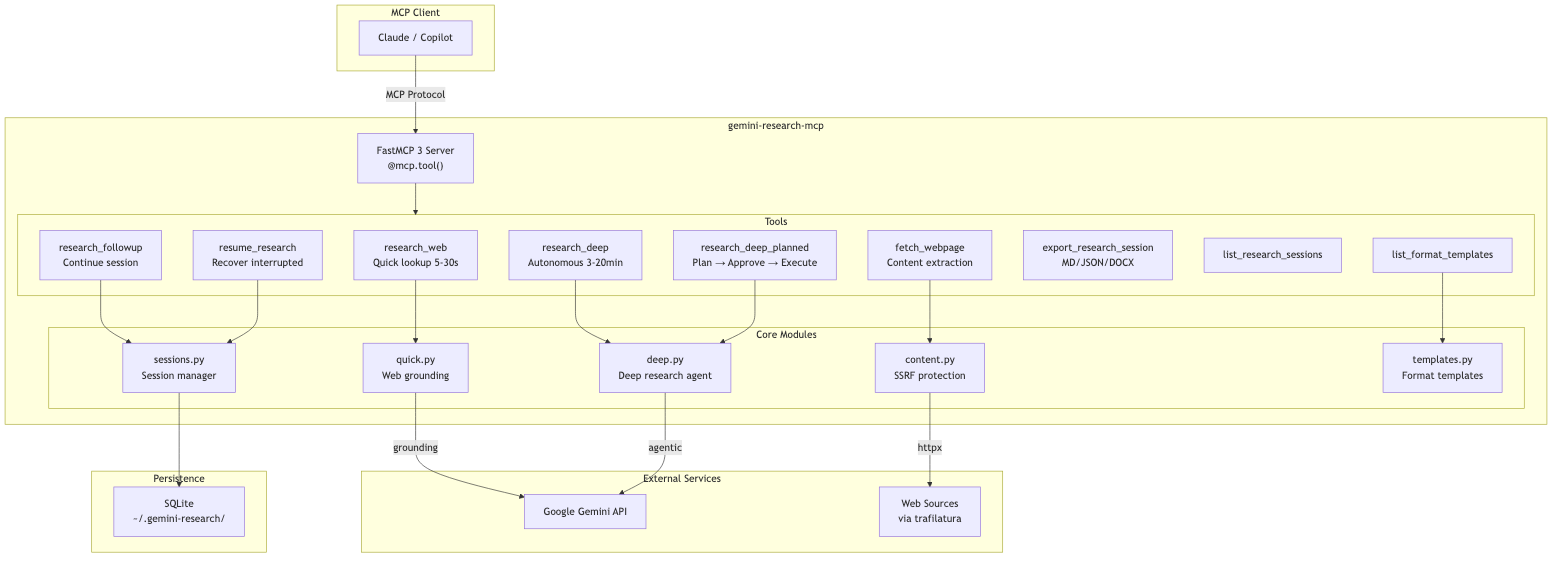
<details> <summary>Mermaid source</summary>
flowchart TB
    subgraph Client["MCP Client"]
        Claude["Claude / Copilot"]
    end

    subgraph Server["gemini-research-mcp"]
        direction TB
        FastMCP["FastMCP 3 Server<br/>@mcp.tool()"]

        subgraph Tools["Tools"]
            RW["research_web<br/>Quick lookup 5-30s"]
            RD["research_deep<br/>Autonomous 3-20min"]
            RF["research_followup<br/>Continue session"]
            RR["resume_research<br/>Recover interrupted"]
            FW["fetch_webpage<br/>Content extraction"]
            EX["export_research_session<br/>MD/JSON/DOCX"]
            LS["list_research_sessions"]
            LT["list_format_templates"]
        end

        subgraph Modules["Core Modules"]
            Quick["quick.py<br/>Web grounding"]
            Deep["deep.py<br/>Deep research agent"]
            Content["content.py<br/>SSRF protection"]
          StorageMod["storage.py<br/>Session manager"]
            Templates["templates.py<br/>Format templates"]
        end
    end

    subgraph External["External Services"]
        Gemini["Google Gemini API"]
        Web["Web Sources<br/>via trafilatura"]
    end

    subgraph Storage["Persistence"]
        SQLite["SQLite<br/>~/.gemini-research/"]
    end

    Claude -->|"MCP Protocol"| FastMCP
    FastMCP --> Tools

    RW --> Quick
    RD --> Deep
    RF --> StorageMod
    RR --> StorageMod
    FW --> Content
    LT --> Templates

    Quick -->|"grounding"| Gemini
    Deep -->|"agentic"| Gemini
    Content -->|"httpx"| Web
    StorageMod --> SQLite
</details>
Tools
Client-Visible Tools
| Tool | Description | Latency |
|---|---|---|
research_web |
Fast web search with citations | 5-30 sec |
research_deep |
Multi-step autonomous research (requires MCP Tasks) | 3-20 min |
resume_research |
Resume or check an interrupted research_deep session |
instant |
export_research_session |
Export a session to Markdown, JSON, or DOCX (disk-first) | instant |
search_tools |
BM25 search across the server's utility tools | instant |
call_tool |
Invoke a utility tool discovered through search_tools |
instant |
Utility Tools Available via search_tools
| Tool | Description | Latency |
|---|---|---|
fetch_webpage |
Extract article content from a specific URL (SSRF-protected, chunkable) | 0.5-2 sec |
research_followup |
Continue conversation after research | 5-30 sec |
list_research_sessions |
List saved research sessions | instant |
list_format_templates |
Browse report format templates | instant |
Discovered utility tools remain directly callable for clients that already know the tool name.
fetch_webpage Parameters
fetch_webpage is discoverable through search_tools in the default server listing.
The fetch_webpage tool supports chunked reading for large pages and optional proxy routing:
| Parameter | Type | Default | Description |
|---|---|---|---|
url |
string | required | HTTP/HTTPS URL to fetch |
max_length |
integer | null | null |
Maximum characters to return (chunk size) |
start_index |
integer | 0 |
Character offset for pagination |
proxy_url |
string | null | null |
Optional HTTP(S) proxy URL for the request |
Notes:
- SSRF protection is always applied (private/internal hosts are blocked).
robots.txtis checked before fetch whenprotegois installed.- When output is truncated, the response includes a continuation hint with next
start_index. - If
proxy_urlis omitted, the server falls back toFETCH_PROXY_URLwhen set. proxy_urlmust be a public HTTP(S) host (private/internal proxy hosts are blocked).
Install the web extra for the highest-quality fetch_webpage experience:
pip install 'gemini-research-mcp[web]'
# or
uv add 'gemini-research-mcp[web]'
Without [web], fetch_webpage still works using the built-in HTML fallback, but trafilatura
extraction and protego-based robots.txt checks are unavailable.
Power User Workflow

Key insight: Gemini Deep Research runs asynchronously on Google's servers. Even if VS Code disconnects, your research continues. The
resume_researchtool retrieves completed work.
Features
- Auto-Clarification:
research_deepasks clarifying questions for vague queries via MCP Elicitation - MCP Tasks: Real-time progress with streaming updates
- Session Persistence: Research sessions are automatically saved and can be resumed later
- Export Formats: Export to Markdown, JSON, or professional DOCX with Table of Contents
- File Search: Search your own data alongside web using
file_search_store_names - Remote MCP sources: Deep Research can call remote MCP servers using
mcp_servers - Format Instructions: Control report structure (sections, tables, tone)
Installation
PyPI (recommended)
pip install gemini-research-mcp
# or
uv add gemini-research-mcp
Claude Desktop (MCPB Bundle)
Download the .mcpb bundle from GitHub Releases and open it in Claude Desktop for single-click installation.
The bundle uses UV runtime - dependencies are installed automatically, no Python required.
Configuration
| Variable | Required | Default | Description |
|---|---|---|---|
GEMINI_API_KEY |
Yes | — | Google AI Studio API key |
GEMINI_MODEL |
No | gemini-3.1-pro-preview |
Model for research_web |
GEMINI_SUMMARY_MODEL |
No | gemini-3-flash-preview |
Model for session summaries (fast) |
DEEP_RESEARCH_AGENT |
No | deep-research-pro-preview-12-2025 |
Agent for research_deep |
FETCH_PROXY_URL |
No | — | Default HTTP(S) proxy for fetch_webpage |
cp .env.example .env
# Edit .env with your API key
Deep Research vs Deep Research Max
Google exposes Deep Research variants through the Gemini Interactions API agent
field, not the regular Gemini model field:
research_deepusesdeep-research-preview-04-2026by default. Use it for interactive research, comparisons, investigations, and latency/cost-sensitive synthesis.research_deep_maxusesdeep-research-max-preview-04-2026. Use it when the user explicitly asks for Max, exhaustive/comprehensive due diligence, market maps, literature reviews, board-ready reports, offline/nightly research, or maximum completeness over speed.
For Copilot and other LLM clients, the two tools are intentionally separate so
Max can be selected from the tool name and description. There is no public
model parameter for Deep Research, because follow-up and quick research use
Gemini models while Deep Research uses Interactions agents.
Remote MCP servers for Deep Research
Google Deep Research supports remote MCP servers through the Interactions API. Pass
mcp_servers to research_deep or research_deep_max when the agent needs a
specialized/private data source.
{
  "query": "Use the Market Researcher MCP evidence ledger to analyze the approved market gate.",
  "mcp_servers": [
    {
      "name": "Market Researcher MCP",
      "url": "https://example.com/mcp",
      "headers": {
        "Authorization": "Bearer ${TOKEN}"
      },
      "allowed_tools": [
        "market_get_mission",
        "market_get_runtime_policy",
        "market_get_task_status",
        "market_generate_report"
      ]
    }
  ]
}
Use allowed_tools aggressively. For evidence-led workflows, expose read-only
ledger/report/status tools to Deep Research and import the resulting report back
through your own audit/quarantine path. The MCP server tool accepts the
user-friendly string list shown above and normalizes it to the Gemini
Interactions API allowed_tools object shape before sending the request.
If Gemini returns a generic 400 invalid_request before the research task
starts, use inspect_mcp_server_for_gemini first. It lists the remote MCP
server tools and flags common compatibility problems such as missing tool
descriptions, empty input schemas, unsupported JSON Schema keywords, or
allowed_tools names that do not exist on the server. Public quick-tunnel hosts
may still be rejected before Gemini contacts the server; prefer a stable HTTPS
deployment for production E2E tests.
Usage
VS Code MCP
Add to .vscode/mcp.json:
{
  "servers": {
    "gemini-research": {
      "command": "uvx",
      "args": ["gemini-research-mcp"],
      "env": {
        "GEMINI_API_KEY": "your-api-key"
      }
    }
  }
}
Or run from source:
{
  "servers": {
    "gemini-research": {
      "command": "uv",
      "args": ["run", "--directory", "path/to/gemini-research-mcp", "gemini-research-mcp"],
      "envFile": "${workspaceFolder}/path/to/gemini-research-mcp/.env"
    }
  }
}
Command Line
uv run gemini-research-mcp
# or
uvx gemini-research-mcp
DOCX Export
Export research sessions to professional Word documents with:
- Cover page with title, date, and research metadata
- Clickable Table of Contents with navigation to sections
- Professional typography: Calibri fonts, 1-inch margins, 1.5x line spacing
- Executive summary with elegant formatting
- Full research report with proper heading hierarchy
- Sources section with full clickable URLs
- Metadata table with session details
VS Code Setup
To enable DOCX export, install with the [docx] extra:
{
  "servers": {
    "gemini-research": {
      "command": "uvx",
      "args": ["--from", "gemini-research-mcp[docx]", "gemini-research-mcp"],
      "env": {
        "GEMINI_API_KEY": "your-api-key"
      }
    }
  }
}
Downloading Files
export_research_session is disk-first: the file is always written
to disk and the absolute path is returned on the first line of the
response text (e.g. ✅ **Saved to:** /…/report.docx). This means any
MCP client — GUI or headless — gets a usable file path back.
By default exports are written to GEMINI_RESEARCH_EXPORT_DIR
(defaults to ~/.gemini-research/exports/; falls back to the system
temp dir if that location isn't writable). Override per-call with the
output_path argument:
{
  "name": "export_research_session",
  "arguments": {
    "interaction_id": "v1_...",
    "format": "docx",
    "output_path": "/absolute/or/relative/path/report.docx"
  }
}
When output_path is supplied, the parent directory must already
exist (no silent mkdir). GUI hosts (e.g. VS Code Copilot Chat) also
receive an EmbeddedResource attachment for native "Save As" —
clients that can't render it can safely ignore it.
Client compatibility
research_deep requires MCP Tasks support
(SEP-1732) on the client. Clients that do not advertise the tasks
capability will receive a -32600 error.
Known client status:
- VS Code Copilot Chat / MCP Inspector / Claude Desktop — supported.
- GitHub Copilot CLI — tracked upstream at
github/copilot-cli#2538;
until that lands, use
research_webfrom the CLI.
Installation (pip/uv)
# Install with DOCX support
pip install 'gemini-research-mcp[docx]'
# or
uv add 'gemini-research-mcp[docx]'
Features
| Feature | Description |
|---|---|
| Cover Page | Title, date, duration, tokens, AI agent |
| Clickable TOC | Internal hyperlinks navigate to sections |
| Syntax Highlighting | Pygments-powered code blocks with GitHub colors |
| Professional Styling | Calibri fonts, proper heading hierarchy (H1-H4) |
| Page Margins | Standard 1-inch (2.54cm) margins |
| Heading Spacing | keep_with_next prevents orphan headings |
| Sources | Full URLs as clickable hyperlinks |
| Pure Python | No external binaries (Pandoc not required) |
Resources
MCP Resources provide read-only data that clients can access:
| Resource | Description |
|---|---|
research://models |
Available models and their capabilities |
research://exports |
List cached exports ready for download |
research://exports/{id} |
Download an exported file (Markdown, JSON, or DOCX) |
File Downloads
The export_research_session tool creates exports and returns a resource URI. Clients (like VS Code) can then fetch the resource to download the file with proper MIME type handling.
Development
uv sync --extra dev
uv run pytest
uv run mypy src/
uv run ruff check src/
Tests
uv run pytest                    # Unit tests
uv run pytest -m e2e             # E2E tests (requires GEMINI_API_KEY)
uv run pytest --cov=src/gemini_research_mcp  # With coverage
Pricing
| Tool | Typical Cost |
|---|---|
research_web |
~$0.01-0.05 per query |
research_deep |
~$2-5 per task |
Deep Research uses ~80-160 searches and ~250k-900k tokens per task.
License
MIT
Recommended Servers

playwright-mcp
A Model Context Protocol server that enables LLMs to interact with web pages through structured accessibility snapshots without requiring vision models or screenshots.

Magic Component Platform (MCP)
An AI-powered tool that generates modern UI components from natural language descriptions, integrating with popular IDEs to streamline UI development workflow.

Audiense Insights MCP Server
Enables interaction with Audiense Insights accounts via the Model Context Protocol, facilitating the extraction and analysis of marketing insights and audience data including demographics, behavior, and influencer engagement.

VeyraX MCP
Single MCP tool to connect all your favorite tools: Gmail, Calendar and 40 more.

graphlit-mcp-server
The Model Context Protocol (MCP) Server enables integration between MCP clients and the Graphlit service. Ingest anything from Slack to Gmail to podcast feeds, in addition to web crawling, into a Graphlit project - and then retrieve relevant contents from the MCP client.

Kagi MCP Server
An MCP server that integrates Kagi search capabilities with Claude AI, enabling Claude to perform real-time web searches when answering questions that require up-to-date information.

E2B
Using MCP to run code via e2b.

Neon Database
MCP server for interacting with Neon Management API and databases

Exa Search
A Model Context Protocol (MCP) server lets AI assistants like Claude use the Exa AI Search API for web searches. This setup allows AI models to get real-time web information in a safe and controlled way.

Qdrant Server
This repository is an example of how to create a MCP server for Qdrant, a vector search engine.