
Frame Pulse MCP
Provides AI agents with real-time system monitoring and control for creative workstations, enabling thermal management and process prioritization to prevent crashes.
README
in progress
🎬 Frame Pulse MCP





AI-native telemetry for creative workstations.
Give your AI assistant (Claude, Hermes, Cursor) a "nervous system" to monitor and govern heavy creative workloads—Blender renders, Unreal builds, Houdini simulations—preventing thermal crashes and lost work during crunch.
🎯 The Problem Frame Pulse Solves
Digital content creation (DCC) tools are resource-intensive. During overnight renders or UE5 lighting builds, workstations overheat, hang, or crash—destroying hours of work and missing deadlines.
Existing tools (Glances, htop) show data. Frame Pulse lets AI act.
| Traditional Monitoring | Frame Pulse with AI |
|---|---|
| You watch numbers | Claude asks "Is my system safe?" |
| Crash after the fact | Throttle before thermal damage |
| Manual Task Manager | Natural language "deprioritize Chrome" |
| Silent failure | Discord/Telegram alerts at 2AM |
🚀 Quick Start
Option A: Claude Desktop (Recommended)
- Clone and install
git clone [https://github.com/idaakiwumi/frame-pulse-mcp.git](https://github.com/idaakiwumi/frame-pulse-mcp.git)
cd frame-pulse-mcp
pip install -r requirements.txt
- Add to Claude Desktop config
-
Windows (MSIX/Store):
%LOCALAPPDATA%\Packages\Claude_pzs8sxrjxfjjc\LocalCache\Roaming\Claude\claude_desktop_config.json -
**Other possible paths
\AppData\Roaming\Claude\claude_desktop_config.json\AppData\Local\Claude\claude_desktop_config.json -
Standard:
%APPDATA%\Claude\claude_desktop_config.json
-
{
  "mcpServers": {
    "frame-pulse": {
      "command": "py",
      "args": [
        "-3.14",
        "-u",
        "C:\\Users\\YOUR_PATH\\frame-pulse-mcp\\src\\frame_pulse\\server.py"
      ]
    }
  }
}
Then ask Claude: "Check my system status" or "Deprioritize my background apps"
Option B: The "Hero Demo" (Streamlit)
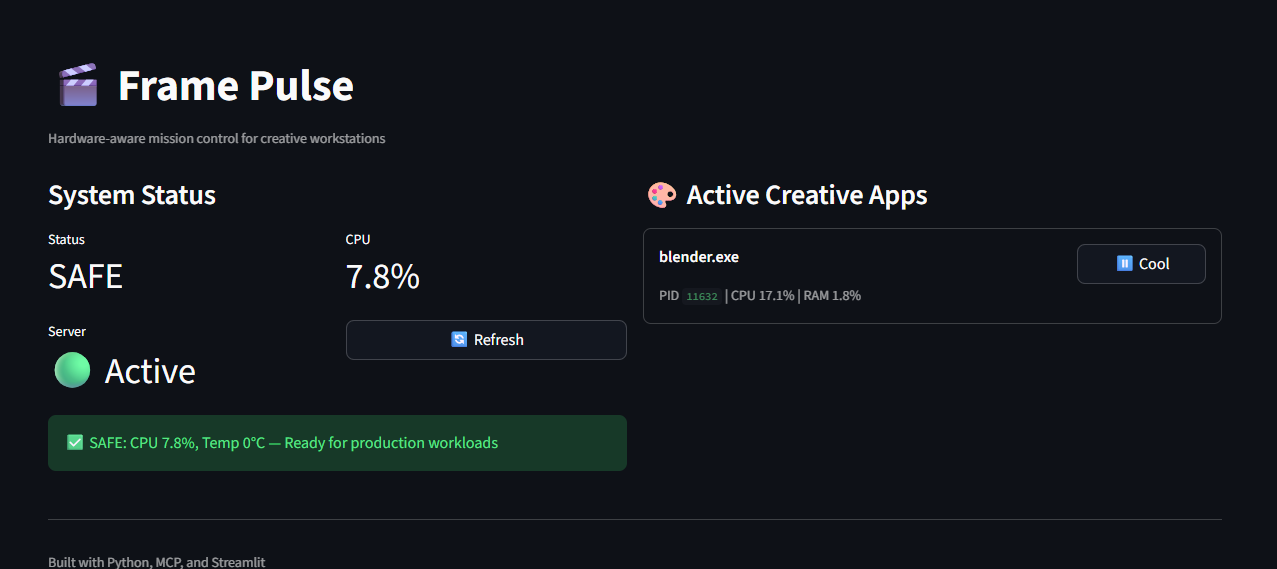
I built a high-fidelity Mission Control Dashboard using Streamlit. While the MCP runs in the background, this dashboard serves as the visual command center for the project.
streamlit run streamlit_app/mission_control.py
📱 The "Digital Pager" Ecosystem (Telegram & Discord)
As a Product Architect, I designed Frame Pulse to be "Headless." Creative professionals don't want another window to monitor; they want an assistant that pings them when they are away from their desk.
- Telegram Bot: Acts as a private production pager. Get a message on your phone if your CPU hits 90°C while you're grabbing coffee.
- Discord Webhooks: Rich, color-coded embeds sent to your studio's Discord server for team-wide render farm monitoring.
Setup: Configure your .env file with your TELEGRAM_BOT_TOKEN and TELEGRAM_CHAT_ID.
🛠️ MCP Tools for AI Agents
| Tool | Function | Use Case |
|---|---|---|
check_system_health() |
CPU, RAM, and Thermal scan | "Is it safe to start a 6-hour render?" |
scan_creative_apps() |
Identifies Blender, Unreal, Maya, etc. | "What's currently taxing the GPU?" |
emergency_throttle() |
Immediate CPU priority reduction | "CRITICAL: Throttle background apps now." |
get_thermal_status() |
Real-time temperature read | "Am I at risk of a thermal shutdown?" |
🤝 Community & Recognition
**Featured on Lobehub — AI tools discovery platform.
🛠️ Built With
- MCP — Model Context Protocol for AI tool interoperability
- FastMCP — Python SDK for MCP servers
- psutil — Cross-platform system monitoring
- Streamlit — Rapid Python dashboarding
📸 Demo
[30-second GIF: Claude asking "Start my render?" → Frame Pulse responding "CAUTION: CPU 89%" → User clicking throttle → Success toast]
🤝 Who's Using This
"Frame Pulse caught a thermal spike before our overnight farm render. Saved us 14 hours of redo work."
— Anonymous VFX Supervisor (via DM)
☕ Support the Mission
If this tool saved your render from thermal throttling, prevented a 3AM crash, or helped your AI agent make hardware-aware decisions—consider fueling continued development:
👩🏽💻 Developed by Ida Akiwumi
Lead Product Designer | Creative Technologist | Narrative Strategist
Translating user friction into product opportunities.

Recommended Servers

playwright-mcp
A Model Context Protocol server that enables LLMs to interact with web pages through structured accessibility snapshots without requiring vision models or screenshots.

Magic Component Platform (MCP)
An AI-powered tool that generates modern UI components from natural language descriptions, integrating with popular IDEs to streamline UI development workflow.

Audiense Insights MCP Server
Enables interaction with Audiense Insights accounts via the Model Context Protocol, facilitating the extraction and analysis of marketing insights and audience data including demographics, behavior, and influencer engagement.

VeyraX MCP
Single MCP tool to connect all your favorite tools: Gmail, Calendar and 40 more.

graphlit-mcp-server
The Model Context Protocol (MCP) Server enables integration between MCP clients and the Graphlit service. Ingest anything from Slack to Gmail to podcast feeds, in addition to web crawling, into a Graphlit project - and then retrieve relevant contents from the MCP client.

Kagi MCP Server
An MCP server that integrates Kagi search capabilities with Claude AI, enabling Claude to perform real-time web searches when answering questions that require up-to-date information.

Neon Database
MCP server for interacting with Neon Management API and databases

E2B
Using MCP to run code via e2b.

Exa Search
A Model Context Protocol (MCP) server lets AI assistants like Claude use the Exa AI Search API for web searches. This setup allows AI models to get real-time web information in a safe and controlled way.

Qdrant Server
This repository is an example of how to create a MCP server for Qdrant, a vector search engine.