
forecast-mcp
Enable any AI agent to forecast time-series data (e.g., sales, traffic) using Google's TimesFM or a zero-dependency statistical baseline.
README
timesfm-mcp


MCP server for Google's TimesFM 2.5 — give any AI agent zero-config time-series forecasting.
Plug TimesFM 2.5, Google's 200M-parameter foundation model for time-series, directly into Claude Code, Claude Desktop, Cursor, or any MCP client. The agent calls forecast, gets point predictions + uncertainty bands + a trend/seasonality summary, and writes the explanation itself.
No ML configuration. No data pipelines. One line to run.
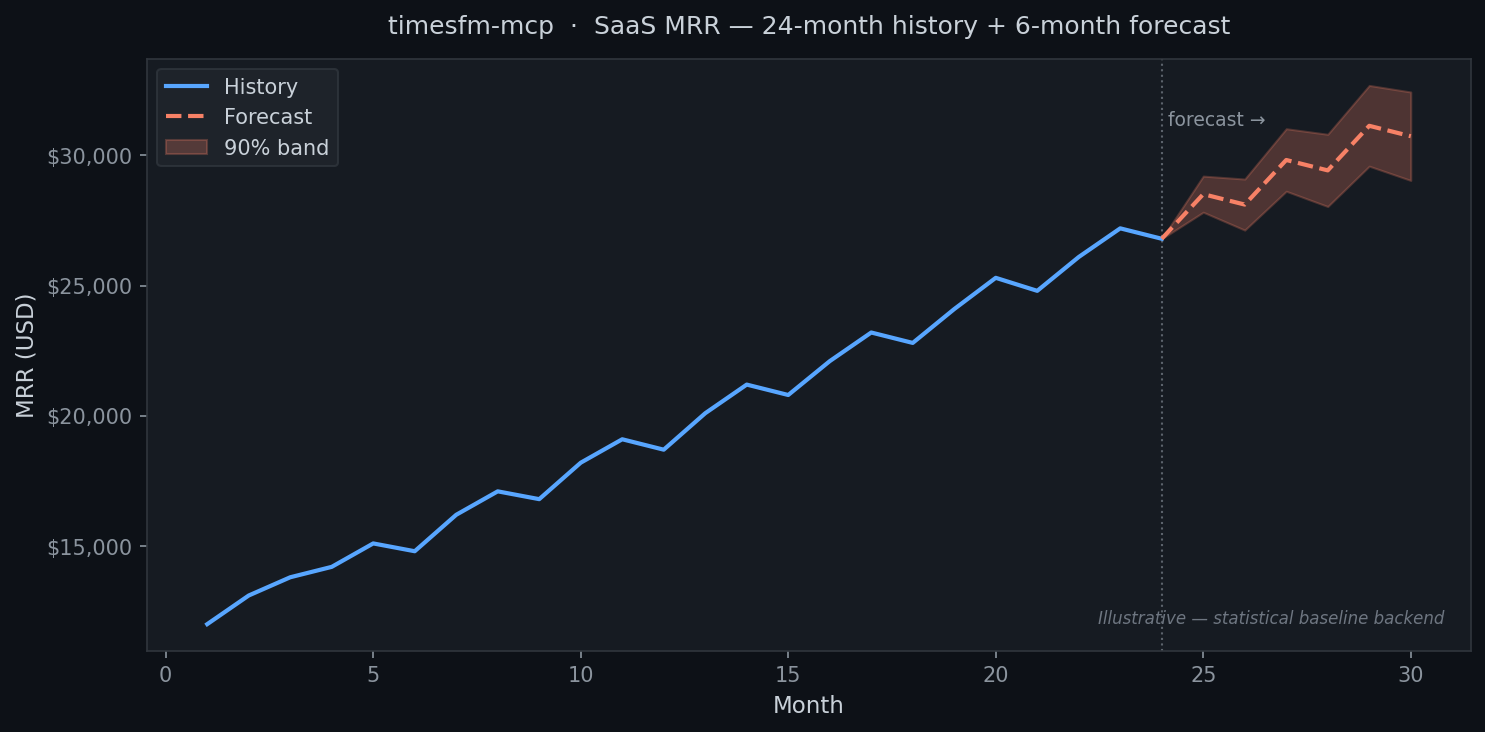
Chart generated with the statistical baseline. Install the timesfm extra (pip install "timesfm-mcp[timesfm]") to use the full TimesFM 2.5 neural model.
Quickstart (30 seconds)
uvx timesfm-mcp # runs over stdio for local agents
Add to your Claude Desktop / Claude Code / Cursor config:
{
  "mcpServers": {
    "forecast": { "command": "uvx", "args": ["timesfm-mcp"] }
  }
}
Then ask your agent: "Forecast the next 6 months from this revenue data and tell me what to expect."
Enable TimesFM 2.5
pip install "timesfm-mcp[timesfm]"
The server auto-detects TimesFM and uses it; otherwise it falls back to the built-in statistical baseline. Both backends always return a result — no configuration needed.
Two backends, zero config
| Backend | When active | What it needs |
|---|---|---|
| TimesFM 2.5 (Google) | When installed | pip install "timesfm-mcp[timesfm]" |
| Statistical baseline | Always | Just NumPy — already a dependency |
Tools
| Tool | What it does |
|---|---|
forecast |
Forecast a single series with optional uncertainty bands |
list_backends |
Report which engine is active (timesfm / baseline) |
backtest |
Hold out the last N points — compare TimesFM vs baseline MAE/sMAPE |
Documentation
Full docs in the docs/ folder:
- Getting Started — installation and first forecast
- Client Setup — Claude Desktop, Claude Code, Cursor configs
- Tool Reference — full parameter docs
- Cookbook — SaaS MRR, e-commerce demand, traffic, cloud spend
- How It Works — the math and model
Migrating from forecast-mcp
timesfm-mcp is the renamed continuation of forecast-mcp. Update your install:
pip install timesfm-mcp      # replaces: pip install forecast-mcp
uvx timesfm-mcp              # replaces: uvx forecast-mcp
Update your agent config: change "args": ["forecast-mcp"] → "args": ["timesfm-mcp"].
License
Apache-2.0
Recommended Servers

playwright-mcp
A Model Context Protocol server that enables LLMs to interact with web pages through structured accessibility snapshots without requiring vision models or screenshots.

Magic Component Platform (MCP)
An AI-powered tool that generates modern UI components from natural language descriptions, integrating with popular IDEs to streamline UI development workflow.

Audiense Insights MCP Server
Enables interaction with Audiense Insights accounts via the Model Context Protocol, facilitating the extraction and analysis of marketing insights and audience data including demographics, behavior, and influencer engagement.

VeyraX MCP
Single MCP tool to connect all your favorite tools: Gmail, Calendar and 40 more.

graphlit-mcp-server
The Model Context Protocol (MCP) Server enables integration between MCP clients and the Graphlit service. Ingest anything from Slack to Gmail to podcast feeds, in addition to web crawling, into a Graphlit project - and then retrieve relevant contents from the MCP client.

Kagi MCP Server
An MCP server that integrates Kagi search capabilities with Claude AI, enabling Claude to perform real-time web searches when answering questions that require up-to-date information.

E2B
Using MCP to run code via e2b.

Neon Database
MCP server for interacting with Neon Management API and databases

Exa Search
A Model Context Protocol (MCP) server lets AI assistants like Claude use the Exa AI Search API for web searches. This setup allows AI models to get real-time web information in a safe and controlled way.

Qdrant Server
This repository is an example of how to create a MCP server for Qdrant, a vector search engine.