
draw2agent
Enables drawing annotations directly on local web pages and sending screenshots, DOM data, and annotation context to your IDE agent for precise code edits.
README
draw2agent ✏️


Draw on your website. Your AI agent sees it.
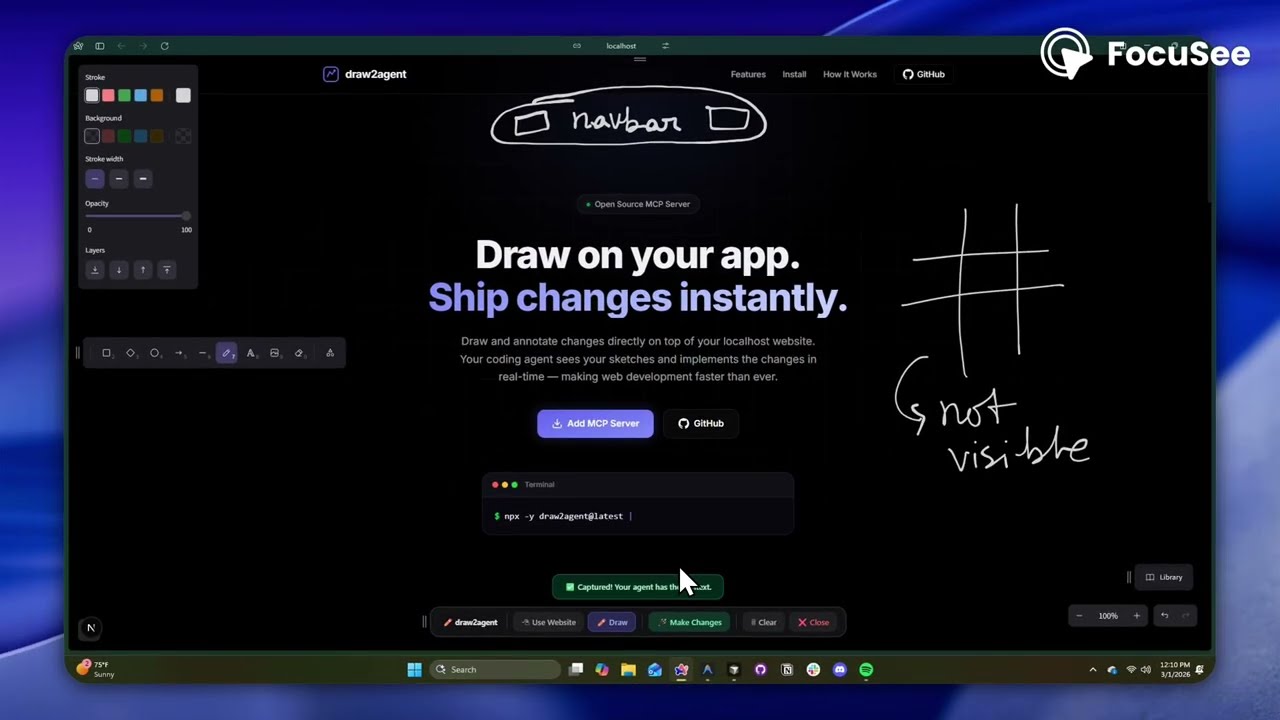
draw2agent is an MCP server that lets you draw annotations directly on top of your local dev page. When you submit, your IDE agent receives a screenshot, structured DOM data, and annotation context to make precise code edits.
👉 Try it out at: draw2agent.vercel.app
Demo
Quick Start
1. Add to your IDE (one-time)
Cursor (~/.cursor/mcp.json):
{
  "mcpServers": {
    "draw2agent": {
      "command": "npx",
      "args": ["-y", "draw2agent@latest"]
    }
  }
}
2. Use it
Tell your agent:
"Use draw2agent to fix the navbar"
- 🌐 Agent opens your browser with drawing tools on your page
- ✏️ Draw circles, arrows, text directly on your website
- 📸 Click Submit
- 🤖 Agent reads the visual context and applies code changes
How It Works
Your Dev Page (proxied)
├── Your original page content
└── Excalidraw overlay (transparent, on top)
    ├── Draw mode: annotate directly on the page
    ├── Select mode: interact with the page normally (Esc)
    └── Submit: screenshot + DOM + annotations → agent
Tools
The MCP server exposes the following tools:
| Tool | Description |
|---|---|
launch_canvas |
Opens your dev page with the drawing overlay |
launch_ipad_canvas |
Serves the page on your LAN and returns a QR code for drawing from iPad/mobile |
launch_scratch |
Opens a standalone Excalidraw whiteboard for freehand sketching |
get_drawing_state |
Returns screenshot, DOM nodes, and annotations for the current state |
launch_canvas
The core tool — proxies your localhost dev server and injects an Excalidraw overlay. Draw annotations directly on your running app, then submit to send visual context to your agent. The tool blocks until you submit.
launch_ipad_canvas
Same as launch_canvas, but serves the proxy on your computer's local network (LAN) address. Automatically opens a new browser tab on your computer with a QR code. Scan it from your iPad or phone — connected to the same Wi-Fi network — to draw annotations with touch. Perfect for whiteboard-style feedback sessions. No internet tunnel required, so it's fast and reliable.
launch_scratch
Opens a blank Excalidraw whiteboard — no target URL needed. Sketch UI mockups, wireframes, or diagrams from scratch. Your agent receives the drawing and implements the design.
get_drawing_state
Returns the last captured drawing state (screenshot, DOM nodes, annotations) without launching a new session. Useful for re-fetching context.
Releasing
Publishing to npm is automated via GitHub Actions (.github/workflows/publish.yml).
To cut a release, just bump the version and push to main:
npm version patch   # or minor / major — updates package.json
git push origin main
When package.json's version changes on main, the workflow builds the
server + overlay and publishes the new version to npm. You can also trigger it
manually from the Actions tab (e.g. to publish the current version).
One-time setup: npm Trusted Publishing
The workflow authenticates with npm via OIDC — no NPM_TOKEN secret needed.
Configure the trusted publisher once:
- Go to npmjs.com/package/draw2agent → Settings → Trusted Publisher.
- Choose GitHub Actions and enter:
- Organization or user:
zero-abd - Repository:
draw2agent - Workflow filename:
publish.yml
- Organization or user:
- Save.
This also satisfies npm's 2FA requirement, so publishing works even with
account 2FA enabled. (Alternative: create an npm Granular Access Token with
publish rights, add it as the NPM_TOKEN repo secret, and set
NODE_AUTH_TOKEN: ${{ secrets.NPM_TOKEN }} on the publish step instead.)
License
MIT
Recommended Servers

playwright-mcp
A Model Context Protocol server that enables LLMs to interact with web pages through structured accessibility snapshots without requiring vision models or screenshots.

Magic Component Platform (MCP)
An AI-powered tool that generates modern UI components from natural language descriptions, integrating with popular IDEs to streamline UI development workflow.

Audiense Insights MCP Server
Enables interaction with Audiense Insights accounts via the Model Context Protocol, facilitating the extraction and analysis of marketing insights and audience data including demographics, behavior, and influencer engagement.

VeyraX MCP
Single MCP tool to connect all your favorite tools: Gmail, Calendar and 40 more.

graphlit-mcp-server
The Model Context Protocol (MCP) Server enables integration between MCP clients and the Graphlit service. Ingest anything from Slack to Gmail to podcast feeds, in addition to web crawling, into a Graphlit project - and then retrieve relevant contents from the MCP client.

Kagi MCP Server
An MCP server that integrates Kagi search capabilities with Claude AI, enabling Claude to perform real-time web searches when answering questions that require up-to-date information.

E2B
Using MCP to run code via e2b.

Neon Database
MCP server for interacting with Neon Management API and databases

Exa Search
A Model Context Protocol (MCP) server lets AI assistants like Claude use the Exa AI Search API for web searches. This setup allows AI models to get real-time web information in a safe and controlled way.

Qdrant Server
This repository is an example of how to create a MCP server for Qdrant, a vector search engine.