
Design Constraint Validator MCP Server
Enables AI agents to validate design system constraints, including WCAG accessibility, token relationships, and consistency, through MCP tools like validate, explain, and suggest-fix.
README
Design Constraint Validator (DCV)
Mathematical constraint validator for design systems — ensuring consistency, accessibility, and logical coherence.







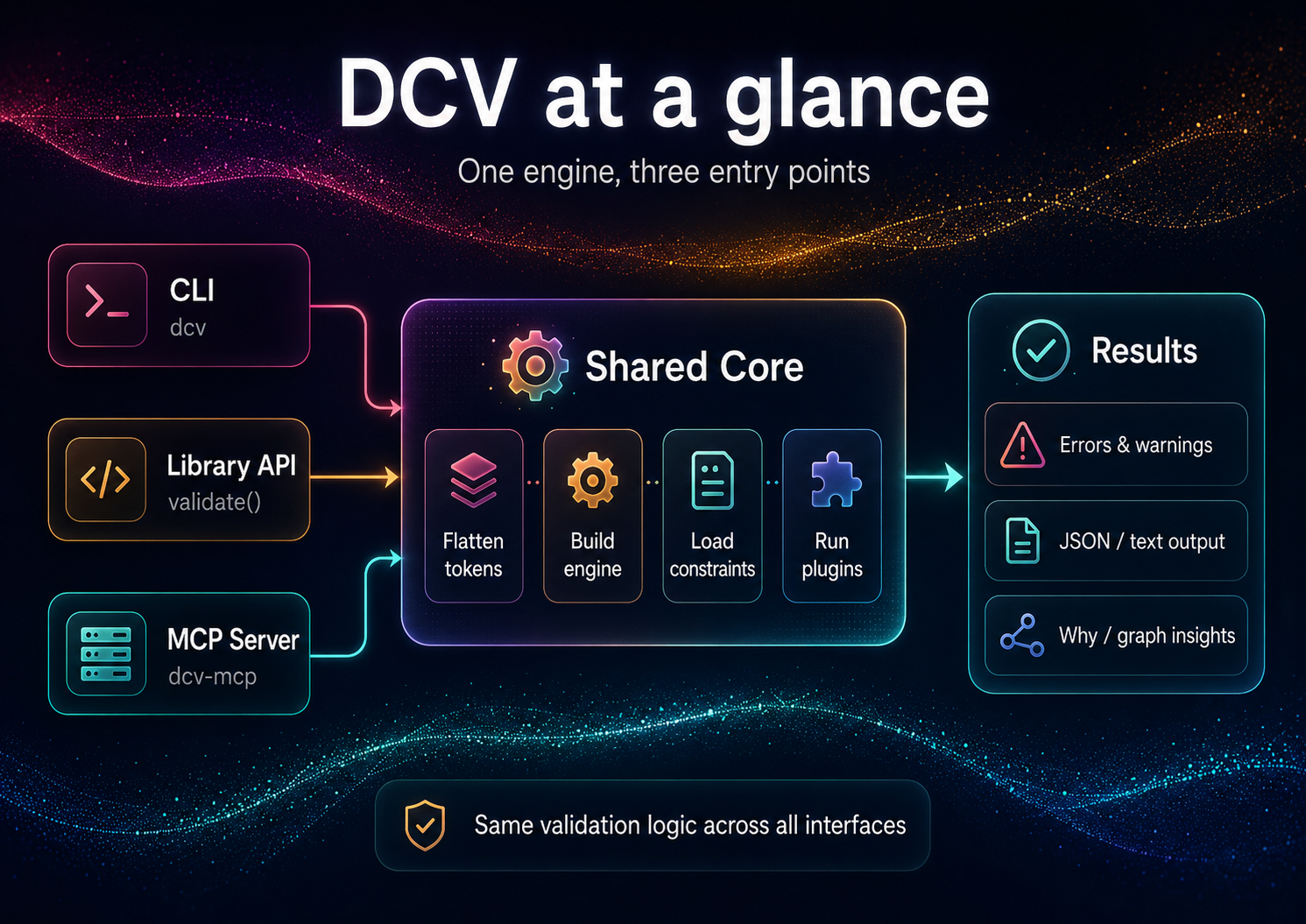
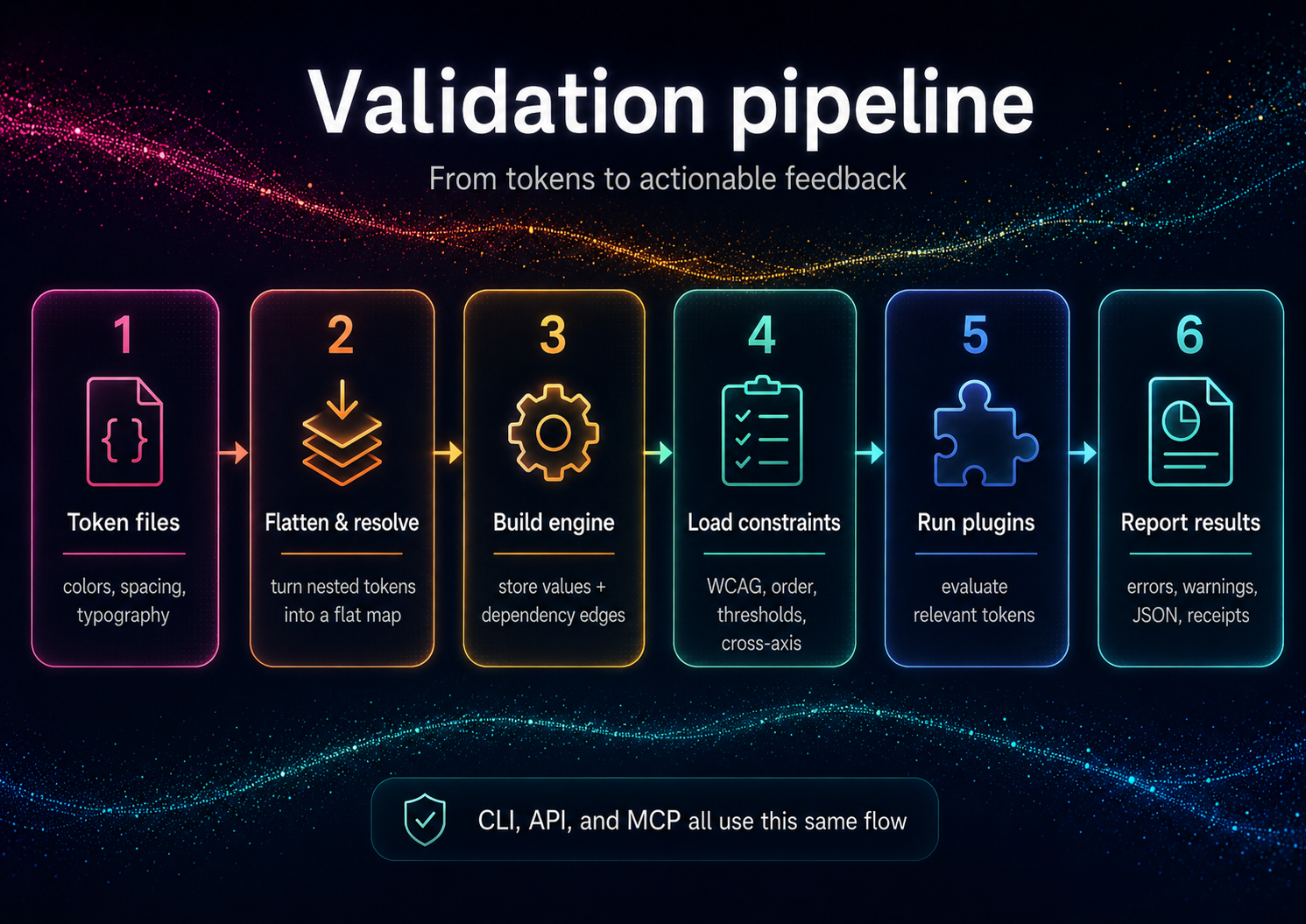
Design Constraint Validator (DCV) validates design constraints across token sets and styles:
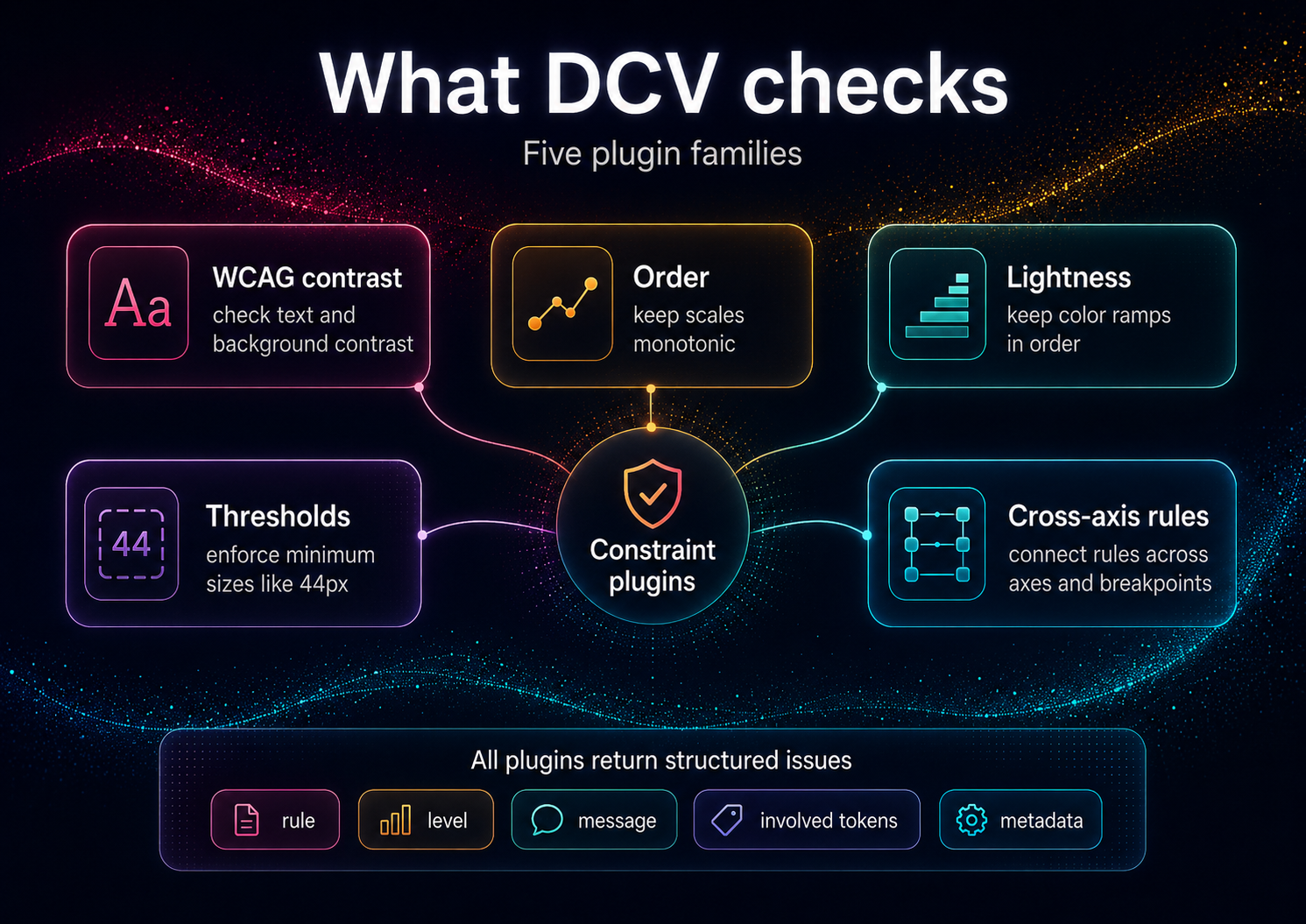
- ✅ Accessibility: WCAG text contrast, perceptual lightness floor/ceilings
- ✅ Order & Monotonicity: increasing typography scales, spacing hierarchies
- ✅ Thresholds & Policies: min/max ranges, cross-axis guards (size × weight × contrast)
- ✅ Graph Intelligence: Hasse/poset graph export; "why" explanations with implicated edges
This is not a schema linter; it's a reasoning validator for values and relationships.
Installation
# Local (recommended)
npm i -D design-constraint-validator

# One-off run, no install (the bin name `dcv` belongs to an unrelated package)
npx design-constraint-validator --help
After a local install, the shorter dcv bin is available (e.g. npx dcv --help).
Requirements: Node.js ≥ 18.x (ESM)
Quick Start
DCV validates your tokens against your constraints. From an empty directory:
# 1. Your design tokens (DTCG-style "$value")
cat > tokens.json <<'JSON'
{
  "color": {
    "text": { "$value": "#888888" },
    "bg":   { "$value": "#999999" }
  }
}
JSON

# 2. Your constraints — auto-discovered as dcv.config.json in the cwd
cat > dcv.config.json <<'JSON'
{
  "constraints": {
    "enableBuiltInWcagDefaults": false,
    "enableBuiltInThreshold": false,
    "wcag": [
      { "foreground": "color.text", "background": "color.bg", "ratio": 4.5, "description": "Body text on background" }
    ]
  }
}
JSON

# 3. Validate (positional path or --tokens; exits non-zero on violations)
npx design-constraint-validator validate tokens.json --summary table

# Explain one token (the tokenId is required)
npx design-constraint-validator why color.text --tokens tokens.json --format table

# Export the dependency graph
npx design-constraint-validator graph --tokens tokens.json --format mermaid > graph.mmd
These one-offs use the full package name because the bare
dcvbin name on npm belongs to an unrelated package. Afternpm i -D design-constraint-validator, use the shorternpx dcv ….
Example output (validate):
validate: 1 error(s), 0 warning(s)
ERROR wcag-contrast  color.text|color.bg @ Body text on background — Contrast 1.24:1 < 4.5:1
scope   rules  warnings  errors
------  -----  --------  ------
global  1      0         1
Exit code is 1 when violations are found, 0 when clean (use --fail-on off to always exit 0). The built-in WCAG/threshold defaults target the bundled example token ids, so disable them (as above) when validating your own token names.
Programmatic API
import { validate } from 'design-constraint-validator';

// Synchronous. Point at files, or pass `tokens` / `constraints` inline.
const result = validate({
  tokensPath: './tokens.json',
  configPath: './dcv.config.json', // omit to auto-discover dcv.config.json in the cwd
});

if (!result.ok) {
  for (const v of result.violations) {
    console.log(`[${v.ruleId}] ${v.message}`);
  }
  process.exitCode = 1;
}
See API Reference for complete programmatic usage.
Use from AI agents (MCP)
DCV ships a second binary, dcv-mcp, that exposes the validator over MCP stdio for agent clients. Add it to a Claude Desktop or generic MCP client config like this:
{
  "mcpServers": {
    "dcv": {
      "command": "npx",
      "args": ["-y", "--package", "design-constraint-validator", "dcv-mcp"]
    }
  }
}
The server exposes six read-only, JSON-returning tools:
validate- validate inlinetokensor atokensPathagainst inlineconstraintsor a config file.why- explain provenance, aliases, dependencies, dependents, and alias chain for one token id.graph- return token dependencynodesandedges.list-constraints- enumerate the active constraints (WCAG pairs, thresholds, order/lightness scales, cross-axis) for the given input.explain- turn a violation into plain-English text plus machine-readable facts.suggest-fix- compute a verified satisfying value for a violation (WCAG color, threshold/monotonic boundary) without writing anything.
The three derivation tools (list-constraints, explain, suggest-fix) stay read-only — they return suggestions; applying them is up to you (dcv set / dcv patch). See AI Guide for the full agent loop.
Tool failures are returned as structured JSON: { "ok": false, "error": { "code": "...", "message": "..." } }.
Documentation
For Everyone
- Getting Started - 5-minute tutorial
- Features & Complete Guide - All features, examples, and FAQ
- Examples - Sample projects and use cases
For Users
- Constraints - All 5 constraint types in detail
- CLI Reference - Complete command documentation
- Configuration - Config file options
- Concepts - Core terminology and defaults
For Developers
- API Reference - Programmatic usage
- Architecture - Internal design
- Adapters - Input/output formats
Additional Resources
- Prior Art / Method - Design rationale (Decision Themes, receipts)
- AI Guide - Using DCV with ChatGPT/Claude/Copilot
- Contributing - Contribution guidelines
- Security - Supply chain security measures
Why Constraints, Not Conventions?
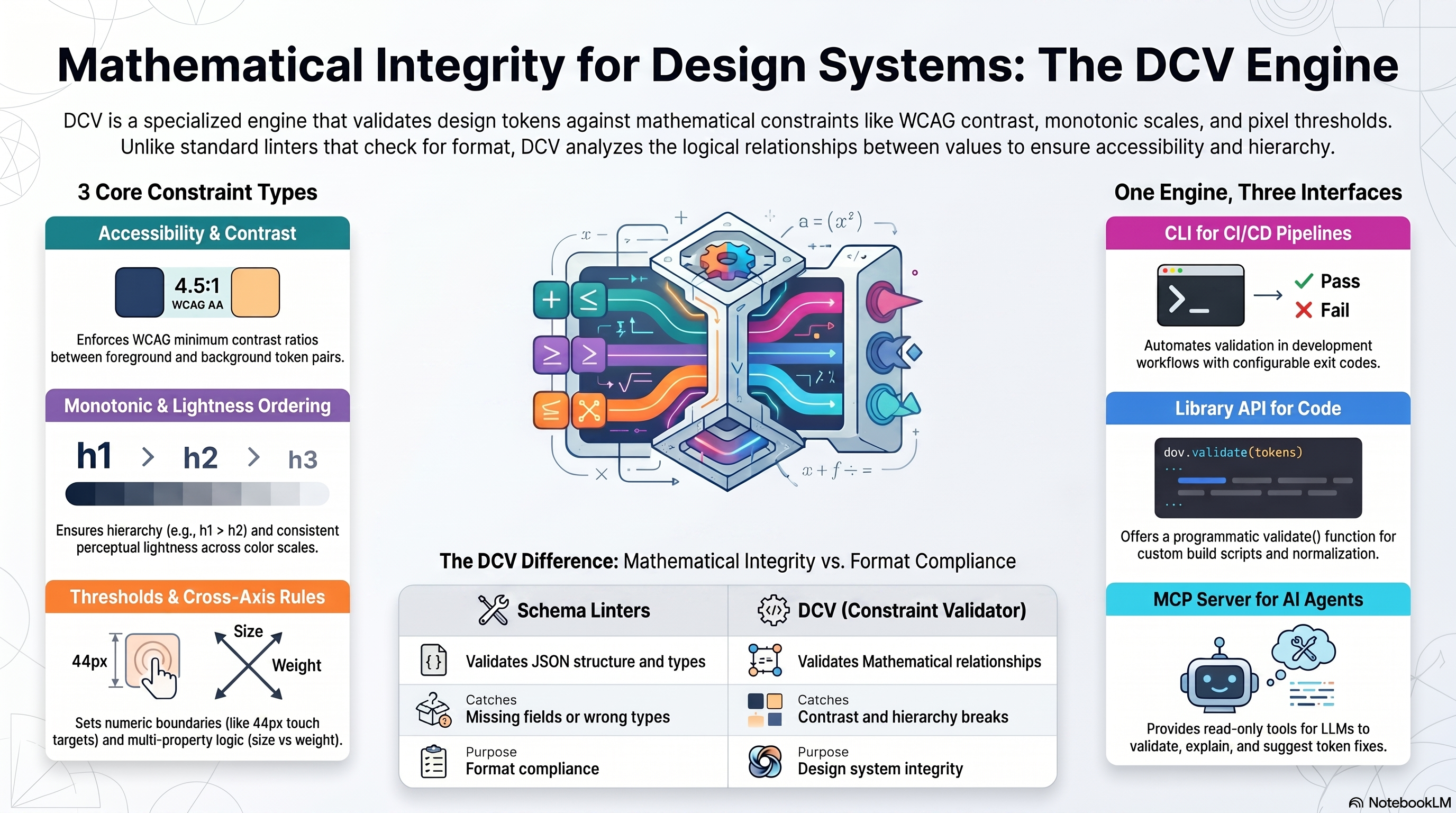
Conventional linters catch schema issues ("has a value, has a type"). DCV enforces relationships that matter to users and brand integrity:
- Legible contrast under all themes and states
- Proper hierarchical spacing/typography (monotonic scales)
- Coherent cross-axis behavior (e.g., weight increases with size where needed)
- Policy conformance (AA/AAA, internal thresholds)
This transforms tokens from "bags of numbers" into a formal design system.
Comparison: Schema Linters vs DCV
| Feature | Schema Linters | DCV |
|---|---|---|
| Validates | JSON structure, types | Mathematical relationships, accessibility |
| Catches | Missing fields, wrong types | Contrast violations, hierarchy breaks |
| Purpose | Format compliance | Design system integrity |
| Examples | DTCG schema validator | WCAG checks, monotonic scales |
DCV is not affiliated with Anima's
design-tokens-validator(schema-focused).
Input Formats
DCV accepts token JSON (flat or nested) and optional policy JSON. Adapters normalize common ecosystems:
- Style Dictionary - See examples/style-dictionary/
- Tokens Studio JSON - See examples/tokens-studio/
- DTCG (Design Tokens Community Group) — reads the 2025.10 stable spec (structured sRGB colors, structured dimensions,
{alias}references,$extensionspassthrough; non-sRGB spaces warn rather than mis-calculate; composite types out of scope). See examples/dtcg/
Full adapter documentation: Adapters
DCV & DecisionThemes
DCV is the standalone validation engine — use it for any token system.
DecisionThemes (coming 2026) is a complete design system framework built on DCV:
- 5-axis decision model (Tone, Emphasis, Size, Density, Shape)
- VT/DT pipeline (Value Themes + Decision Themes → deterministic CSS configs)
- Studio UI + Hub marketplace for sharing Decision Systems
DCV powers DecisionThemes' validation layer — but works perfectly standalone. Preview: www.decisionthemes.com
Method & Prior Art
The Design Constraint Validator engine is based on a theming and validation method published as defensive prior art.
To understand the underlying architecture (Decision Themes / Value Themes, deterministic compute, post-compute validation and receipts):
These documents keep the method openly implementable and prevent patent lock-up.
Security & Supply Chain
SBOM (Software Bill of Materials)
DCV generates CycloneDX-compliant SBOMs for supply chain transparency:
- CI Builds: SBOM artifacts on every CI run (90-day retention)
- Version tags: SBOM artifacts for release tags
- GitHub Releases: SBOM files (JSON + XML) attached when a GitHub Release is created
- Manual: Run
npx @cyclonedx/cyclonedx-npmin project root
Download:
Roadmap
- Plugin API for custom constraints
- VS Code diagnostics (inline explain)
- Cross-axis packs (typography × weight × contrast)
- Signed / attestable receipts —
dcv validate --receiptalready emits environment + input content hashes today; cryptographic signing is the roadmap part - UI graph explorer (node inspector, violations focus)
Philosophy
Constraints, not conventions.
Design systems need mathematical guarantees. This validator:
- Enforces relationships - Typography hierarchies, color progressions
- Validates accessibility - WCAG contrast with alpha compositing
- Explains violations - Provenance tracing shows why rules fail
- Scales with complexity - Incremental validation of 1000s of tokens
Related Projects
This is the core validation engine. For a complete decision-driven design system with a 5-axis framework (Tone, Emphasis, Size, Density, Shape) and theme configurator UI, see DecisionThemes (coming soon).
Contributing
Contributions welcome! See CONTRIBUTING.md
License
MIT © Cseperke Papp
Recommended Servers

playwright-mcp
A Model Context Protocol server that enables LLMs to interact with web pages through structured accessibility snapshots without requiring vision models or screenshots.

Magic Component Platform (MCP)
An AI-powered tool that generates modern UI components from natural language descriptions, integrating with popular IDEs to streamline UI development workflow.

Audiense Insights MCP Server
Enables interaction with Audiense Insights accounts via the Model Context Protocol, facilitating the extraction and analysis of marketing insights and audience data including demographics, behavior, and influencer engagement.

VeyraX MCP
Single MCP tool to connect all your favorite tools: Gmail, Calendar and 40 more.

graphlit-mcp-server
The Model Context Protocol (MCP) Server enables integration between MCP clients and the Graphlit service. Ingest anything from Slack to Gmail to podcast feeds, in addition to web crawling, into a Graphlit project - and then retrieve relevant contents from the MCP client.

Kagi MCP Server
An MCP server that integrates Kagi search capabilities with Claude AI, enabling Claude to perform real-time web searches when answering questions that require up-to-date information.

E2B
Using MCP to run code via e2b.

Neon Database
MCP server for interacting with Neon Management API and databases

Exa Search
A Model Context Protocol (MCP) server lets AI assistants like Claude use the Exa AI Search API for web searches. This setup allows AI models to get real-time web information in a safe and controlled way.

Qdrant Server
This repository is an example of how to create a MCP server for Qdrant, a vector search engine.