
cyntrisec
A local-first AWS security tool that uses graph theory to discover attack paths (e.g., Internet → Role → DB) and prioritize remediations. It allows agents to perform read-only security audits and generate Terraform fixes without data exfiltration.
README
Cyntrisec CLI





[!CAUTION] Beta Software Disclaimer: This tool is currently in BETA. It is provided "as is", without warranty of any kind. While Cyntrisec is a read-only analysis tool by default, the user assumes all responsibility for any actions taken based on its findings. Always review generated remediation plans and Terraform code before application.
AWS capability graph analysis and attack path discovery.
A read-only CLI tool that:
- Scans AWS infrastructure via AssumeRole
- Builds a capability graph (IAM, network, dependencies)
- Discovers attack paths from internet to sensitive targets
- Prioritizes fixes by ROI (security impact + cost savings)
- Identifies unused capabilities (blast radius reduction)
- Outputs deterministic JSON with proof chains
Demo
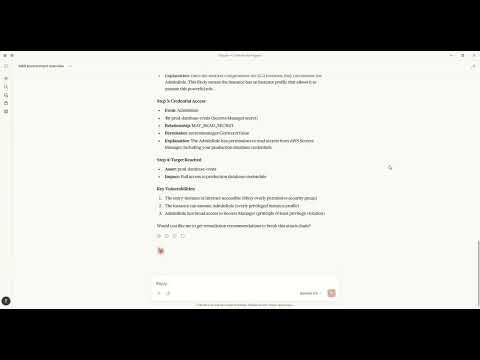
Watch how to discover attack paths and generate fixes using natural language with Claude MCP.
Architecture
+----------------------------------------------------------------------------------+
|                                   CYNTRISEC CLI                                   |
+----------------------------------------------------------------------------------+
| CLI Layer (Typer)                                                                 |
|   scan   analyze   cuts   waste   report   comply   can   diff   serve   ...      |
+-----------------------------+----------------------------------------------------+
| Core Engine                 | Storage (local)                                     |
|  - AWS collectors           |  ~/.cyntrisec/scans/<scan_id>/                      |
|  - Normalization/schema     |    snapshot.json, assets.json, relationships.json   |
|  - GraphBuilder -> AwsGraph |    findings.json, attack_paths.json                 |
|  - Path search -> paths     |  ~/.cyntrisec/scans/latest -> <scan_id>             |
|  - Min-cut + Cost (ROI)     |  (Windows fallback: latest is a file)               |
+-----------------------------+----------------------------------------------------+
| Outputs: JSON/agent, HTML report, remediation plan + Terraform hints              |
+----------------------------------------------------------------------------------+
<!-- Legacy Unicode diagram (kept for reference; may render oddly in some environments) --> <!--
┌─────────────────────────────────────────────────────────────────────────────┐
│                              CYNTRISEC CLI                                  │
├─────────────────────────────────────────────────────────────────────────────┤
│                                                                             │
│  ┌─────────────────────────────────────────────────────────────────────┐    │
│  │                         CLI Layer (typer)                           │    │
│  │  ┌─────────┐ ┌─────────┐ ┌─────────┐ ┌─────────┐ ┌─────────┐        │    │
│  │  │  scan   │ │ analyze │ │  cuts   │ │  waste  │ │ report  │ ...    │    │
│  │  └────┬────┘ └────┬────┘ └────┬────┘ └────┬────┘ └────┬────┘        │    │
│  └───────┼──────────┼──────────┼──────────┼──────────┼─────────────────┘    │
│          │          │          │          │          │                      │
│  ┌───────▼──────────▼──────────▼──────────▼──────────▼────────────────┐     │
│  │                         Core Engine                                │     │
│  │  ┌──────────────┐  ┌──────────────┐  ┌──────────────┐              │     │
│  │  │    Graph     │  │    Paths     │  │  Compliance  │              │     │
│  │  │  (AwsGraph)  │  │  (BFS/DFS)   │  │  (CIS/SOC2)  │              │     │
│  │  └──────────────┘  └──────────────┘  └──────────────┘              │     │
│  │  ┌──────────────┐  ┌──────────────┐  ┌──────────────┐              │     │
│  │  │    Cuts      │  │    Waste     │  │  Simulator   │              │     │
│  │  │  (ROI/Min)   │  │  (Unused)    │  │  (IAM Eval)  │              │     │
│  │  └──────────────┘  └──────────────┘  └──────────────┘              │     │
│  │  ┌──────────────┐                                                  │     │
│  │  │ Cost Engine  │                                                  │     │
│  │  │ (Estimator)  │                                                  │     │
│  │  └──────────────┘                                                  │     │
│  └────────────────────────────────────────────────────────────────────┘     │
│          │                                                                  │
│  ┌───────▼────────────────────────────────────────────────────────────┐     │
│  │                         AWS Layer                                  │     │
│  │  ┌──────────────┐  ┌──────────────┐  ┌──────────────┐              │     │
│  │  │  Collectors  │  │  Normalizers │  │ Relationship │              │     │
│  │  │  (EC2, IAM,  │  │  (Asset →    │  │   Builder    │              │     │
│  │  │   RDS, ...)  │  │   Schema)    │  │              │              │     │
│  │  └──────────────┘  └──────────────┘  └──────────────┘              │     │
│  └────────────────────────────────────────────────────────────────────┘     │
│          │                                          │                       │
│  ┌───────▼──────────────────────┐   ┌──────────────▼──────────────────┐     │
│  │      Storage Layer           │   │         MCP Server              │     │
│  │  ┌────────────┐ ┌─────────┐  │   │  ┌──────────────────────────┐   │     │
│  │  │ Filesystem │ │ Memory  │  │   │  │  Tools: get_scan_summary │   │     │
│  │  │ (~/.cyntri │ │ (tests) │  │   │  │  get_attack_paths, ...   │   │     │
│  │  │   sec/)    │ │         │  │   │  └──────────────────────────┘   │     │
│  │  └────────────┘ └─────────┘  │   │                                 │     │
│  └──────────────────────────────┘   └─────────────────────────────────┘     │
│                                                                             │
└─────────────────────────────────────────────────────────────────────────────┘
                                      │
                                      ▼
┌─────────────────────────────────────────────────────────────────────────────┐
│                            AWS Account                                      │
│  ┌─────────────┐  ┌─────────────┐  ┌─────────────┐  ┌─────────────┐         │
│  │     IAM     │  │     EC2     │  │     RDS     │  │     S3      │  ...    │
│  │  (Roles,    │  │ (Instances, │  │ (Databases) │  │  (Buckets)  │         │
│  │  Policies)  │  │  SGs, VPCs) │  │             │  │             │         │
│  └─────────────┘  └─────────────┘  └─────────────┘  └─────────────┘         │
└─────────────────────────────────────────────────────────────────────────────┘
-->
Data Flow
CLI (scan) --AssumeRole--> AWS Session --Describe/Get/List--> AWS APIs (read-only)
     |
     v
Collectors -> normalize -> Assets + Relationships -> AwsGraph
                                                |
                                                v
                                   Attack path search (BFS/DFS)
                                                |
                                                v
                                   Min-cut (remediation cuts)
                                                |
                                                v
                                      Cost engine (ROI)

Local artifacts: ~/.cyntrisec/scans/<scan_id>/*.json
<!-- Legacy Unicode diagram (kept for reference; may render oddly in some environments) --> <!--
┌──────────┐    AssumeRole     ┌──────────┐    Describe/Get/List     ┌─────────┐
│   CLI    │ ─────────────────▶│   AWS    │ ◀─────────────────────▶│  APIs   │
│  (scan)  │                   │  Session │                          │(read-only)
└────┬─────┘                   └──────────┘                          └─────────┘
     │
     ▼
┌──────────┐    normalize      ┌──────────┐    build edges    ┌──────────────┐
│Collectors│ ─────────────────▶│  Assets  │ ─────────────────▶│Relationships│
└──────────┘                   └──────────┘                   └──────┬───────┘
                                                                     │
     ┌───────────────────────────────────────────────────────────────┐
     ▼
┌──────────┐    BFS/DFS        ┌──────────┐    min-cut        ┌──────────────┐
│ AwsGraph │ ─────────────────▶│  Attack  │ ─────────────────▶│ Remediation │
│          │                   │  Paths   │                   │    Cuts      │
└──────────┘                   └──────────┘                   └──▲───────────┘
                                                                 │ (ROI)
                                                          ┌──────┴───────┐
                                                          │ Cost Engine  │
                                                          └──────────────┘
-->
Installation
pip install cyntrisec
Windows PATH Fix
If you see "cyntrisec is not recognized", the Scripts folder isn't on PATH:
# Option 1: Run with python -m
python -m cyntrisec --help

# Option 2: Add to PATH for current session
$env:PATH += ";$env:APPDATA\Python\Python311\Scripts"
Quick Start
Prerequisite: Ensure you have AWS CLI installed and configured with credentials (e.g.,
aws configure) or environment variables set.terraformis required for the setup step.
# 1. Create the read-only IAM role in your account
cyntrisec setup iam 123456789012 --output role.tf

# 2. Apply the Terraform
cd your-infra && terraform apply

# 3. Run a scan
cyntrisec scan --role-arn arn:aws:iam::123456789012:role/CyntrisecReadOnly

# 4. View attack paths
cyntrisec analyze paths --min-risk 0.5

# 5. Find minimal fixes (prioritized by ROI)
cyntrisec cuts --format json

# 6. Generate HTML report
cyntrisec report --output report.html
Commands
Core Analysis
| Command | Description |
|---|---|
scan |
Scan AWS infrastructure |
analyze paths |
View attack paths |
analyze findings |
View security findings |
analyze stats |
View scan statistics |
analyze business |
Business entrypoint analysis |
report |
Generate HTML/JSON report |
Setup & Validation
| Command | Description |
|---|---|
setup iam |
Generate IAM role Terraform |
validate-role |
Validate IAM role permissions |
Remediation
| Command | Description |
|---|---|
cuts |
Find minimal fixes (Cost & ROI prioritized) |
waste |
Find unused IAM permissions |
remediate |
Generate or optionally apply Terraform plans (gated) |
Policy Testing
| Command | Description |
|---|---|
can |
Test "can X access Y?" |
diff |
Compare scan snapshots |
comply |
Check CIS AWS / SOC2 compliance |
Agentic Interface
| Command | Description |
|---|---|
manifest |
Output machine-readable capabilities |
explain |
Natural language explanations |
ask |
Query scans in plain English |
serve |
Run as MCP server for AI agents |
MCP Server Mode
Run Cyntrisec as an MCP server for AI agent integration:
# Install with MCP support
pip install "cyntrisec[mcp]"
cyntrisec serve              # Start stdio server
cyntrisec serve --list-tools # List available tools
MCP Tools (15)
| Category | Tool | Description |
|---|---|---|
| Discovery | list_tools |
List all available tools |
set_session_snapshot |
Set active snapshot for session | |
get_scan_summary |
Get summary of latest AWS scan | |
| Assets | get_assets |
Get assets with type/name filtering |
get_relationships |
Get relationships between assets | |
get_findings |
Get security findings with severity filtering | |
| Attack Paths | get_attack_paths |
Get attack paths with risk scores |
explain_path |
Detailed hop-by-hop path breakdown | |
explain_finding |
Detailed finding explanation | |
| Remediation | get_remediations |
Find optimal fixes for attack paths |
get_terraform_snippet |
Generate Terraform code for remediation | |
| Access | check_access |
Test if principal can access resource |
get_unused_permissions |
Find unused IAM permissions | |
| Compliance | check_compliance |
Check CIS AWS or SOC 2 compliance |
compare_scans |
Compare scan snapshots |
Claude Desktop
MacOS: ~/Library/Application Support/Claude/claude_desktop_config.json
Windows: %APPDATA%\Claude\claude_desktop_config.json
{
  "mcpServers": {
    "cyntrisec": {
      "command": "python",
      "args": ["-m", "cyntrisec", "serve"]
    }
  }
}
Claude Code (CLI)
Run the following command to configure the server:
claude mcp add cyntrisec -- python -m cyntrisec serve
Google Gemini / Antigravity
Locate your agent configuration (e.g., ~/.gemini/antigravity/mcp_config.json) and add:
{
  "mcpServers": {
    "cyntrisec": {
      "command": "python",
      "args": ["-m", "cyntrisec", "serve"]
    }
  }
}
Trust & Safety
Read-Only Guarantees
This tool makes read-only API calls to your AWS account. The IAM role
should have only Describe*, Get*, List* permissions.
No Data Exfiltration
All data stays on your local machine. Nothing is sent to external servers.
Scan results are stored in ~/.cyntrisec/scans/.
No Auto-Remediation (Default Safe Mode)
By default, Cyntrisec is read-only and does not modify your AWS infrastructure.
- It analyzes your account using read-only APIs.
- It can generate remediation artifacts (e.g., Terraform modules) for you to review.
- It does not apply changes automatically.
Optional Remediation Execution (Explicit Opt-In)
Cyntrisec includes an explicitly gated path that can execute Terraform only if you intentionally enable it.
This mode is:
- Disabled by default
- Requires
--enable-unsafe-write-mode - Requires an additional explicit flag (e.g.
--execute-terraform) to run Terraform - Intended for controlled environments (sandbox / CI with approvals), not unattended production
If you do not pass these flags, Cyntrisec will never run terraform apply.
Write Operations
Cyntrisec makes no AWS write API calls during scanning and analysis.
The only supported "write" behavior is optional execution of Terraform locally on your machine, and only when explicitly enabled via unsafe flags.
Every AWS API call is logged in CloudTrail under session name cyntrisec-cli.
Trust & Permissions
Cyntrisec runs with a read-only IAM role. Generate the recommended policy with
cyntrisec setup iam <ACCOUNT_ID> and keep permissions to Describe*, Get*,
and List*. Live modes (waste --live, can --live) require extra IAM
permissions; the generated policy and docs cover those additions.
Output Format
Primary output is JSON to stdout. When stdout is not a TTY, the CLI automatically switches to JSON:
cyntrisec analyze paths --format json | jq '.paths[] | select(.risk_score > 0.7)'
Agent-friendly output wraps results in a structured envelope:
cyntrisec analyze paths --format agent
{
  "schema_version": "1.0",
  "status": "success",
  "data": {...},
  "artifact_paths": {...},
  "suggested_actions": [...]
}
Exit Codes
| Code | Meaning |
|---|---|
| 0 | Success / compliant |
| 1 | Findings / regressions / denied |
| 2 | Usage error |
| 3 | Transient error (retry) |
| 4 | Internal error |
Use in CI/CD:
cyntrisec scan --role-arn $ROLE_ARN || exit 1
cyntrisec diff || echo "Regressions detected"
Storage
Scan results are stored locally:
~/.cyntrisec/
|-- scans/
|   |-- 2026-01-17_123456_123456789012/
|   |   |-- snapshot.json
|   |   |-- assets.json
|   |   |-- relationships.json
|   |   |-- findings.json
|   |   `-- attack_paths.json
|   `-- latest -> 2026-01-17_...
`-- config.yaml
<!-- Legacy Unicode tree (kept for reference; may render oddly in some environments) --> <!--
~/.cyntrisec/
├── scans/
│   ├── 2026-01-17_123456_123456789012/
│   │   ├── snapshot.json
│   │   ├── assets.json
│   │   ├── relationships.json
│   │   ├── findings.json
│   │   └── attack_paths.json
│   └── latest -> 2026-01-17_...
└── config.yaml
-->
Versioning
This project follows Semantic Versioning. See CHANGELOG.md for release notes.
License
Apache-2.0
Links
Recommended Servers

playwright-mcp
A Model Context Protocol server that enables LLMs to interact with web pages through structured accessibility snapshots without requiring vision models or screenshots.

Magic Component Platform (MCP)
An AI-powered tool that generates modern UI components from natural language descriptions, integrating with popular IDEs to streamline UI development workflow.

Audiense Insights MCP Server
Enables interaction with Audiense Insights accounts via the Model Context Protocol, facilitating the extraction and analysis of marketing insights and audience data including demographics, behavior, and influencer engagement.

VeyraX MCP
Single MCP tool to connect all your favorite tools: Gmail, Calendar and 40 more.

graphlit-mcp-server
The Model Context Protocol (MCP) Server enables integration between MCP clients and the Graphlit service. Ingest anything from Slack to Gmail to podcast feeds, in addition to web crawling, into a Graphlit project - and then retrieve relevant contents from the MCP client.

Kagi MCP Server
An MCP server that integrates Kagi search capabilities with Claude AI, enabling Claude to perform real-time web searches when answering questions that require up-to-date information.

E2B
Using MCP to run code via e2b.

Neon Database
MCP server for interacting with Neon Management API and databases

Exa Search
A Model Context Protocol (MCP) server lets AI assistants like Claude use the Exa AI Search API for web searches. This setup allows AI models to get real-time web information in a safe and controlled way.

Qdrant Server
This repository is an example of how to create a MCP server for Qdrant, a vector search engine.