
Context Loom
MCP server that integrates with chat tools to provide context from local projects, enabling reviewed and cited prompts.
README
Context Loom
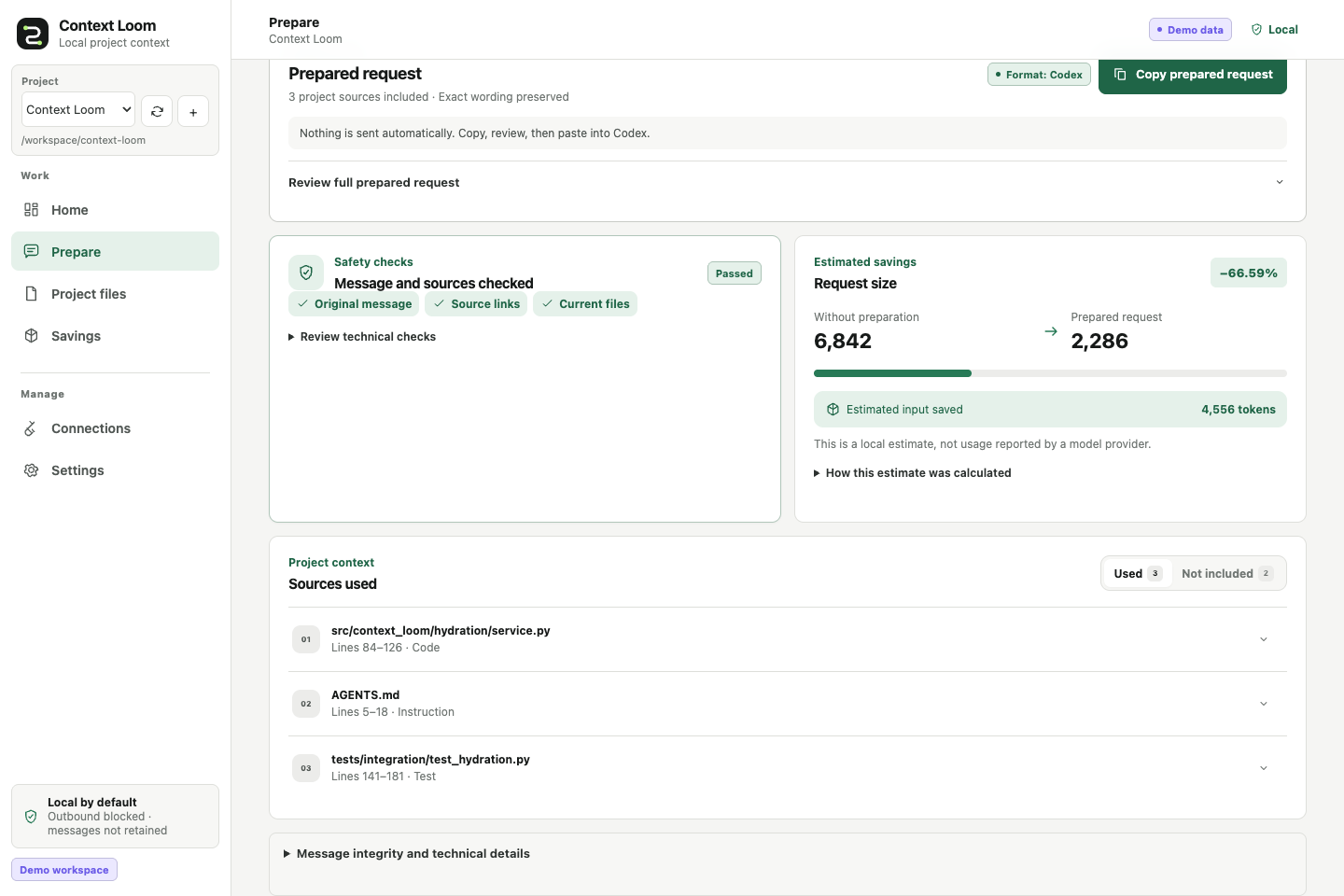
Context Loom turns a chat request and a local project into a smaller, cited prompt you can review before sending. It preserves your exact message, stays local by default, and separates projected token savings from usage actually reported by a model provider.
How it works
- Connect a project. Context Loom indexes eligible text files inside one folder you choose.
- Prepare a message. Write the request exactly as you want the destination model to receive it.
- Review and copy. Inspect the selected sources, fidelity checks, and complete rendered payload.
- Track the conversation. Reuse a conversation name to see projected and observed token history.
Context Loom never sends the copied payload to a model unless you deliberately use an integration that performs an outbound request.
Install from source
The primary install is Node-free and uses the workbench already bundled in the Python package.
Python 3.11-3.13 and uv are required.
Clone the public source repository and install its bundled workbench:
git clone https://github.com/ownasquare/context-loom.git
cd context-loom
uv tool install .
context-loom demo
context-loom serve
Open http://127.0.0.1:8768. Context Loom is not currently distributed through PyPI; the source
install above is the canonical install path.
If you already have a checkout, start at uv tool install .. Run uv tool update-shell and open a
new terminal if context-loom is not found after installation.
Try the demo
context-loom demo creates a private generated project, indexes it, and prepares one sample message.
Start context-loom serve, then use Home, Prepare, Project files, and Savings to inspect
the complete flow. The demo does not call a provider or require credentials.
Use your own project
Start the workbench and choose Add project, then enter a local folder that the Context Loom process can read. It scans immediately, and the project switcher can add, select, and rescan multiple projects.
For a scripted setup:
context-loom workspace add /absolute/path/to/project --name "My project" --id my-project
context-loom workspace sync my-project
context-loom serve
The demo uses demo-workspace; the example above uses my-project, so the two flows do not collide.
See Getting started
for the first-success walkthrough and Docker setup.
Connect a chat tool
Copy and paste is the recommended first integration. Context Loom also offers an MCP server and a loopback-only HTTP API; provider-shaped output formats are available for advanced use.
context-loom adapter preview codex
adapter preview prints a standalone snippet for review. It does not edit harness configuration;
after you add the snippet, the harness starts context-loom mcp serve --transport stdio when needed.
See Harness integrations
and Extending Context Loom.
Docker
Docker keeps state in a named volume and mounts one chosen project read-only at /workspace:
export CONTEXT_LOOM_PROJECT=/absolute/path/to/project
docker compose up --build --detach
docker compose exec context-loom context-loom workspace add /workspace --name "My project" --id my-project
docker compose exec context-loom context-loom workspace sync my-project
Then open http://127.0.0.1:8768. Without CONTEXT_LOOM_PROJECT, Compose mounts the bundled sample
project. Host paths are not visible inside the container unless they are mounted.
What Context Loom guarantees
- The exact user message is retained in the canonical envelope and checked at renderer boundaries.
- Selected text remains tied to a current source version, hash, path, and line range.
- Unsafe summarization falls back to extractive or passthrough behavior.
- Telemetry, outbound access, secret-file indexing, and raw-message persistence are off by default.
- Projected, provider-observed, and verified counterfactual token figures remain distinct.
No system can guarantee the same model answer while withholding arbitrary source bytes. Read the fidelity contract, token-accounting contract, and limitations before making quality or savings claims.
Learn and contribute
Package users do not need Node. Contributors need Node 22 only when changing or validating the React workbench. Context Loom is currently a local single-user beta; hosted, production, paid-provider, and real-harness proof remain separate from credential-free local validation.
License
MIT
Recommended Servers

playwright-mcp
A Model Context Protocol server that enables LLMs to interact with web pages through structured accessibility snapshots without requiring vision models or screenshots.

Magic Component Platform (MCP)
An AI-powered tool that generates modern UI components from natural language descriptions, integrating with popular IDEs to streamline UI development workflow.

Audiense Insights MCP Server
Enables interaction with Audiense Insights accounts via the Model Context Protocol, facilitating the extraction and analysis of marketing insights and audience data including demographics, behavior, and influencer engagement.

VeyraX MCP
Single MCP tool to connect all your favorite tools: Gmail, Calendar and 40 more.

graphlit-mcp-server
The Model Context Protocol (MCP) Server enables integration between MCP clients and the Graphlit service. Ingest anything from Slack to Gmail to podcast feeds, in addition to web crawling, into a Graphlit project - and then retrieve relevant contents from the MCP client.

Kagi MCP Server
An MCP server that integrates Kagi search capabilities with Claude AI, enabling Claude to perform real-time web searches when answering questions that require up-to-date information.

Neon Database
MCP server for interacting with Neon Management API and databases

E2B
Using MCP to run code via e2b.

Exa Search
A Model Context Protocol (MCP) server lets AI assistants like Claude use the Exa AI Search API for web searches. This setup allows AI models to get real-time web information in a safe and controlled way.

Qdrant Server
This repository is an example of how to create a MCP server for Qdrant, a vector search engine.