
cliptunnel-mcp
Operate a locked-down remote machine through its clipboard by tunneling shell and file commands over a shared clipboard slot, exposing them as MCP tools like remote_shell and remote_fs_*.
README
cliptunnel-mcp
Operate a locked-down remote machine through its clipboard.
What it does
cliptunnel-mcp turns a shared clipboard into a reliable control channel between two machines. When the remote machine sits behind a Citrix session, a locked-down VDI, or any environment that blocks SSH, file transfer, and networking but still exposes a clipboard, ClipTunnel tunnels commands through that single slot and exposes them as Model Context Protocol tools.
The package ships three layers:
- Protocol — a wire format (
CT1) with base64 payloads, sequence numbers, and typed messages (command, response, error, ack). - Endpoints —
Controller(operator side) andAgent(remote side), connected by an injectedTransport. Both run background threads with ARQ retransmission, sequence-bound deduplication, and generation-safe lifecycle. - MCP server — a FastMCP application that exposes the Controller's helpers as
remote_shell,remote_fs_*,remote_upload,remote_download, andremote_sysinfotools over stdio.
The core package has zero dependencies. The MCP server requires the optional [server] extra (mcp>=1.2,<2).
Architecture
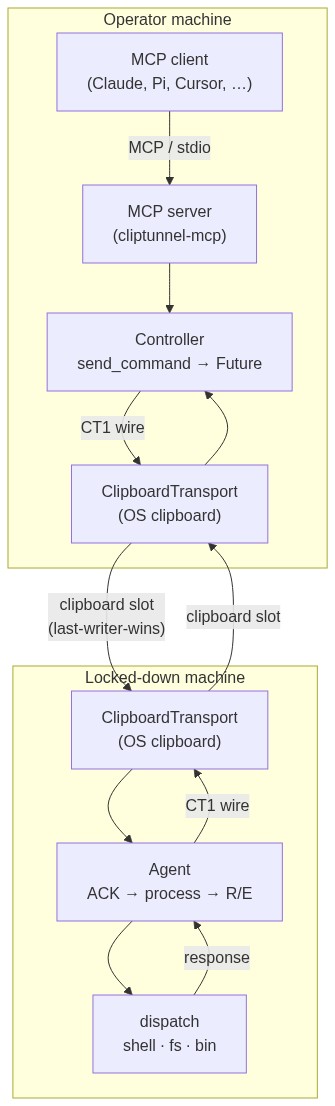
Both endpoints share a single last-writer-wins clipboard slot. The protocol uses stop-and-wait ARQ: the Controller writes one command, the Agent ACKs immediately, processes the command in a worker pool, then writes one typed response (R or E) and retransmits it until the Controller's matching ACK arrives. The Controller sends one command at a time and resolves futures as responses come back.
Wire format
CT1|<from>|<to>|<seq>|<type>|<payload>
| Field | Value |
|---|---|
CT1 |
Protocol signature + version |
from |
C (Controller) or A (Agent) |
to |
C or A |
seq |
Positive integer, monotonic per Controller session |
type |
C (command), R (response), E (error), A (ack) |
payload |
Base64-encoded UTF-8 |
Installation
pip install cliptunnel-mcp          # core + cliptunnel-agent binary
pip install cliptunnel-mcp[server]  # adds cliptunnel-mcp server binary (mcp>=1.2,<2)
Both modes install console entry points:
| Binary | Extra needed | Purpose |
|---|---|---|
cliptunnel-agent |
(none) | Runs the Agent on the local OS clipboard. |
cliptunnel-mcp |
[server] |
Runs the MCP server over stdio. |
Quick start
Agent (remote machine)
The simplest way to run the Agent is the installed binary:
cliptunnel-agent
Antivirus / EDR workaround (Windows): unsigned
.exeentry points may be quarantined. Usepython -minstead — it runs through the already-trusted Python interpreter with no generated binary:python -m cliptunnel_mcp.agent # instead of cliptunnel-agent python -m cliptunnel_mcp.server # instead of cliptunnel-mcp
This builds a ClipboardTransport backed by the system clipboard (pbcopy/pbpaste on macOS, user32 on Windows, wl-copy/wl-paste on Wayland, xclip/xsel on X11) and wires operations.dispatch as the command handler. The Agent watches the clipboard slot, ACKs commands, processes them in a worker pool, and writes responses back. Press Ctrl+C to stop.
Controller + MCP server (operator machine)
On the operator side, configure your MCP client (Claude Desktop, Cursor, Pi, etc.) to launch the server binary:
{
  "mcpServers": {
    "cliptunnel": {
      "command": "cliptunnel-mcp",
      "args": []
    }
  }
}
If the cliptunnel-mcp binary is blocked by antivirus, use python -m:
{
  "mcpServers": {
    "cliptunnel": {
      "command": "python",
      "args": ["-m", "cliptunnel_mcp.server"]
    }
  }
}
The server binary injects a Controller backed by a ClipboardTransport and runs the FastMCP application over stdio. All remote_* tools are available immediately.
Note: the MCP server requires
pip install cliptunnel-mcp[server].
Controller only (no MCP)
For programmatic use without an MCP client:
from cliptunnel_mcp.clipboard_transport import ClipboardTransport
from cliptunnel_mcp import Controller
import json

controller = Controller(transport=ClipboardTransport())

# Async — returns a Future
future = controller.send_command(json.dumps({"op": "shell", "cmd": "whoami"}))
result = future.result(timeout=30)

# Sync — blocks until response or timeout
output = controller.send_command_sync(json.dumps({"op": "fs.read", "path": "/etc/hostname"}))
Programmatic Agent
If you need a custom handler or transport:
from cliptunnel_mcp.clipboard_transport import ClipboardTransport
from cliptunnel_mcp import Agent
from cliptunnel_mcp.operations import dispatch

agent = Agent(transport=ClipboardTransport(), handler=dispatch)
# Blocks until agent.close() — run in a thread or manage lifecycle yourself.
API surface
Controller
The operator-side endpoint. Sends commands asynchronously, dispatches one at a time, and resolves futures as responses arrive.
| Method | Description |
|---|---|
send_command(command: str) -> Future |
Queue a command; returns a Future that resolves with the response payload or None on failure. |
send_command_sync(command: str) -> str | None |
Send and block until response or timeout seconds. |
close() |
Stop background threads. Idempotent. |
Constructor parameters: transport (required), timeout, retries, poll_interval, ack_timeout, initial_seq, persist_seq, seq_store.
Agent
The remote-side endpoint. Watches the slot, ACKs commands immediately, processes them in a worker pool, and writes one typed response at a time with retransmission.
| Method | Description |
|---|---|
close() |
Stop this agent generation. Idempotent; never strands a thread. |
Constructor parameters: transport (required), handler (required), poll_interval, max_workers, response_ack_timeout.
dispatch
The default Agent handler. Parses JSON payloads and routes to the matching operation.
from cliptunnel_mcp.operations import dispatch

output, is_error = dispatch('{"op": "shell", "cmd": "echo hello"}')
Protocol primitives
| Symbol | Description |
|---|---|
pack(msg) -> str |
Serialize a Message into wire format. |
unpack(raw) -> Message | None |
Parse a wire string; None on malformed input. |
validate(raw, my_role) -> bool |
True if raw is well-formed and addressed to my_role. |
Message |
Dataclass: frm, to, seq, mtype, payload. |
MsgType |
Enum: COMMAND, RESPONSE, ERROR, ACK. |
Role |
Enum: CONTROLLER, AGENT. |
SeqTracker |
Per-seq dedupe state: new → processing → done. |
Transport protocol
class Transport(Protocol):
    def read(self) -> str: ...
    def write(self, value: str) -> None: ...

class RevisionMonitor(Protocol):
    @property
    def revision(self) -> int: ...
    def wait_for_change(self, after: int, timeout: float = 1.0) -> int: ...
A transport must implement read/write (last-writer-wins). Implementing RevisionMonitor (or exposing wait_for_revision / wait_for_change) enables change-aware waits instead of polling.
Operations
The dispatch handler supports these operations:
| Operation | Parameters | Returns |
|---|---|---|
shell |
cmd |
JSON: {stdout, stderr, returncode} |
fs.read |
path |
JSON: {content, lines} |
fs.write |
path, content |
wrote N bytes to PATH |
fs.list |
path |
JSON: [{name, size, is_dir}] |
fs.delete |
path |
deleted PATH |
fs.replace |
path, old, new |
replaced 1 occurrence in PATH (exact-once match) |
fs.search |
path, pattern |
JSON: [{line, content}] (regex) |
fs.find |
path, pattern |
JSON: [PATH, ...] (glob, ** recurses) |
fs.bin_read |
path |
JSON: {path, size, b64} |
fs.bin_write |
path, b64 |
wrote N bytes to PATH |
MCP tools
The server exposes 13 tools over stdio:
| Tool | Description |
|---|---|
remote_shell |
Execute a shell command; auto-sync (10 s) then async with job_id polling. |
remote_shell_result |
Poll for the result of an async shell command. |
remote_fs_read |
Read a file. |
remote_fs_write |
Create or overwrite a file (creates parent dirs). |
remote_fs_list |
List directory entries. |
remote_fs_delete |
Delete a file. |
remote_fs_replace |
Search-and-replace in a file (exact-once match). |
remote_fs_search |
Regex search in a file. |
remote_fs_find |
Glob-find files under a directory. |
remote_fs_bin_read |
Read a binary file as base64. |
remote_fs_bin_write |
Write base64 content to a binary file. |
remote_upload |
Upload a local file to the remote machine. |
remote_download |
Download a remote file to the local machine. |
remote_sysinfo |
Return system info (OS, Python, CPU, memory, disk) from the remote machine. |
Lifecycle and coalescing semantics
- One command at a time: the Controller dispatches commands serially. The pending command's seq is published atomically with the slot write so the reader never observes the command before the dispatcher.
- Immediate ACK: the Agent ACKs every command before processing, freeing the slot for the Controller.
- One response at a time: the Agent holds exactly one pending response envelope. A new command never implicitly ACKs a pending response — only the Controller's matching
A(seq)releases it. - Retransmission: both sides retransmit on ACK timeout. The Controller retries up to
retriestimes (default 3). The Agent retransmits the response everyresponse_ack_timeoutseconds (default 1.0). - Deduplication: the Agent's
SeqTrackertracks per-seq state (new → processing → done). Duplicate commands are ACKed; done ones replay the cached typed response; in-flight ones are already being processed. - Stale message guard: the Controller skips any R/E with
seq <= min_seq— stale slot content from a previous session. - Generation-safe: all stop state and queues are local to each instance. Closing and starting a new Agent or Controller never strands threads.
- Paced writes: the Controller enforces a bounded inter-write gap (2× poll interval) so the Agent can read each message before it is overwritten.
Backend selection
ClipTunnel ships ClipboardTransport, a transport backed by the OS clipboard. On Wayland it uses wl-paste --watch for event-driven change detection (zero polling, zero CPU when idle). On macOS, Windows, and X11 it polls every 100 ms with hash-based change detection. It implements both Transport and RevisionMonitor, so both endpoints get change-aware waits. The binaries cliptunnel-agent and cliptunnel-mcp use it automatically.
For custom setups — a Citrix clipboard redirection, a shared Gist, a network pipe — implement the Transport protocol (read() -> str, write(str) -> None) and optionally RevisionMonitor (revision + wait_for_change). Inject it into Controller or Agent directly.
Platform support
| Platform | Status | Clipboard backend | Change detection |
|---|---|---|---|
| macOS | Tested | pbcopy/pbpaste (built-in) |
Polling (100 ms) |
| Windows | Tested | ctypes + user32 (no extra deps) |
Polling (100 ms) |
| Linux / Wayland | Tested | wl-copy/wl-paste (wl-clipboard package) |
Event-driven |
| Linux / X11 | Core works | xclip (fallback: xsel) |
Polling (100 ms) |
Development
# Create a virtual environment
uv venv && source .venv/bin/activate

# Install in development mode
uv pip install -e . pytest

# Run the test suite (161 tests)
python -m pytest -q
# or
python -m unittest discover -s tests -t .

# Bare mode — no install, just PYTHONPATH
PYTHONPATH=src:. python -m pytest -q
The test suite uses a deterministic ClipboardSlot test double that models the last-writer-wins channel with revisions and bounded waits. No clipboard hardware is needed.
Limitations
- Text-only clipboard: the protocol carries UTF-8 strings. Binary files are base64-encoded, which roughly doubles their size over the wire.
- Single slot: the clipboard holds one value at a time. The ARQ protocol serializes all traffic through it, so throughput is bounded by the clipboard round-trip latency.
- No encryption: the wire format is plain base64. If the clipboard is observable, use an encryption layer in your transport or handler.
License
MIT — see LICENSE.
Recommended Servers

playwright-mcp
A Model Context Protocol server that enables LLMs to interact with web pages through structured accessibility snapshots without requiring vision models or screenshots.

Magic Component Platform (MCP)
An AI-powered tool that generates modern UI components from natural language descriptions, integrating with popular IDEs to streamline UI development workflow.

Audiense Insights MCP Server
Enables interaction with Audiense Insights accounts via the Model Context Protocol, facilitating the extraction and analysis of marketing insights and audience data including demographics, behavior, and influencer engagement.

VeyraX MCP
Single MCP tool to connect all your favorite tools: Gmail, Calendar and 40 more.

graphlit-mcp-server
The Model Context Protocol (MCP) Server enables integration between MCP clients and the Graphlit service. Ingest anything from Slack to Gmail to podcast feeds, in addition to web crawling, into a Graphlit project - and then retrieve relevant contents from the MCP client.

Kagi MCP Server
An MCP server that integrates Kagi search capabilities with Claude AI, enabling Claude to perform real-time web searches when answering questions that require up-to-date information.

E2B
Using MCP to run code via e2b.

Neon Database
MCP server for interacting with Neon Management API and databases

Exa Search
A Model Context Protocol (MCP) server lets AI assistants like Claude use the Exa AI Search API for web searches. This setup allows AI models to get real-time web information in a safe and controlled way.

Qdrant Server
This repository is an example of how to create a MCP server for Qdrant, a vector search engine.