
cli2mcp
Wrap any CLI as a Model Context Protocol (MCP) server for Claude, ChatGPT, Cursor, Gemini and any MCP-compatible client — schema auto-inferred from --help.
README
cli2mcp




Status: v0.1 — early release. Stdio transport only. APIs may change before 1.0.
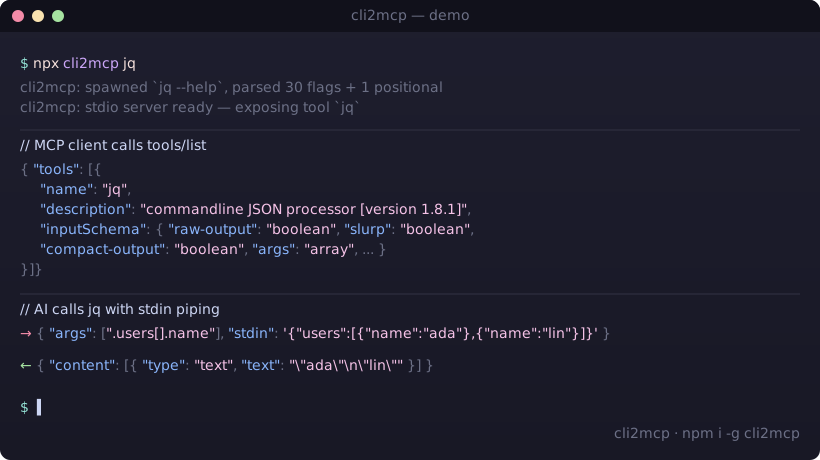
Expose any command-line binary as a Model Context Protocol tool by parsing its --help output and synthesizing a JSON Schema at startup. One command, no boilerplate.
Works with any MCP-compatible client — Claude Desktop, ChatGPT (via OpenAI Agents SDK), Cursor, Gemini CLI, Cline, Windsurf, Continue, Zed, and anything else that speaks the MCP stdio transport.
npx cli2mcp <command>
Why
Writing an MCP server for a CLI you already have is mechanical work: instantiate the SDK, register a tool, hand-write the input schema, marshal arguments, spawn the subprocess, format the output. Roughly 80–150 lines of TypeScript per binary, repeated forever as new tools come out.
cli2mcp does it in one command. The CLI's own --help is the source of truth for the schema — if rg adds a flag tomorrow, the AI sees it tomorrow without code changes.
Install
npm install -g cli2mcp
# or invoke without installing
npx cli2mcp <command>
Requires Node.js 22+.
Configure your MCP client
cli2mcp is launched by your client as a stdio subprocess. Add an entry per CLI you want to expose.
Claude Desktop
Config file location:
| OS | Path |
|---|---|
| macOS | ~/Library/Application Support/Claude/claude_desktop_config.json |
| Windows | %APPDATA%\Claude\claude_desktop_config.json |
| Linux | ~/.config/Claude/claude_desktop_config.json |
{
  "mcpServers": {
    "ripgrep": {
      "command": "npx",
      "args": ["-y", "cli2mcp", "rg", "--name", "ripgrep"]
    },
    "jq": {
      "command": "npx",
      "args": ["-y", "cli2mcp", "jq"]
    }
  }
}
Restart Claude Desktop after editing.
Other clients
| Client | Config file | Format |
|---|---|---|
| ChatGPT (OpenAI Agents SDK) | MCPServerStdio parameter — see OpenAI Agents docs |
command: "npx", args: ["-y", "cli2mcp", "<cli>"] |
| Cursor | .cursor/mcp.json (project) or ~/.cursor/mcp.json (global) |
Same mcpServers block as above |
| Cline | VS Code → Cline → MCP Settings → cline_mcp_settings.json |
Same mcpServers block |
| Windsurf | ~/.codeium/windsurf/mcp_config.json |
Same mcpServers block |
| Gemini CLI | ~/.gemini/settings.json |
Same mcpServers block |
| Continue | ~/.continue/config.json → experimental.modelContextProtocolServers |
Same launcher |
| Zed | ~/.config/zed/settings.json → context_servers |
Same launcher |
| Any stdio-capable MCP client | per the client's docs | Same launcher: npx -y cli2mcp <command> |
Refer to each client's documentation for the exact config path on your platform — they evolve and are not guaranteed to match the table above.
Quick wins — copy-paste configs
Drop any of these into your client's mcpServers block (paths shown above per client). Each one wraps a popular CLI as an MCP tool an AI can call directly.
{
  "mcpServers": {
    "ripgrep": {
      "command": "npx",
      "args": ["-y", "cli2mcp", "rg", "--name", "ripgrep",
               "--description", "Recursively search files with regex"]
    },
    "jq": {
      "command": "npx",
      "args": ["-y", "cli2mcp", "jq",
               "--description", "Query and transform JSON via stdin"]
    },
    "pandoc": {
      "command": "npx",
      "args": ["-y", "cli2mcp", "pandoc",
               "--description", "Convert documents between markup formats"]
    },
    "sqlite3": {
      "command": "npx",
      "args": ["-y", "cli2mcp", "sqlite3",
               "--description", "Run SQL against a SQLite database file",
               "--cwd", "/path/to/safe/dir"]
    },
    "yt-dlp": {
      "command": "npx",
      "args": ["-y", "cli2mcp", "yt-dlp",
               "--description", "Download media from URLs",
               "--cwd", "/path/to/downloads",
               "--timeout", "300000"]
    }
  }
}
Each CLI must already be installed and on
PATH.cli2mcpdoes not install them for you.
How it compares
| Approach | LOC per CLI | New flag handling | Maintenance |
|---|---|---|---|
| Hand-written MCP server (TypeScript SDK) | ~80–150 | manual schema edit | per-CLI release cycle |
| OpenAPI → MCP generators | n/a | requires an OpenAPI spec | does not cover arbitrary CLIs |
Wrapping bash / sh as a tool |
~10 | n/a — gives the AI a shell | unsafe, no schema, no sandbox |
cli2mcp <command> |
0 | automatic at next start | none — re-reads --help |
The closest neighbor is FastMCP's from_openapi — it does not cover arbitrary CLI binaries. As of April 2026 there is no other published tool that turns an arbitrary --help output into a typed MCP tool in one command.
Verified targets
These CLIs are covered by the test suite or have been manually exercised end-to-end:
| CLI | Status | Notes |
|---|---|---|
jq |
✅ tested | help-on-stderr correctly captured; stdin piping works |
ripgrep (rg) |
✅ tested | 90+ flags inferred; args positional handled |
curl |
✅ fixture | shape extraction validated against bundled fixture |
node |
✅ integration test | end-to-end MCP handshake + tools/call |
Other POSIX-style CLIs (e.g. ffmpeg, yt-dlp, pandoc, sqlite3, imagemagick) are expected to work but are not yet covered by tests. Report bugs in issues.
How --help becomes a JSON Schema
| Help fragment | MCP property |
|---|---|
--flag |
boolean |
--flag <value> / <file> / <path> |
string |
--flag <n> / <ms> / <size> |
number |
--flag <a|b|c> |
string enum with choices |
| Repeatable flag | array<string> |
| Positional args | args: array<string> |
Reserved input stdin |
string piped to subprocess stdin |
When parsing fails on an unconventional --help, cli2mcp falls back to a single variadic args positional so the tool is still usable — the model just gets a free-form argument list instead of typed flags.
Options
cli2mcp <command> [options]

  --name <name>         Tool name shown to the AI           (default: <command>)
  --description <text>  Tool description shown to the AI    (default: first --help line)
  --timeout <ms>        Subprocess timeout per call         (default: 60000)
  --cwd <path>          Working directory for subprocess    (default: process.cwd())
  --env <KEY=VALUE>     Extra environment variables         (repeatable)
  --stderr <mode>       stderr handling:
                          include  →  appended to tool output (default)
                          drop     →  discarded
                          error    →  any stderr → isError: true
  -h, --help            Show help
Piping stdin
Reserved input property stdin is piped to the subprocess:
{ "args": [".name"], "stdin": "{\"name\": \"cli2mcp\"}" }
How it works
cli2mcp rg
   │
   ├─ 1. spawn: rg --help          →  capture stdout + stderr
   ├─ 2. parse help text           →  CliShape { flags, positionals, description }
   ├─ 3. synthesize JSON Schema    →  inputSchema
   ├─ 4. register one MCP tool     →  name: "rg", schema: <above>
   └─ 5. start stdio MCP server    →  await client connection

On tools/call:
   { args, flags, stdin? }  →  argv builder  →  execa(rg, argv, { stdin })
                                                           │
                                          stdout (+ stderr) → content[text]
Non-zero exit → { isError: true, content: [{ type: "text", text: <stderr> }] } (unless --stderr drop).
Security
cli2mcp lets an AI agent invoke the CLIs you expose, with the arguments the agent chooses. You are responsible for what those CLIs can do on your machine.
Practical guidance:
- Only expose CLIs whose blast radius you accept.
jq,rg,pandocare mostly safe (read-only, deterministic).curl,ffmpeg --output,sqlite3,rm,kubectl,awsare not. - The AI is not sandboxed. A prompt injection attack could cause an exposed
curlto fetchevil.example.com, an exposedrmto delete files, etc. - Use
--cwdto constrain filesystem scope when wrapping CLIs that touch files. - Use
--envdeliberately. Do not pass through credentials the model shouldn't reach. - Never expose
sh,bash,zsh,python -c, or anything with eval semantics — that bypasses every safeguardcli2mcpprovides.
The schema-from-help design reduces the risk of malformed argv but does not eliminate the risk of misuse. Treat each exposed CLI as a delegated capability, not a sandbox.
Troubleshooting
The CLI has no --help flag.
cli2mcp will still start with a single args positional. The AI can pass arguments freely; you lose typed flag inference.
The schema came out empty / wrong.
Run cli2mcp <command> manually and inspect the tools/list response (use npx @modelcontextprotocol/inspector). The most common cause is non-standard help formatting (no --long-form flags, columns misaligned). Open an issue with the <command> --help output attached.
The subprocess hangs.
The default 60s timeout will kill it. Raise via --timeout. If your CLI is interactive (waits for a TTY), cli2mcp cannot help — pipe input via stdin instead.
Flag not being passed.
Set --stderr include (the default) and inspect the content[].text. If the flag isn't appearing in argv, the help parser failed to extract it — file an issue.
Contributing
Bug reports and patches welcome. Fixtures for new CLIs (test/fixtures/help/<cli>.txt + a shape test) are the highest-leverage contributions.
pnpm install
pnpm test         # vitest
pnpm typecheck    # tsc --noEmit
pnpm lint         # biome check
Star history
If cli2mcp saved you an afternoon of writing MCP boilerplate, a star helps other people find it.
Author
Built by Ronie Neubauer — Principal Engineer, 22+ years shipping production systems.
- GitHub: @RonieNeubauer
- Blog: ronieneubauer.com
- Issues & ideas: github.com/RonieNeubauer/cli2mcp/discussions
License
MIT © 2026 Ronie Neubauer.
Recommended Servers

playwright-mcp
A Model Context Protocol server that enables LLMs to interact with web pages through structured accessibility snapshots without requiring vision models or screenshots.

Magic Component Platform (MCP)
An AI-powered tool that generates modern UI components from natural language descriptions, integrating with popular IDEs to streamline UI development workflow.

Audiense Insights MCP Server
Enables interaction with Audiense Insights accounts via the Model Context Protocol, facilitating the extraction and analysis of marketing insights and audience data including demographics, behavior, and influencer engagement.

VeyraX MCP
Single MCP tool to connect all your favorite tools: Gmail, Calendar and 40 more.

graphlit-mcp-server
The Model Context Protocol (MCP) Server enables integration between MCP clients and the Graphlit service. Ingest anything from Slack to Gmail to podcast feeds, in addition to web crawling, into a Graphlit project - and then retrieve relevant contents from the MCP client.

Kagi MCP Server
An MCP server that integrates Kagi search capabilities with Claude AI, enabling Claude to perform real-time web searches when answering questions that require up-to-date information.

Neon Database
MCP server for interacting with Neon Management API and databases

E2B
Using MCP to run code via e2b.

Exa Search
A Model Context Protocol (MCP) server lets AI assistants like Claude use the Exa AI Search API for web searches. This setup allows AI models to get real-time web information in a safe and controlled way.

Qdrant Server
This repository is an example of how to create a MCP server for Qdrant, a vector search engine.