
ChemGlyph
Provides an MCP interface for publication-quality chemical structure and reaction rendering from SMILES/InChI/molblock, with validation and name parsing. Enables AI agents to draw molecules and reactions as images.
README
ChemGlyph
Publication-quality chemical structure and reaction rendering for AI agents. ChemGlyph is the KaTeX of chemistry: a rendering layer, a validation layer, and an MCP interface on top of RDKit.

Install
pip install chemglyph
Render a molecule
import chemglyph

result = chemglyph.render_molecule("c1ccccc1")  # benzene
open("benzene.svg", "w").write(result.data)
render_molecule takes SMILES, InChI, or molblock and returns SVG (or PNG)
plus canonical_smiles, mol_formula, mol_weight, and warnings.
Styles
Three styles, same molecule (benzoic acid, caffeine, (S)-ibuprofen):
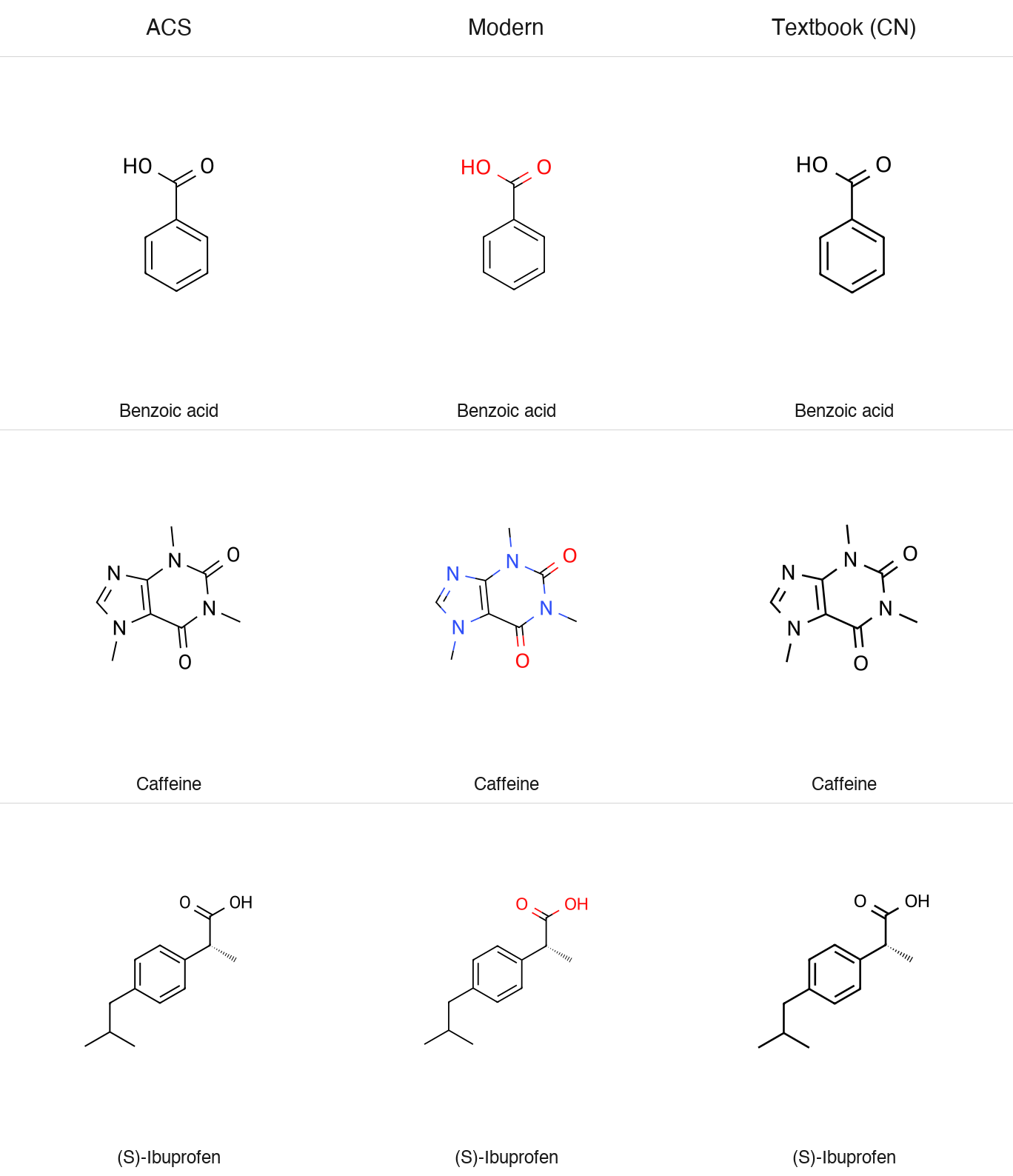
chemglyph.render_molecule(smiles, style="acs")  # black/white, ACS journal
chemglyph.render_molecule(smiles, style="modern")  # colored heteroatoms, screens
chemglyph.render_molecule(smiles, style="textbook-cn")  # bold monochrome, textbook
All styles default to a transparent background (transparent=True) and
support fmt="png".
Reactions
spec = {
    "steps": [
        {
            "reactants": ["OC(=O)c1ccccc1O", "CC(=O)OC(C)=O"],
            "products": ["CC(=O)Oc1ccccc1C(=O)O", "CC(=O)O"],
            "conditions": {"above": "H₂SO₄ (cat.)", "below": "rt, 15 min"},
            "yield": "89%",
            "arrow": "forward",
        }
    ],
    "style": "modern",
}
svg = chemglyph.render_reaction(spec)
Conditions are pre-formatted Unicode text, so pass H₂SO₄, not H2SO4.
ChemGlyph does not parse formulas out of text. The full schema
(multi-step chains, equilibrium and retro arrows, line wrapping) is in
docs/reaction_schema.md.
The aspirin demo writes a two-step route:
python examples/aspirin_synthesis.py # writes examples/aspirin_synthesis.svg
Validation
validate_structure reports parse errors and applies four quick fixes:
unmatched brackets and ring closures (reported, not guessed), kekulization
failures of lowercase aromatic atoms, and nitrogen valence errors via a
formal [N+]. Anything else passes RDKit's message through unchanged.
report = chemglyph.validate_structure("c1cccc1")
report.fixes[0].description  # 'lowercase aromatic atoms could not be kekulized...'
report.fixes[0].fixed_smiles  # 'C1CCCC1'
Naming
chemglyph.parse_name("aspirin") # 'CC(=O)Oc1ccccc1C(=O)O'
English IUPAC and common names resolve offline through OPSIN
(pip install 'chemglyph[opsin]', plus a Java runtime). Chinese names use
the built-in dictionary, and the library API accepts a translator callable
for names that are not in it:
chemglyph.parse_name("阿司匹林")  # 'CC(=O)Oc1ccccc1C(=O)O'
chemglyph.parse_name("六甲基苯", translator=to_english)
ChemGlyph itself never calls an online service, including for translation.
MCP server
Run the bundled console script (stdio transport):
<!-- mcp-name: io.github.random-orbit/chemglyph -->
chemglyph-mcp
Claude Desktop registration (macOS:
~/Library/Application Support/Claude/claude_desktop_config.json):
{
  "mcpServers": {
    "chemglyph": {
      "command": "chemglyph-mcp"
    }
  }
}
| Tool | Use it when | Returns |
|---|---|---|
render_molecule |
the user asks to draw one structure from SMILES/InChI/molblock | PNG image plus formula, MW, warnings (SVG source on request) |
render_reaction |
the user asks for a reaction or synthesis route | PNG image of the reaction scheme |
validate_structure |
a SMILES may be malformed and you need a repair | validation report JSON |
parse_name |
the user gives a name like "aspirin" instead of SMILES | canonical SMILES or an error |
One thing to know about clients. Some MCP clients, LM Studio included, only
pass the text part of a tool result to the model and never display the
attached image. The render tools write their PNG to ~/Downloads/chemglyph/
and return that path in the text, so you can always open the file yourself.
If a model claims it rendered a figure but nothing shows up, ask it for the
saved path rather than having it redraw the structure by hand.
Benchmarks
benchmarks/ holds the fixed 20-molecule blind test and a generator that
writes shuffled, numbered PNG/SVG figures plus answer_key.json:
python benchmarks/generate_blind_test.py --seed 1234
The deck, methodology, and scoring tooling are all open-sourced: the fixed molecule list, the A/B deck generator (which pairs ChemGlyph against an open-source reference renderer), the runbook, and the scorer live in benchmarks/. Anyone can run the protocol and contribute results. The pass threshold and procedure are documented in benchmarks/RUNBOOK.md.
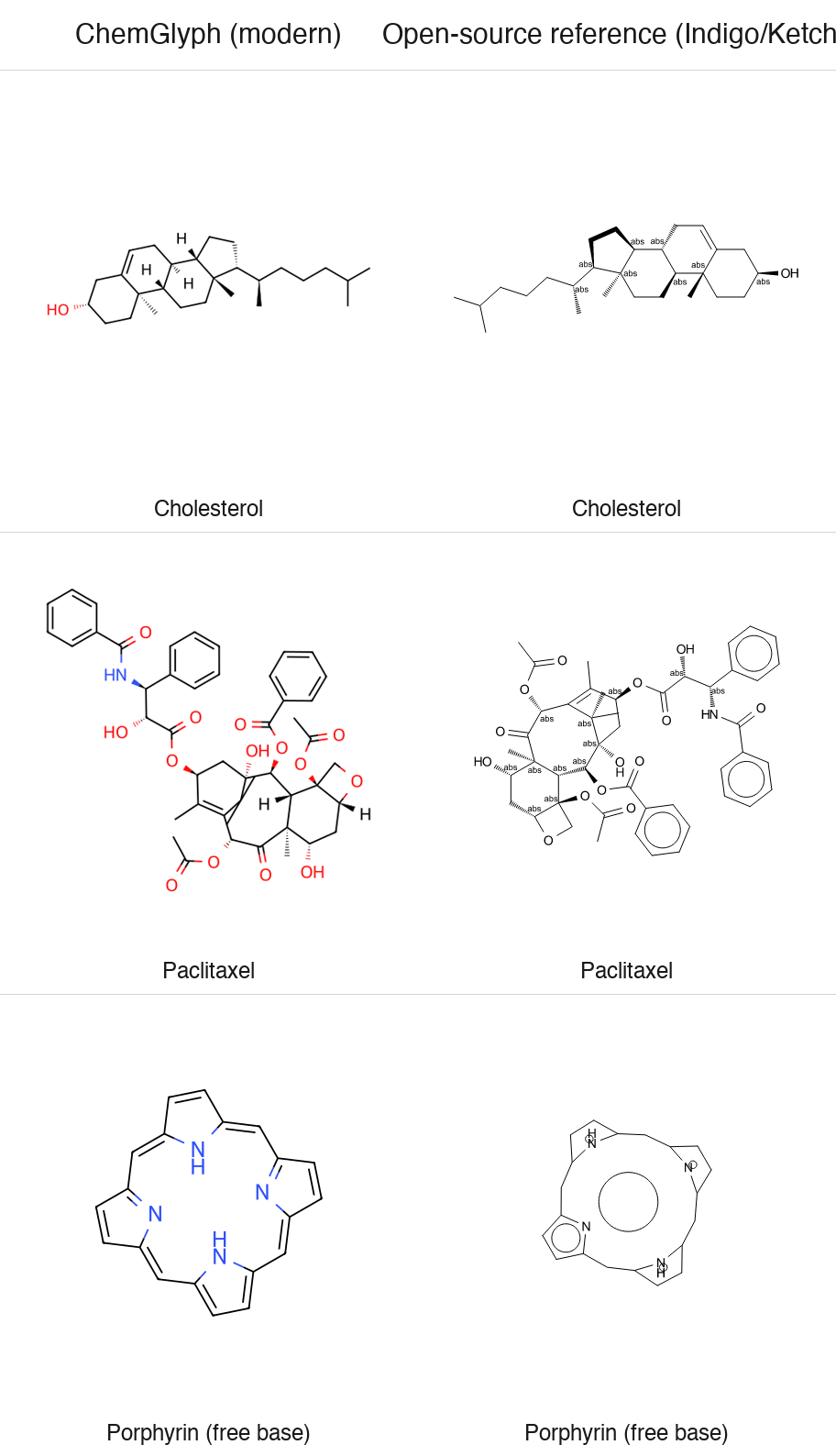
Blind test vs ChemDraw: pending. The image above is an author-generated
comparison of ChemGlyph modern against the open-source reference renderer
(Indigo, the engine behind Ketcher) - it is not an independent review.
Known limitations
- Blind-test figures for ferrocene (metal complex) and the free-base porphyrin (large conjugated macrocycle) are excluded from the benchmark denominator and recorded separately.
- RDKit has no clean 2D layout for paclitaxel: its gem-dimethyl substituent placement inside the central 8-membered ring is a documented layout limitation.
- Full automatic Chinese name-to-structure parsing is not implemented; Chinese names resolve through a small built-in dictionary plus an optional translator hook. English names resolve through OPSIN.
Roadmap
- v0.2: Chinese naming (built-in dictionary plus translator hook), down-arrow line wrapping, arrow column alignment, cropped fragments. All shipped.
- Next: mechanism (electron-pushing) arrows, see docs/progress/v02-research.md.
- Later: a larger Chinese dictionary as an optional data extra.
Non-goals
No structure editor GUI (Ketcher/ChemDraw competition), no 3D visualization, no retrosynthesis or property prediction, no online database queries, and no automatic mechanism generation. The full list is in the project specification.
Development
python -m venv .venv
.venv/bin/pip install -e ".[dev]"
.venv/bin/ruff check . && .venv/bin/ruff format . && .venv/bin/pytest
Python 3.11+, RDKit 2024.9+, MIT license. All errors derive from
chemglyph.errors.ChemGlyphError.
Recommended Servers

playwright-mcp
A Model Context Protocol server that enables LLMs to interact with web pages through structured accessibility snapshots without requiring vision models or screenshots.

Magic Component Platform (MCP)
An AI-powered tool that generates modern UI components from natural language descriptions, integrating with popular IDEs to streamline UI development workflow.

Audiense Insights MCP Server
Enables interaction with Audiense Insights accounts via the Model Context Protocol, facilitating the extraction and analysis of marketing insights and audience data including demographics, behavior, and influencer engagement.

VeyraX MCP
Single MCP tool to connect all your favorite tools: Gmail, Calendar and 40 more.

graphlit-mcp-server
The Model Context Protocol (MCP) Server enables integration between MCP clients and the Graphlit service. Ingest anything from Slack to Gmail to podcast feeds, in addition to web crawling, into a Graphlit project - and then retrieve relevant contents from the MCP client.

Kagi MCP Server
An MCP server that integrates Kagi search capabilities with Claude AI, enabling Claude to perform real-time web searches when answering questions that require up-to-date information.

E2B
Using MCP to run code via e2b.

Neon Database
MCP server for interacting with Neon Management API and databases

Exa Search
A Model Context Protocol (MCP) server lets AI assistants like Claude use the Exa AI Search API for web searches. This setup allows AI models to get real-time web information in a safe and controlled way.

Qdrant Server
This repository is an example of how to create a MCP server for Qdrant, a vector search engine.