
cc-tap
An MCP server that bridges Claude Desktop and Claude Code by letting Desktop read and interact with Claude Code Remote Control sessions, enabling cross-agent coordination.
README
<!-- mcp-name: io.github.es617/cc-tap -->
cc-tap



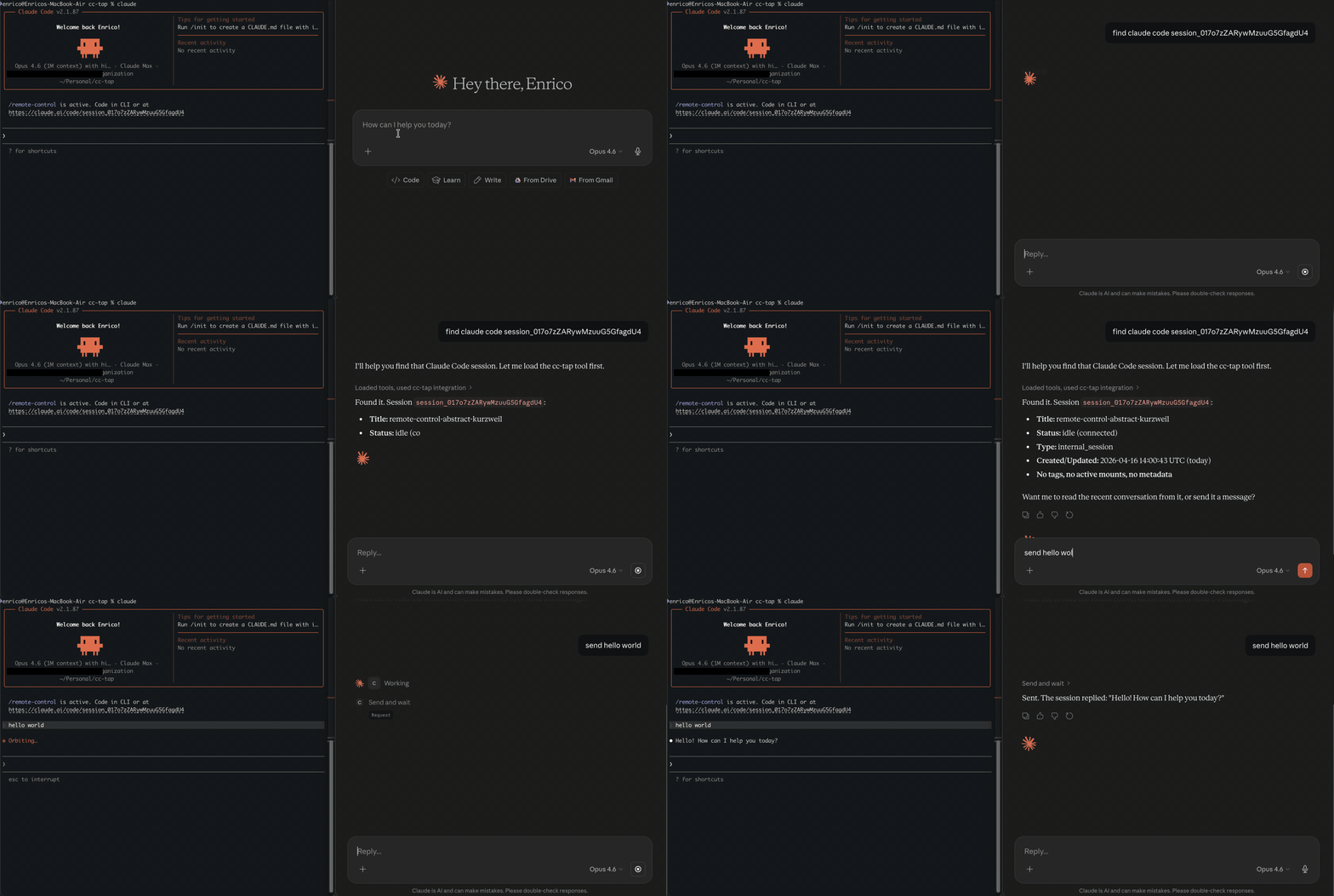
Experimental MCP server that lets Claude Desktop see into and interact with Claude Code Remote Control sessions.
Example: Ask Claude Desktop "what's my Code session working on?" and get a real answer.
Why this exists
Claude Desktop and Claude Code are separate worlds. Both build up rich context on your project, but neither can see what the other is doing. A design idea on Desktop that should drive an implementation in Code, or an implementation detail in Code that the Desktop conversation needs; both require you to copy-paste between windows and re-explain context that already exists.
Claude Code's Remote Control lets you drive a session from another device, but that's still you driving the same session. cc-tap is for the other axis: letting a different agent (Claude Desktop, or another Claude Code instance) read and interact with a running CC session through MCP.
Who is this for
- Developers who use both Claude Desktop and Claude Code
- Anyone who wants to monitor or interact with CC sessions programmatically
- Multi-agent workflows where one Claude instance needs to coordinate with another
Quickstart
pip install cc-tap
Requires an active Claude Code login (claude /login) and Remote Control enabled.
Claude Code
claude mcp add cc-tap -- cc_tap
Claude Desktop
Add to claude_desktop_config.json:
{
  "mcpServers": {
    "cc-tap": {
      "command": "cc_tap",
      "args": []
    }
  }
}
Tools
| Tool | Description |
|---|---|
list_sessions |
List all CC sessions (optionally filter by status) |
get_session_info |
Get details about a specific session |
read_session |
Read recent conversation from a session |
get_session_events |
Get raw events, optionally filtered by type |
send_message |
Send a message to a CC session (fire and forget) |
send_and_wait |
Send a message and wait for the full response |
How it works
cc-tap reads your Claude Code OAuth credentials (from macOS Keychain or ~/.claude/.credentials.json) and talks to the same API that Claude Code's Remote Control web UI uses. No additional authentication needed.
Sessions are accessed via HTTP polling (~1.5s latency). Messages you send appear in the target CC session as if typed by the user.
Limitations
- Tool approval — the session runtime only picks up approvals via WebSocket (behind Cloudflare bot protection). You can see pending tool requests via
send_and_wait, but must approve them in the CC terminal or claude.ai/code web UI. - Not real-time — uses HTTP polling, not WebSocket streaming. ~1.5s latency.
- Undocumented API — uses internal Anthropic endpoints that may change without notice.
- Local only — reads credentials from the local machine. Can't be deployed as a remote service.
Protocol
See PROTOCOL.md for the reverse-engineered Claude Code Remote session API documentation.
Development
git clone https://github.com/es617/cc-tap.git
cd cc-tap
pip install -e ".[dev,test]"
pre-commit install
pytest
Disclaimer
This project is an experimental research tool for personal and educational use. It interacts with undocumented, internal Anthropic APIs that are not part of any public or supported API surface. These endpoints may change, break, or be removed at any time without notice.
This project is not affiliated with, endorsed by, or supported by Anthropic. Use it at your own risk. The authors assume no responsibility for any consequences of using this tool, including but not limited to account restrictions, data loss, or service disruption.
By using this tool you acknowledge that you are responsible for compliance with Anthropic's Terms of Service and Acceptable Use Policy.
License
Recommended Servers

playwright-mcp
A Model Context Protocol server that enables LLMs to interact with web pages through structured accessibility snapshots without requiring vision models or screenshots.

Magic Component Platform (MCP)
An AI-powered tool that generates modern UI components from natural language descriptions, integrating with popular IDEs to streamline UI development workflow.

Audiense Insights MCP Server
Enables interaction with Audiense Insights accounts via the Model Context Protocol, facilitating the extraction and analysis of marketing insights and audience data including demographics, behavior, and influencer engagement.

VeyraX MCP
Single MCP tool to connect all your favorite tools: Gmail, Calendar and 40 more.

graphlit-mcp-server
The Model Context Protocol (MCP) Server enables integration between MCP clients and the Graphlit service. Ingest anything from Slack to Gmail to podcast feeds, in addition to web crawling, into a Graphlit project - and then retrieve relevant contents from the MCP client.

Kagi MCP Server
An MCP server that integrates Kagi search capabilities with Claude AI, enabling Claude to perform real-time web searches when answering questions that require up-to-date information.

E2B
Using MCP to run code via e2b.

Neon Database
MCP server for interacting with Neon Management API and databases

Exa Search
A Model Context Protocol (MCP) server lets AI assistants like Claude use the Exa AI Search API for web searches. This setup allows AI models to get real-time web information in a safe and controlled way.

Qdrant Server
This repository is an example of how to create a MCP server for Qdrant, a vector search engine.