
Black-Litterman Portfolio Optimization MCP Server
Enables AI agents to perform Black-Litterman portfolio optimization with investor views, backtesting, and asset analysis, generating dashboards for visualization.
README
Black-Litterman Portfolio Optimization MCP Server


Black-Litterman portfolio optimization MCP server for AI agents
Works with Claude Desktop, Windsurf IDE, Google ADK, and any MCP-compatible AI
Features
- Portfolio Optimization - Black-Litterman model with sensitivity analysis
- Investor Views - Absolute/relative views with confidence levels
- Backtesting - Strategy comparison, drawdown analysis, timeseries
- Asset Analysis - Correlation matrix, VaR, per-asset statistics
- Dashboard Generation - Visualization hints for AI-generated charts
- Multiple Assets - S&P 500, NASDAQ 100, ETF, Crypto, custom data
Quick Start
Option 1: Smithery (Easiest - No Installation!) 🌟
Install via Smithery in one command:
npx @smithery/cli install @irresi/bl-view-mcp --client claude
Or visit smithery.ai/server/@irresi/bl-view-mcp and click:
- "Add to Claude Desktop" - One-click setup
- "Add to ChatGPT" - Direct integration
- "Run" - Test in browser instantly
No Python/uv installation needed! Smithery hosts the server for you.
Option 2: Local Installation (uvx)
For offline use or development:
Step 1: Find uvx path
Run in terminal:
which uvx
# Example output: /Users/USERNAME/.local/bin/uvx
If uvx is not installed:
curl -LsSf https://astral.sh/uv/install.sh | sh
Step 2: Configure Claude Desktop
Config file location:
- macOS:
~/Library/Application Support/Claude/claude_desktop_config.json - Windows:
%APPDATA%\Claude\claude_desktop_config.json
File content (replace with your uvx path):
{
  "mcpServers": {
    "black-litterman": {
      "command": "/Users/USERNAME/.local/bin/uvx",
      "args": ["black-litterman-mcp"]
    }
  }
}
Step 3: Restart Claude Desktop
Cmd+Q (macOS) or fully quit and restart
Usage
Ask Claude:
"Optimize a portfolio with AAPL, MSFT, GOOGL. I think AAPL will return 10%."
First run: S&P 500 data auto-downloads (~30 seconds)
Tip: Want charts or dashboards? Just ask: "Show me a dashboard with the results" or "Create a visualization of the portfolio weights"
Example Use Cases
Try these prompts with Claude:
Note: Default period is 1 year for all tools. All returns are annualized - when you say "outperform by 40%", it means 40% annual return expectation.
Basic Optimization + Visualization
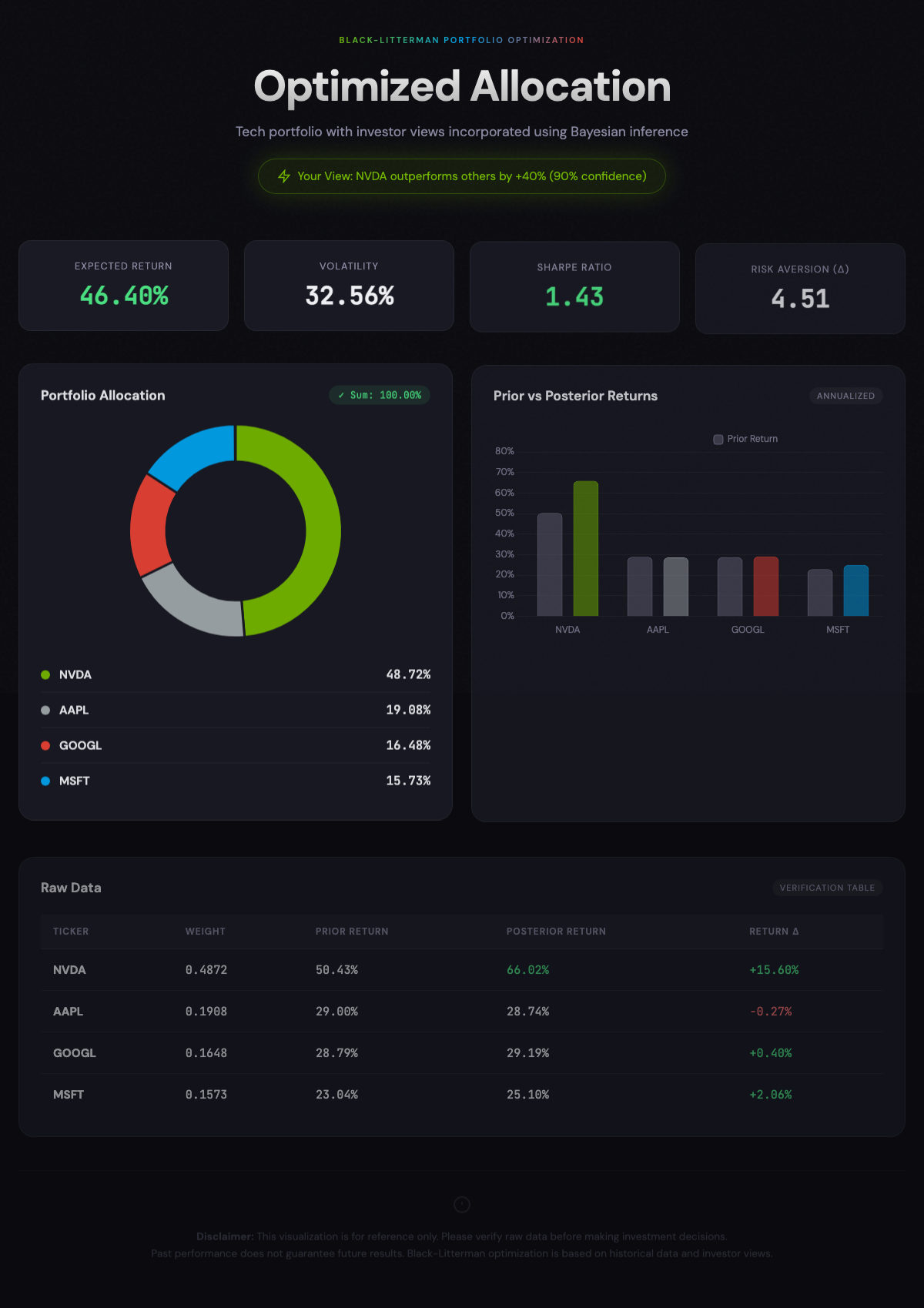
Optimize a portfolio with AAPL, MSFT, GOOGL, NVDA. I am confident that NVDA will outperform others by 40%. Show me a dashboard.
Backtesting with Benchmark
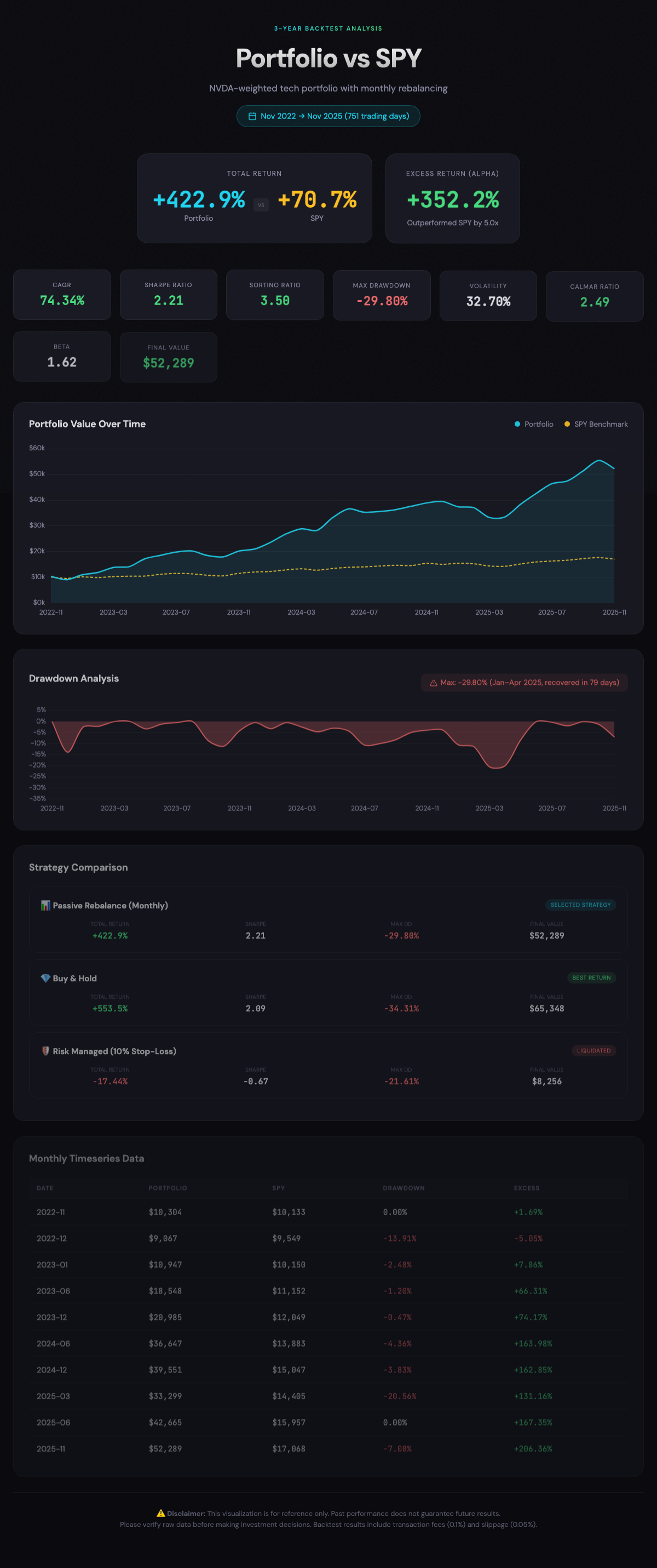
Backtest the above optimized portfolio for 3 years and compare with SPY.
Strategy Comparison
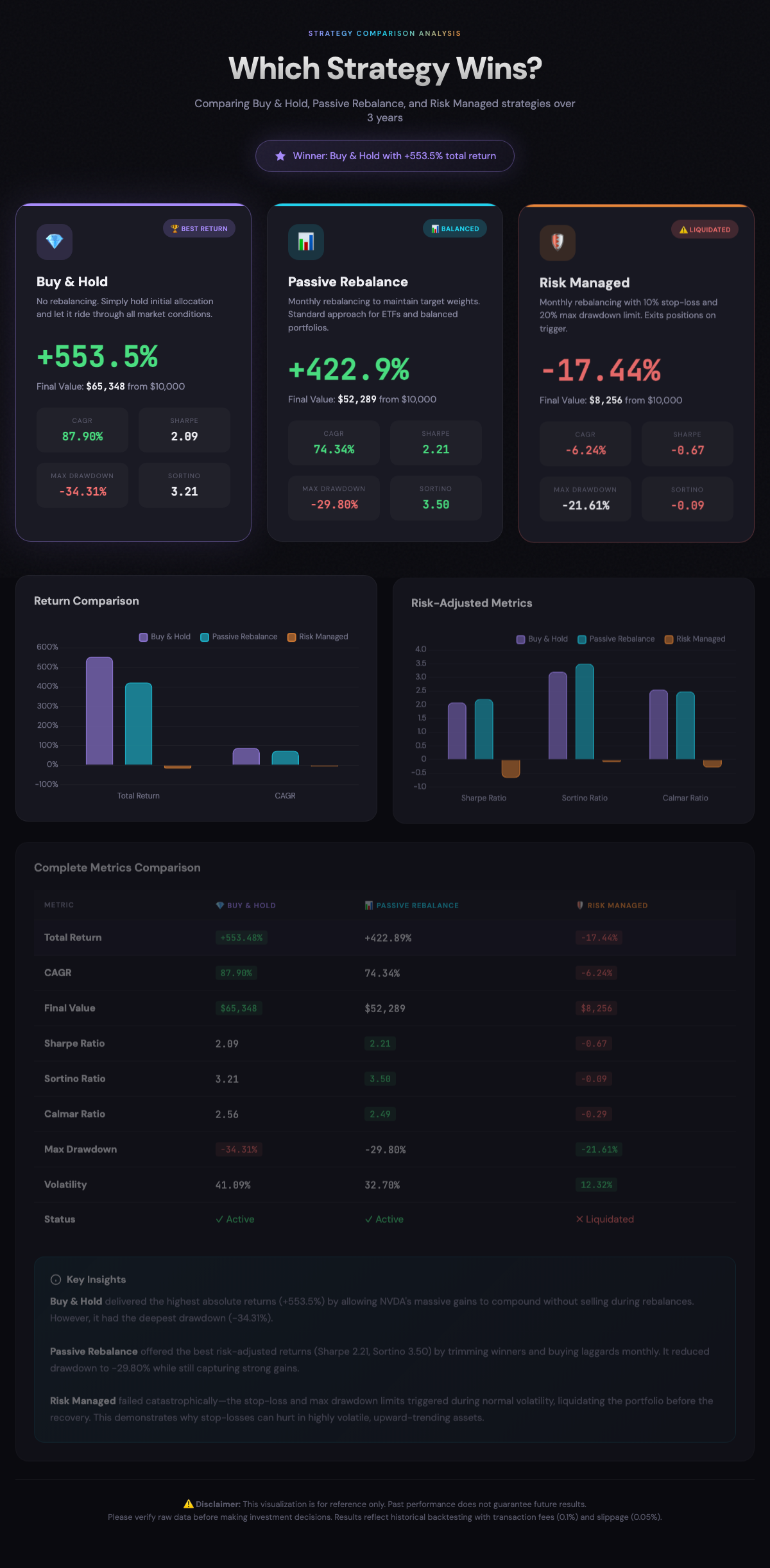
Compare buy_and_hold, passive_rebalance, and risk_managed strategies for this portfolio.
Correlation Analysis
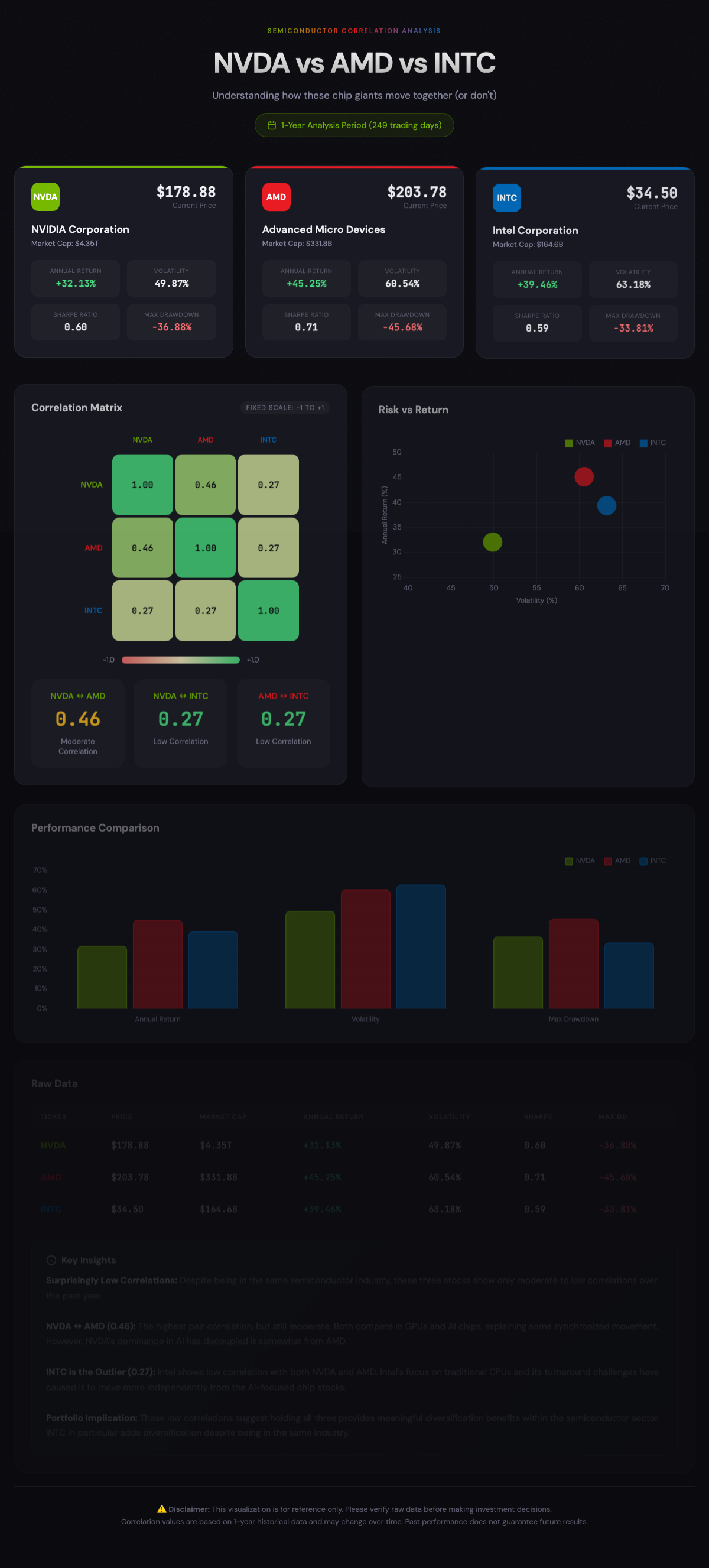
Analyze the correlation between NVDA, AMD, and INTC.
Sensitivity Analysis
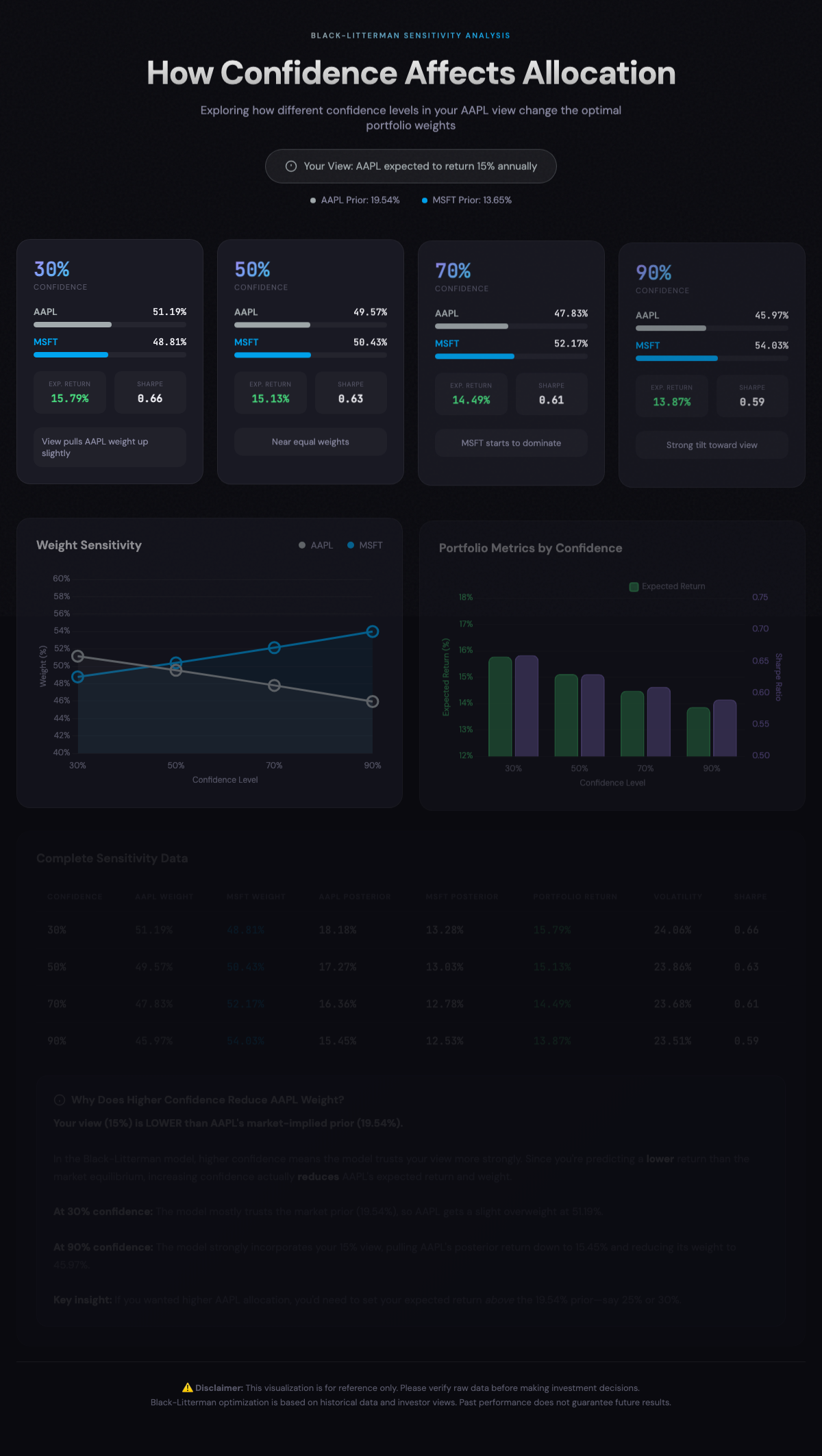
Create a portfolio with AAPL and MSFT. I expect AAPL to return 15%. Run sensitivity analysis with confidence levels 0.3, 0.5, 0.7, 0.9.
Demo Dashboards
Generated using the example prompts above with Claude Desktop:
<ins>Click images</ins> to view interactive HTML dashboards:
| Optimization | Backtest | Strategy |
|---|---|---|
 |
 |
 |
| Correlation | Sensitivity |
|---|---|
 |
 |
Other Installation Methods
pip (Python Package)
Install directly from PyPI:
pip install black-litterman-mcp
Then configure your MCP client to run:
black-litterman-mcp # or bl-view-mcp, bl-mcp
Requires Python 3.11+. Data auto-downloads on first use.
Windsurf IDE
.windsurf/mcp_config.json:
{
  "mcpServers": {
    "black-litterman": {
      "command": "/Users/USERNAME/.local/bin/uvx",
      "args": ["black-litterman-mcp"]
    }
  }
}
From Source (Developers)
git clone https://github.com/irresi/bl-view-mcp.git
cd bl-view-mcp
make install
make download-data  # S&P 500 data
make test-simple
Docker
docker build -t bl-mcp .
docker run -p 5000:5000 -v $(pwd)/data:/app/data bl-mcp
Google ADK Web UI
Test with Google ADK (Agent Development Kit):
# Terminal 1: Start MCP HTTP server
make server-http  # localhost:5000

# Terminal 2: Start ADK Web UI
make web-ui       # localhost:8000
Open http://localhost:8000 in browser
Requires
make install(includes google-adk dependency)
Supported Datasets
| Dataset | Tickers | Description |
|---|---|---|
snp500 |
~500 | S&P 500 constituents (default) |
nasdaq100 |
~100 | NASDAQ 100 constituents |
etf |
~130 | Popular ETFs |
crypto |
~100 | Cryptocurrencies |
custom |
- | User-uploaded data |
PyPI install: S&P 500 data auto-downloads on first run
Source install: Download additional datasets manually
make download-data       # S&P 500 (default)
make download-nasdaq100  # NASDAQ 100
make download-etf        # ETF
make download-crypto     # Crypto
MCP Tools
optimize_portfolio_bl
Calculate optimal portfolio weights using Black-Litterman model.
optimize_portfolio_bl(
    tickers=["AAPL", "MSFT", "GOOGL"],
    period="1Y",
    views={"P": [{"AAPL": 1}], "Q": [0.10]},  # AAPL expected 10% return
    confidence=0.7,
    investment_style="balanced"  # aggressive / balanced / conservative
)
Views examples:
# Absolute view: "AAPL will return 10%"
views = {"P": [{"AAPL": 1}], "Q": [0.10]}

# Relative view: "NVDA will outperform AAPL by 20%"
views = {"P": [{"NVDA": 1, "AAPL": -1}], "Q": [0.20]}
VaR Warning: When predicted returns exceed 40%, EGARCH-based VaR analysis is automatically included in the warnings field.
backtest_portfolio
Validate portfolio strategy with historical data.
backtest_portfolio(
    tickers=["AAPL", "MSFT", "GOOGL"],
    weights={"AAPL": 0.4, "MSFT": 0.35, "GOOGL": 0.25},
    period="3Y",
    strategy="passive_rebalance",  # buy_and_hold / passive_rebalance / risk_managed
    benchmark="SPY"
)
get_asset_stats
Get asset statistics including VaR, correlation matrix, and covariance matrix.
get_asset_stats(
    tickers=["AAPL", "MSFT", "GOOGL"],
    period="1Y",
    include_var=True  # Set False for faster response (skips EGARCH VaR)
)
# Returns: assets (price, return, volatility, sharpe, var_95, percentile_95),
#          correlation_matrix, covariance_matrix
upload_price_data
Upload external data (international stocks, custom assets, etc.).
# Direct upload (small data)
upload_price_data(
    ticker="005930.KS",  # Samsung Electronics
    prices=[
        {"date": "2024-01-02", "close": 78000.0},
        {"date": "2024-01-03", "close": 78500.0},
        ...
    ],
    source="custom"
)

# Or load from file (large data)
upload_price_data(
    ticker="CUSTOM_INDEX",
    file_path="/path/to/data.csv",
    date_column="Date",
    close_column="Close"
)
list_available_tickers
Query available tickers.
list_available_tickers(search="AAPL")        # Search
list_available_tickers(dataset="snp500")     # S&P 500 only
list_available_tickers(dataset="custom")     # Custom data
Documentation
| Document | Description |
|---|---|
| docs/TESTING.md | Testing guide |
| docs/ARCHITECTURE.md | Technical architecture |
Tech Stack
- MCP Server: FastMCP
- Optimization: PyPortfolioOpt
- Risk Model: arch (EGARCH)
- Data: yfinance, ccxt (crypto)
License
MIT License - LICENSE
Troubleshooting
"spawn uvx ENOENT" / "uv binary not found"
Claude Desktop may not recognize system PATH. Use absolute path:
which uvx
# Use the output path in config
"Data file not found"
Source install:
make download-data
PyPI install: Auto-downloads on first run (~30 seconds).
"uv: command not found"
curl -LsSf https://astral.sh/uv/install.sh | sh
Need more help?
Recommended Servers

playwright-mcp
A Model Context Protocol server that enables LLMs to interact with web pages through structured accessibility snapshots without requiring vision models or screenshots.

Magic Component Platform (MCP)
An AI-powered tool that generates modern UI components from natural language descriptions, integrating with popular IDEs to streamline UI development workflow.

Audiense Insights MCP Server
Enables interaction with Audiense Insights accounts via the Model Context Protocol, facilitating the extraction and analysis of marketing insights and audience data including demographics, behavior, and influencer engagement.

VeyraX MCP
Single MCP tool to connect all your favorite tools: Gmail, Calendar and 40 more.

graphlit-mcp-server
The Model Context Protocol (MCP) Server enables integration between MCP clients and the Graphlit service. Ingest anything from Slack to Gmail to podcast feeds, in addition to web crawling, into a Graphlit project - and then retrieve relevant contents from the MCP client.

Kagi MCP Server
An MCP server that integrates Kagi search capabilities with Claude AI, enabling Claude to perform real-time web searches when answering questions that require up-to-date information.

Neon Database
MCP server for interacting with Neon Management API and databases

E2B
Using MCP to run code via e2b.

Exa Search
A Model Context Protocol (MCP) server lets AI assistants like Claude use the Exa AI Search API for web searches. This setup allows AI models to get real-time web information in a safe and controlled way.

Qdrant Server
This repository is an example of how to create a MCP server for Qdrant, a vector search engine.