
Audio File MCP App
Enables playing and inspecting local audio files in an MCP host with an in-conversation UI showing waveform, spectrogram, and loudness metrics, while exposing playback state and metadata to the model.
README
Audio File MCP App
An MCP App for playing and inspecting local audio files in an MCP host.
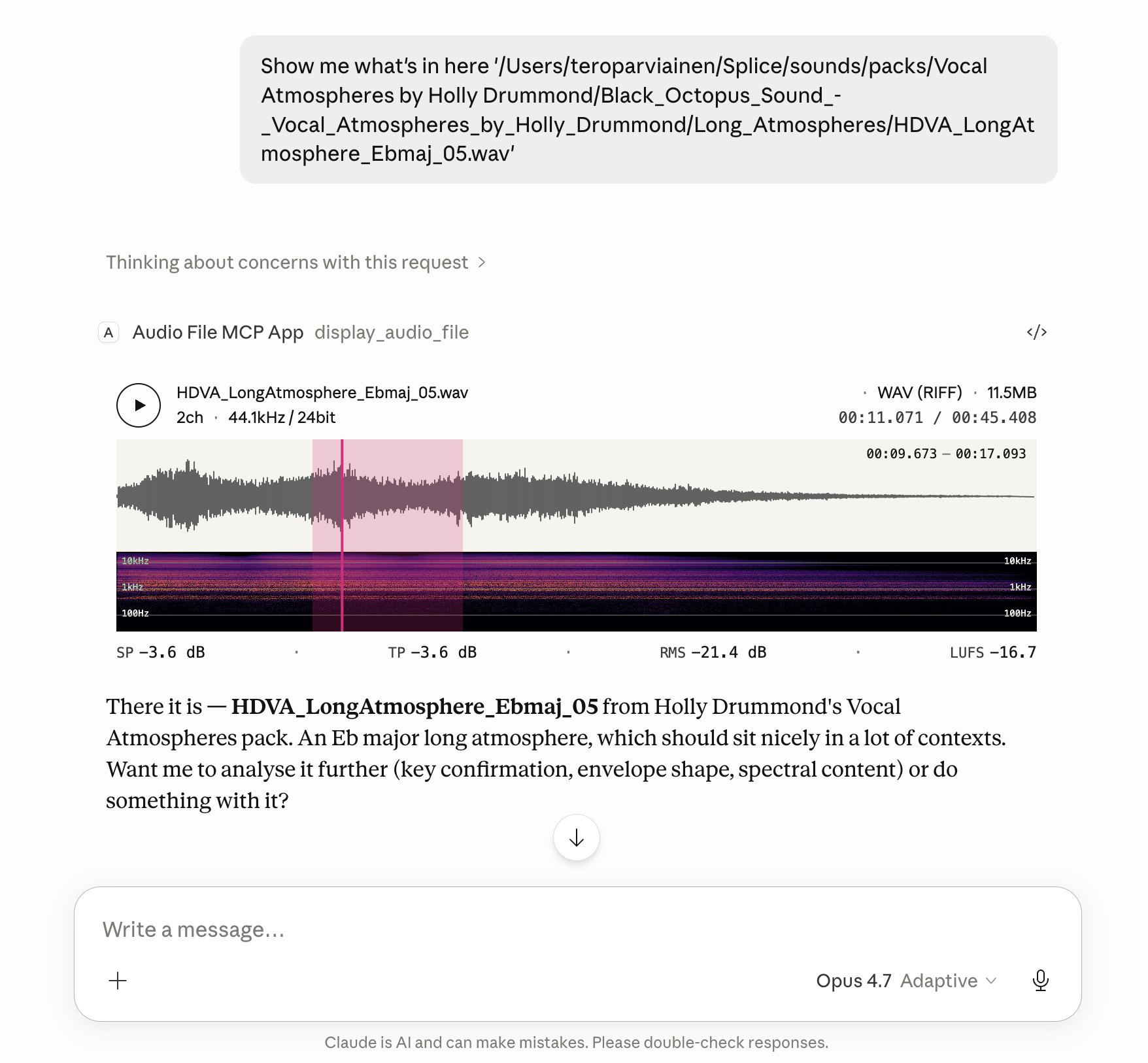
Renders an in-conversation UI with playback, metadata, loudness, and a spectrogram.
File metadata, loudness statistics, the current playhead position, and any selected region are also exposed back to the model, so follow-up tasks can refer to what the user is actually hearing and looking at.
Features
- Global loudness metrics computed to EBU R128: Integrated Loudness (LUFS), Loudness Range (LRA), True Peak (dBTP), Sample Peak, and RMS.
- Instantaneous loudness metrics while playing or hovering: Momentary (400 ms) and Short-Term (3 s) LUFS, plus sample-peak and RMS at the cursor position.
- Waveform colouring by spectral centroid — each waveform slice is shaded along a tonal ramp using a low/mid/high band-energy ratio, so bright/dark regions read at a glance as bright/dark sound.
- Reassigned spectrogram with log-frequency bins (20 Hz floor) and an Inferno colour scale; time-frequency reassignment sharpens transients and tonal partials beyond what a plain STFT shows.
- Looping region selection. Drag on the timeline to mark a region; playback loops over it, and the region's start/end are passed back to the model alongside the file's loudness and playhead state.
Install
The server runs locally over stdio. Every install path below configures the
same command: npx -y @counterpoint-studio/audio-file-mcp-app.
Claude Desktop
Easiest: grab the latest .mcpb from the
Releases page
and double-click it. Claude Desktop has Node bundled, so no extra runtime
is needed.
Or add the server by hand to claude_desktop_config.json:
{
  "mcpServers": {
    "audio-file": {
      "command": "npx",
      "args": ["-y", "@counterpoint-studio/audio-file-mcp-app"]
    }
  }
}
VS Code (Copilot, Agent mode)

Or add to .vscode/mcp.json (workspace) or your user mcp.json:
{
  "servers": {
    "audio-file": {
      "type": "stdio",
      "command": "npx",
      "args": ["-y", "@counterpoint-studio/audio-file-mcp-app"]
    }
  }
}
Goose
Paste this deep link into your browser (Goose Desktop must be installed; the custom URI scheme can't be a real link in a GitHub README):
goose://extension?id=audio-file&name=Audio%20File%20MCP%20App&cmd=npx&arg=-y&arg=%40counterpoint-studio%2Faudio-file-mcp-app
Or run goose configure → Add Extension → Command-line Extension and
enter npx -y @counterpoint-studio/audio-file-mcp-app.
MCP Inspector
npx @modelcontextprotocol/inspector npx -y @counterpoint-studio/audio-file-mcp-app
Usage
Ask the host to show you a local audio file by its absolute path. For example:
"Show me
/Users/me/Music/track.wav"
The host calls the display_audio_file tool, which renders the in-app UI
with waveform, spectrogram, loudness metrics, and playback transport.
Client compatibility
Tested and known to work in:
- Claude Desktop — Chat and Cowork
- Visual Studio Code
- Goose
- MCP Inspector
The Codex app has been tested too, but its MCP App support is currently broken.
Development
pnpm install
pnpm run build:dsp   # emsdk required; see WASM-BUILD.md
pnpm run serve       # runs the server with tsx, no compile step
pnpm test
pnpm run build:dist produces the publishable layout under dist/
(dist/mcp-app.html + dist/server/).
Releasing
pnpm version <bump>                                 # bumps package.json + tags
pnpm publish --access public                        # publishes to npm
pnpm run build:mcpb                                 # produces dist/audio-file-mcp-app-<version>.mcpb
gh release create v<version> dist/*.mcpb           # attaches the bundle to a GitHub release
mcp-publisher login github && mcp-publisher publish # updates the MCP Registry listing
mcp-publisher is a Go binary; install it via
brew install mcp-publisher or per the
registry quickstart.
It reads server.json from the repo root — keep its version in sync with
package.json before publishing.
License
ISC © Counterpoint Studio OÜ
Recommended Servers

playwright-mcp
A Model Context Protocol server that enables LLMs to interact with web pages through structured accessibility snapshots without requiring vision models or screenshots.

Magic Component Platform (MCP)
An AI-powered tool that generates modern UI components from natural language descriptions, integrating with popular IDEs to streamline UI development workflow.

Audiense Insights MCP Server
Enables interaction with Audiense Insights accounts via the Model Context Protocol, facilitating the extraction and analysis of marketing insights and audience data including demographics, behavior, and influencer engagement.

VeyraX MCP
Single MCP tool to connect all your favorite tools: Gmail, Calendar and 40 more.

graphlit-mcp-server
The Model Context Protocol (MCP) Server enables integration between MCP clients and the Graphlit service. Ingest anything from Slack to Gmail to podcast feeds, in addition to web crawling, into a Graphlit project - and then retrieve relevant contents from the MCP client.

Kagi MCP Server
An MCP server that integrates Kagi search capabilities with Claude AI, enabling Claude to perform real-time web searches when answering questions that require up-to-date information.

E2B
Using MCP to run code via e2b.

Neon Database
MCP server for interacting with Neon Management API and databases

Exa Search
A Model Context Protocol (MCP) server lets AI assistants like Claude use the Exa AI Search API for web searches. This setup allows AI models to get real-time web information in a safe and controlled way.

Qdrant Server
This repository is an example of how to create a MCP server for Qdrant, a vector search engine.