
aosp-mcp
Enables searching and reading Android Open Source Project (AOSP) source code via cs.android.com, with support for regex search, file content retrieval, and symbol suggestions.
README
AOSP-MCP




A Bun-powered Model Context Protocol (MCP) server for searching and reading Android source code via
cs.android.com. Built for coding agents: compact ripgrep-style results, response caching, request coalescing, and
pagination designed around agent token budgets.
Works with Claude Code, Cursor, VS Code Copilot, Zed, Gemini CLI, Codex CLI, Windsurf, and any other MCP
client with stdio support.
Preview
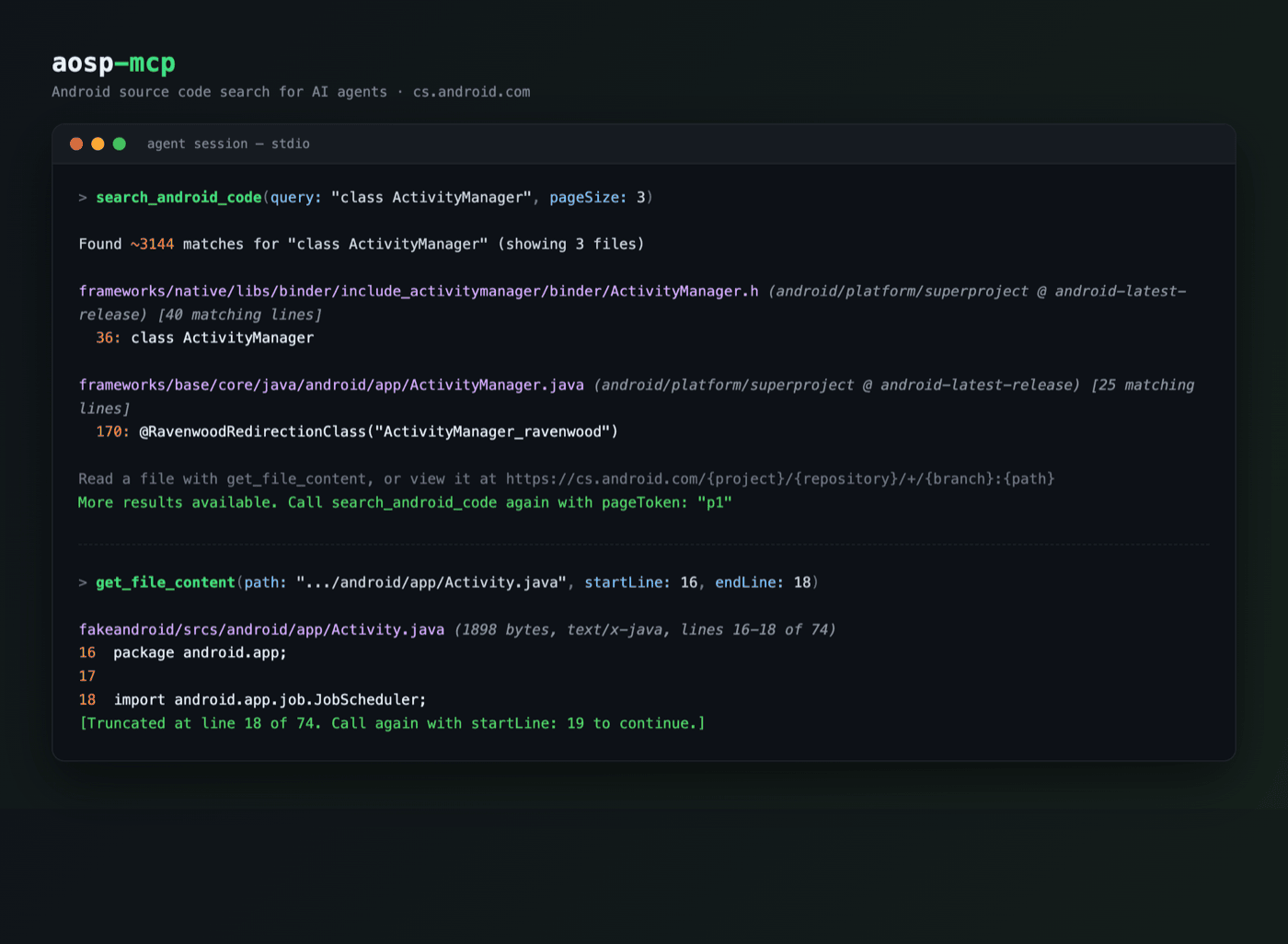
Features
- Code search across AOSP, AndroidX/Jetpack, Android Studio, and Android LLVM, with regex and
file:/class:/function:/symbol:/content:/lang:operators - File reading with line numbers,
startLine/endLineranges, and continuation hints for large files - Symbol suggestions to resolve partial class/method/file names
- Fast: server ready in ~46 ms under Bun (
bunx --bun) or ~130 ms under Node (bun run benchreproduces these two numbers on your machine; medians of 9 runs; bunx/npx package-resolution overhead is extra); measured separately at ~ 111 ms for the Node-only predecessor as shipped, making the bun-to-bun rewrite ~20% faster; TLS warm-up on boot; repeat queries served from the in-memory cache in under a millisecond (measured end-to-end over stdio); one fast retry on transient upstream failures - Token-efficient: concise-by-default search results, deduplicated matches, snippet caps, and short pagination handles; measured search and large-file payloads run 50-85% smaller (~70% typical) than the predecessor's
Installation
The recommended launcher is bunx (Bun 1.3+); npx (Node 20.3+) also works.
Claude Code
claude mcp add aosp -- bunx --bun -y @itznotabug/aosp-mcp
<details> <summary><b>Cursor</b> (<code>~/.cursor/mcp.json</code>) / <b>Windsurf</b> (<code>~/.codeium/windsurf/mcp_config.json</code>)</summary>
{
  "mcpServers": {
    "aosp": {
      "command": "bunx",
      "args": [
        "--bun",
        "-y",
        "@itznotabug/aosp-mcp"
      ]
    }
  }
}
</details>
<details> <summary><b>VS Code Copilot</b> (<code>.vscode/mcp.json</code>)</summary>
{
  "servers": {
    "aosp": {
      "type": "stdio",
      "command": "bunx",
      "args": [
        "--bun",
        "-y",
        "@itznotabug/aosp-mcp"
      ]
    }
  }
}
</details>
<details> <summary><b>Zed</b> (<code>settings.json</code>)</summary>
{
  "context_servers": {
    "aosp": {
      "command": "bunx",
      "args": [
        "--bun",
        "-y",
        "@itznotabug/aosp-mcp"
      ]
    }
  }
}
</details>
<details> <summary><b>Codex CLI</b> (<code>~/.codex/config.toml</code>)</summary>
[mcp_servers.aosp]
command = "bunx"
args = ["--bun", "-y", "@itznotabug/aosp-mcp"]

[mcp_servers.aosp.env]
AOSP_MCP_MAX_RESULT_CHARS = "9000"
</details>
<details> <summary><b>Gemini CLI</b> (<code>~/.gemini/settings.json</code>)</summary>
{
  "mcpServers": {
    "aosp": {
      "command": "bunx",
      "args": [
        "--bun",
        "-y",
        "@itznotabug/aosp-mcp"
      ],
      "trust": true
    }
  }
}
</details>
Troubleshooting
- "Executable not found" in GUI-launched editors (macOS): desktop apps often miss your shell PATH. Use the absolute
path from
which bunx(typically~/.bun/bin/bunx) as the command. - No Bun installed: use
npxwith-y @itznotabug/aosp-mcpin any snippet above. - Clients that truncate large tool results: lower
AOSP_MCP_MAX_RESULT_CHARS(e.g.9000) to fit your client's limit, as in the Codex example.
Tools
search_android_code
| Parameter | Required | Description |
|---|---|---|
query |
Yes | Search query (regex plus file:, class:, function:, symbol:, lang:, content: operators) |
project |
No | android, androidx, android-studio, or android-llvm (default: all) |
pageSize |
No | Files per page (default 10, max 50) |
pageToken |
No | Continuation token from a previous result (e.g. p1) |
contextLines |
No | Context lines around matches (default 1, max 10) |
responseFormat |
No | concise (default) or detailed |
get_file_content
| Parameter | Required | Description |
|---|---|---|
project |
Yes | Project id |
repository |
Yes | Repository, e.g. platform/superproject |
branch |
Yes | Branch, e.g. main, android-latest-release |
path |
Yes | File path relative to the repository root |
startLine |
No | First line to return (1-based) |
endLine |
No | Last line to return (inclusive; reads cap at 2000 lines per call) |
suggest_symbols
| Parameter | Required | Description |
|---|---|---|
query |
Yes | Partial symbol or file name |
maxResults |
No | Max suggestions (default 7, max 20) |
list_projects
No parameters. Returns the searchable projects (also as structured content).
Configuration
| Environment variable | Default | Description |
|---|---|---|
AOSP_MCP_TIMEOUT_MS |
30000 |
Per-attempt upstream request timeout |
AOSP_MCP_CACHE_TTL_MS |
60000 |
Search/suggest cache TTL (0 disables) |
AOSP_MCP_FILE_CACHE_TTL_MS |
300000 |
File-content cache TTL (0 disables) |
AOSP_MCP_MAX_RESULT_CHARS |
60000 |
Character budget per file-read result (minimum 1000; does not cap search results) |
MCP resources (android://source?...) intentionally return complete files and bypass the character budget. Cached
entries are keyed by the full request, so a cache hit is always the answer to the same question; TTLs only bound how
long a just-changed branch head can serve a slightly older revision.
Development
bun install        # dependencies
bun run dev        # run the server from TypeScript source
bun test           # test suite (100% coverage thresholds enforced)
bun run lint       # Biome + the strict.grit lint plugin
bun run typecheck  # tsc
bun run build      # bundle to dist/
bun run smoke      # stdio handshake against the built bundle
Tests run against captured live API fixtures (tests/fixtures/) with the network mocked, plus end-to-end MCP
client/server tests over an in-memory transport. Refresh fixtures deliberately with
bun scripts/fixtures.ts when the upstream response shape changes.
License
Apache 2.0. See NOTICE for attribution.
Based on cs_android_mcp.
Recommended Servers

playwright-mcp
A Model Context Protocol server that enables LLMs to interact with web pages through structured accessibility snapshots without requiring vision models or screenshots.

Magic Component Platform (MCP)
An AI-powered tool that generates modern UI components from natural language descriptions, integrating with popular IDEs to streamline UI development workflow.

Audiense Insights MCP Server
Enables interaction with Audiense Insights accounts via the Model Context Protocol, facilitating the extraction and analysis of marketing insights and audience data including demographics, behavior, and influencer engagement.

VeyraX MCP
Single MCP tool to connect all your favorite tools: Gmail, Calendar and 40 more.

graphlit-mcp-server
The Model Context Protocol (MCP) Server enables integration between MCP clients and the Graphlit service. Ingest anything from Slack to Gmail to podcast feeds, in addition to web crawling, into a Graphlit project - and then retrieve relevant contents from the MCP client.

Kagi MCP Server
An MCP server that integrates Kagi search capabilities with Claude AI, enabling Claude to perform real-time web searches when answering questions that require up-to-date information.

E2B
Using MCP to run code via e2b.

Neon Database
MCP server for interacting with Neon Management API and databases

Exa Search
A Model Context Protocol (MCP) server lets AI assistants like Claude use the Exa AI Search API for web searches. This setup allows AI models to get real-time web information in a safe and controlled way.

Qdrant Server
This repository is an example of how to create a MCP server for Qdrant, a vector search engine.