
Anyquery
Connect to more than 40 apps with a single binary
julien040
README
Anyquery
<img src="https://anyquery.dev/images/logo-shadow.png" alt="Anyquery logo" width="96"></img>







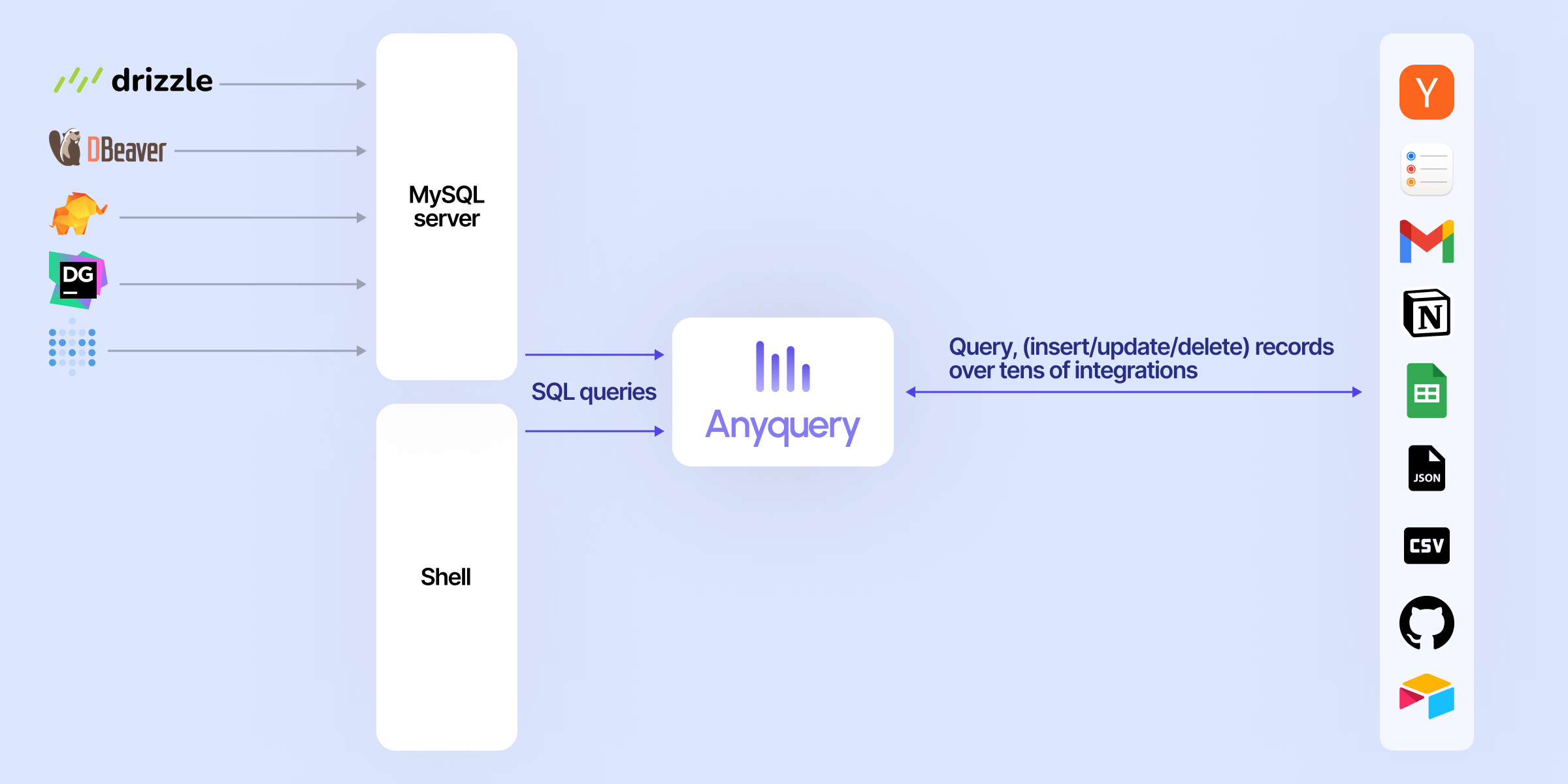
Anyquery is a SQL query engine that allows you to run SQL queries on pretty much anything. It supports querying files, databases, and apps (e.g. Apple Notes, Notion, Chrome, Todoist, etc.). It's built on top of SQLite and uses plugins to extend its functionality.
It can also connect to LLMs (e.g. ChatGPT, Claude, Cursor, TypingMind, etc.) to allow them to access your data.
Finally, it can act as a MySQL server, allowing you to run SQL queries from your favorite MySQL-compatible client (e.g. TablePlus, Metabase, etc.).
Usage
Connecting LLM
LLMs can connect to Anyquery using the Model Context Protocol (MCP). This protocol provides context for LLMs that support it. You can start the MCP server with the following command:
# To be started by the LLM client
anyquery mcp --stdio
# To connect using an HTTP and SSE tunnel
anyquery mcp --host 127.0.0.1 --port 8070
You can also connect to clients that supports function calling (e.g. ChatGPT, TypingMind). Refer to each connection guide in the documentation for more information.
# Copy the ID returned by the command, and paste it in the LLM client (e.g. ChatGPT, TypingMind)
anyquery gpt

Running SQL queries
The documentation provides detailed instructions on how to run queries with Anyquery.
But let's see a quick example. Type anyquery in your terminal to open the shell mode. Then, run the following query:
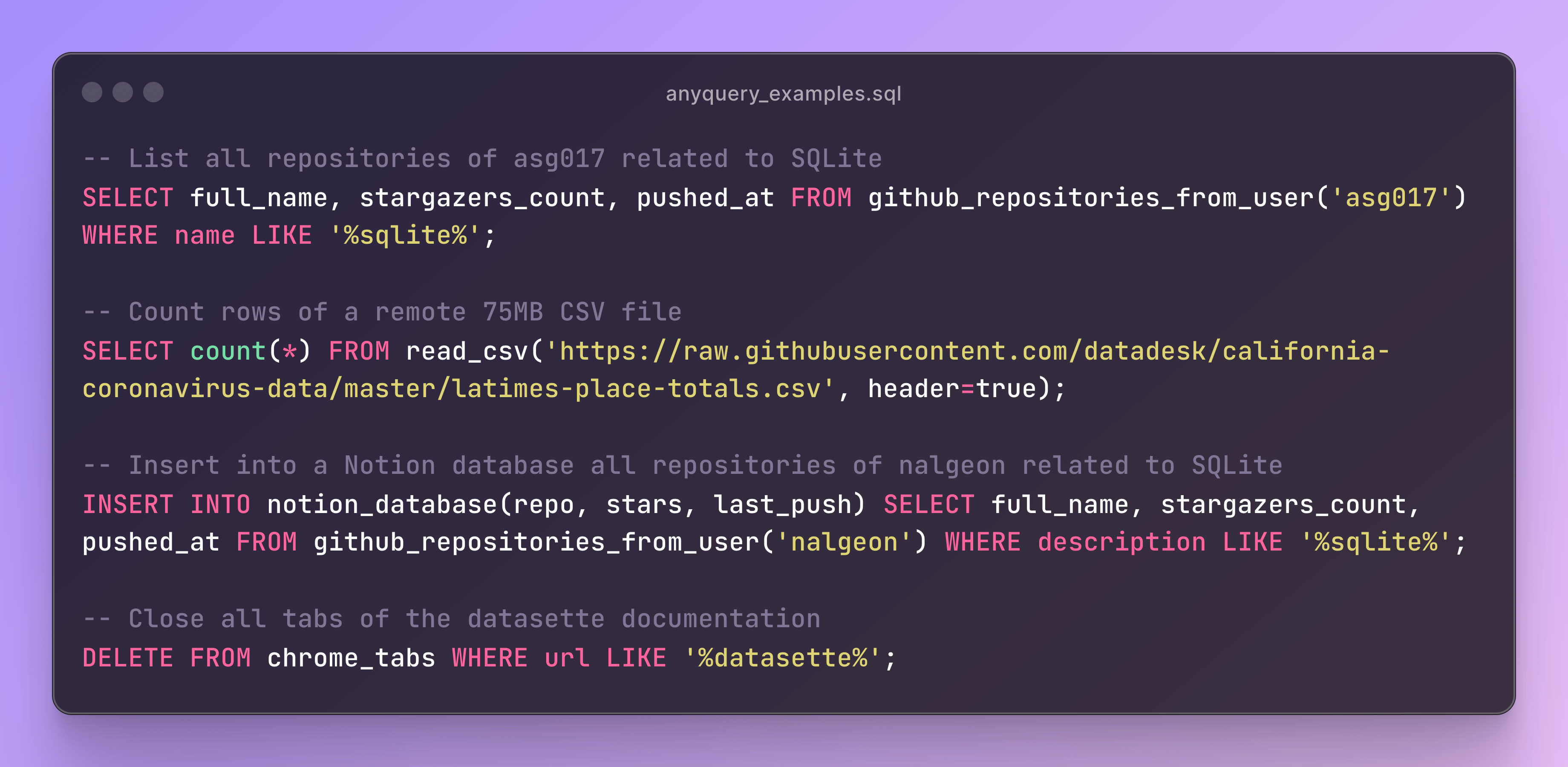
You can also launch the MySQL server with anyquery server and connect to it with your favorite MySQL-compatible client.
anyquery server &
mysql -u root -h 127.0.0.1 -P 8070
Installation
The documentation provides detailed instructions on how to install Anyquery on your system. You can install anyquery from Homebrew, APT, YUM/DNF, Scoop, Winget and Chocolatey. You can also download the binary from the releases page.
Homebrew
brew install anyquery
<!--
Snap
sudo snap install anyquery
``` -->

### APT

```bash
echo "deb [trusted=yes] https://apt.julienc.me/ /" | sudo tee /etc/apt/sources.list.d/anyquery.list
sudo apt update
sudo apt install anyquery
YUM/DNF
echo "[anyquery]
name=Anyquery
baseurl=https://yum.julienc.me/
enabled=1
gpgcheck=0" | sudo tee /etc/yum.repos.d/anyquery.repo
sudo dnf install anyquery
Scoop
scoop bucket add anyquery https://github.com/julien040/anyquery-scoop
scoop install anyquery
Winget
winget install JulienCagniart.anyquery
Chocolatey
choco install anyquery
Plugins
Anyquery is plugin-based, and you can install plugins to extend its functionality. You can install plugins from the official registry or create your own. Anyquery can also load any SQLite extension.

License
Anyquery is licensed under the AGPLv3 license for the core engine. The RPC library is licensed under the MIT license so that anyone can reuse plugins in different projects.
The plugins are not subject to the AGPL license. Each plugins has its own license and the copyright is owned by the plugin author. See the LICENSE file for more information.
Contributing
If you want to contribute to Anyquery, please read the contributing guidelines. I currently only accept minor contributions, but I'm open to any suggestions or feedback.
You can have a brief overview of the project in the architecture documentation.
Recommended Servers

Crypto Price & Market Analysis MCP Server
A Model Context Protocol (MCP) server that provides comprehensive cryptocurrency analysis using the CoinCap API. This server offers real-time price data, market analysis, and historical trends through an easy-to-use interface.

MCP PubMed Search
Server to search PubMed (PubMed is a free, online database that allows users to search for biomedical and life sciences literature). I have created on a day MCP came out but was on vacation, I saw someone post similar server in your DB, but figured to post mine.

dbt Semantic Layer MCP Server
A server that enables querying the dbt Semantic Layer through natural language conversations with Claude Desktop and other AI assistants, allowing users to discover metrics, create queries, analyze data, and visualize results.

Sequential Thinking MCP Server
This server facilitates structured problem-solving by breaking down complex issues into sequential steps, supporting revisions, and enabling multiple solution paths through full MCP integration.

mixpanel
Connect to your Mixpanel data. Query events, retention, and funnel data from Mixpanel analytics.
Vectorize
Vectorize MCP server for advanced retrieval, Private Deep Research, Anything-to-Markdown file extraction and text chunking.
Nefino MCP Server
Provides large language models with access to news and information about renewable energy projects in Germany, allowing filtering by location, topic (solar, wind, hydrogen), and date range.

Mathematica Documentation MCP server
A server that provides access to Mathematica documentation through FastMCP, enabling users to retrieve function documentation and list package symbols from Wolfram Mathematica.
kb-mcp-server
An MCP server aimed to be portable, local, easy and convenient to support semantic/graph based retrieval of txtai "all in one" embeddings database. Any txtai embeddings db in tar.gz form can be loaded

Research MCP Server
The server functions as an MCP server to interact with Notion for retrieving and creating survey data, integrating with the Claude Desktop Client for conducting and reviewing surveys.