
ableton-live-mcp-server
Enables LLMs to control Ableton Live via OSC and the Model Context Protocol, supporting commands like setting up tracks and routing.
README
Ableton Live MCP Server
📌 Overview
The Ableton Live MCP Server is a server implementing the Model Context Protocol (MCP) to facilitate communication between LLMs and Ableton Live. It uses OSC (Open Sound Control) to send and receive messages to/from Ableton Live. It is based on AbletonOSC implementation and exhaustively maps available OSC adresses to tools accessible to MCP clients.
This project consists of two main components:
mcp_ableton_server.py: The MCP server handling the communication between clients and the OSC daemon.osc_daemon.py: The OSC daemon responsible for relaying commands to Ableton Live and processing responses.
✨ Features
- Provides an MCP-compatible API for controlling Ableton Live from MCP clients.
- Uses python-osc for sending and receiving OSC messages.
- Based on the OSC implementation from AbletonOSC.
- Implements request-response handling for Ableton Live commands.
⚡ Installation
Option 1: Install with UV (Recommended)
-
Install UV if you don't have it already:
pip install uv -
Install directly from PyPI:
uv install ableton-live-mcp-server -
Or install from GitHub:
uv install git+https://github.com/yourusername/ableton-live-mcp-server.git
Option 2: Manual Installation
- Install
uvpip install uv - Clone the repository:
git clone https://github.com/your-username/mcp_ableton_server.git cd mcp_ableton_server - Install dependencies:
uv install python-osc fastmcp - Install the MCP Server
This assumes that you're using Claude Desktop
mcp install mcp_ableton_server.py - Install AbletonOSC Follow the instructions at AbletonOSC
🚀 Usage
Running the OSC Daemon
The OSC daemon will handle OSC communication between the MCP server and Ableton Live:
# If installed via UV:
ableton-osc-daemon

# Or if running from source:
python osc_daemon.py
This will:
- Listen for MCP client connections on port 65432.
- Forward messages to Ableton Live via OSC on port 11000.
- Receive OSC responses from Ableton on port 11001.
Running the MCP Server
Start the MCP server to enable LLMs to control Ableton:
# If installed via UV:
ableton-mcp-server

# Or if running from source:
python mcp_ableton_server.py
Example Usage
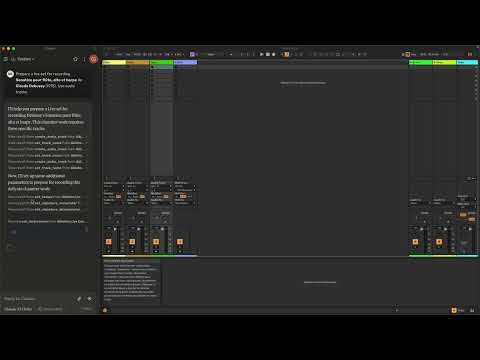
In Claude desktop, ask Claude: Prepare a set to record a rock band Set the input routing channel of all tracks that have "voice" in their name to Ext. In 2
⚙️ Configuration
By default, the server and daemon run on localhost (127.0.0.1) with the following ports:
- MCP Server Socket: 65432
- Ableton Live OSC Port (Send): 11000
- Ableton Live OSC Port (Receive): 11001
To modify these, edit the AbletonOSCDaemon class in osc_daemon.py or use command-line parameters:
ableton-osc-daemon --socket-port 65432 --ableton-port 11000 --receive-port 11001
Claude Desktop Configurations
- macOS:
~/Library/Application\ Support/Claude/claude_desktop_config.json - Windows:
%APPDATA%/Claude/claude_desktop_config.json
"mcpServers": {
"Ableton Live Controller": {
      "command": "uv",
      "args": [
        "run",
        "ableton-mcp-server"
      ]
    }
  }
Contributing
Feel free to submit issues, feature requests, or pull requests to improve this project.
Publishing Updates
To publish new versions using UV:
- Update the version in
pyproject.toml - Build the package:
uv build - Publish to PyPI:
uv publish
License
This project is licensed under the MIT License. See the LICENSE file for details.
Acknowledgments
- Model Context Protocol (MCP)
- python-osc for OSC handling
- Daniel John Jones for OSC implementation with AbletonOSC
- Ableton Third Party Remote Scripts
- Julien Bayle @Structure Void for endless inspirations and resources.
TODO
- Explore resources and prompts primitives opportunities.
- Build a standalone Ableton Live MCP client.
Recommended Servers

playwright-mcp
A Model Context Protocol server that enables LLMs to interact with web pages through structured accessibility snapshots without requiring vision models or screenshots.

Magic Component Platform (MCP)
An AI-powered tool that generates modern UI components from natural language descriptions, integrating with popular IDEs to streamline UI development workflow.

Audiense Insights MCP Server
Enables interaction with Audiense Insights accounts via the Model Context Protocol, facilitating the extraction and analysis of marketing insights and audience data including demographics, behavior, and influencer engagement.

VeyraX MCP
Single MCP tool to connect all your favorite tools: Gmail, Calendar and 40 more.

graphlit-mcp-server
The Model Context Protocol (MCP) Server enables integration between MCP clients and the Graphlit service. Ingest anything from Slack to Gmail to podcast feeds, in addition to web crawling, into a Graphlit project - and then retrieve relevant contents from the MCP client.

Kagi MCP Server
An MCP server that integrates Kagi search capabilities with Claude AI, enabling Claude to perform real-time web searches when answering questions that require up-to-date information.

E2B
Using MCP to run code via e2b.

Neon Database
MCP server for interacting with Neon Management API and databases

Exa Search
A Model Context Protocol (MCP) server lets AI assistants like Claude use the Exa AI Search API for web searches. This setup allows AI models to get real-time web information in a safe and controlled way.

Qdrant Server
This repository is an example of how to create a MCP server for Qdrant, a vector search engine.